
A HubSpot playbook is a card that opens on a contact, company, deal or ticket record with questions a rep answers during or right after the call. When the rep logs it, the questions, answers and any notes are saved as one engagement on the record’s timeline (HubSpot: use playbooks). For a manager, the useful setup is three or four questions per deal stage, so that every note at that stage reads the same way on Friday and deals can be compared instead of decoded. Playbooks come with Sales Hub or Service Hub Professional and Enterprise, and anyone creating or viewing them needs an assigned Sales or Service seat (same source). Below: which questions go on the card for each stage, and what you do with the answers.
The note you can’t read on Friday
Friday, ten past four. The manager opens “Northfield, 40 seats”, which has sat in Negotiation for three weeks. The latest note, from Tuesday: “Good call. They like it. Sending numbers.” The one before it: “Call w/ Dan, follow up next wk.”
Who is Dan. Does Dan sign. Which numbers. When does Northfield decide. None of it is on the deal. The rep is at a customer until six, so the manager writes “ask Tom Monday” on a pad and opens the next deal, which says “Left VM.”
Multiply that by thirty open deals and two reps and you have the Friday afternoon most small sales teams actually have. The reps are not lazy. A blank note box asks nothing, so it gets whatever is on top of the the rep’s mind when the call ends, which is usually mood.
Two fixes get tried first. A note template pasted into the deal description dies within a fortnight because nothing enforces it. Required properties at the stage work for the handful of facts a number depends on (see required properties by deal stage in HubSpot) and badly for the conversation itself, because nobody types a paragraph into a text property. A playbook sits in between. It asks, the rep types, and HubSpot files the answer where the deal lives.
What a HubSpot playbook is, and the plan you need
Playbooks are interactive content cards shown on contact, company, deal and ticket records (custom objects too, once a super admin adds the card). Three things decide what you can build with them (HubSpot: use playbooks):
- Subscription. Sales Hub or Service Hub Professional gives you playbooks with open-text questions. The list-of-answer-options question type is Sales Hub Enterprise only. Answers that update a CRM property are marked Sales Hub or Service Hub Enterprise, but another section of the same page says Professional or Enterprise, so check your own portal before you promise anyone a dropdown. Your subscription also caps how many playbooks you can create, which matters if you plan one per stage.
- Seats and permissions. An assigned Sales or Service seat is required to create, edit, view and delete playbooks, plus “Publish and/or Write playbooks” permissions for the people who build them.
- Recommendation rules. In the playbook editor’s Settings tab you can set rules on company, contact, deal or ticket properties, and a playbook whose rule matches appears at the top of the record as Recommended. A rule on Deal stage is the one we care about here.
That last point is what turns a generic “sales call” card into a stage card. Discovery deals show the discovery questions; deals in Negotiation show the negotiation questions. The rep does not pick, and does not have to remember.
Before you open the editor do one thing on paper. Write down your deal stages and, next to each, the single decision that stage exists to make. “Is this worth a proposal.” “Will they sign this quarter.” If you cannot name the decision, you cannot write the questions, and the playbook turns into a checklist of everything anyone ever wanted to know.
Four questions per stage, not forty
We think four questions a rep can answer in a minute beat a fifteen-item checklist every time, and the reason is arithmetic. The card appears on every call at that stage, so its cost is paid every call. Past four or five questions, reps start answering the first three and skipping the rest, and a half-filled playbook is worse than none because it looks complete on the timeline.
The test for each question: is this something the manager would otherwise have to ask on Monday? Can the rep answer it from the call that just ended, without research? Does it ask for a fact (who, when, what they said) rather than a feeling (how it went)?
Below is our example for three stages. The stage names are ours, not HubSpot defaults; map them onto your own pipeline. If you have not done it yet, decide first whether to rename the default HubSpot deal stages.
Discovery call (the decision: is this worth a proposal)
- Who did we talk to, and what is their role in the decision?
- What is the problem, in the buyer’s own words? One sentence, quoted.
- What happens on their side if they do nothing this quarter?
- What did the buyer agree to do next, and by when?
Of the four, read the third first. If doing nothing costs them “nothing much”, there is no proposal to write.
Proposal sent (the decision: is the price and scope going to survive)
- Who, apart from our contact, will see the proposal, and who signs?
- What did the buyer say out loud about price or scope?
- What date did the buyer name for a decision? (Theirs, not our close date.)
That date is the answer to look at here. The close date on the deal is ours; this one is theirs.
Negotiation (the decision: will they sign this quarter)
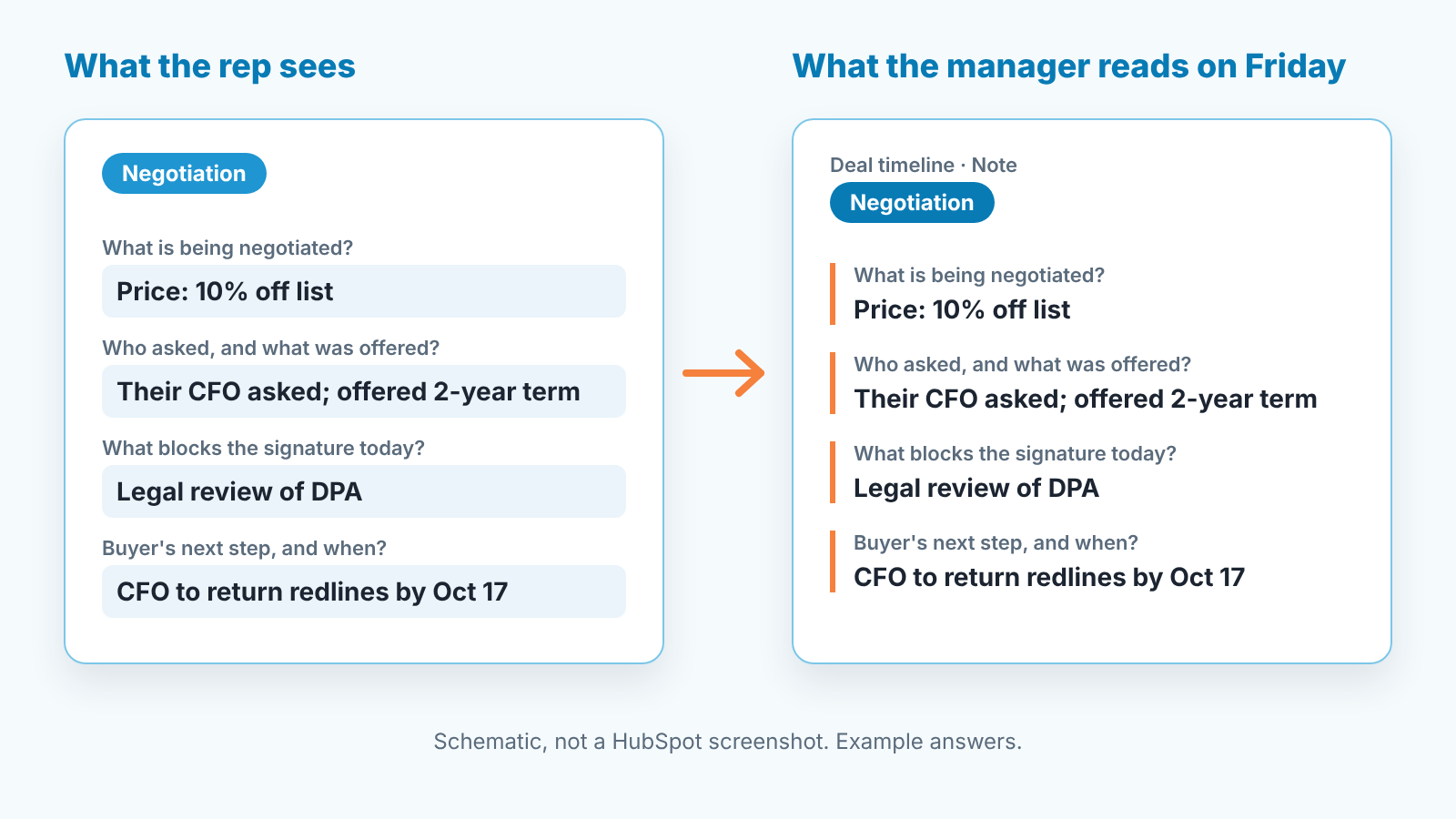
- What exactly is being negotiated: price, terms, scope or start date?
- Who on their side asked for it, and what did they offer in return?
- What is blocking the signature today, in one sentence?
- What is the buyer doing next, and on what date?
In Negotiation, start with the blocker. A deal that cannot name one is not really in Negotiation.
Notice the last question repeats at every stage. A deal moves when the buyer does something, not when we do, and a note that ends with the buyer’s next action is the one you can check a week later. The review-side version of that idea is in deal review questions built around the buyer’s next action; those are the manager’s questions, these are the rep’s.
Word the questions so that a lazy answer looks lazy. “How did it go?” accepts “good”. “Who signs?” does not. “What is blocking the signature today?” cannot be answered with “they like it”.
On Sales Hub Enterprise, “Who signs?” suits answer options (our contact / someone else, named in notes / unknown), and the buyer’s decision date suits a property update, so it can drive a view. On Professional, leave both as open text and let the manager read. Reading is the job anyway. The same goes for the MEDDPICC letters that belong in a note, not a property.
Where the answers go: standardized notes on the deal
When a rep logs the playbook, it is saved as an engagement on the record’s timeline with the questions, answers and any notes; until then teh draft autosaves, so a rep interrupted mid-call does not lose it. Engagements land on associated records only when a question targets that record type, so questions about the deal go on the deal, and if you want “role in the decision” to live on the contact, ask it as a contact question (HubSpot: use playbooks).
There is also a “Create a task to follow up” checkbox at the point of logging (same source). Our rule for it: tick it only when the last question has a real date in it. The task is for us to check whether the buyer did what they said, on the day after they said they would. A follow-up task with no buyer commitment behind it is just a reminder to call and ask how it is going.
Name each playbook after the stage, “Negotiation call” rather than “Sales call v3”, so the timeline entry says which stage the conversation belonged to.
One limit. A playbook is not a gate. Nothing stops a rep from dragging a deal into Negotiation without opening the card. If a value must exist before a stage move, that is a conditional stage property, not a playbook question. We run both: three required properties to move the deal, four playbook questions to describe the conversation.
Reading them in a weekly review
Here is what the Friday looks like once the cards have been in use for a month. Filter the board to one stage, open each deal, read only the most recent playbook engagement. Thirty seconds a deal, because you know where the four answers are and in what order.
You are reading for four patterns. A blank answer, which means the rep skipped the question, and the first thing to ask is whether the question is wrong for that stage. The same answer three weeks running, which means calls are being logged and the deal is not moving. A buyer date that has already passed with no new entry. And “unknown” against who signs on a deal in Negotiation, which is the single most expensive word on a pipeline.
Those four become the deal review agenda, and the 1:1 agenda after it. We described the report side in HubSpot manager reports for a weekly review and the conversation side in a 1:1 agenda for sales managers. The playbook’s Analyze tab shows totals such as views and active users (HubSpot: use playbooks), which tells you whether the cards get opened at all. It cannot tell you whether the answers are any good. That part stays with you.
A disclosure, since this is where a manager wants a list of deals that need attention without opening thirty records: we build SalesBond, a sales management layer on top of the CRM a team already uses. Deal Health flags the deals where there is no activity logged and no movement, whether or not anyone filled in a playbook, so the Friday read starts with the deals that have gone quiet rather than the ones in alphabetical order. If that is your Friday, check your CRM with SalesBond. The reading of the answers themselves is still yours.
When a playbook is the wrong tool
Not every note problem wants a card.
If you are on Starter or the free tools playbooks are not available, and the honest answer is a pinned note template plus required properties for the facts.
If the thing you want is a number or a date, use a property and make it required at the stage. A playbook answer in open text cannot be summed or filtered. For reusable email text, see snippet or template: the 30-second rule.
If what you want is to script what the rep says, that is a sales playbook in the older sense, a document about how your team sells. We wrote about that one for Pipedrive teams in a sales playbook for a small team. A script on a call card gets read once and ignored.
If the team is two people who sit next to each other, talk. The card costs more than it returns until the manager can no longer hear every call.
And if you find yourself writing question fifteen, stop. The problem is not the playbook, it is that the stage has no clear decision attached to it, and no number of questions will supply one. Fix the stage, then come back and write four.


