

MEDDPICC is a B2B sales qualification framework: Metrics, Economic buyer, Decision criteria, Decision process, Paper process, Identify pain, Champion, Competition. In HubSpot, four of those letters earn a deal property (Economic buyer, Champion, Paper process, Competition), three stay in notes, and the Decision process goes into a mutual action plan. Read the four properties before a deal moves to Commit.
That read takes a minute. It catches the deals that should not be in Commit yet, and the rest of this post is the reasoning behind it: why four properties and not eight, what type each one should be, how to require one without turning the stage into a popup wall, and what to look at in the sixty seconds before you accept a deal into your Commit number.
The eight MEDDPICC letters, and where each one lives in HubSpot
Here are the eight in the wording the methodology’s own site uses: Metrics (“the quantified value of your solution”), Economic buyer (“the person with the overall buying authority”), Decision criteria (“how your solution is evaluated”), Decision process (“how the buyer decides on your solution”), Paper process (“how you go from decision to signature”), Identify pain (“the problem your customer is facing”), Champion (“who can help drive your deal forward”) and Competition (“any alternative person, vendor, or initiative”) (MEDDICC: the Metrics page). The difference from MEDDIC is two letters: Paper process and Competition (Force Management on MEDDIC vs. MEDDPICC).
We already wrote about running a cut-down MEDDIC in Pipedrive, and the argument there holds here: a small team does not need every letter as a mandatory field. This post asks something else. Given the eight which ones are a HubSpot deal property, which ones are a note on the deal, and which one is neither?
Our split, and we will defend each line below:
- A deal property: Economic buyer, Champion, Paper process, Competition. Each has a small number of honest states, and a manager reads it in a glance.
- A note on the deal: Metrics, Identify pain, Decision criteria. These are paragraphs in the customer’s words, and a field would flatten them into something that looks complete and isn’t.
- Neither: Decision process. It is a sequence of steps with dates, which is a mutual action plan, plus the Close date property you already have.
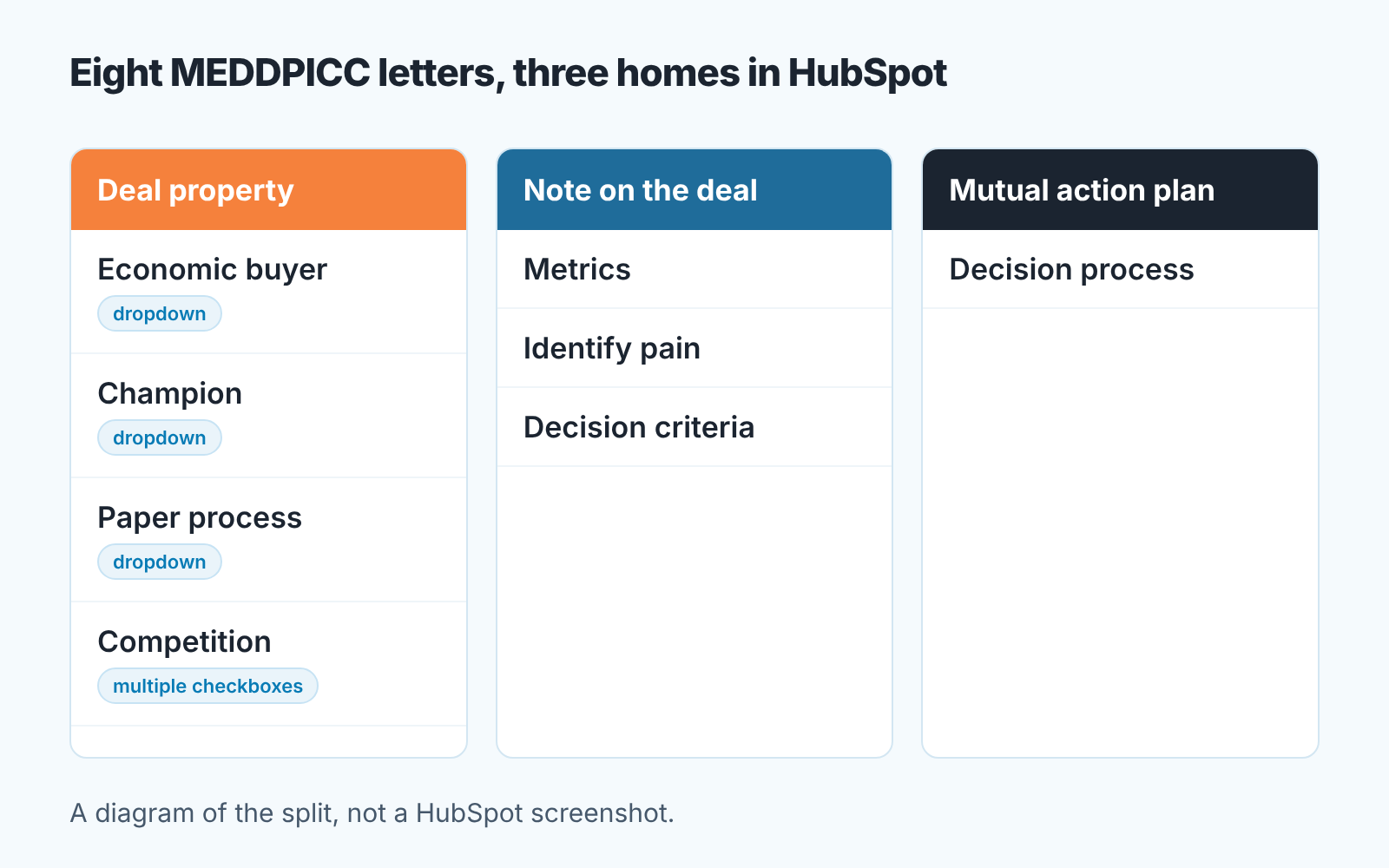
The test behind the sorting is simple. If a manager would change a forecast call because of the value, it is a property. If the manager needs to read a story to judge it, it is a note.
The letters that belong in a deal property
Start with the field type, because the type is the decision. HubSpot’s dropdown select “stores multiple options, where only one option can be selected as a value”, and multiple checkboxes “stores checkboxes that contain several options” (HubSpot: property field types). Single-line text is for names and phrases. We use dropdowns for three of the four letters, checkboxes for the last, and almost no free text.
Economic buyer. Not a name field. The person who signs belongs on the contact record, associated with the deal, with their title and email. In HubSpot, association labels let you mark that contact as the decision maker right on the deal. The property is about status, and it is a dropdown: Not identified, Identified, not met, Met, Confirmed they sign. The order matters. Each step up is something the rep did, and “Confirmed they sign” means the person said so in a meeting the rep attended.
Don’t be tempted by the HubSpot user type here. It “stores a list of users in your HubSpot account” (HubSpot: property field types), which is your team, not the customer’s.
Champion. Also a dropdown, also about evidence: None, Candidate, Tested, Confirmed. The jump from Candidate to Tested is the one that matters, and it needs a definition the team agrees on. Ours: the person did something for us inside thier company that cost them effort, like getting us a meeting with the economic buyer. We wrote the longer version of that test for Pipedrive teams in how to tell a champion from a friendly contact. The test is the same in HubSpot; only the field changes.
Paper process. This is the letter small teams skip, and it is the one that moves close dates. A deal that is “verbally agreed” and then spends five weeks in security review and procurement was never a Commit deal. Dropdown: Not asked, Steps known, In motion, Signed. “Steps known” means the rep can list who signs, in what order, and what has to be attached (security questionnaire, vendor form, legal redlines). If they can’t list it, the value is “Not asked”, however confident the rep sounds.
Competition. The one letter that is genuinely multi-valued, so it gets multiple checkboxes. Options: the two or three vendors you actually run into, plus Do nothing, Build in-house and Unknown. Those last three are not filler. MEDDICC defines competition as “any alternative person, vendor, or initiative” (MEDDICC), and in the small deals we see, “do nothing” is the alternative that comes up again and again. A rep who ticks nothing has told you something too.
That’s four custom properties. Give each a one-line description in the property settings so the rep sees the definition, and add all four as columns to the manager’s deal view. The build is done. Four properties on the deal are plenty, and the reasoning is in HubSpot custom objects vs deal properties.
The letters that belong in a note
Metrics, Identify pain and Decision criteria are the letters that make MEDDPICC guides long. There’s a reason. They are stories.
A pain written into a dropdown becomes “Efficiency”. A pain written into a note reads “Their ops lead rebuilds the weekly report by hand on Monday mornings because the two systems disagree on order status, and the CEO stopped trusting the number in August.” The second one tells the manager whether the deal is real. The first tells them the rep found the dropdown.
Metrics have the same problem, with a twist. Give Metrics a number property and you get a number in every deal and most of them will be invented to get past the stage. A number the customer said out loud, in their own units, belongs in a note with the date and who said it. A number the rep calculated belongs in the proposal, not in the CRM.
Decision criteria is a list, and lists tempt people toward multiple checkboxes. Resist it. The criteria that decide a deal are usually one or two, in the buyer’s words (“has to work with the warehouse scanner they already own”), and the rep learns them in the second meeting, not the first.
We keep these notes on the deal with a fixed first line, “MEDDPICC:”, so a manager can find them with search before a review. Nobody is blocked for leaving them empty. The manager reads them for the top of the Commit list, not the whole pipeline.
Making a property required without blocking the rep
HubSpot lets you require a property at a stage with conditional stage properties, and the help page is plain about what the checkbox does: “If a property is required, users cannot create or update the record until they set a value for it.” The rule fires when users manually create a deal in that stage or move one into it, and you need Edit property settings permissions to set it up (HubSpot: set up and manage object pipelines). We covered the mechanics, and the month-later check, in required deal properties by stage in HubSpot. Here is only what is specific to MEDDPICC.
Require two, not four: Economic buyer and Paper process, on the stage before your Commit stage. Champion and Competition stay visible on the deal and in the manager’s view but are never required. Require them and you get “Candidate” and “Unknown” on every deal, which is the same as not having the field.
The second trick keeps the rule from blocking anyone. Every dropdown has an honest zero: Not identified, Not asked. A required dropdown with a zero option cannot stop a rep from moving a deal. It can only stop them from moving it silently. The rep who selects “Not asked” on Paper process at the stage before Commit has told you exactly what you needed to know, and the deal arrived with it’s real status attached. That is the job of a required field: make the gap visible, instead of forcing a rep to invent a value so the popup goes away.
One limit to know about. The help page describes the rule for deals that users create or move by hand. A deal that reached the stage through an import, a workflow or the API may not have passed that check, so it can carry empty MEDDPICC properties. Add Record Source to the same view and you’ll see which deals those are.
The one-minute check before Commit
Commit is a promise the manager makes upward, so the check happens when the deal asks to enter it, not at month end. Open the deal, look at the four properties, and go through this in order:
- Economic buyer is “Confirmed they sign” or at least “Met”. Anything lower and the deal goes to Best case, not Commit, whatever the stage probability says. If you have not read how HubSpot’s stage probability feeds the forecast, the short version: probability is a stage setting, not a judgement about this deal.
- Paper process is “Steps known” or “In motion”. “Not asked” at this point is an automatic no. Ask the rep to get the steps on the next call and come back.
- Champion is “Tested” or “Confirmed”. “Candidate” gets into Commit only if the economic buyer is “Confirmed they sign” and the rep met them personally. One strong letter can cover for one weak one. Two weak letters cannot.
- Competition has a value, and it is not only “Unknown”. If “Do nothing” is ticked, open the pain note and check it has a date and a reason this matters this quarter. No pain note means Best case.
- The close date falls after the last paper-process step the rep can name. A close date on the 31st with a security review that has not started is not a Commit date.
Once the fields exist, that’s about a minute per deal, and the answer is one of three: Commit, Best case, or back a stage. What those words should mean for a small team is in commit versus best case. The four properties give you a reason for the word, and a reason is what you need when the rep argues.
Where MEDDPICC goes wrong in a small team
The failure we see most often is not too little MEDDPICC. It is too much. A team of four reps and one manager copies the eight-field template from a methodology vendor, makes every field required at Qualified, and inside a month the pipeline is full of deals that look qualified and aren’t. The reps are not lazy. They have four fields they understand and four they fill with whatever gets the deal past the popup, and the manager cannot tell which is which because every field is full.
A score makes it worse. One point per letter, sort the pipeline by it, and a deal with a confirmed economic buyer and nothing else scores the same as a deal with a champion, a mapped paper process and no buyer in sight. We would rather a manager read four dropdowns than one number, because the dropdowns tell them what to ask.
The other failure is quieter. The fields exist, nobody requires them, and after a quarter they are a column of “Not identified” that everyone scrolls past. A field nobody reads is a field nobody fills. That is why our deal review opens on these columns.
Since we are on the subject of reading fields: we build SalesBond, a sales management layer on top of the CRM a team already uses. It reads deals from the CRM and shows which ones carry risk or are missing a step before they reach the forecast. It does not know your paper process. What it saves you is opening every deal by hand to find the gaps the check above looks for. Check your CRM with SalesBond if you want to see what it finds in yours.
So where do you start? Build the Paper process dropdown this week, with “Not asked” as its first value. It is the cheapest honest question in the whole method, and the deal that cannot answer it is the one that slips.


