
Create a HubSpot custom object only when no existing object and its properties can hold the data. Deal attribution reports and sales forecasts in HubSpot are connected directly to deals, not to other objects (HubSpot: create custom objects), so any revenue you move out of a deal and into an object of your own drops out of the numbers a sales manager runs the week on. Custom objects come with Enterprise subscriptions (Sales Hub Enterprise, Smart CRM Enterprise and others).
That last point means many teams reading this either do not have them or have just got them and are wondering what the button is for. Our position: a deal property first, a custom object when a property would have to be repeated. Below is the three-question rule we use, the reports that break when you get it wrong, and the three cases where the object wins.
What a HubSpot custom object is, and who gets one
A HubSpot custom object is an object you define yourself, with its own name and properties, for data that contacts, companies, deals and tickets cannot hold. Once it exists you can create properties on it, give it pipelines, associate its records with other objects, use it in workflows and build reports on it (HubSpot: create custom objects). It behaves like a deal or a ticket, except that HubSpot does not know what it is for, so none of the built-in sales logic assumes anything about it.
You create one in the data model: in your HubSpot account, Data Management > Data Model, then Edit data model (same page).
Availability is the first filter. Custom objects are listed only for Enterprise subscriptions, and the number of objects and properties you can create is capped by subscription (same page). On a portal without an Enterprise subscription the question in this article is settled for you, and the honest answer is “a deal property, done well”. We wrote how to choose those in required properties by deal stage in HubSpot.
If you are on Enterprise, keep reading. The button is there, and someone will press it.
Three questions before anyone presses Create
HubSpot’s own help page suggests asking, before you create an object, whether an existing object already fits, whether the data would overlap with an existing object, and which features only the standard objects have (HubSpot: create custom objects). We use the same three, worded for a manager who has to decide in a meeting rather than in a data model.
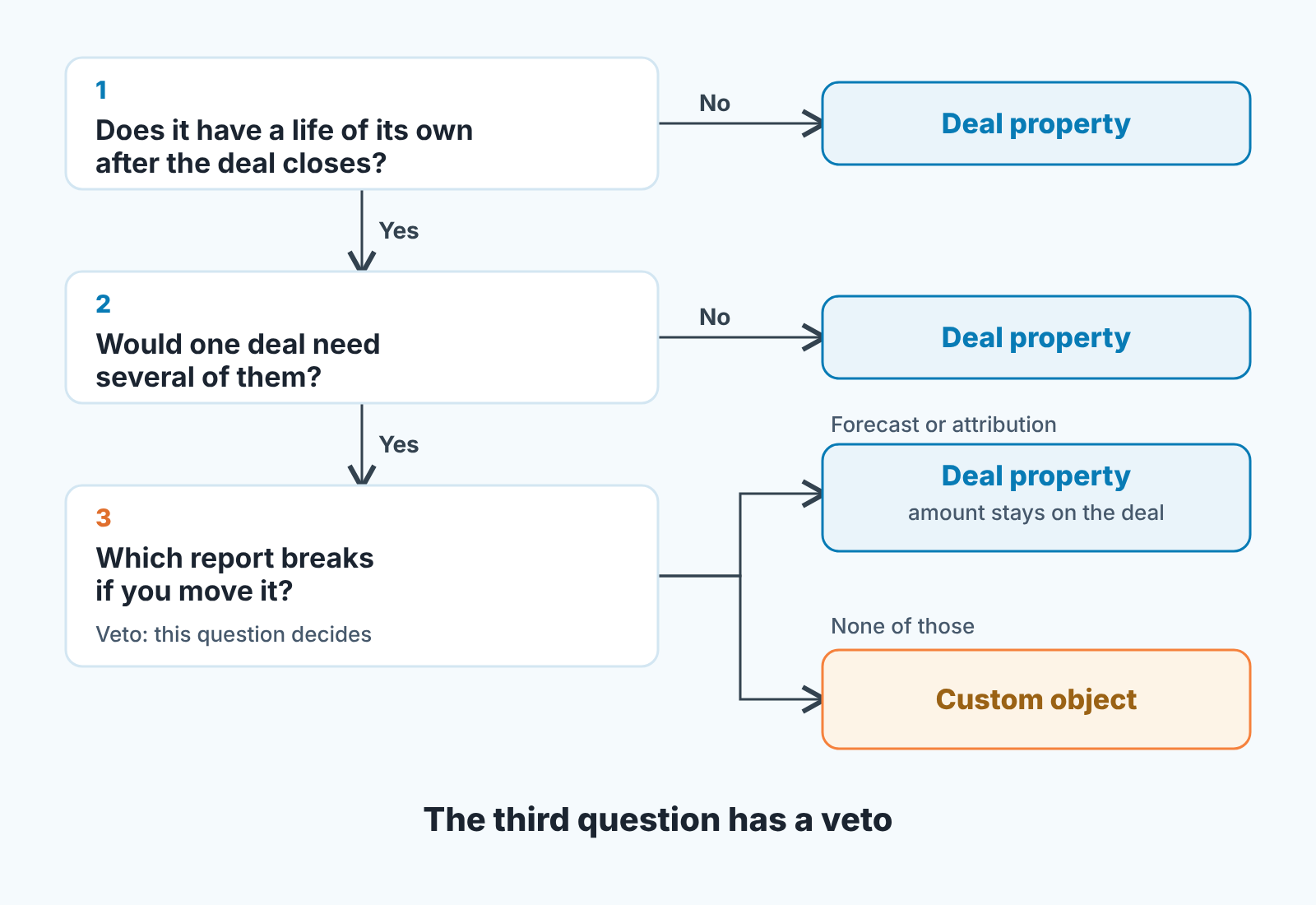
- Does the thing have a life of its own after the deal closes? A deal is won once. If the data you want to store keeps changing after Closed won, on its own schedule, with its own owner, it is a candidate for an object. If it is a fact about the deal (contract term, discount reason, which competitor you beat), it is a property.
- Would one deal need several of them? A deal has one close date, so close date is a property. A deal that ships three machines, each with a serial number and a service date, cannot hold that in properties without “Serial 1, Serial 2, Serial 3” and an empty fourth slot a year later. Repetition is the clearest sign you are looking at an object.
- Which report breaks if you move it? Name the report before you create the object. If the answer is “the forecast” or “attribution”, stop.
Two yes and one no is not a pass. All three have to point the same way, and the third one has a veto.
The revenue that disappears from the forecast
If revenue sits on a custom object, HubSpot sales forecasts and deal attribution reports will not count it, because they are connected to deals, not to other objects (HubSpot: create custom objects). The help page says it in one line. A manager reads that as a footnote. It is the decision.
Picture a team that sells software with a yearly renewal. Somebody decides “Subscription” should be its own object, with an amount, a start date and a renewal date, because that is where the recurring money lives. Clean model and the ops person is proud of it. Then the quarter ends and the forecast shows new-business deals only, because the renewal money sits on subscription records the forecast cannot see. The rep who renewed four accounts shows a quiet quarter. The manager rebuilds the number in a spreadsheet, which is exactly the job the CRM was bought to do.
The same page gives a second example of the same thing: bulk marketing emails can only be sent to contacts, not other objects (HubSpot: create custom objects). Some functions belong to standard objects and do not follow your data when you move it. Bulk email is a contact thing. Attribution and the forecast are deal things.
So our rule is short: revenue is a deal. A custom object may describe what was sold. It does not get to be what was sold. If a renewal is money you need in the forecast, it is a renewal deal, in a renewal pipeline, with the subscription record associated to it. The amount lives on the deal, the plan and the seat count live on the object, and the forecast stays honest without anyone exporting anything. How that forecast is weighted is its own topic, covered in HubSpot deal stage probability and the forecast.
Projects, subscriptions, installed assets: three examples that pass
Projects first, because this is the easy one. A deal closes and a delivery project starts: kickoff, build, go-live, with a delivery manager as owner and sometimes two or three projects for one customer. A life of its own, yes. Several per deal, sometimes. Report broken, none, because the deal keeps the amount and the project only tracks delivery. That is an object, with its own pipeline, and the sales team barely touches it.
Subscriptions are the tempting one, and the one from the story above. The subscription record itself (plan, seats, start date, renewal date) is a fair object: it outlives the deal and a customer can hold several. The money is not. Renewals are deals; the subscription object is associated to the renewal deal and describes it. And if all you want to know is “what plan is this customer on”, that is one dropdown on the company record and you do not need the object at all.
Installed assets, meaning machines, devices or licences at the customer’s site. Serial numbers, install dates, next service dates. One deal, five machines. This is the classic case, and the one where properties fail fastest, because the “Serial 3” column always runs out. Nothing on the asset record goes into a forecast, so the third question passes too.
Now the other side. “Competitor on this deal” is a dropdown property. “Economic buyer identified” is a property. So is “Reason we lost”. Every qualification field a manager asks about in a pipeline review is a property, and we argued for keeping those to a handful in MEDDPICC in HubSpot deal properties. The same discipline we described for cleaning up Pipedrive custom fields applies here, one level up: an object nobody fills in is worse than a field nobody fills in, because it has it’s own pipeline, its own permissions and its own report nobody opens.
Associations: one role owns the link to the deal
A custom object is only useful to a sales manager through its associations: the subscription on the company, the asset on the deal. HubSpot lets you customize those associations for a custom object (HubSpot: create custom objects). The failure we see is not technical. It is that nobody is responsible for making the the link, so some of the assets float with no deal behind them and every report that counts “assets sold this quarter” comes up short.
The fix is a sentence in the process, not a setting. One role makes the association, at one moment. For example: the rep associates the assets to the deal at Closed won, before the handover; the delivery manager associates the project to the deal at kickoff. Write it next to the stage, the same way you write which properties are required there. Then put one line in the weekly review: records of the object with no associated deal. If that list is empty three weeks in a row, the rule has stuck.
Permissions are the second half of this. Custom objects are on the list of CRM objects with customizable permissions in HubSpot (HubSpot: user permissions guide). Decide who can create and edit records of the object before the first record exists. If reps should not be editing service dates, do not give them edit rights and then complain about the data.
What the manager actually gets from reports on the object
Reports on custom objects are there (HubSpot: create custom objects), and they are good at counting things with dates: projects past their go-live date, assets due for service this month, subscriptions renewing in the next 90 days. That last one is the report worth building. Next to it, put the list of renewal deals for the same window. If the two lists do not match, someone has a subscription with no deal behind it, and the forecast is short by exactly that amount. Run it every two weeks, and expect rows the first few times.
What the reports do not give you is a number you can put in the forecast. Reports count the object; the forecast counts deals. Keep that in mind whenever a dashboard built on a custom object starts showing currency.
A disclosure: we build SalesBond, a sales management layer on top of the CRM a team already uses; we started with Pipedrive, and it works with HubSpot. Check your CRM with SalesBond.
Where the money lives
Start with the forecast, not the data model. If there is revenue you expect this quarter that is not on a deal, find the object it sits on and give it a deal in the right pipeline, with the object associated to it. Then pick one owner for each object’s link to the deal, and one report that justifies the object’s existence. An object that cannot name its report is a list nobody reads, so stop adding records to it before you decide whether to keep it.


