
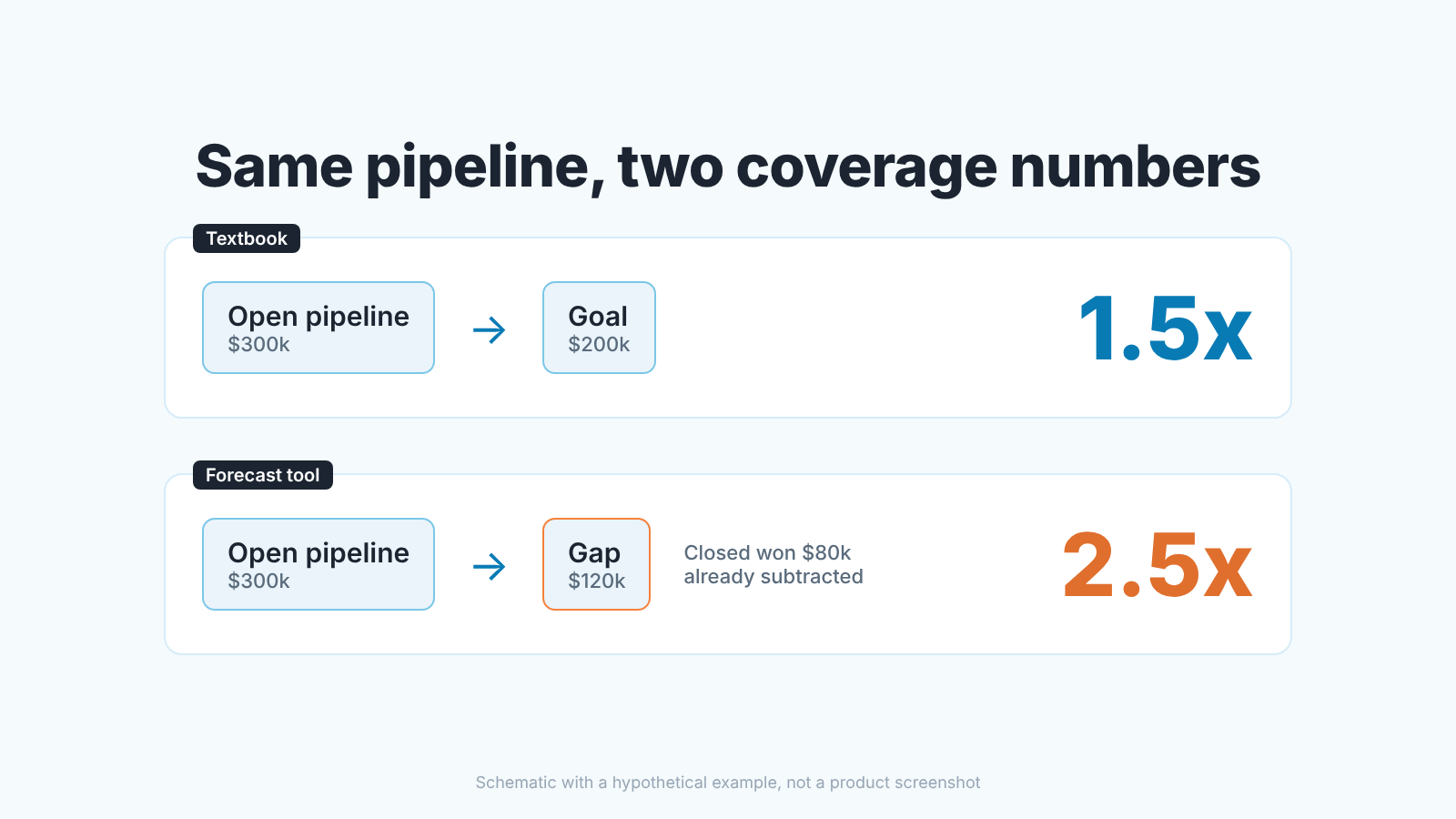
Pipeline coverage in HubSpot is open pipeline divided by what is still left to close. The Forecast tool calculates it for you: its Pipeline table has an Open pipeline coverage column, defined as the Open pipeline value divided by gap to goal, and the gap is the goal minus closed-won revenue (HubSpot: use the forecast tool).
That is not the textbook pipeline coverage ratio of pipeline over the whole goal, and the difference grows every week of the period. The custom report builder can put goals and deals side by side, but the goal reports HubSpot documents measure closed revenue against target, not open pipeline. So you read coverage in the Forecast tool and check it in the deals view.
HubSpot divides by the gap, not the goal
The formula most of us learned is open pipeline divided by the target for the period, with 3x as the folk rule. We have written that up already, including what a good ratio looks like and why 3x is a habit rather than a law (pipeline coverage ratio: is 3x enough?, and the Pipedrive version). None of that changes here. The denominator does.
In HubSpot’s Forecast tool the Team table carries Goal, Closed Won and Gap, and Gap is the difference between the first two (use the forecast tool). Open pipeline coverage divides open pipeline by that gap. On day one of the quarter, with nothing closed, the two formulas agree. By mid-quarter they don’t.
A made-up example. The goal is $200k and open pipeline is $300k, so textbook coverage is 1.5x. Then $80k closes, the gap is $120k, and the Forecast tool shows 2.5x on the same $300k of pipeline. Both numbers are honest. The first asks whether the quarter was ever funded; the second asks whether what is left is funded.
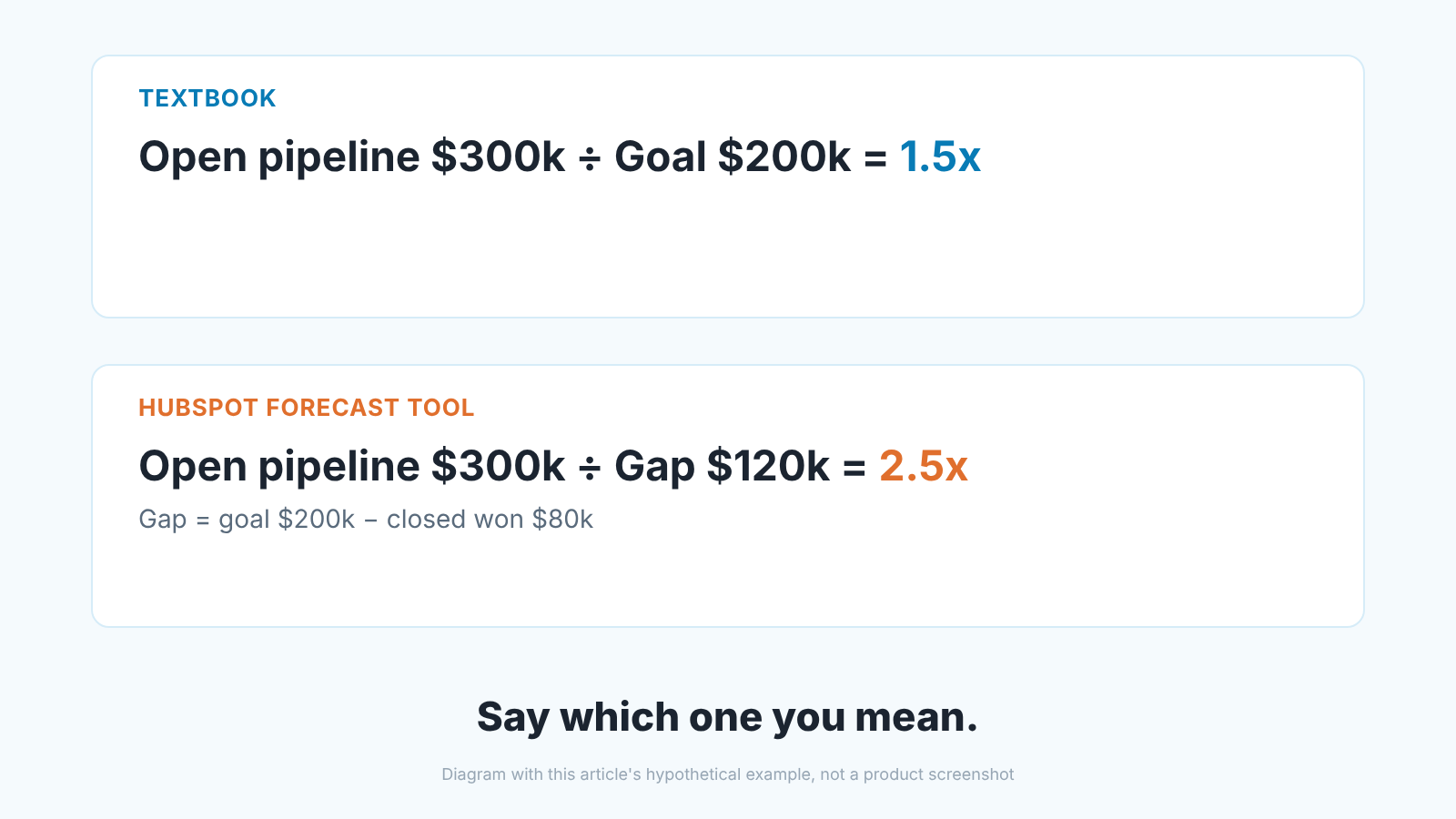
We think the gap version is the better management number, because it moves as the team closes. It needs one rule: never quote it without the closed-won figure next to it, or the manager who closed early looks like the one with the most pipeline. If closed won is zero, the two numbers are identical.
Why the report builder is not where coverage lives
The HubSpot community question that sends people here asks how to build coverage as a report. Short version: HubSpot does let goals and deals share a report, and you still don’t get coverage out of it.
In the custom report builder you can pick Goals as the primary data source and join Deals to it. Goals are associated directly with deals only, so contacts and companies come in through deals (HubSpot: create goal reports in the custom report builder). Every aggregate goal report must include a KPI unit type filter, and the date grouping should follow the goal’s cadence: monthly goals, monthly grouping. The documented example puts Sum of Goal target next to Sum of Closed deal amount in home currency, by End datetime, filtered to KPI unit type = Currency.
Read that example again. It is closed revenue against target: attainment, which is useful and is not coverage. Coverage needs the open deals, and the goal reports documentation describes no open pipeline or coverage figure at all. When a rep says “I’ll build a coverage report”, the realistic result is an attainment chart with a number worked out beside it by hand. Save teh hour.
Three settings that move the Forecast number
The coverage column is only as good as the settings behind it, and three of them change the figure without anyone touching a deal.
Which goals the tool can see. The Forecast tool can only show goals associated to one pipeline or to all pipelines (use the forecast tool). A revenue goal becomes forecastable when you answer Yes to “Do you need to use this goal in the forecasting tool?” while creating it; standard revenue goals appear only in reporting and the Goals overview tab (HubSpot: create sales goals). Setting the goals themselves is covered in HubSpot goals and rep targets. No forecastable goal, no gap, no coverage.
The forecast period. Monthly or quarterly, it applies to all pipelines, and the goal’s duration must match it to display in the forecast (set up the forecast tool, create sales goals). Editing the period resets forecastable revenue goals and forecast submissions for all pipelines. If someone switched from monthly to quarterly last week, last week’s coverage and this week’s are not comparable, and the goals need re-creating.
Weighted or total. The per-user rows show Weighted pipeline by default and Total pipeline only if the Forecast deal amount setting says so, while the Open pipeline sum is plain amounts; more on this in what HubSpot’s Forecast tool counts, and the probabilities behind the weighting in deal stage probability in HubSpot forecasts.
Two quieter things shift the figure as well. The pipeline and close date dropdowns decide which open deals are summed, and a deal you can’t access isn’t in your sum at all, which is how two managers read two coverages off the same CRM. In multi-currency teams open deals and goals convert at the current exchange rate, while closed-won deals keep the rate from when they closed.
A manual check in five minutes
Before you repeat a coverage number upward, rebuild it once by hand. Three figures from the Forecast tool, one from the deals view.
- In the Forecast tool, set the pipeline and the period you report on. Write down Goal and Closed Won from the Team table and subtract: that is your gap.
- Write down Open pipeline from the Pipeline table and divide by the gap. It should match the Open pipeline coverage column; if it doesn’t, the period or pipeline filter is not what you think.
- Divide the same Open pipeline by the full Goal. That is the textbook number most benchmarks refer to. Keep both.
- In the deals index, filter the same pipeline, open stages only, close date inside the period, and add up Amount. The difference from Open pipeline is deals outside your access or outside the close-date window.
- Open the five largest deals on that list and ask of each: would I bet my own money this closes in the period?
Step five is the real check. The arithmetic takes a minute; the five deals take the the other four. We have found more coverage problems there than in all the settings put together.
What pads the number
Hopeful close dates and stale deals that are still technically open inflate coverage without a warning, because the tool sums whatever the close date and pipeline filters let in; we walk through those cases in why a deal is missing from the forecast. Test deals count too, and a filter on deals with no associated contact or company usually finds them.
What a low number should trigger this week
Suppose the manual check holds and the gap-based coverage is low for your win rate. The temptation is to announce a prospecting push. Do the smaller things first.
Move the dates you don’t believe. Every deal you push out of the period lowers coverage further which feels wrong and is right: you are trading a comfortable number for a true one, and the prospecting plan should be sized against the true one.
Then look at what closed-won did to the gap. High closed-won and a small gap means a thin pipeline is the shape of a quarter that is nearly done, not an emergency. Closed-won near zero with coverage that only looks healthy over the whole goal means the textbook number is flattering you, and the gap number will catch up with it in a month.
Only then talk about new pipeline, and talk about it in deals, not multiples. “We need half a turn more coverage” means nothing to a rep. “We need four more qualified deals at our average size, created by the 15th” does.
A disclosure, since this is the part of the job we build for: we build SalesBond, a sales management layer on top of the CRM a team already uses; we started with Pipedrive. It points at the deals behind this article, the ones with a close date that has already passed, no next activity scheduled or no recent customer activity, so step five starts from a short list instead of the whole pipeline. To see which deals your coverage rests on, check your CRM with SalesBond. The Forecast settings are a different matter: fixing them is a Monday-morning job, not a software one.


