
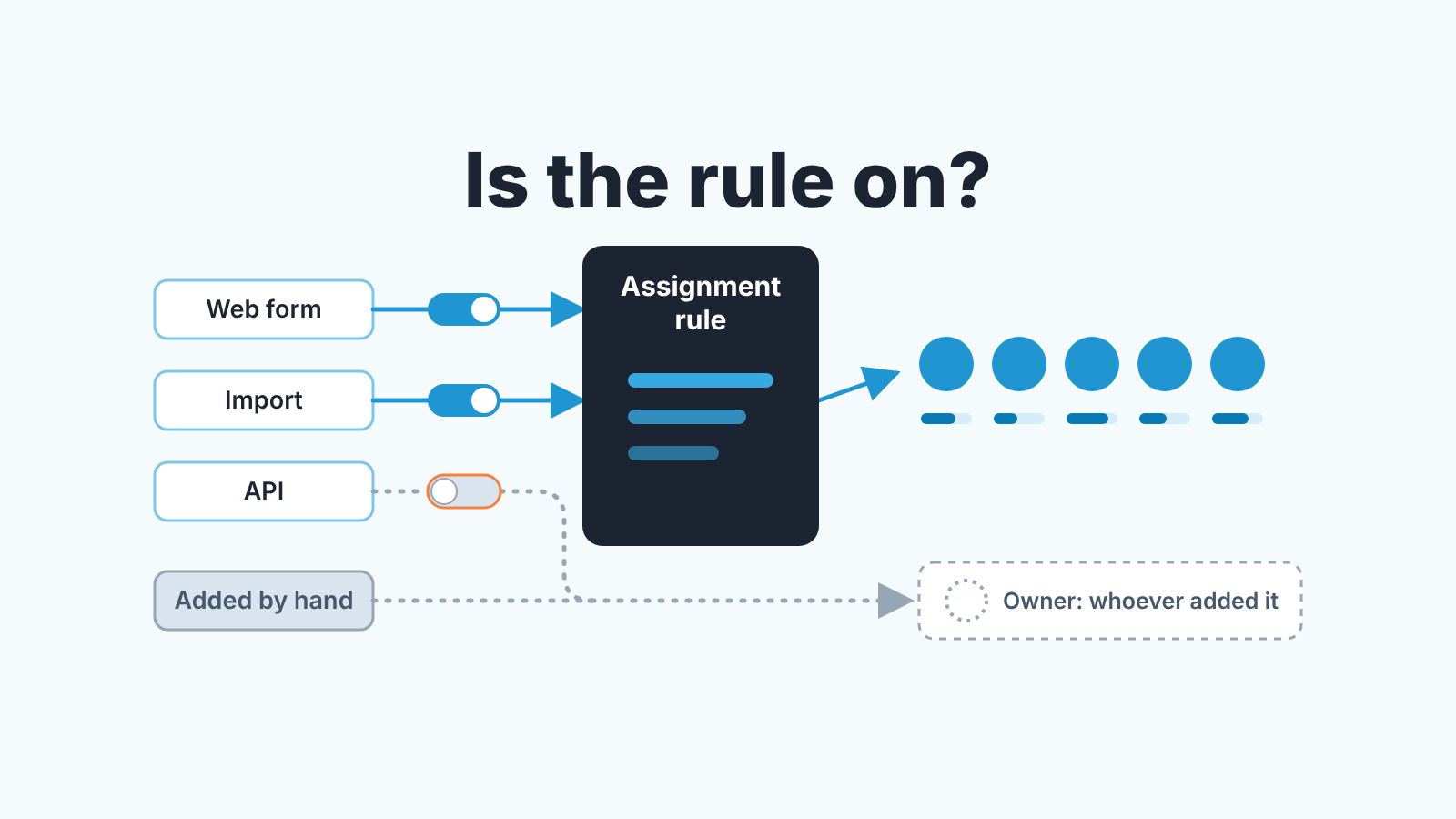
Assignment rules in Zoho CRM give a new lead an owner without anyone touching it: a rule matches the lead on its criteria and hands it to a named user, or rotates it round-robin across a group. To stop the same rep collecting every lead, set an Assignment Threshold, the cap on how many records one user can receive per day, week or month (Zoho CRM Help: Assignment Threshold). Then check the part that is easy to forget: a rule only runs on an import, an API insert or a web form when someone chose it there, and leads added by hand never go through it.
What assignment rules do in Zoho CRM (and where they stop)
A rule answers one question at the moment a lead is created: whose is it? Each entry in the rule says “a lead that looks like this goes to this person” or “goes to the next person in this group”. That is the whole job. It does not call the lead, it does not create a task, and it does not come back a day later to ask whether anyone did.
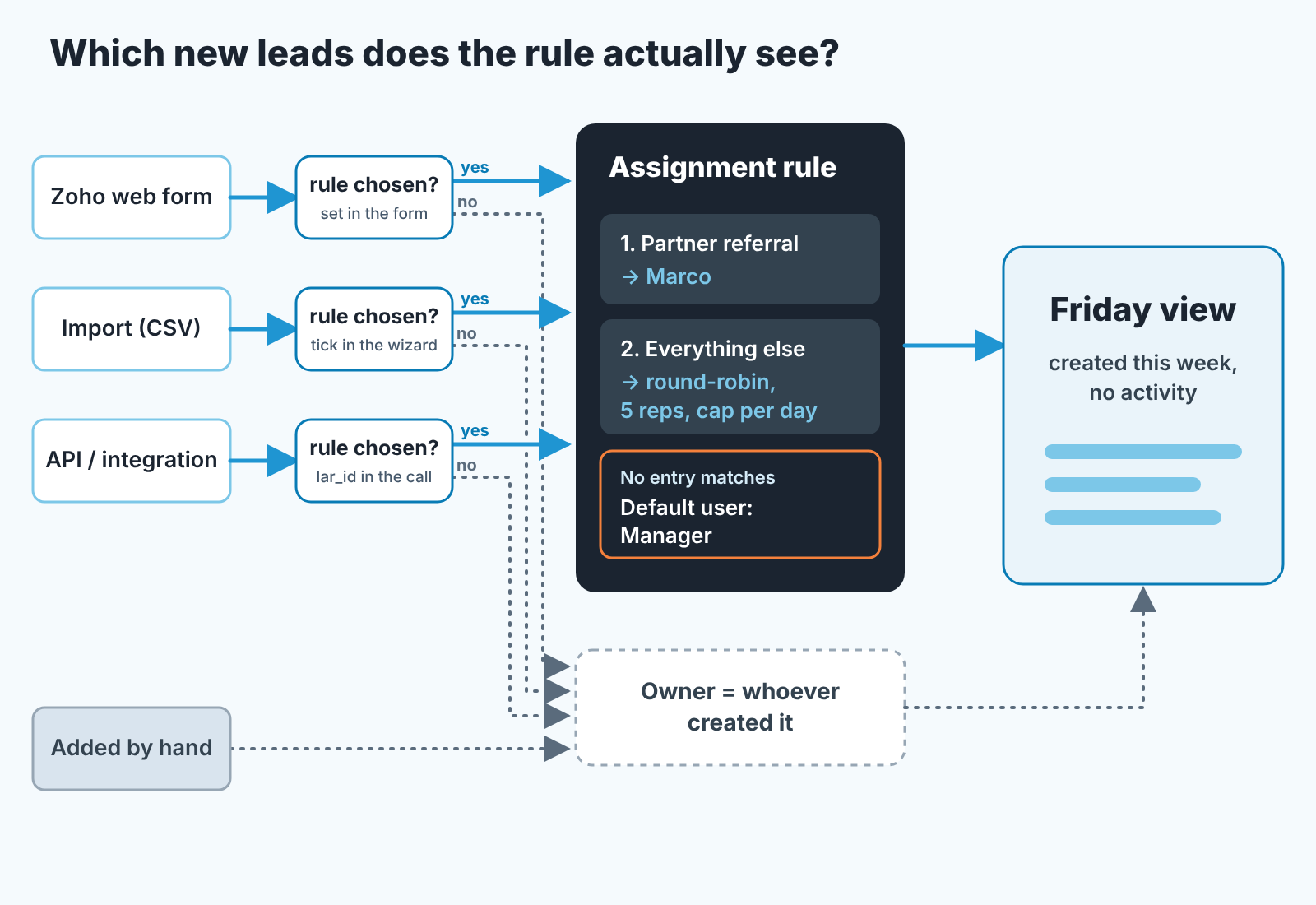
The part that catches small teams is how the rule gets switched on. Zoho’s FAQ says assignment rules apply only to records generated through import, web forms and the API, and not to records added manually (Zoho CRM Help: FAQs on Assignment Rules). Those three doors don’t run the rule on their own, though. In the import wizard you tick “Assign owner based on Assignment Rules” and pick the rule (Zoho CRM Help: Import data). On an API insert the call passes lar_id, which the developer docs describe as “the unique ID of the assignment rule you want to trigger while inserting a record” (Zoho CRM API: Insert Records). A web form gets the rule in its own settings, and Zoho’s tips thread shows a form submission triggering workflow rules and assignment rules together (Zoho Community: Trigger Zoho CRM workflows and assignment rules upon form submissions).
So the honest description is this. The rule is a switch on each door, and somebody has to flip it every time. The trade show spreadsheet imported on a Monday with the box unticked, the Zapier zap that never passes a rule ID, the rep who types a lead in from a phone call: all of these produce a lead the rule never saw. That is not a bug in Zoho. The manager’s job is to know which doors have the switch on.
We wrote the Salesforce version of this problem as a manager’s audit of who actually owns the new leads. Different mechanics, same gap: the rule decides, and someone still has to answer.
Order the entries, then name the fallback
Write the specific entries first and the wide one last. Zoho checks a record against the entries in the order you set and assigns it by the first one it qualifies for (Zoho CRM Help: FAQs on Assignment Rules). The specific entry is “Lead Source is Partner referral, owner is Marco”, because Marco runs the partner channel and nobody else should see those leads. The wide entry is “everything else, round-robin across the team”. Put the wide one first and it eats every lead, and Marco finds out about partner referrals from the partner.
Then there is the lead that matches nothing. A rule built for web leads has criteria for Country, Industry, maybe Number of Employees. The lead with a blank country and a personal email address matches none of them. Zoho sends it to the rule’s default user, and if no default user is set, to the logged-in user, which on an import is whoever pressed the button. We think the default user of any rule should be the sales manager, by name. Not a shared “Sales” user that nobody logs in as, and not the admin who built the rule and left for another project. The person who will notice on Tuesday that a lead has sat untouched since Thursday.
This is a position, so here is the reason. Every rep’s list view is filtered to “my leads”. A lead that lands on the importer or on a dormant account appears on nobody’s working list, and the only way to find it is to go looking, which nobody does on a normal week. A lead on the manager’s name sits in the manager’s list and is annoying there, and annoying is what you want. The default user is not a routing decision. It is the alarm.
Two more words on the specific entries: keep them to the fields the lead actually arrives with. A rule that routes on Industry when your web form has no Industry question always falls through to the default, and the manager becomes the round-robin.
Round-robin and the workload threshold for five reps
Round-robin on its own is fair in count and unfair in load. Five reps, each gets every fifth lead; the one who is at a conference on Wednesday still gets Wednesday’s share, and on Thursday has two days of leads to call. The Assignment Threshold is the fix: an upper limit on the records assigned to each user per day, week or month, with day as the default. A record that cannot go to a user under their limit goes to the default assignee you name in the threshold (Zoho CRM Help: Assignment Threshold).
For a team of five, one round-robin group across all inbound leads is the simplest setup and usually the right one. Two groups by territory is fine if the territories are real; two groups because two reps asked for their own is a rule you will be undoing in a month. Order the entries as above: named owners for channels that have one, the group for the rest, the manager as default.
Set the cap from the calendar, not from ambition. The cap is the number of new leads a rep can make a first call to on the day they arrive. If that number is six the daily cap is six. A cap of twenty with a team that calls six isn’t a workload limit, it’s a backlog with a timestamp.
And give the overflow a person. When the cap bites, the default assignee picks up what the reps can’t take, so make that the manager again and turn it into a conversation on Friday: hire, raise the cap, or stop paying for the campaign that produced the overflow.
For HubSpot we went through the same setup with its own field names in lead distribution with round-robin for a small team, and for Pipedrive in lead routing for a small Pipedrive team. The fallback owner is the part that is the same everywhere and skipped everywhere.
Leads that miss the rule: import, API, third-party forms
If your Zoho CRM assignment rules seem not to be working, check which door the lead came through, and whether the rule was switched on there.
Start with import, because it happens on a Monday morning with a hundred rows. Someone comes back from an event with a spreadsheet and uploads it to Leads. The wizard has a step for this: tick “Assign owner based on Assignment Rules” and choose the rule (Zoho CRM Help: Import data). Skip that step and the rows stay with the importer. Our rule for imports is blunt: whoever imports picks the rule in the wizard, every time, and if the rows need hand-picked owners, the file carries an owner column that gets mapped. Finding out in three weeks that all hundred sit on the importer’s name takes longer than either.
The API is the second door, and the quieter one. A connector between your website builder and Zoho, a Zapier zap, a developer’s script: all of these create leads through the API, and the rule runs only if the insert passes lar_id with the rule’s ID (Zoho CRM API: Insert Records). If your developer built the integration, ask them one question: does the insert send lar_id, and for which rule? If a no-code tool built it and its settings show no assignment rule option, set the owner in the tool’s field mapping or let a workflow do it after the record lands.
Third-party forms are the API door with a nicer front. A Typeform or a form from your website platform does not submit into Zoho the way a Zoho web form does; it hands the record over through an integration, so everything in the previous paragraph applies. For those, the fallback is a workflow rule on lead creation that sets Lead Owner by Lead Source. We built one workflow rule for a different purpose in the follow-up task that stops deals going quiet; the mechanics of trigger, criteria and action are the same, with a field update instead of a task.
Then there’s the lead a rep types in after a phone call. Assignment rules don’t apply to records added manually, so that lead belongs to whoever created it, which is usually fine and occasionally its the wrong person.
One practical consequence: make Lead Source required on every door, including the import file. “Which leads skipped the rule” is then a filter on Lead Source instead of an afternoon of guessing. If you are choosing between the built-in form and a separate form tool, we compared Zoho CRM web forms vs Zoho Forms.
The Friday view: new leads nobody has touched
None of the above tells you whether the leads were worked. The rule assigned them, the import had the box ticked, the workflow set the field. Fine. Now the only question that matters: did a person do anything with the lead after it got a name?
We run one custom view on Leads every Friday, and we would rather it were ugly and used than elegant and ignored. Criteria: Created Time in the last seven days. Columns: Lead Owner, Lead Source, Created Time and Last Activity Time. Sort by owner. Then read it the way a a manager reads it, not the way a report reads it. One caution on that last column: Zoho updates Last Activity Time for tasks, calls, meetings and emails, and also for any change to the lead’s fields (Zoho CRM: Record the actual last activity time). A lead that was reassigned on Tuesday looks “active” on Tuesday, so open the ones that look suspicious and check the activities themselves.
A lead created Monday with no call, no email and no task logged by Friday is a lead that was assigned and not worked, and the owner’s name is right there in the first column. Three of those on one name is a conversation about that rep. Three of those spread across five names is a conversation about the cap, or the campaign. A lead on the manager’s own name is the default doing its job, and the manager clears it before the weekend or admits the rule needs a new entry.
The view also catches the forgotten switches. A lead with Lead Source “Trade show” and Lead Owner “Admin” tells you the import went in without the rule ticked. A lead with a source you don’t recognise, sitting on an integration user, tells you a new connection appeared and nobody gave it a rule ID. You will find those within a week instead of within a quarter, which is the entire point of looking on Friday.
A disclosure, since this is the gap we build in. We make SalesBond, a sales management layer on top of the CRM a team already uses, and the Friday list is the kind of thing it produces without anyone maintaining a view: records with an owner and no movement, with the reason stated. Its Deal Health checks every deal against more than 20 rules, but it starts at the deal, one step after the lead, so the lead view in Zoho is still yours to run. Put the manager’s name in the default user field first, then Check your CRM with SalesBond.


