
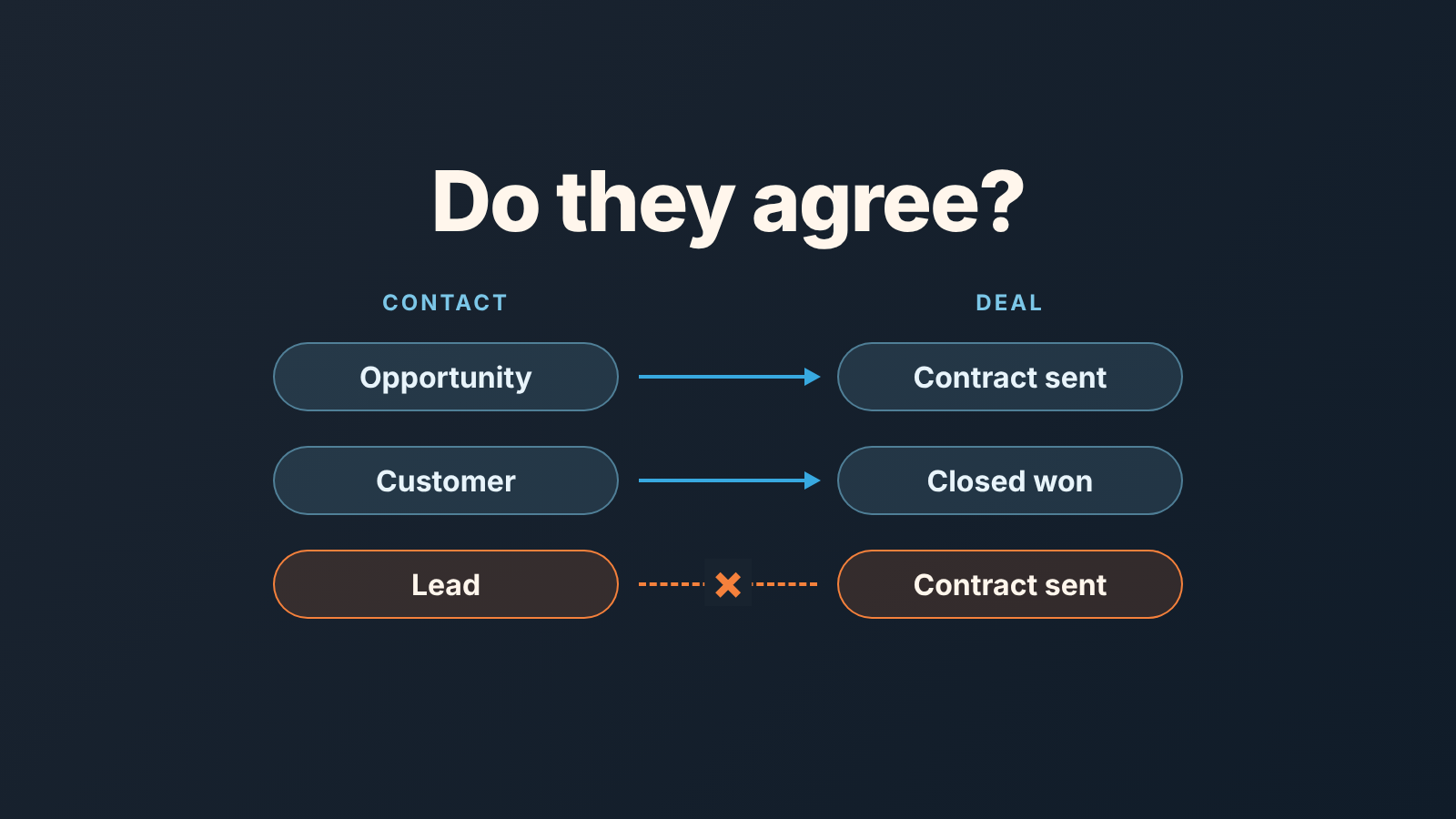
Lifecycle stage describes the whole relationship HubSpot has with a contact or company; deal stage tracks one sales opportunity. They are different properties on different records, so nothing in HubSpot forces them to agree unless you turn that on. Agree on a mapping between the two and switch on the automatic sync HubSpot offers for deal creation and deal won. Then, once a week, check for the contradictions the sync does not cover. We treat a contradiction as a data defect with an owner, not as a quirk of the tool.
Three properties, one contact
Open any contact record in HubSpot and there are three places that claim to say “where this person is in the sale”. Lifecycle stage sits on the contact and on the company. The default stages run in this order: Subscriber, Lead, Marketing Qualified Lead, Sales Qualified Lead, Opportunity, Customer, Evangelist and Other. HubSpot’s own definitions for the two that matter here are short: an Opportunity is a contact “associated with a deal”, a Customer has “at least one closed deal” (HubSpot: use lifecycle stages). Lead status is a second property on the contact, a finer-grained label reps use while someone is still a lead, meant to answer “what is a rep doing with this lead right now”: new, attempted, connected, unqualified and so on. Deal stage lives on the deal, which is a separate object associated to the contact. One contact can have several deals, each in its own stage.
That last point is where the trouble starts. Lifecycle stage is a property of a person. Deal stage is a property of a transaction. A person can be a Customer who is also in the middle of a second deal at Contract sent. A person can have a lifecycle stage of Lead because marketing set it two years ago, while a rep has a deal with them at Decision maker bought-in. Neither record is lying, they are answering different questions, and nobody wrote down which answer wins. Before contacts become deals, see lead status and where lifecycle stage takes over.
One more thing to know before you build anything: HubSpot’s default Lifecycle stage property moves forward only. Its own tools, imports, forms, workflows and the API, cannot push it to an earlier stage unless the value is cleared first (HubSpot: use lifecycle stages). So a contact who was Customer once stays Customer even if the renewal deal is lost. Keep that in mind when you read the mapping below.
Where they contradict
A composite, but we have seen each of these in a real HubSpot portal.
Dermot, who runs a six-person team selling warehouse software, asks for a count of open opportunities. The sales dashboard says 41 open deals. The contact filter “Lifecycle stage is Opportunity” says 19. Twenty-two deals are with contacts who are still Lead or Sales Qualified Lead, because the deals were created before anyone turned on the sync, or by an import that created the deal without touching the contact. Marketing is nurturing those “leads” with a top-of-funnel email series while a rep is negotiating price with them.
Second case. A deal for Harrow & Finch Logistics closes won on a Thursday. The deal is in Closed won, the invoice goes out, and the company record still reads Opportunity a month later. Customer success filters companies by Lifecycle stage is Customer to build thier onboarding list. Harrow & Finch is not on it. The first the account manager hears of them is a complaint.
Third, the reverse. Yusuf, a rep, creates a new deal on a contact whose lifecycle stage is already Customer. He expects it to flip to Opportunity so it shows up in the “open opportunities” contact view the team uses for calling. It does not, and it should not: HubSpot’s sync will not move a stage backwards, and Customer is further along than Opportunity (HubSpot: automatically set and sync lifecycle stages). Yusuf’s upsell is invisible to any list built on contact lifecycle stage. It is perfectly visible on the deal board, where the team does not look for it.
Three patterns, one cause. The team has reports on both properties and a rule for neither. The same mismatch quietly bends any HubSpot funnel report built on lifecycle stages.
Mapping deal stages to lifecycle stages
A smarter report won’t fix this. A short agreement will: what each deal stage implies for the lifecycle stage of the associated contact and company, written down once and then enforced partly by HubSpot and partly by a weekly check. Here is the version we hand to teams on HubSpot’s default sales pipeline. Rename the stages to yours; the shape is what matters.
A new deal in Appointment scheduled or Qualified to buy means the contact and company should be at Opportunity, unless they are already Customer. HubSpot sets this itself when the deal is created.
The middle of the pipeline (Presentation scheduled, Decision maker bought-in, Contract sent) expects the same Opportunity, unless already Customer. Nothing sets it at these stages; the weekly check catches it.
Closed won means Customer. HubSpot sets it when the deal is won.
Closed lost leaves the lifecycle stage unchanged, because HubSpot will not move it back, and the deal owner sets lead status to the reason by hand.
Two of those four HubSpot can do for you, and you should let it. In Settings, go to Data Management, open Objects, pick Contacts, then the Lifecycle Stage tab and its Automate tab. Turn on “Set lifecycle stage when a deal is created” and pick Opportunity, and “Set lifecycle stage when a deal is won” and pick Customer. That is all the deal side needs. The creation rule fires when the first deal is associated to a contact or company; the won rule fires when an associated deal reaches Closed won. Both are available on every HubSpot plan (HubSpot: automatically set and sync lifecycle stages). You will see a Sync lifecycle stages checkbox on the same screen. It is a different setting, about companies and their contacts rather than deals, and we come back to it below.
The other two need a human. The middle stages have no HubSpot trigger of their own, which is fine as long as the creation rule has been on since before those deals existed. Where it was not, you inherit the mismatches, and the only way through is the Monday list below.
Closed lost is the one people ask about most: the deal is lost, the contact is sitting at Opportunity, now what? We take a position. Leave the lifecycle stage where it is and write the reason into lead status. A lost deal with a contact who stays at Opportunity is honest, because the relationship did get that far. Moving the contact back to Lead by hand wipes the Became an Opportunity date, so the record stops showing that the relationship ever reached a deal, and it tells marketing to start the nurture over on someone who already saw a price.
Keep the whole mapping on one page. Put it at the top of the stage definitions you already use, next to the exit criteria. If a stage has required properties, this is the same document. If your team has renamed the stages, our guide on how to rename the default HubSpot deal stages covers what to change and what to leave.
Two lists to check on Monday
The sync handles the future. Monday handles the past and the edge cases. We run two saved views on the contacts index page, both shared with the team, and we expect both to be short. It’s the same trick as a saved view for deals with no next activity: a shared filter and a target of zero.
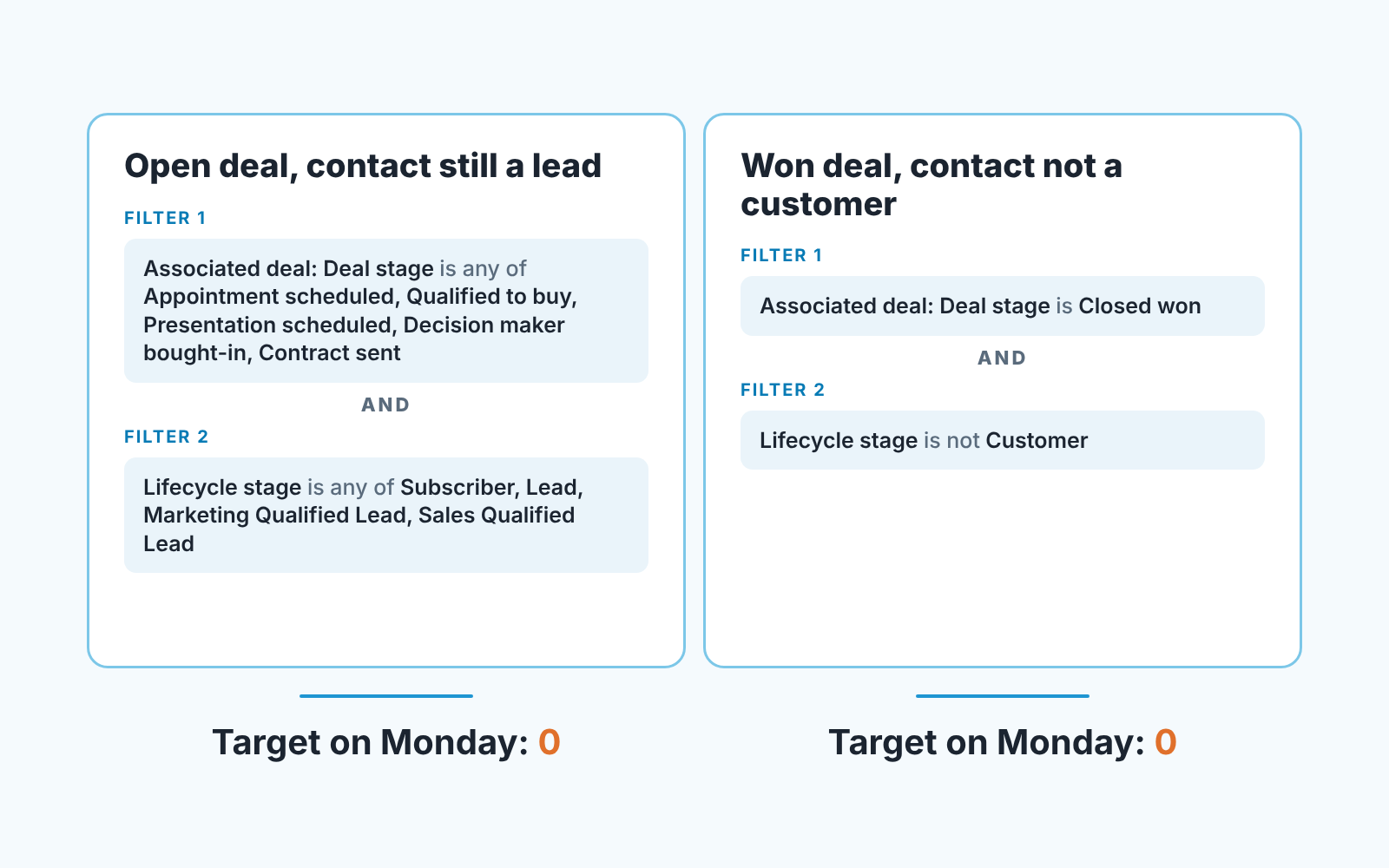
The first list is contacts with an open deal whose lifecycle stage is still behind Opportunity. Filter on the associated deal’s stage being any of your open stages, then on Lifecycle stage being any of Subscriber, Lead, Marketing Qualified Lead or Sales Qualified Lead. Every row is a person a rep is actively selling to while the rest of the company thinks they are a lead. Once the creation sync is on, new rows should stop appearing; whatever is left is backlog. Clearing it is a bulk edit of lifecycle stage to Opportunity, which HubSpot allows because it moves the value forward.
The second list is contacts with a Closed won deal whose lifecycle stage is anything other than Customer. Filter on associated deal stage is Closed won and Lifecycle stage is not Customer. This one should be empty every week once the won sync is on. When it is not, in the portals we have seen the usual reasons are a deal that was won by import rather than by moving the card, or a deal associated to the company but to no contact. Each row goes to the deal owner with the same question: is this person a customer, yes or no?
Run the same two views on the companies index page. Here is where that Sync lifecycle stages checkbox comes in. When it is ticked, the stage of a contact’s primary company is copied down to that contact, while a contact’s stage never changes the company (HubSpot: automatically set and sync lifecycle stages). So a wrong stage on a primary company multiplies across every contact under it.
Resist the temptation to add a third list for lead status. Lead status is a working label for reps on contacts that have not yet become a deal, and the moment a deal exists the deal stage is the truth. If you want a lead-status check keep it to one rule: a contact with an open deal does not carry an Unqualified lead status. That is a one-line filter, and that is as far as we take lead status in this article.
Who fixes it
The deal owner. Not marketing, not ops, and not the manager who found it.
We hold this line for a simple reason. The deal owner is the only person who knows whether the contact at Lead with a deal at Contract sent is a real opportunity or a deal that should have been closed lost in June. A RevOps person bulk-editing lifecycle stages on a Friday afternoon makes the report tidy and the data worse. The rep takes thirty seconds per row and the answer is right.
What the manager owns is the mapping itself and the Monday ritual. Open the two views, read the count, send each row to its owner with a deadline of the same day, and track one number week over week: how many rows were there on Monday morning. The first week it will be dozens. By the fourth it should be a handful, and a handful is the normal noise of imports and deals created by email. If the number stops falling, the mapping is wrong for your pipeline or the sync was never switched on; both take ten minutes to check. If your team has not settled who owns which CRM field at all, settle that first, because a Monday list with no owner is a Monday list nobody clears.
Since we are on the subject of checks that run without a person: we build SalesBond, a sales management layer on top of the CRM a team already uses. Its Deal Health checks every open deal against more than 20 rules and flags the ones that need attention, so the rep sees a problem before the the manager’s Monday list does. The two lifecycle views above still live in HubSpot, and for a small team they may be all the checking you need. If you would rather see every deal’s defects in one place, check your CRM with SalesBond.
When Dermot asks how many opportunities are open, the deal board and the contact filter should give the same number, and the weighted forecast built on deal stage should be talking about the same people marketing has stopped emailing. Write the four-line mapping this week, flip the two switches, and open the two views next Monday. If both are empty, you are done. If they are not, you now know whose job it is.


