
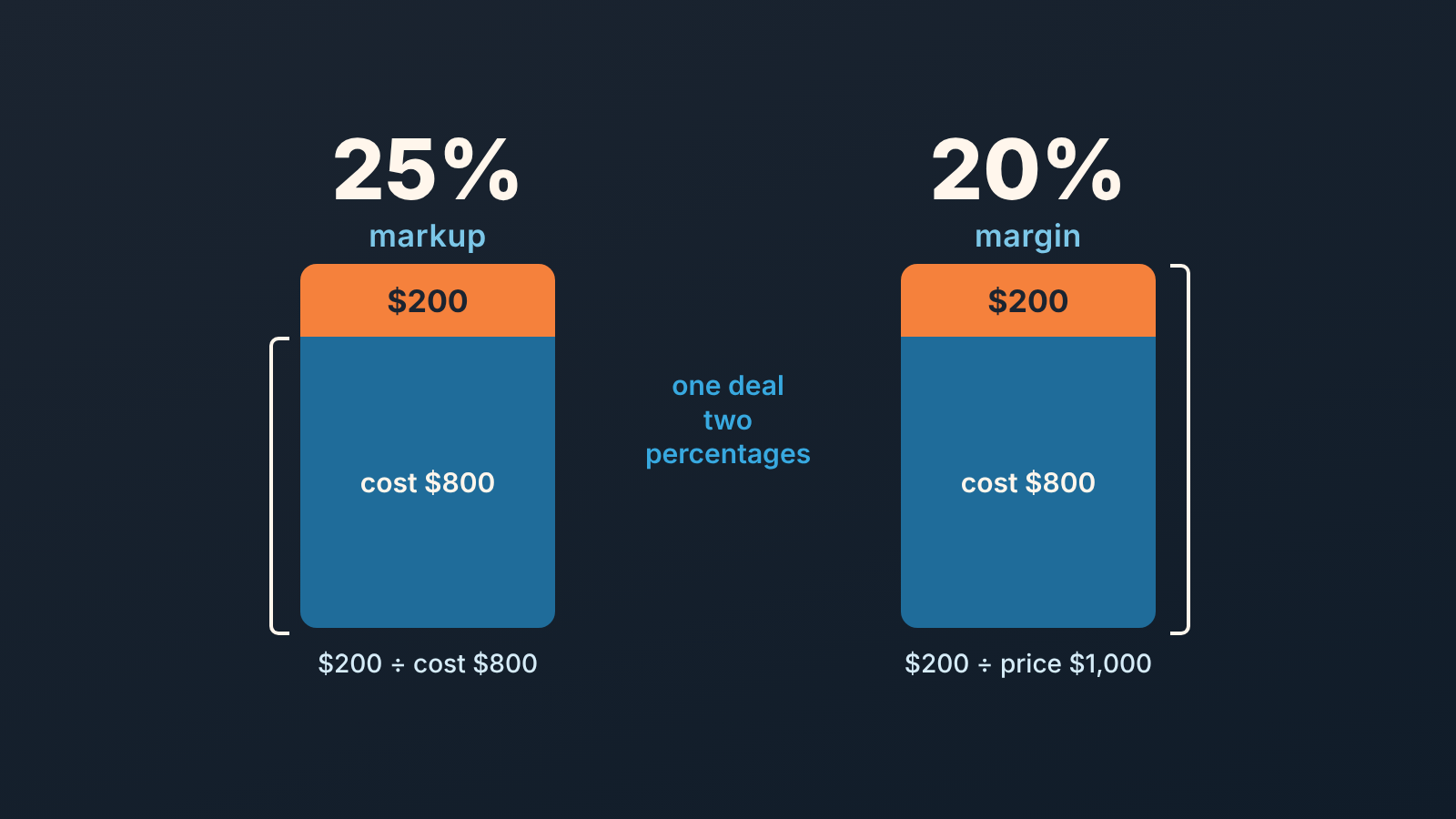
The markup vs margin difference comes down to one denominator. Markup is profit as a share of cost; margin is profit as a share of price. Same deal, same dollars, two different percentages, and the markup number is always the bigger one: a 25% markup is a 20% margin. The place this bites a sales manager is the discount request. When a rep asks for “just 10% off”, the price drops 10% but the margin on that deal drops far more, because the cost does not move. That is why we think the deal record should show the manager margin, not only the amount, before anyone signs.
Markup vs margin in two lines and one example
Take a deal that costs you $800 to deliver and sells at $1,000. Profit is $200 either way. What changes is the denominator.
Markup divides that profit by cost: $200 / $800 = 25%. Margin divides it by the selling price: $200 / $1,000 = 20%. Throughout this article “margin” means gross margin on the deal (price minus the cost of delivering it), not net margin after rent and salaries. Xero’s glossary puts the two formulas side by side as Markup = (Revenue − COGS) ÷ COGS and Margin = (Revenue − COGS) ÷ Revenue (Xero: margin vs markup), and Bench makes the same split in accounting terms: markup relates gross profit to cost of goods sold, margin relates it to revenue (Bench: how to calculate profit margin).
Which one does a sales team need? Both, for different jobs. Xero splits the jobs this way: markup helps you set prices, margin helps you report on and benchmark profitability (Xero). For a sales manager, that second job shrinks to one deal: was this sale worth what we gave away to get it? Pricing usually happens once, in a price list or a quote template. Judging the sale happens on every discounted deal, and that is the manager’s job. So the number that belongs on the deal card is margin.
Markup vs margin chart: 20% markup is not 20% margin
Reps who learned pricing from a cost-plus sheet carry markup percentages in their heads. Finance talks in margin. The two groups nod at each other across the table while meaning different numbers.
The conversion is Margin = Markup ÷ (1 + Markup), with both written as decimals (Xero). We ran the common values ourselves:
| Markup on cost | Margin on price |
|---|---|
| 10% | 9.1% |
| 20% | 16.7% |
| 25% | 20.0% |
| 30% | 23.1% |
| 40% | 28.6% |
| 50% | 33.3% |
| 100% | 50.0% |
Two things to take from the table. First, the gap grows with the number: at 10% the difference is rounding, at 50% it is a third of the margin. Second, a “20% markup” on a quote means a 16.7% margin, so a team with a 20% margin floor is already under it before any discount is typed. (A margin floor is the lowest margin % a deal may carry without someone approving it.)
If your floor is a margin, price from the floor, not toward it. Xero gives the formula: Price = Cost ÷ (1 − target margin) (Xero). For our $800 deal and a 20% target, that is $800 / 0.8 = $1,000. Adding 20% to cost instead gives $960 and a 16.7% margin, which is the mistake the table is there to catch.
Put the discount and its approver into the quote template with matching deal fields so the check is visible.
Why reps confuse them in quotes and discount requests
Nobody confuses them in a classroom. They confuse them on a Thursday afternoon with a buyer on the the phone.
Part of it is where each number lives. Cost sits in a spreadsheet or a procurement system. Price sits in the quote. Margin sits nowhere the rep looks, so the only percentage they can see while talking to the buyer is the discount field, and a discount is a percentage of price. Everything on the rep’s screen is denominated in price. Cost, the thing the discount actually eats into, is invisible.
Part of it is language. “We make 25% on this” is true as markup and wrong as margin, and in most sales rooms the sentence is said without the suffix. Bench notes that markup is usually calculated on a per-product basis (Bench), which is exactly the level a rep thinks at when building a quote line, while the manager and finance look at the deal and the quarter in margin. The rep is not wrong. They are answering a different question.
And part of it is that a discount request is framed as a price conversation. “Can I do 10%?” sounds like a question about the customer. It is a question about your profit, and the honest version is “can I give away half the margin on this deal?” Nobody asks it that way, which is why the manager has to translate. If your quotes carry several lines with different costs, the same translation has to happen per line, which is the case we worked through in price-match requests on quote lines.
What a 10% discount does to margin (worked example)
Back to the $800 cost, $1,000 price, 20% margin deal. The rep asks for 10% off to close this week. Here is the arithmetic, which we checked by hand rather than trusting a calculator page.
Price becomes $900. Cost is still $800. Profit falls from $200 to $100. Margin on the deal is now $100 / $900 = 11.1%.
So a 10% price cut removed 50% of the profit and took the margin from 20% to 11.1%. The rep saw a 10% concession. The business took a 50% one.
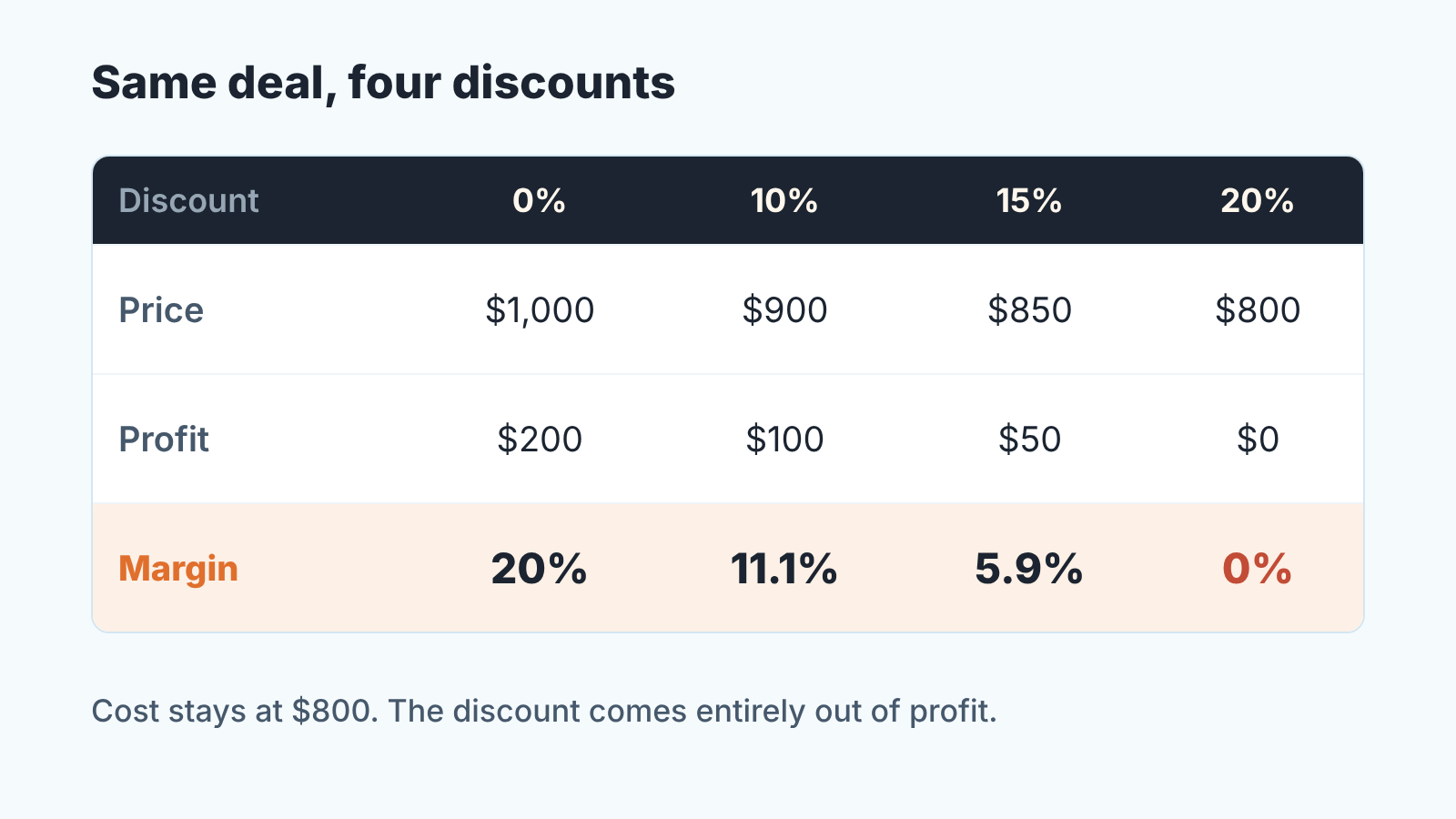
Push the same deal further and the curve gets steep fast. At 15% off, price is $850, profit is $50, margin 5.9%. At 20% off, price equals cost, profit is zero. There is no 20% discount on a 20% margin deal; there is a free delivery.
Two more numbers a manager should have ready. If the team’s floor is 15% margin, the most this deal can be discounted is about 5.9% (price $941.18), because $800 / (1 − 0.15) = $941.18. And if the rep argues the discount will bring volume, ask how much: at 10% off, profit per unit halves, so it takes two deals to earn what one deal earned at list. The buyer rarely signs for two.
None of this requires finance. It requires the cost on the deal and a formula field.
Fields to put on the deal: cost, price, margin %, approver
Three fields and one rule, and the rule is the part teams skip.
Cost is a currency field on the deal, filled when the quote is built, not at close. Where the deal has product lines, cost belongs on the line and rolls up; where it does not, a single deal-level estimate beats an empty field. Reps will say they do not know the cost. Give them the price list’s cost column and a default per product, and let them override it with a reason.
Price you already have: it is the discounted amount the deal carries. Nothing new to add, but the discount should be applied to the amount, not kept in a note, or the margin field below computes on the list price and lies.
Margin % is a formula: (price − cost) / price. Most CRMs can do it in a calculated or formula field; the Pipedrive version, with the field type and rounding quirks, is in formula fields for deal margin in Pipedrive. Show it on the deal card and in the pipeline list view. The point is that the rep sees it move while they type the discount.
Then the approver, which is the rule. Pick a margin floor (a number your finance lead signs off, not one from a blog), and decide who approves a deal below it: the manager down to one threshold, the owner below that. Write it as two lines and pin it where quotes are built. In CRMs with a native approval flow, the deal can be held at the stage until the approver acts; we described the Salesforce build in an approval process as a discount gate. Without a native flow, a required “Discount approved by” field on the proposal stage plus a saved filter does the same job less elegantly.
What we would not do is put markup on the card as well. Two percentages next to each other invite the exact confusion this article is about. One number, margin, and the floor next to it.
Monday check: deals discounted below the margin floor
A margin field nobody looks at is a decoration. The check that makes it real takes ten minutes on Monday and works in any CRM that can filter on a number.
Open the pipeline, filter deals in proposal or later with margin % below the floor, sort by amount. For each one, the question to the rep is not “why did you discount” but “who approved it”. If the answer is nobody, the deal goes back a stage until someone does. That feels harsh teh first two weeks. After that, reps start checking the margin field before they offer the number, which is the whole aim.
Keep a second filter for deals with an empty cost field at proposal stage. Those are the ones where the margin shows as blank or 100%, and a blank is how the first filter gets dodged. A deal with no cost is not ready for a discount conversation, because nobody knows what the discount is a share of.
Over a quarter the two lists tell you something a win rate never will: whether your team is closing deals or buying them. If the below-floor list is long and the approvals are all after the fact, the problem is upstream, in how quotes get built and handed off between sales and whoever delivers, and no amount of Monday filtering fixes that.
A disclosure, since we are near the tooling question: we build SalesBond, a sales management layer on top of the CRM a team already uses. It reads deal data from the CRM and points out what needs attention, but nothing in this article depends on it. Check your CRM with SalesBond. The arithmetic above works just as well in a filter and a formula field, as long as the cost is on the deal and someone opens the list.


