
Ask for the billing contact before the contract goes out, not after the signature: who the invoice is addressed to, whether they need a purchase order number on it, and the exact legal name of the entity that pays. Then put those answers on the Pipedrive organization or deal as custom fields. A deal in Pipedrive has one linked person and a list of participants with no roles attached, so “billing” is not something you can mark on a person. It has to live in a field you created.
The invoice went to someone who left
Rupert runs a five-person design agency. In September he closed a quarterly retainer with Vivienne, the marketing director at a regional retail chain. Three months at $2,400 a month, $7,200 on the first invoice. Vivienne negotiated it, Vivienne signed it, and Vivienne was the only person on the Pipedrive deal. On October 2 the invoice went to her inbox, net 30, due November 1.
November 1 passed. Rupert gave it a week, because clients are often a week late and chasing on day two makes you look nervous. On November 12 he wrote to Vivienne and got an auto-reply: she had left the company in October, and inquiries should go to Tobias. Tobias had never heard of the retainer. By the next morning he had worked out that the chain’s marketing budget sits with the parent company, a separate legal entity with its own accounts payable team, and that invoices addressed to the retail chain never get forwarded there. Yolanda in that AP team was perfectly helpful. She just needed the invoice reissued to the right name, and their terms run from the date they receive it.
So the invoice was reissued on November 13, due December 13. That is 42 days later than the date Rupert planned his cash around, and 72 days from the day he first sent it, for a payment nobody ever disputed. The work was fine. The relationship was fine. The invoice was addressed to a person instead of to the function that pays, and the person left.
We tell this story because it is unremarkable. No bad client, no lazy rep. Just a deal record that knew who signed and nothing about who pays.
Signs, uses, pays: three different people
A billing contact is the person or mailbox that receives and approves your invoice on the customer’s side, usually in accounts payable, and is rarely the person who signed. Ordway, which sells subscription billing software, puts it as “the financial bridge to a customer’s Accounts Payable team”, while primary contacts “manage the business relationship but may not handle day-to-day payments” (Ordway: billing contact management for subscription businesses, 2026-03-27). They go one step further and split the billing contact, who receives and reviews the invoice, from the AP contact who processes the payment in the finance system. In a large customer those can be two people in two different offices.
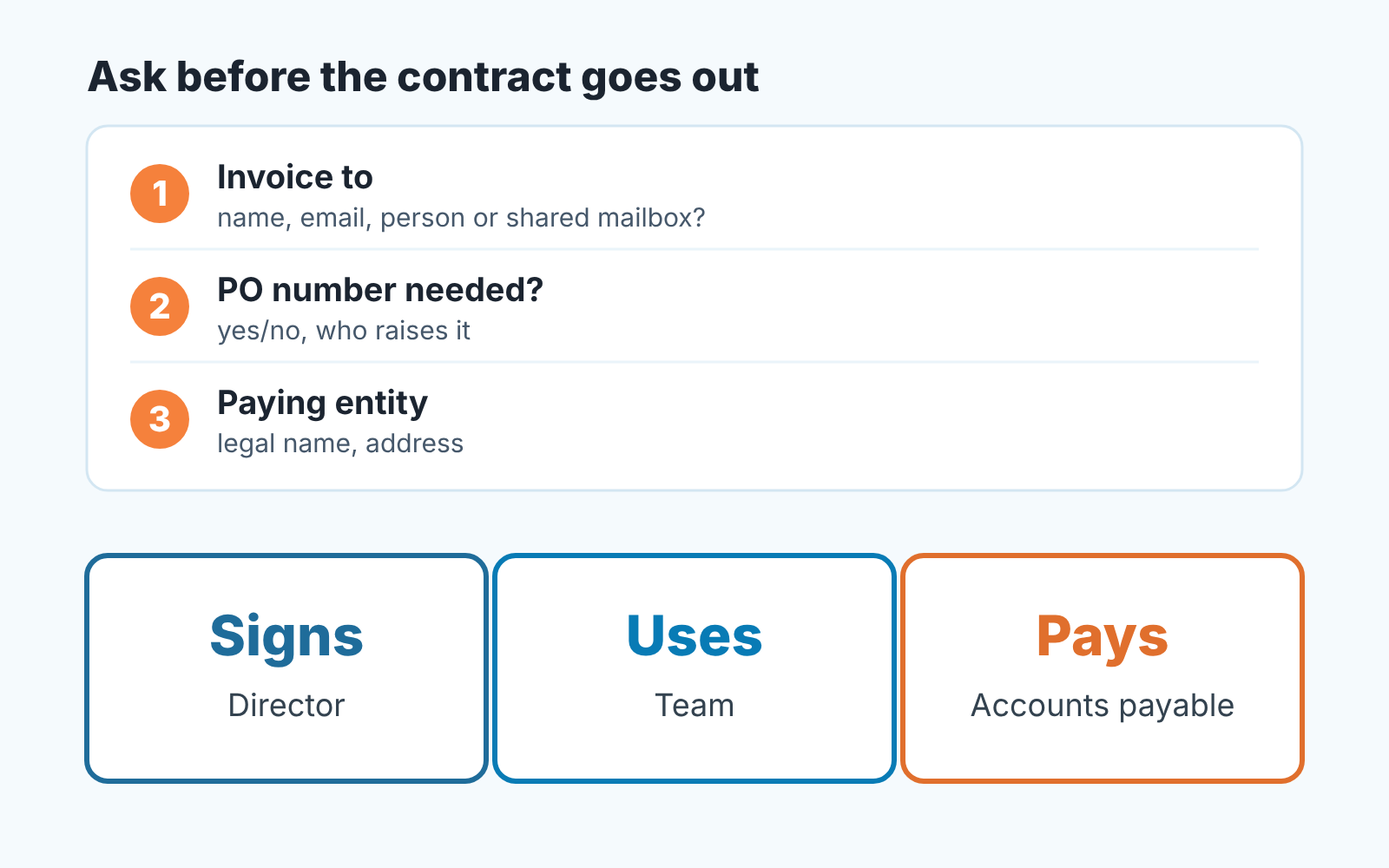
For a small B2B seller the practical version has three roles. Someone signs: the sponsor, the one you negotiated with. Someone uses: the team who will open your product or receive your work, and who will be the first to notice if it stops. Someone pays: a person or a mailbox in finance who has never heard your name and matches invoices against approvals. In a ten-person client all three might be the owner. In a hundred-person client they are rarely the same person, and the one who pays is the one you have least reason to meet during the sale.
Ordway’s advice is to validate billing contacts at onboarding and to keep the CRM and the billing system in sync. Good advice and it comes too late. Onboarding happens after the signature, and the signature is the last moment you have the sponsor’s full attention. We think the question belongs in the contract stage.
Three lines to ask before the contract goes out
The moment to ask is when you tell the sponsor the agreement is coming over. You are already asking who signs and what the start date is. Add three lines to the same message, and ask them as facts you need for the paperwork, not as a credit check:
- Who do we address the invoice to? A name and an email, and ideally whether that address is a person or a shared AP mailbox. Shared mailboxes do not resign.
- Will your side need a purchase order number on the invoice? If yes, the PO comes before your invoice, and that has its own timeline. We wrote that up separately: ask for the PO before the contract.
- What is the exact legal name and address of the entity that pays? Not the brand on the website, the name that will appear on the bank transfer. In Rupert’s case this one question would have surfaced the parent company in September.
Anyone who has bought from a supplier before answers these in a minute. Sponsors do not mind being asked. What they mind is an invoice bouncing around their finance department two months later with thier name on it.
If the sponsor does not know the answer, that is a finding too. “I’ll have to check with finance” before the signature means a conversation with finance before the signature, which is exactly where you want it.
Where the billing contact goes in Pipedrive: organization fields, not a participant
Here is the honest limit. In Pipedrive “a deal can only have one linked person at a time”, and additional people are added as participants (Pipedrive: participants, updated 2026-09-11). Participants are a list of names. The help article describes adding them from the sidebar, from a linked email thread or by import, and nothing in it lets you say why a person is on the deal. There is no “billing” role, and the contacts documentation does not add one either: a deal links to one person or organization at a time, and contacts can carry labels and custom fields (Pipedrive: contacts, people and organizations). Make Yolanda a participant, and six weeks later nobody will remember whether she was the AP contact or someone cc’d on a kickoff email.
So we store the billing answers as custom fields, and we put them on the organization rather than the deal. Accounts payable belongs to the company, not to this quarter’s retainer, and the next deal with the same client should inherit it. Custom fields are created under Personal preferences > Data fields, where you choose the entity (deal, person or organization) and the field type. The type cannot be changed once the field exists, so decide before you click (Pipedrive: custom fields, updated 2026-09-03). How many custom fields you can have depends on your plan, which is why this set is deliberately small:
- Billing email on the organization. A person’s address or a shared AP mailbox; prefer the mailbox when one exists.
- Billing entity (legal name) on the organization. Rupert’s would read the parent company, not the retail chain.
- PO required on the organization, as a yes/no. The PO number itself goes on the deal, because it belongs to one purchase.
- Billing notes on the organization, for what does not fit a field: “invoices to AP mailbox, cc Tobias; terms count from receipt”.
The deal itself keeps the sponsor as its linked person, which is correct, since the sponsor is who the sale is with. Want the AP person on the deal as a participant so they come up when you address emails? Fine, Pipedrive suggests participants as recipients. Just do not treat the participant list as the record of who pays. The record is the field. For the mechanics of switching the linked person and what happens to participants when you do, see switching the deal contact in Pipedrive.
Fields also beat notes for a practical reason. Pipedrive can pull custom fields into email templates and Smart Docs, and automations can fire when a field’s value changes (Pipedrive: custom fields). A billing email in a field can land on the invoice cover email automatically. A billing email in a note cannot.
Is this a workaround? Yes. A CRM that let you tag a participant “billing” would be cleaner. Until then a field on the organization is the version that survives a change of sponsor.
When the AP contact changes
It will. People leave, finance teams reorganize, a client gets acquired and its invoices move to the acquirer. Ordway suggests that billing teams flag accounts automatically when emails bounce or payments fail, and that is the right instinct: the first sign your billing contact is gone is usually a bounce. On a sales team in Pipedrive, three habits cover most of it.
- When an invoice email bounces or an auto-reply names a successor, update the organization’s billing fields the same day, before you forward anything. Otherwise the old address stays wrong for every future deal until someone touches the the field.
- At renewal, re-ask the three lines. The sponsor may be the same person; the paying entity often is not.
- Any change on the client side (new owner, merger, a sponsor moving on) is a reason to check the billing fields, even if nobody mentioned finance. Yolanda’s team did not change. Vivienne did, and that was enough.
No billing contact, no Won
The cheapest enforcement is a rule your team agrees out loud: a deal does not move to Won with the organization’s billing email empty. The sale is real either way. But the next step after Won is an invoice, and an invoice with nowhere to go is not a next step.
We have written about required fields in Pipedrive, where they help and where they just make reps type “TBC” to get past the box: required fields in Pipedrive. Our view is that the billing email is one of the few fields worth requiring, because its absence costs money on a known date and nobody can fill it in from memory later. The legal name is a close second. PO required can stay optional, since “no” is a legitimate and common answer.
Where the check really belongs is the handoff from sales to whoever sends the invoice. If your Won checklist already exists, the billing contact is one more line on it, and it should be the first one finance reads: the closed-won handoff in Pipedrive. If it does not exist, this is a good reason to write one. At Rupert’s agency the person who invoices clients is Rupert, on a Friday evening, working from whatever the deal says.
We build SalesBond, a sales management layer on top of the CRM a team already uses; we started with Pipedrive. Deal Health, one of our products, checks every open deal against more than 20 system rules, and its Data rules look for gaps in a deal’s record, then show the specific violation and what to do about it. The billing field is still your team’s agreement, so the Won rule above stays a habit people keep. Deal Health does not get the invoice paid. Check your CRM with SalesBond.
When the invoice still gets stuck
Sometimes you did all of the above and the invoice sits anyway. That is a collections problem rather than a data problem, with its own playbook: what to do when an overdue customer places a new order, and, if you need money before work starts, won but not paid: prepayment invoices in Pipedrive.
When the invoice is late, the billing contact tells you who to call. It is not the person who signed. Every invoice that goes to the wrong person first adds days to days sales outstanding, and part of that number is decided at the sale.


