
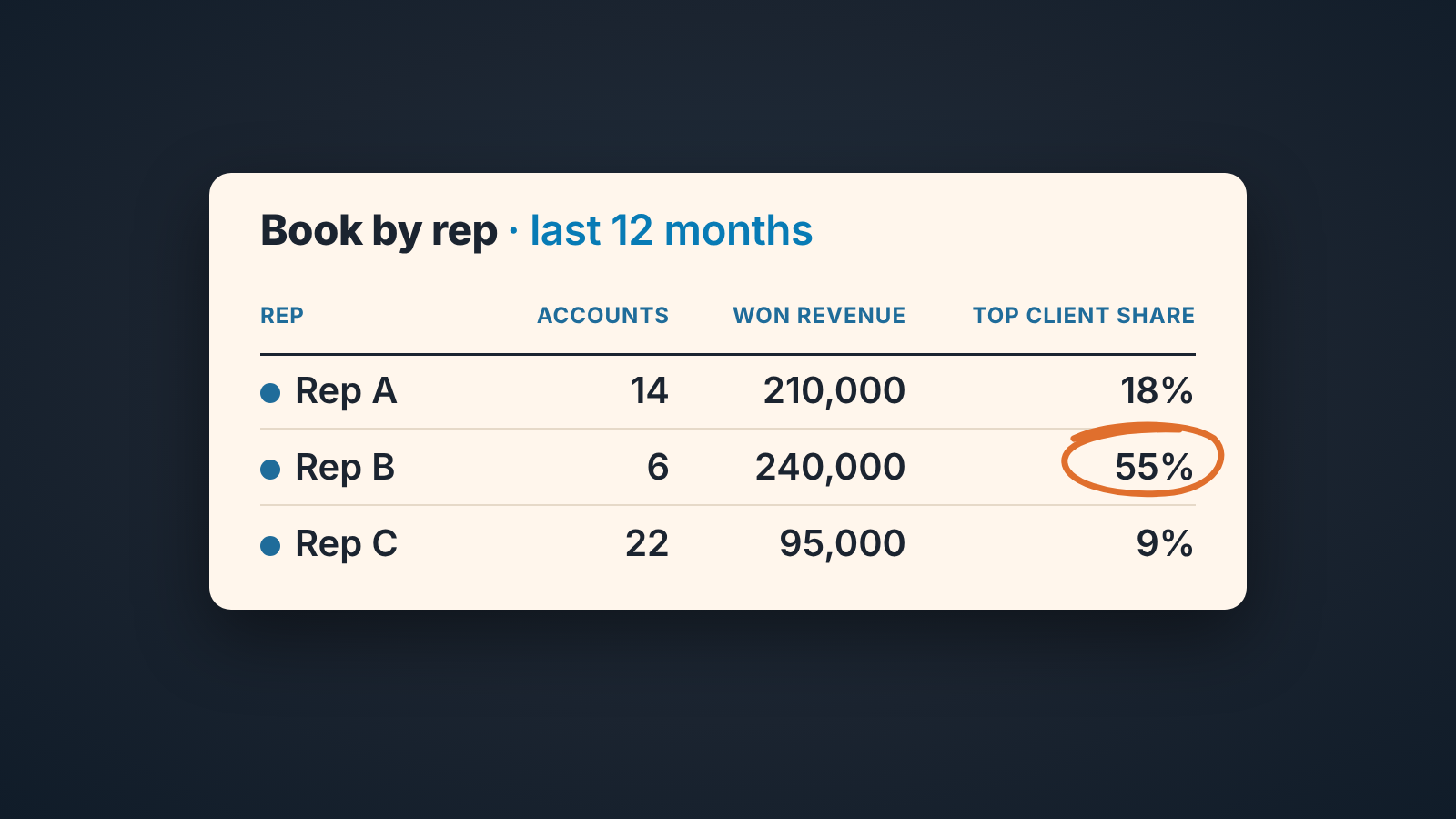
In sales, a book of business is the set of customer accounts a rep owns and the revenue those accounts bring. The phrase comes from law and insurance; in a B2B team it is a CRM report grouped by account owner: how many accounts each rep holds, how much closed-won revenue they produced in the last 12 months, and what share of it the largest client takes. If you cannot run that report today, your team has books, but you cannot see them.
This is for the owner of a small B2B team who hears “my book” in one-on-ones and wants to see it in the CRM instead of taking the rep’s word for it.
What a book of business means in sales (and what it does not)
OnePageCRM gives the shortest usable definition: “A book of business is a collection of client records or accounts.” They add that the term is mostly used in law and real estate, and also by financial consultants and salespeople (OnePageCRM: book of business).
Three things a B2B rep’s book is not. It is not the pipeline: a rep with forty open deals and two paying customers has a big pipeline and a small book. It is not the contact list either. The book counts companies that bought.
And it is not the rep’s property. The accounts belong to the company; the rep is their owner in the CRM sense, the person responsible for the record. Who owns the data itself is covered in who owns the CRM data in a small sales team.
Three numbers that describe a book: accounts, recurring revenue, concentration
A sales book of business needs exactly three numbers. We would resist a fourth until these three are clean.
Accounts. Companies where this rep is the owner and at least one deal was closed won in the last 12 months. A customer who bought once in 2023 and never again is a former account; leaving them in inflates every book on the team.
Recurring revenue. The sum of closed-won deal values on those accounts over the same 12 months. For a subscription business this is close to annual recurring revenue by owner; for a project business it is last year’s won revenue, a weaker signal but the honest one.
Concentration. The largest account’s revenue divided by the rep’s total. Ten accounts with one paying half is a different book from ten accounts paying roughly the same, even if the totals match.
What is a book worth? In B2B nobody sells it, so its value is that recurring revenue and how much of it hangs on one name.
The figures below are made up to show the shape.
| Rep | Accounts (12 mo) | Won revenue (12 mo) | Top client share |
|---|---|---|---|
| Rep A | 14 | 210,000 | 18% |
| Rep B | 6 | 240,000 | 55% |
| Rep C | 22 | 95,000 | 9% |
Rep B has the biggest book by revenue and the most fragile one. Rep C has the most accounts and the thinnest. None of that shows in the revenue column alone, the only one most teams look at.
Where the book actually lives: owner fields, not the rep’s memory
A book is a query on one field: the record owner. In HubSpot the company record has an Owner property, described simply as “the company’s owner” (HubSpot: default company properties). Pipedrive keeps one owner on the organization and a separate one on the deal (Pipedrive: reassigning items to another user). Zoho CRM has an Account Owner field, “the user to whom the account is assigned” (Zoho CRM: standard fields in Accounts). Salesforce accounts have an owner too, and changing it needs its own permission (Salesforce Help).
The catch: company, deal and contact each carry their own owner, and nothing forces them to agree. A deal can belong to the rep who closed it while the company still belongs to whoever imported the list two years ago. Deal owner gives you a sales-credit report, company owner a relationship report, and on a team that hasn’t picked one they disagree by a lot.
Our position: the book is the company-level owner. The deal owner says who gets credit for one sale; the company owner says who is responsible for the customer next year. If your team splits AE and account manager roles, the book sits under the account manager and the AE’s book is zero by design (who owns the account after Closed Won).
So before any report one cleanup. For every company with a won deal in the last 12 months, does the company owner match the person who actually works the account? On a ten-person team that is an afternoon with a filter.
The report the owner reads once a month: book by rep
The book-by-rep report is one filter, one grouping and three aggregates. Take companies with at least one closed-won deal in the last 12 months, group them by company owner, and show the count of companies, the sum of won deal value, and the largest single-company value. The third divided by the second is concentration.
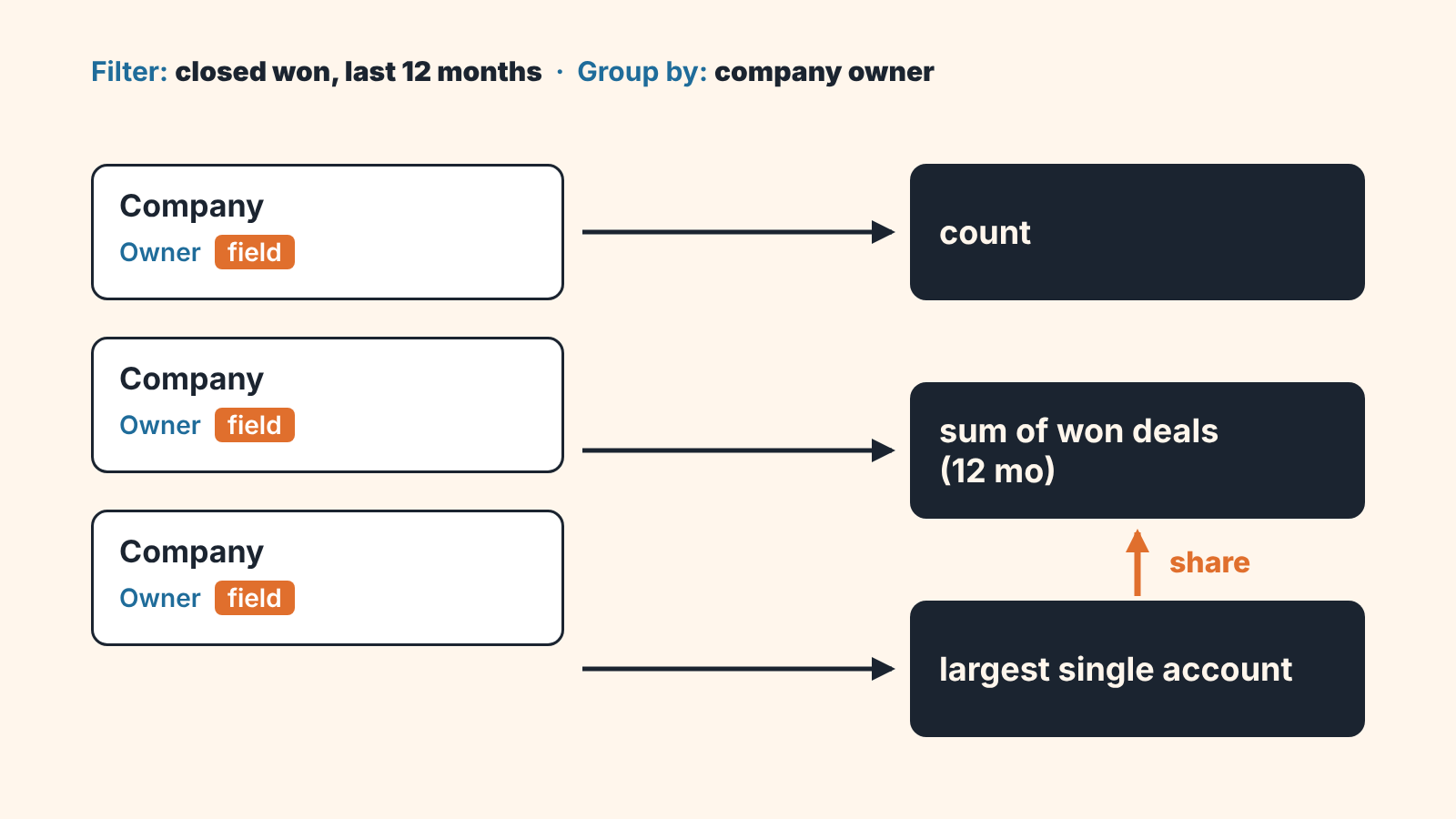
Read counts first: a rep whose account count fell is losing customers, whatever the revenue says. Then revenue against count, since a book that grew in revenue but not in accounts grew through one client. Concentration last.
The whole reading takes ten minutes if the owner fields are right. If it takes an hour, the fields are wrong, and that is the finding.
A disclosure: we build SalesBond, a sales management layer on top of the CRM a team already uses; we started with Pipedrive, and today it works with Pipedrive, HubSpot, Salesforce, Zoho CRM, Microsoft Dynamics 365, Freshsales, Close, monday CRM, Copper, Zendesk Sell, Nutshell, Insightly, Attio, Bitrix24 and Kommo (amoCRM). Its Repeat Sales watches the customer base for repeat business and computes it per customer and seller, so a manager sees both the account and the seller behind it, but the book-by-rep report is a plain CRM report and we would build it before buying anything. For a second pair of eyes on the owner data, check your CRM with SalesBond.
When one client is too much of one rep’s book
A rep’s book is concentrated when one account brings most of its revenue, like Rep B in the table. It is common on small teams: one early customer grew, the rep who landed them stayed close, and three years later a single renewal is most of that person’s year.
The company-level version is in customer concentration risk: how to measure it. The per-rep version also exposes the rep’s judgement. Someone whose income rides on one renewal will protect it over new business and hesitate to raise price. Its what the book makes rational, whatever the rep’s character.
What we do: the owner or an account manager becomes the second name on the account, and the rep’s new-business target for two quarters is reviewed against book count. The account stays where it is; the point is to make the book survive it.
What happens to the book when a rep leaves or changes territory
In B2B the accounts belong to the company, so the book stays in the CRM when the rep goes; what they may do with those relationships afterwards is a question for their contract. A customer who only ever talked to that one person, though, may treat the departure as a reason to reconsider. Law firms handle this in the open: when a partner resigns, bar rules require that clients be notified so they can decide on their own representation (Wikipedia: Book of business (law)).
The leaver’s book, sorted by revenue with top-client share next to it, tells you before the last day which customers those are. To see what a year of departures costs across the team, see the turnover rate for a sales team and the open deals it leaves behind.
Moving open deals is covered in a rep just quit: how to reassign their Pipedrive deals. The book adds one rule: reassign companies too. In Pipedrive, a bulk change of deal owner doesn’t touch the people and organizations linked to those deals; you repeat it in the Organizations tab (Pipedrive: reassigning items to another user). Leave the company owner on a deactivated user and the won accounts drop out of every book on the team, and the first anyone hears of it is the the renewal nobody called about.
Territory changes are the same operation in slow motion: change the company owner on both lists the same day, or both reps will count the overlap.
Setting up the check in HubSpot, Pipedrive, Salesforce or Zoho CRM
The setup is small; the discipline above is the hard part.
- HubSpot: use the company Owner property. Filter companies by Recent deal close date, which HubSpot sets to the date of the last associated deal closed won, within the last 12 months, and sort by owner. Total revenue holds the won total for all time, so for a 12-month sum use a deals report (HubSpot: default company properties).
- Pipedrive: the organization owner is the book owner, whoever owns the deals. Filter the Organizations list by owner for the account count; for revenue, take deals with status won in the last 12 months for the same organizations.
- Salesforce: use the account’s owner. A report on closed-won opportunities from the last 12 months, grouped by account owner, gives the count and the sum. Check the largest account per rep in the same report.
- Zoho CRM: use Account Owner on the account. Same report shape as above.
Start this week with that owner cleanup on every company with a won deal in the last 12 months; the report is worth running once the owners are right.


