
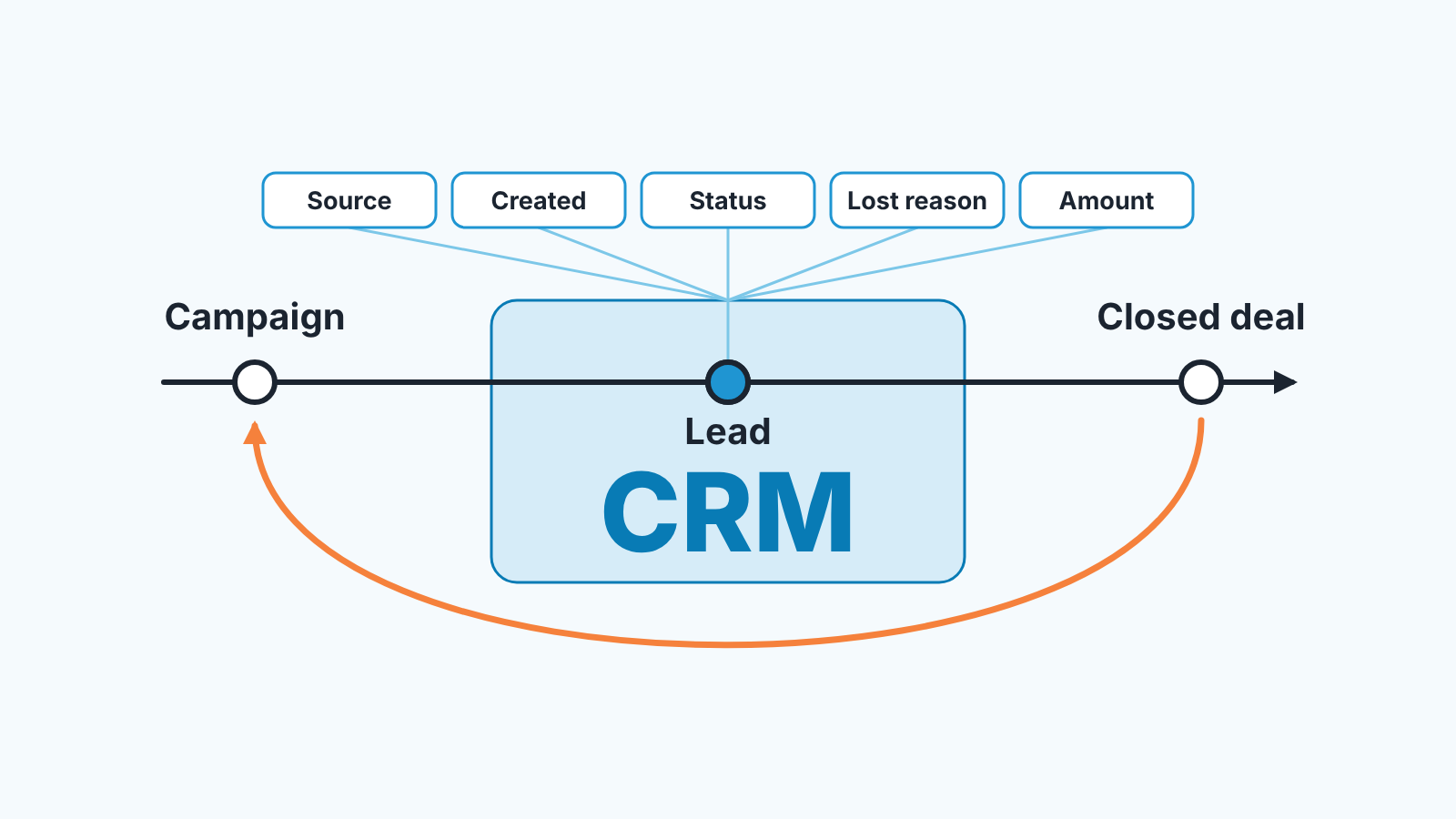
CRM marketing means using the customer and deal data in your CRM to decide who marketing talks to, with what, and what the campaign actually earned. For a small company the useful part is narrow: record where each lead came from, what happened to it and why deals were lost, then feed that back into campaigns and reports. Everything else sold under the name, from automation to attribution models, sits on top of those few fields and does nothing while they are empty.
CRM marketing in one paragraph
CRM marketing differs from email marketing in what it measures: an email tool knows who opened and who clicked, while a CRM knows who became a lead, who bought, who said no and what reason they gave, so a campaign is judged by the deals its leads turned into. You don’t need a “marketing CRM” licence, a marketing department or an attribution model for that, only five pieces of information written into the CRM at the moment someone knows them and somebody who reads three reports built on them once a month. For a small company, where marketing is one person or the owner on Thursday afternoons, that is the whole CRM marketing strategy and the right size to start at, and the five fields have to exist in any CRM before the step-by-step setup in sales and marketing alignment in HubSpot is worth doing; if you are still deciding what a CRM is for, start with what is CRM, a plain-English guide.
Five CRM fields marketing needs from sales
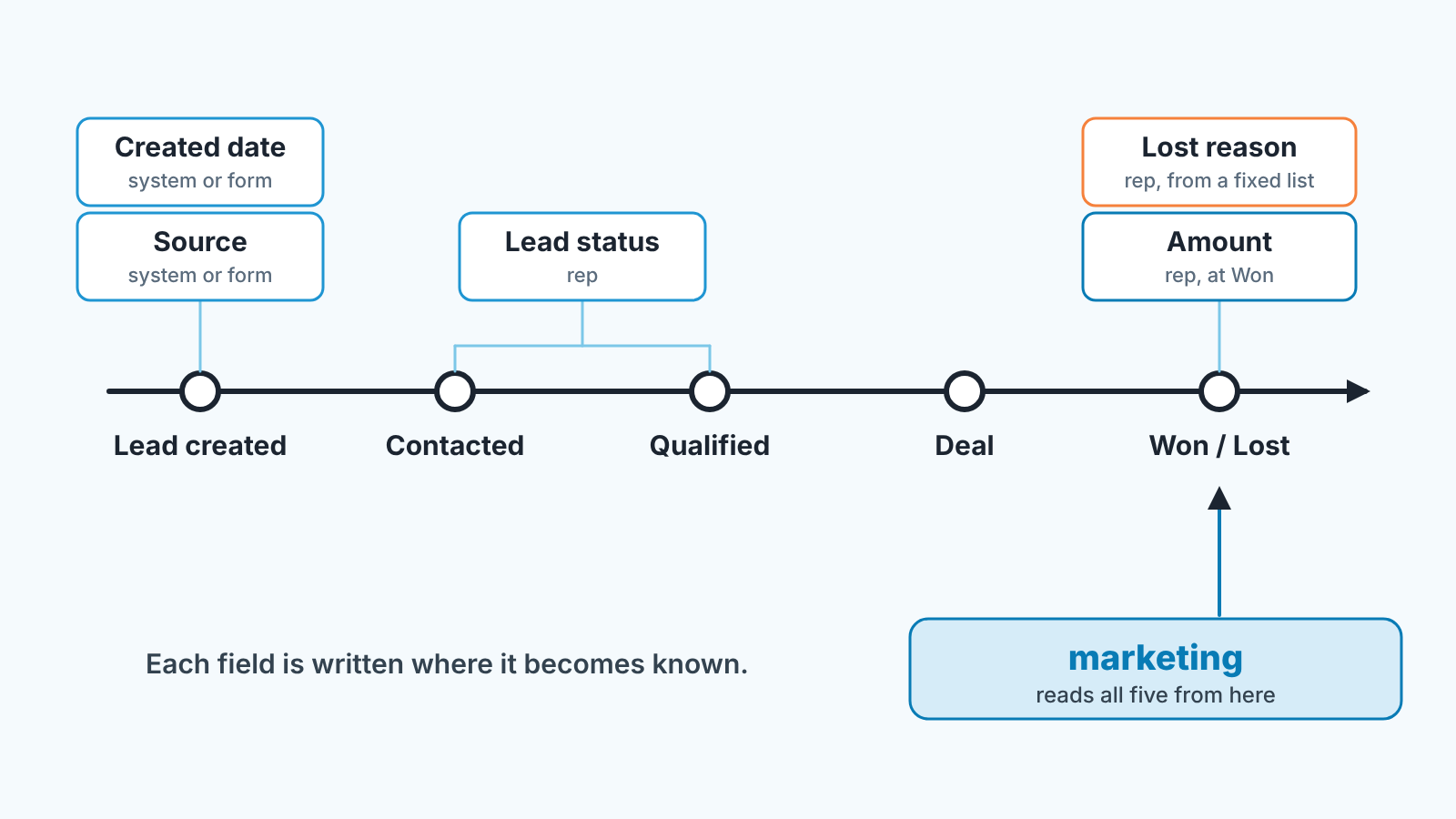
Marketing can run campaigns with nothing from sales. It cannot know what the campaigns were worth without five things that only exist on the sales side of the CRM. Two of them the system usually fills. The other three need a person.
Lead source
Where the contact or deal came from, as a short list the whole company agrees on: Referral, Website, Paid ads, Trade show, Outbound, Partner. Keep it short. Every report below groups by it, and a list of forty values groups nothing.
Most CRMs capture a technical source on their own. In HubSpot, Original Traffic Source is “the first known source through which the contact interacted with your business” (HubSpot: default contact properties). In Pipedrive, a lead or deal carries source_origin, populated by the system and not editable by users, and source_channel, whose values an admin manages and any user can edit (Pipedrive: lead and deal source). The system field tells you the mechanism (a web form, an import, the API). The human field tells you the channel in words the owner uses. You need both, and the second is the one that gets left blank.
For leads from ads and forms, “Paid ads” is rarely enough on its own. Marketing will want to know which campaign, so treat the campaign as a detail under the source rather than a sixth field. HubSpot keeps that detail next to the source in Original Traffic Source drill-down 1, “additional information about the traffic source”, set automatically (HubSpot: default contact properties). Pipedrive pairs source_channel with source_channel_id, the specific item that brought the lead in, and its own example is finding which email campaign, by campaign ID, brings in the most won deals (Pipedrive: lead and deal source). For web forms, the UTM source, medium and campaign can travel in hidden fields; how to set that up is in Pipedrive lead source from web forms.
Lead created date
The month a lead arrived, so that a campaign in March is measured against the leads that arrived in March. In HubSpot, Create date is “the date that the contact was created in your HubSpot account”, set automatically (HubSpot: default contact properties). Nobody has to fill this one. People do have to stop deleting and recreating records when they want a “clean” one, because that resets the the date.
Lead status
Whether anyone has touched the lead and what happened. In HubSpot this is Lead status, “the contact and company property that indicates where the contact or company is within a buying cycle as a lead”, and separately Lifecycle stage, which indicates “at what point the contact is within the marketing/sales process” (HubSpot: default contact properties). The default lifecycle stages run Subscriber, Lead, Marketing Qualified Lead, Sales Qualified Lead, Opportunity, Customer, Evangelist and Other, and default automatic updates only move the stage forward (HubSpot: use lifecycle stages). Pipedrive keeps it simpler: a lead stays a lead until someone turns it into a deal, and from then on the deal’s pipeline stage carries the story.
For marketing, the value that matters most here is the one that means “not qualified”. We would split it in two: not a fit, and not now. The first is a targeting lesson. The second is a list to come back to.
Lost reason
Why a deal was lost, from a fixed list, filled by the rep at the moment they mark the deal lost. Pipedrive offers two kinds: freeform reasons that any user writes when marking a deal lost, and a predefined list that a user with Deals admin permission sets up for others to choose from. Lost reasons can then be tracked in Insights, as a filter on a deal performance report (Pipedrive: lost reasons). We would switch the predefined list on in week one. Freeform reasons read like diary entries (“went quiet”, “didn’t reply”, “ghosted”) and cannot be counted. HubSpot has a default deal property for this, Closed lost reason, and its options can be customized, so give it the same short list.
The list itself is a marketing document. Price, No budget, Chose competitor, No decision, Bad fit, Timing. Each one tells the marketer to do something different.
Amount, and whether the deal was won
The last field is the one everybody assumes is there and often is not: the deal amount on closed-won deals, so that a source can be read in money and not only in count. A source that produces many leads and little revenue, and one that produces three leads a quarter and the largest deals of the year, look identical in a lead count. Reps who leave Amount blank until the contract is signed are not wrong. But then the report has to use closed-won deals only, and the owner should know that is what it shows.
Three reports that connect spend, leads and closed deals
Five fields filled and never read are a tax on the reps. The point of filling them is three tables, read monthly by the owner and whoever runs marketing, together. All three come from the fields above, nothing more.
| Report | Question it answers | Fields it needs | Read by |
|---|---|---|---|
| Leads by source, by month | Where did this month’s leads come from, and what did each source cost us? | Lead source, created date; spend per source added by marketing | Marketing, owner |
| Source to closed-won | Of the leads from each source, how many were qualified, how many closed, for how much? | Lead source, lead status or lifecycle stage, won/lost, amount | Owner, marketing, head of sales |
| Lost reasons by source | Why do leads from each source die? | Lead source, lost reason | Marketing, head of sales |
Two things about the table. Spend is not in the CRM, and we would not try to put it there. The marketer keeps a sheet with one row per source per month and a spend column, and pastes the CRM export next to it. Second the middle report is the one to build first, because it is the single table that stops the argument about whether marketing “works”. In HubSpot it is a custom report broken down by lead source, and the exact clicks are in the alignment article. In Pipedrive, the lead conversion report in Insights, grouped by source channel, does the same job once the channel is filled, as described in the web forms article.
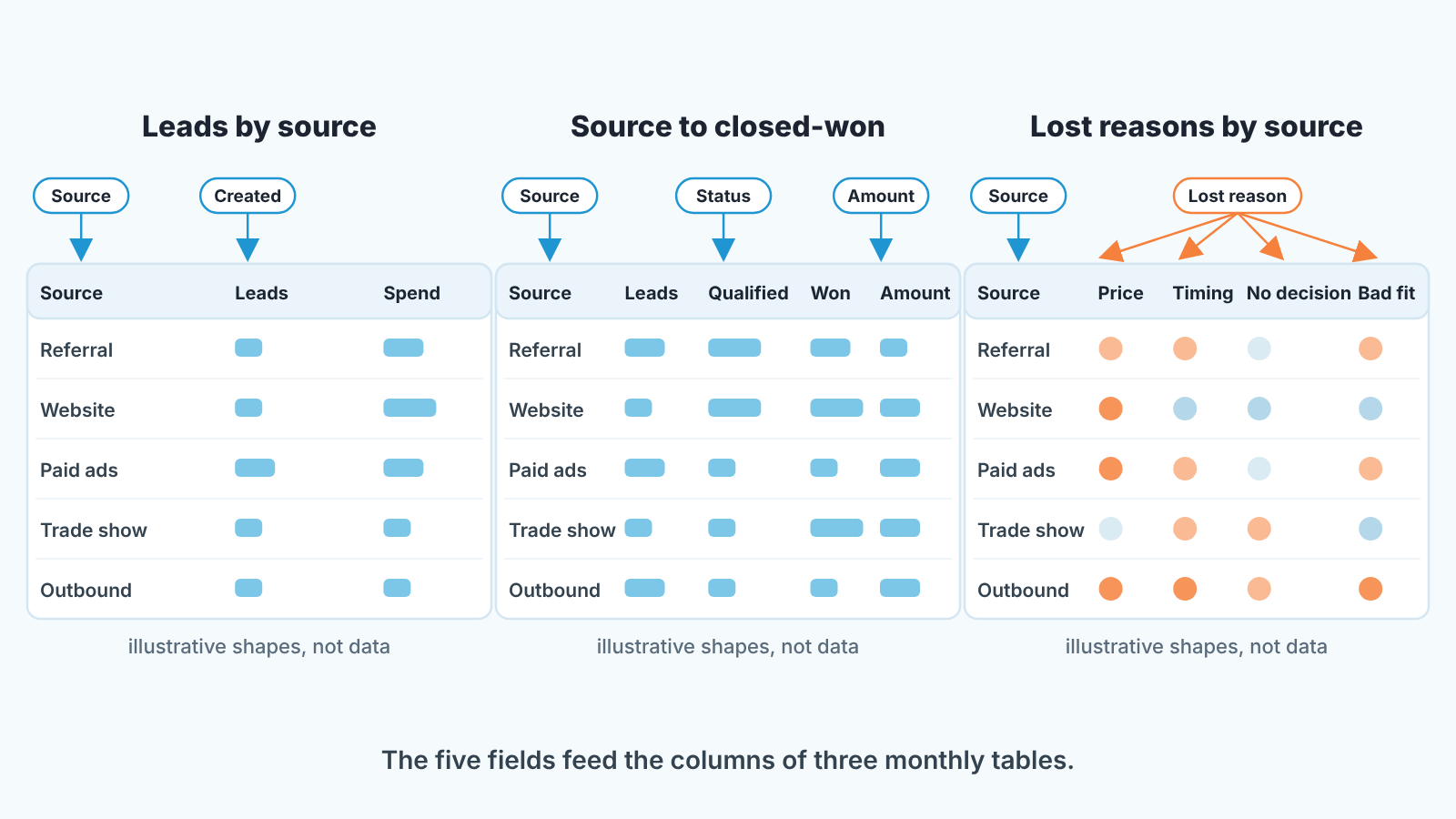
The third report is the one most small companies never build, and it changes what marketing does next. Say paid-ads leads die of “Bad fit” and referral leads die of “Timing”. Those are two different problems with two different owners, and no click-through rate would have shown you either.
Who owns each field
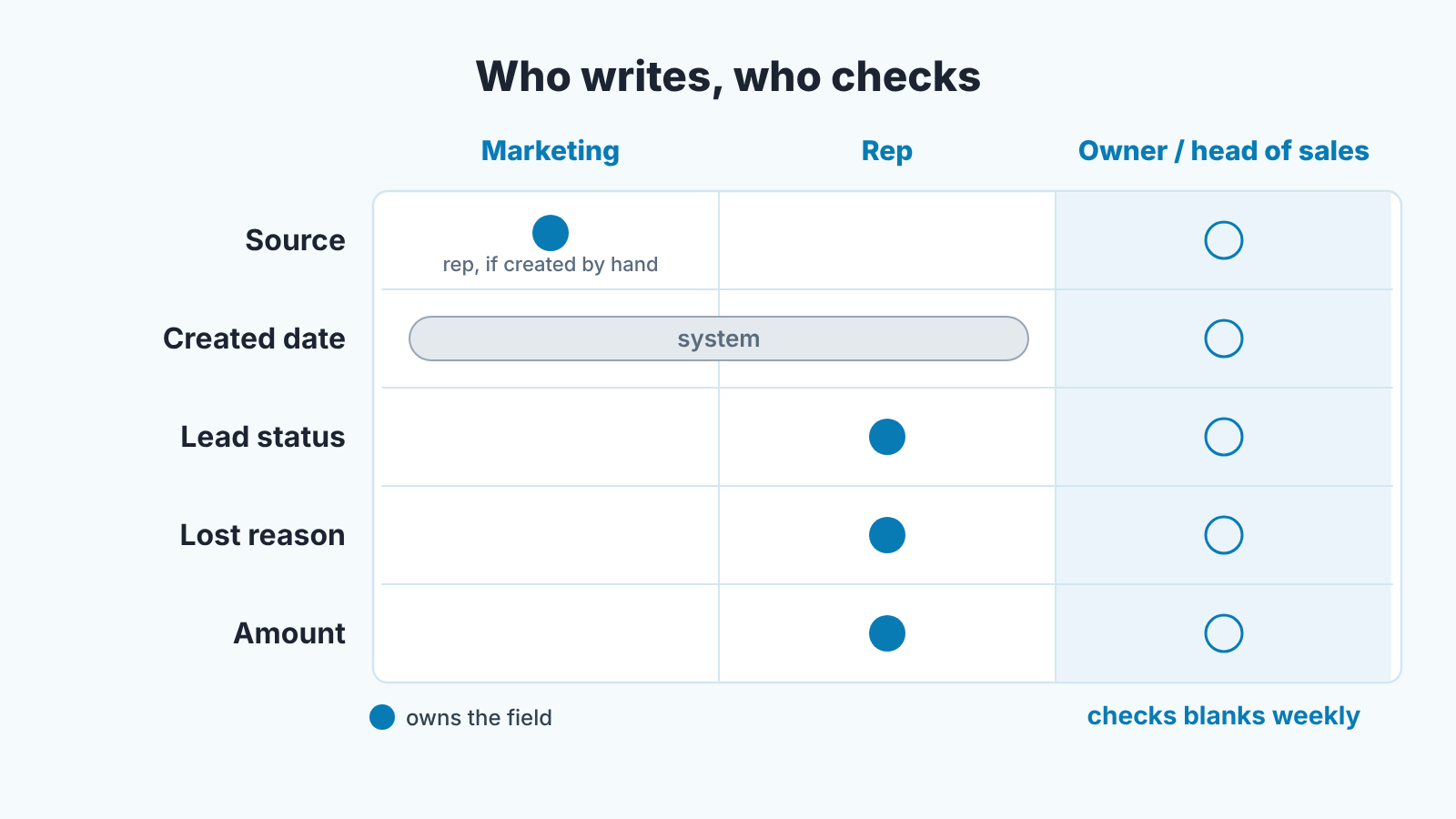
Most of these fields are blank for a simple reason: nobody was ever told they were theirs. So assign them, by name, and keep the rule short enough to say on a Monday call.
Marketing owns the source for anything that arrives through a channel marketing runs: the web form, the ad landing page, the event list import. Marketing also owns the value list itself. When someone wants to add “LinkedIn” next to “Website”, the marketer decides whether that is a new source or a sub-type of an existing one, because the marketer is the person who will have to read the report with one more row in it.
The rep owns everything that happens after teh first conversation: lead status, the move to a deal, the amount, and the lost reason. A rep who marks a deal lost without a reason has not finished marking it lost. We say that sentence as written; it is clearer than a required-field setting and survives a CRM change.
The owner or head of sales owns the blanks. Once a week, before the pipeline review, someone opens the list of deals with an empty source and the list of lost deals with an empty reason and reads the names out. It takes a few minutes. A blank found in the same week can still be filled from memory. A blank found at the monthly report usually can’t.
And when reps still leave the source empty? More reminders rarely change much. What we would try instead is making the source the first question in the monthly review: “Which of your closed deals this month came from marketing?” A rep whose deals are missing from the table because the source was empty tends to fill it the next month. If you would rather have the blanks found for you, check your CRM with SalesBond.
CRM marketing examples: segments, lost-deal follow-up, suppression
Here the fields stop being a reporting chore and start changing campaigns. For a one-person marketing function, this is where the hour spent pays back most.
Segments come first. With a lead status and a lifecycle stage in the CRM, “everyone on the list” splits into people who have never spoken to a rep, people in a live conversation, people who said not now, and customers. Those four groups should not get the same email, and in most small companies they do, because the email tool only knows the address. The “not now” group is the one marketing usually ignores and should not: these people were qualified enough to talk to, told you the timing was wrong, and often gave you a date. A quiet message every few months, with something useful in it, is cheap, and the rep does not have to write it.
Lost-deal follow-up is the second use, and the lost reason decides it’s shape. A deal lost on Price wants to hear when the pricing changes or when a smaller plan exists, and nothing else. A deal lost to a competitor wants to be asked, a year on, how that went. A deal lost on No decision is often a lead that should never have been a deal: a qualification lesson for sales and a targeting lesson for marketing, with no follow-up needed. Bad fit gets nothing. Take them off the list.
Suppression is the third, and it is the one reps notice. Nobody in an open negotiation should receive the autumn promotion with a discount in it before the rep has sent the proposal. Nobody lost on Price last month should receive the announcement of a price rise. Nobody marked Bad fit should receive anything. In practice, marketing builds its send lists from the CRM’s status and stage, not from “everyone who ever filled a form”, and rebuilds the list before each send rather than once a year.
None of this needs automation to start. A filter, an export and a monthly habit are enough for a company with a few hundred contacts. Automation earns its place when the same filter has been run by hand for three months and nobody has changed its definition.
Consent and unsubscribes: where the status lives
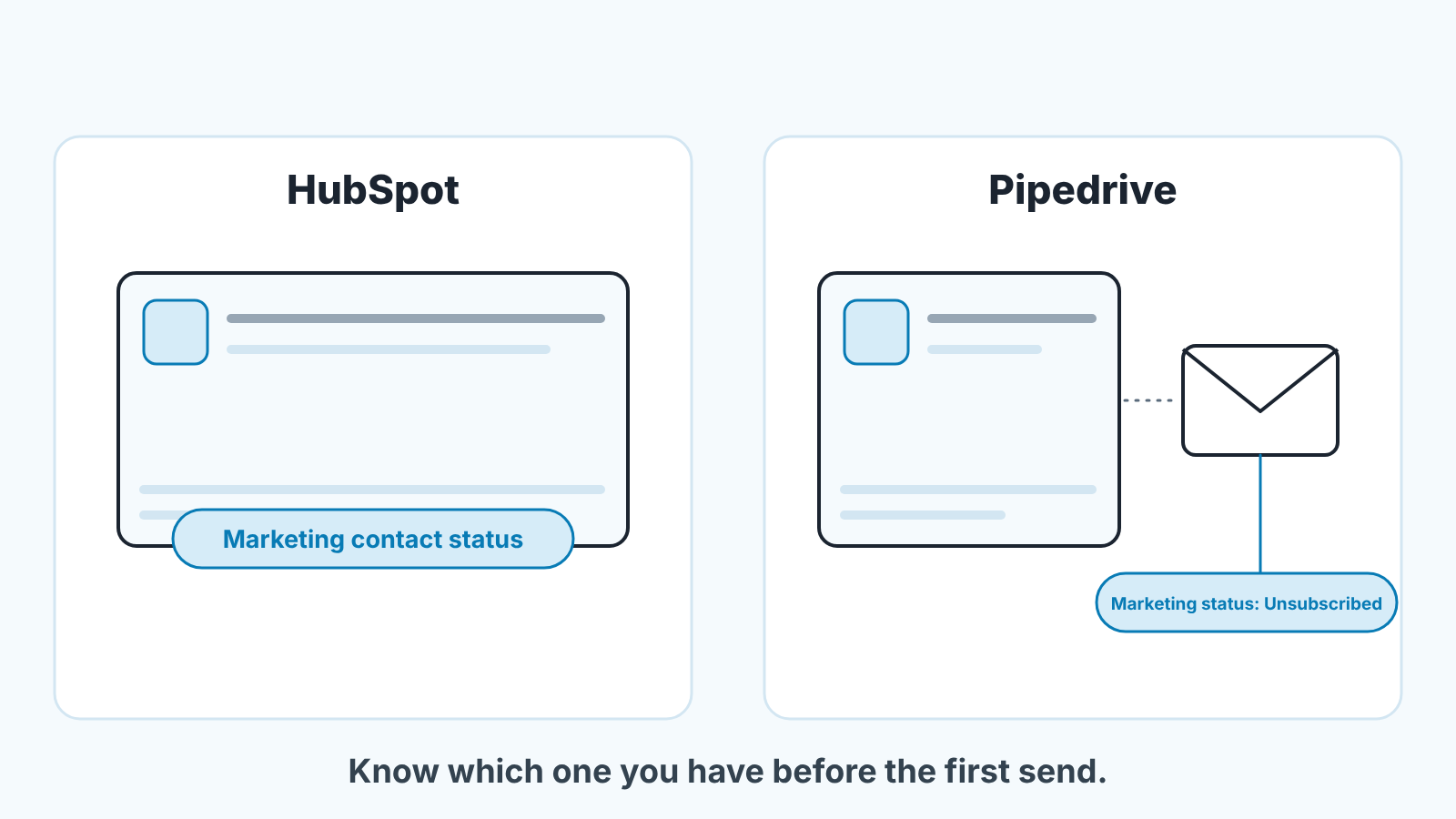
Before marketing sends anything from CRM data, both teams need to know where consent lives in their CRM. It is not in the same place in every system, and a rep’s innocent edit can hide an unsubscribe.
In HubSpot, the contact property Marketing contact status “indicates if the contact is currently a marketing or non-marketing contact” (HubSpot: default contact properties). It sits on the contact record, next to the rest of the person’s data, which is what most people expect.
Pipedrive works differently, and the difference matters for a team where reps edit contact cards. There, the marketing status is attached to the email address rather than to the person, it does not apply to leads or deals, campaigns are only sent to contacts with the subscribed status, and an unsubscribe is preserved indefinitely (Pipedrive: Campaigns, marketing contacts). So when a rep replaces a buyer’s old work address with a new one, the unsubscribe stays with the old address and the new one starts from zero. The field also only appears once Campaigns, a paid add-on, is enabled (Pipedrive: double opt-in and marketing contacts FAQ). The full case, with what to do about address edits and list imports, is in Pipedrive marketing status: it belongs to the email, not the contact.
The team rule that follows from both : consent is marketing’s field. Reps do not change it. A rep who changes an email address tells the marketer, or the marketer checks changed addresses before each send.
Do you need a marketing CRM or a CRM plus an email tool?
There are three workable options, in no order of preference.
The first is a CRM with a marketing module or add-on, so that contacts, deals, campaigns and consent are one database. HubSpot’s marketing tools and Pipedrive’s Campaigns add-on are examples. The gain is that every segment and suppression above is a filter you run inside the CRM. The cost is the licence, and the marketing side of a sales CRM is rarely the strongest email tool you could buy.
The second is a sales CRM plus a separate email tool, connected by a sync. This is how most small companies actually run, often because thier email tool came first. It works if the sync carries three things both ways: the source, the lead status or stage, and the unsubscribe. If it carries only the address, you are back to judging campaigns on clicks.
The third is an all-in-one small-business suite where the CRM is one tab among invoicing, booking and email. Fine while the sales process is one stage long; usually outgrown when it is not. Keap CRM for small business is the example of this kind we compared by job.
For a company with one marketer, we would decide by where the source field and the consent status will live, and make sure each lives in one place. The brand of the box matters less than whether a rep and a marketer are looking at the same field when they disagree about a lead. If you are at the point of picking the box, our shortlist of CRMs for small businesses is the next read.
FAQ
What is a CRM for businesses?
A CRM is the system where a company keeps its contacts, companies, deals and the history of conversations with them, so that anyone on the team can see where a customer stands. For a sales team that means the pipeline; for marketing it means the five fields in this article. The longer answer, with diagrams, is in what is CRM.
Is CRM marketing the same as marketing automation?
No. Automation is a way of acting on CRM data without a person pressing send. CRM marketing is the decision about who to talk to and what the campaign earned, and it can be done entirely by hand with a filter and a monthly export. Automate once the manual version has run long enough that you trust the fields it depends on.
What are the basic CRM skills a marketer needs?
Building a filter or list from field values; exporting it; reading one report grouped by a field; and knowing which fields on the record belong to sales and must not be edited by marketing. Most of it needs no admin role, and none of it takes longer to learn than the email tool did.
Is CRM hard to learn for a small marketing team?
The settings are the easy part: a short source list, a lost-reason dropdown, a few saved filters. The hard part is the habit: filling the lost reason on the day, keeping the source list short, and sitting down with the report every month. Companies that skip the habit and buy automation first end up automating empty fields.


