
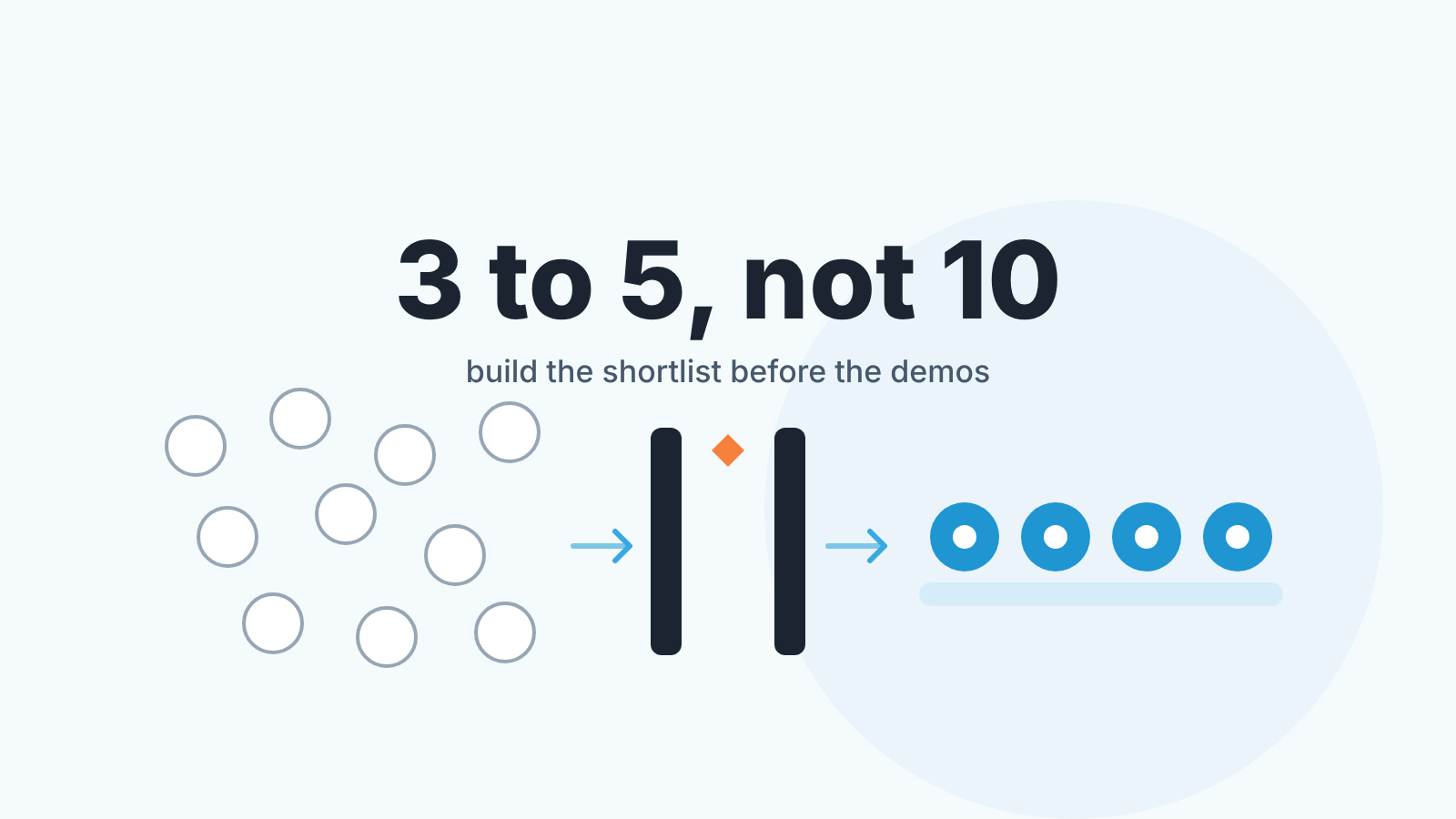
Most small businesses of 1 to 20 people should shortlist three to five CRMs, not ten: a free-tier CRM if you have under three users, a pipeline-first CRM like Pipedrive if the manager lives in the deal view, and a suite like HubSpot or Zoho CRM if marketing and service tools matter as much as the pipeline. Prices and free-plan limits below were checked on the vendors’ own pages on October 31, 2026, and every number links to the page it came from. Check them again before you buy; pricing pages change more often than articles about them.
A CRM, for a business this size, is the one place where every contact, deal and next step lives, so nobody has to ask “where are we with them?” This is a shortlist in no particular order. We don’t think a single “best CRM for small business” exists, because a two-person consultancy and a twenty-person distributor need different things from the same word. So each CRM below gets a “good when”, which is a fact you can verify, and a note on what to check before you sign.
Which CRM fits a team of 1, 5 and 20 people
At one or two people, start on a free plan and pay nothing until it hurts. HubSpot, Capsule, Zoho CRM and Salesforce all list a $0 plan, and Close sells a paid Solo plan “Limited to 1 user” if you would rather pay for calling from day one (what Close CRM is gives a sales manager’s view of it). A founder selling alone is the usual startup case, and we compared the best CRM for startups by job.
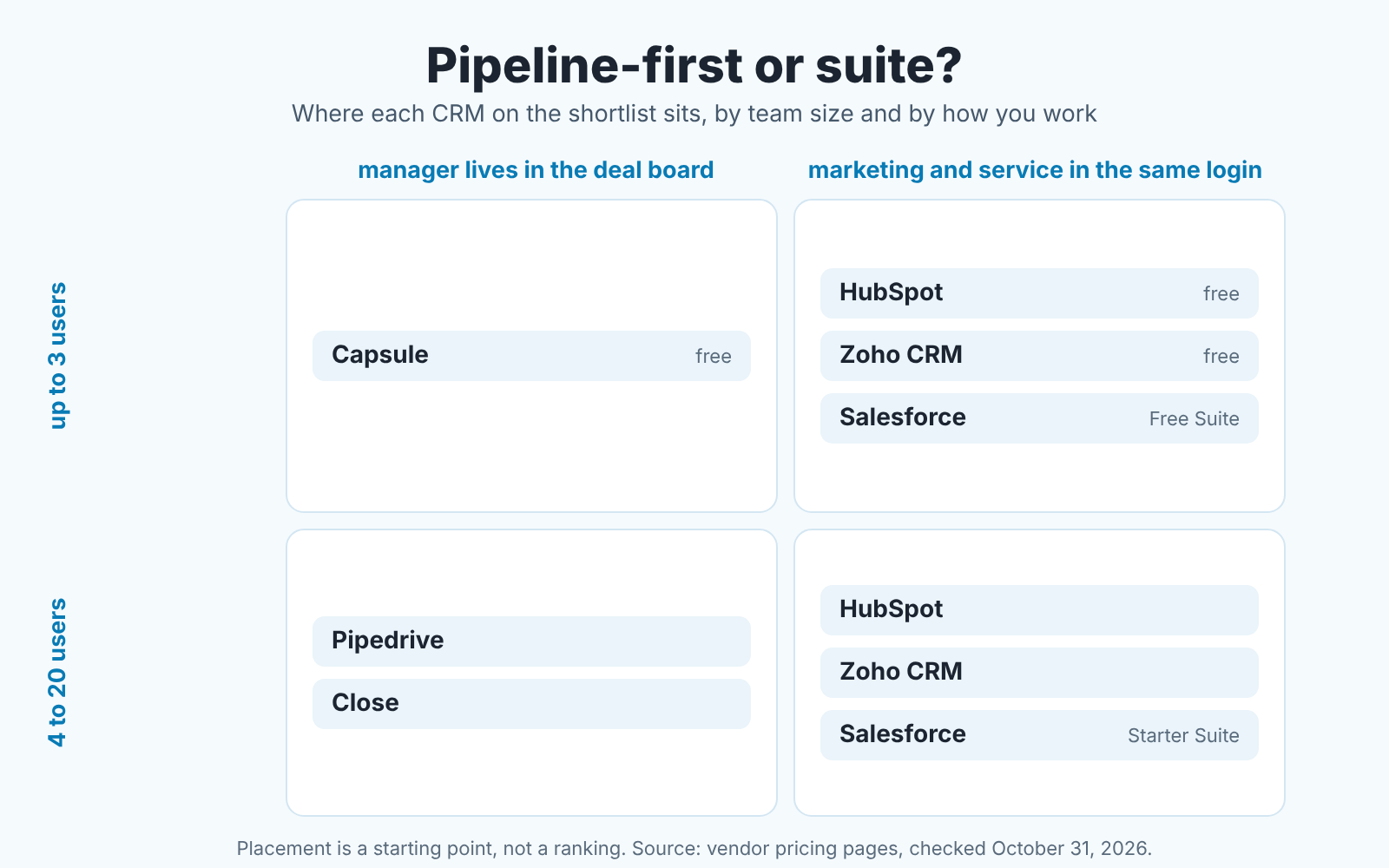
At five, the two-user free plans are behind you and Zoho CRM’s three-user plan is too. The real choice is pipeline-first (Pipedrive, Close) or a suite (HubSpot, Zoho CRM, Salesforce Starter Suite), and it depends on where your sales manager spends the day. If monday CRM is among the candidates, start with what monday CRM is.
At twenty, you are no longer picking a CRM so much as a tier. Roles, who sees which deals, and reports the owner reads without asking anyone all sit on higher plans; we cover that below. The method behind a choice like this, with five reports and a pilot on ten deals, is in how to choose a CRM for a sales team of five.
How we checked prices and what we left out
Every price in this article comes from the vendor’s own public pages, opened on October 31, 2026, in US English, except the HubSpot Smart CRM prices, which come from its product page and carry their own November 2026 date. We quote what the page said that day, in the vendor’s wording where the wording matters (“Free for 3 users” is quoted word for word). Where a page shows two prices for monthly and annual billing we give both. Where the price appears only after you pick a currency or a billing cycle, we say so and don’t guess.
Three pages did not give us a number. Pipedrive’s pricing page returned an access error when we opened it on October 31, so Pipedrive appears here without figures; its place on the shortlist rests on what the the product is, which we know from working in it daily. Freshsales returned the same error. Zendesk Sell’s pricing address redirected to Zendesk’s general pricing page, which listed Support and Suite plans but nothing for Sell, so we left Zendesk Sell out rather than quote a different product’s price.
We did not evaluate support quality, uptime or AI features at all. We have opinions, but none of them is checkable from a pricing page. One more bias worth naming: we build a sales management tool on top of CRMs, and Pipedrive, HubSpot, Salesforce and Zoho CRM are the four we know from the inside. The others are here because they show up when small businesses search for a CRM and they publish a pricing page we could open; Less Annoying CRM for a small sales team is one more small-team option we looked at on its own.
Comparison table: free plan limits and starting prices, checked October 2026
“Not stated” means the number was not on the page we opened; the feature or plan may still exist.
| CRM | Free plan | Free-plan limits stated on the page | Lowest paid plan on the page | Source, checked 2026-10-31 |
|---|---|---|---|---|
| HubSpot | Yes, $0/mo | Up to 2 users; 1,000 contacts; 1,000 records across other standard objects | Starter: $20/mo/seat regular rate; “Starts at $7/mo/seat” for new customers on annual billing, $10 month-to-month | hubspot.com/pricing/crm |
| Zoho CRM | Yes, “Forever free, for 3 users” | 3 users; no contact cap stated; “5000 API calls/day”; data export “up to 10 times for free” | Edition prices shown only after choosing a currency; CRM Plus bundle “Starts at $20 /user/month” | zoho.com/crm/zohocrm-pricing.html |
| Salesforce | Yes, Free Suite at $0 | No user cap stated on the pricing page | Starter Suite $25 USD/user/month, “Billed monthly or annually” | salesforce.com/sales/pricing |
| Capsule | Yes | “Maximum 2 users”; 250 contacts | Paid plans “Per user, per month. Billed Annually”; amounts did not render on our load | capsulecrm.com/pricing |
| Close | No; free trial, “No credit card required” | n/a | Solo, “Limited to 1 user”: $9 to $19 per user/month depending on billing cycle | close.com/pricing |
| monday CRM | No; 14-day trial | n/a; “Plans start from 3 users” | Basic: $12/seat/month billed yearly, $18 monthly; 1,000 active contacts and deals | monday.com/crm/pricing |
| Pipedrive | Page returned an access error on 2026-10-31 | no figures quoted | no figures quoted | pipedrive.com/en/pricing |
| Freshsales | Page returned an access error on 2026-10-31 | no figures quoted | no figures quoted | freshworks.com/crm/sales/pricing |
Two readings of this table matter more than any single cell. First, the free plans split by what they cap: HubSpot and Capsule cap users and contacts, Zoho CRM states a user cap only, and Salesforce’s pricing page states neither for Free Suite, so ask before you plan around it. Second, “starting price” is a slippery number. HubSpot shows a regular rate and a promotional rate on the same card; monday CRM’s page says “The price is determined by the user’s billing country”; Close shows two figures per plan and leaves it to the billing toggle. Compare prices on the same billing cycle, seat count and month.
Pipedrive, HubSpot, Zoho CRM and Salesforce: what breaks at 3, 10 and 20 users
These four are the ones we work inside every day, so our experience is worth the most here and our bias is the highest. Rather than a feature tour, here is where each one tends to push a growing team onto the next plan.
Pipedrive is good when the sales manager runs the team from the pipeline view and wants nothing between them and the deals. The deal board is the home screen, activities hang off deals, and the reports are about stages, activities and conversion. We could not open its pricing page on October 31, 2026, so there is no price here. Without figures from its page we can’t say what changes at user three, so start with the later questions. At ten, find which plan carries the permission sets you’ll need once someone joins who shouldn’t see every deal. At twenty, find which plan has the team reports your manager reads weekly. Both usually sit above the entry plan, and the Pipedrive vs HubSpot checklist has our manager-level comparison.
HubSpot is good when you want to start free and grow into marketing and service tools from the same vendor. The third user is the first wall: the pricing page says “Free for up to 2 users”, with 1,000 contacts. After that you meet two price grids: the Starter card shows “Starts at $7/mo/seat” (new customers, annual) against a regular $20, while the Smart CRM page prices the CRM alone from $15, $50 and $75 per seat for Starter, Professional and Enterprise (checked November 2026). At ten, note that the Smart CRM page lists permission sets and required fields on Starter; at twenty, custom reporting appears on Professional. The free tier for five people is unpacked in HubSpot free CRM limits for a five-person sales team.
Zoho CRM for small business is good when the budget is tight and three users is enough for now, or when you already pay for other Zoho products. The Zoho CRM pricing page is headed “Free for 3 users” and the plan card says “Forever free, for 3 users”. So the wall arrives one hire later than HubSpot’s, at user four. The page lists Standard, Professional and Enterprise editions, plus an Ultimate edition the FAQ calls “tailored for large-scale, bespoke deployments”, but edition prices only appear after you choose a currency and billing cycle; the one figure shown without that step is the CRM Plus bundle, which “Starts at $20 /user/month”. At ten and at twenty, the question is the same: which edition includes the automation and custom reports you need. The free edition is a real CRM for three people with no time limit. The manager’s view against HubSpot is in the Zoho CRM vs HubSpot checklist.
Salesforce Starter Suite is good when you already know you will be on Salesforce in three years and would rather not migrate twice. The Salesforce Sales pricing page lists Free Suite at $0 per user per month, Starter Suite at $25 USD per user per month “Billed monthly or annually”, and Pro Suite at $100 per user per month billed annually. Free Suite has no user cap on that page, so ask at signup rather than assume. The free 30-day trial of Starter Suite covers “up to 10 users”, which makes ten a natural test size. At twenty, read the comparison grid row by row for integrations and API access, because the gap between Starter and Pro is where small teams get surprised.
Other CRMs worth a look at this size
We don’t run these in our daily work, so here we are closest to a reader who has never used them. Everything below is from their pricing pages on October 31, 2026, and nothing more.
Capsule is good when you want contacts and a pipeline and very little else, and you are one or two people. The Capsule pricing page lists a free plan with “Maximum 2 users”, 250 contacts, 5 custom fields and one sales pipeline, then Starter, Growth and Advanced plans with contact caps of 30,000, 60,000 and 120,000, “Per user, per month. Billed Annually”, and an Ultimate plan. The paid amounts did not render on our load, so we aren’t quoting them. Check before you sign: the 250-contact cap, which you will hit before the user cap if you import an old adress book.
Close is good when the team sells by phone and email all day and wants calling inside the CRM rather than bolted on. The Close pricing page lists four plans, each with two prices depending on the billing cycle: Solo at $9 to $19 per user per month, Essentials at $35 to $49, Growth at $99 to $109, Scale at $139 to $149. Solo comes with a catch in its own feature list: “Limited to 1 user”, “Limited to 10k leads”, “Workflows not included”. There is no free plan, only a free trial with “No credit card required”. Check before you sign: the Solo cap of one user which means the second hire moves you to Essentials.
monday CRM is good when the company already runs delivery or projects on monday.com boards and wants sales in the same system. The monday CRM pricing page lists Basic at $12 per seat per month billed yearly ($18 monthly), Standard at $17 ($25), Pro at $28 ($41), and Ultimate at a custom price. The FAQ says “Plans start from 3 users”, so a solo founder pays for three seats, and the free option is a 14-day trial. Limits are specific: Basic allows 1,000 active contacts and deals and one custom dashboard, Standard 10,000 and five, Pro 100,000 and fifty. Watch the Basic cap, which a team of five can reach in a year of normal selling .
Freshsales and Zendesk Sell we wanted to include and could not. Freshsales’s pricing page returned an access error on October 31, 2026, and Zendesk Sell’s address redirected to a general Zendesk page with nothing for Sell. Both may be fine products. We have no page to quote, so we quote nothing.
Free CRM for a small business: what the free tier really covers
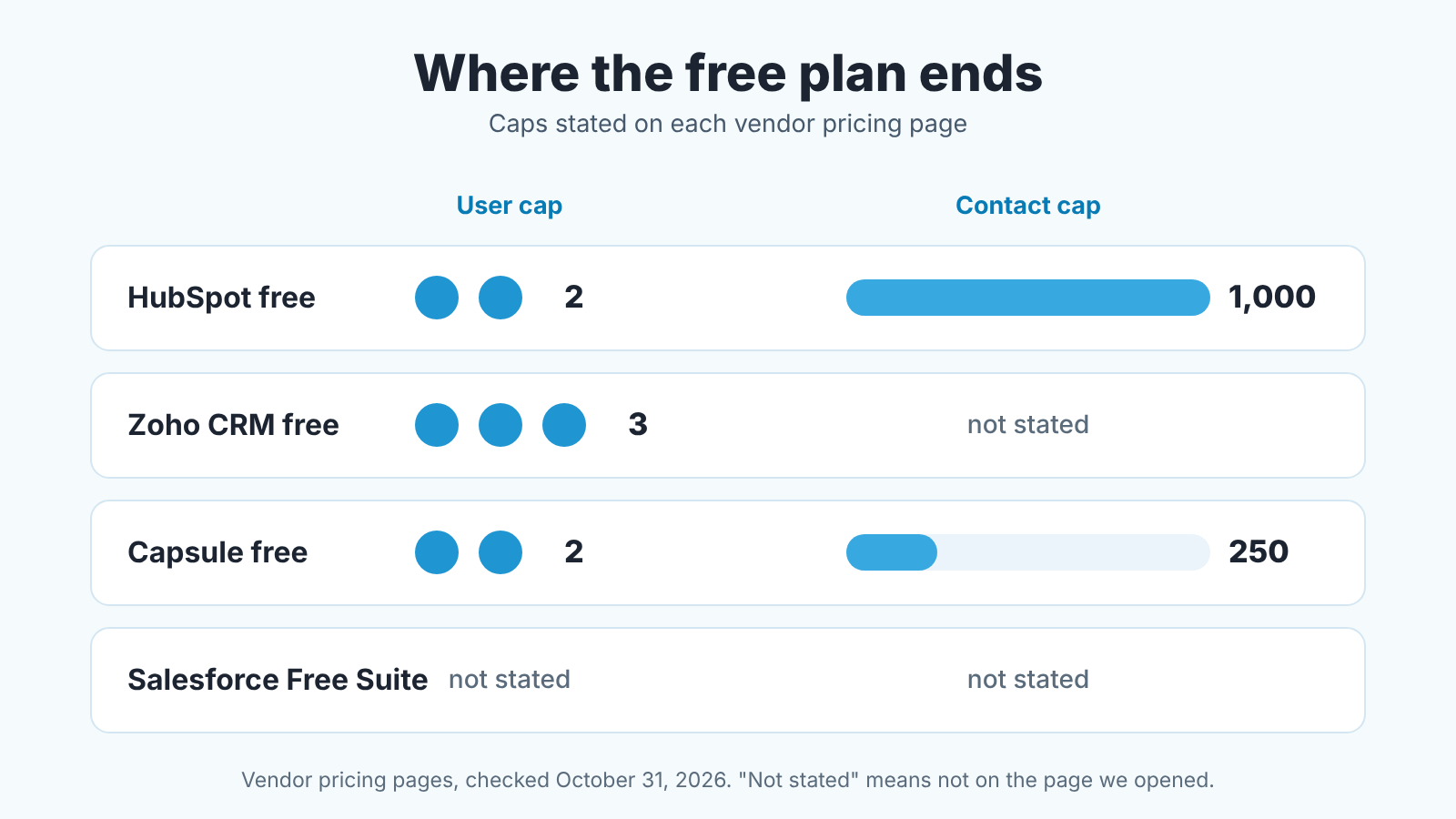
Contacts run out before people do. That is the first thing we would tell a two-person business that just exported five years of email into a spreadsheet. Capsule’s free plan holds 250 contacts and HubSpot’s holds 1,000, and a busy consultant’s address book passes 250 long before a third colleague turns up. Zoho CRM’s pricing page states no contact cap for the free edition, and Salesforce’s states none for Free Suite.
How fast you hit a contact cap depends less on your team than on your habits. Import everyone you have ever emailed and Capsule’s limit goes on day one. Import only live accounts and open deals, which is what we would do anyway (see what not to migrate), and 250 can last a small consultancy a while. Add a website form that creates a contact per inquiry and HubSpot’s 1,000 is closer than it looks.
Users are the second wall: HubSpot 2, Capsule 2, Zoho CRM 3. The third hire ends two of these free plans, the fourth ends Zoho CRM’s. Then come the quieter limits. HubSpot caps 1,000 records across other standard objects, and deals and companies count there. Zoho CRM caps exports at 10 free ones and API calls at 5,000 per day, which only matters once you connect other tools, and that is exactly what you do in year two.
None of these are trials. HubSpot’s page says “your free access has no time limit”; Zoho CRM’s says “Forever free”. What free leaves out sits in the edition comparison further down each page: automation, custom reports, roles and permissions. Thats where paid starts. Our position: use free until the first week you want a report the free edition cannot produce, then pay for the lowest tier that produces it. Don’t pay in advance for the team you plan to have.
What changes between 5 and 20 users
What grows between five and twenty is the list of questions. At five people everyone sees everything and the owner reads the pipeline directly. At twenty you have at least one person who should not see salaries in deal notes, a manager who needs a team view, and an owner who wants one report on Monday without opening the CRM. Those needs map onto things vendors sell on higher tiers: roles and permissions, team reporting, admin controls.
That’s why the “starting price” column is the wrong number for a twenty-person team. The price that matters is the tier with roles and team reports, times twenty seats, times twelve months, plus setup. On Salesforce, twenty seats is $6,000 a year on Starter Suite and $24,000 on Pro Suite; whether you need Pro depends on which row of the grid your requirements land in. On HubSpot, Sales Hub Professional and Enterprise carry required one-time onboarding fees of $1,500 and $3,500 (Sales Hub pricing). Most pricing pages don’t show setup fees at all, so ask.
We’ve watched teams grow through this range, and the sequence that holds up is boring. At five, buy the lowest tier and set field discipline first: which fields are required at which stage. At ten, add roles when teh first person joins who should not see everything. At fifteen to twenty, buy the reporting tier and move the Monday meeting to the CRM’s report instead of a spreadsheet. Roles and reports built on empty fields show nothing useful. The rollout itself is in the four-week CRM implementation plan for a small sales team.
Which to pick: three situations
Most of the small businesses we talk to are in one of three places. None of them has one answer, so each gets a few names and the question that splits them. A mortgage brokerage sits outside all three and has its own comparison, the best mortgage CRM for brokers and loan officers.
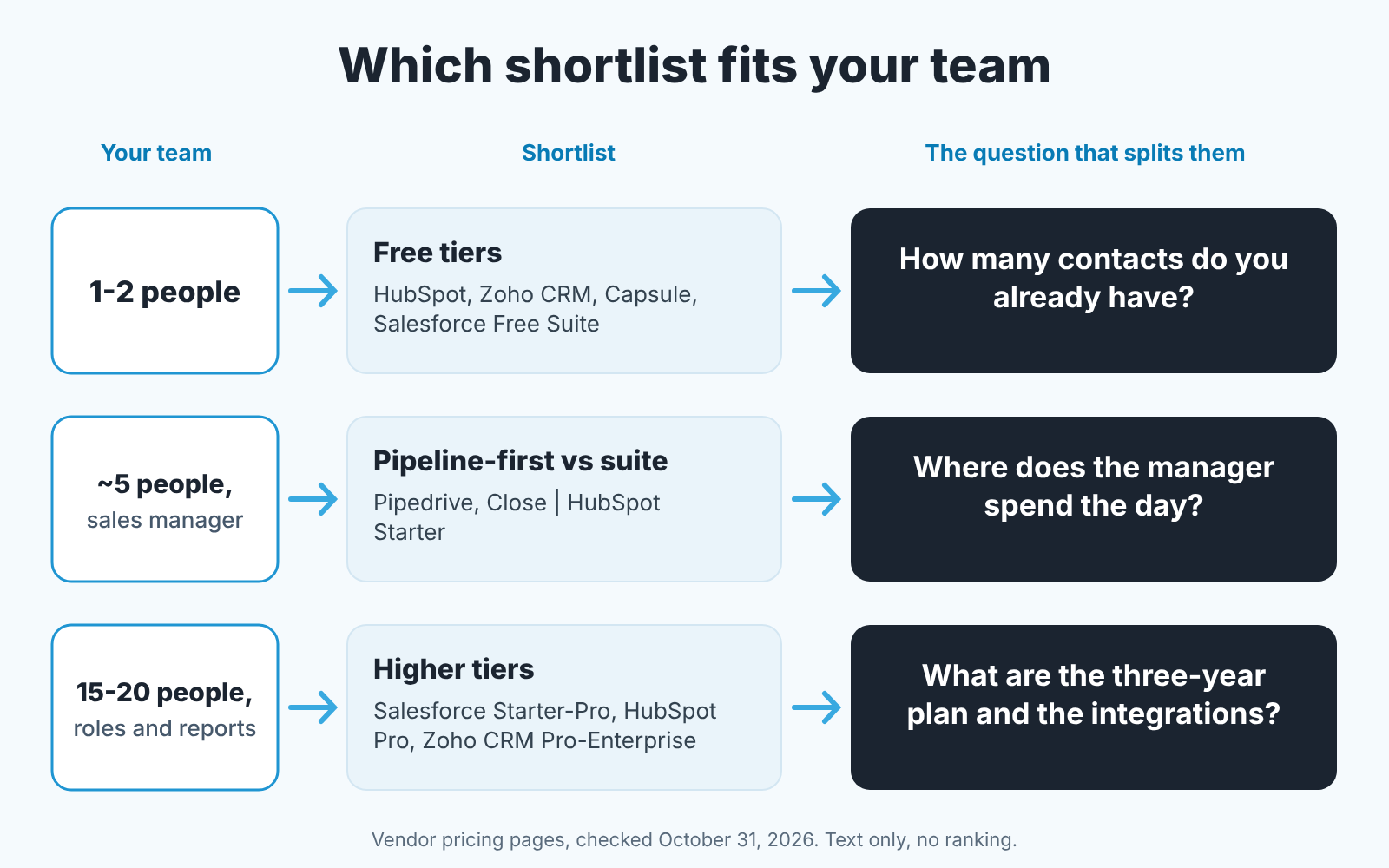
One or two people, a few dozen accounts. HubSpot free, Zoho CRM free or Capsule free. Count the contacts you already have: under 250, any of the three; under 1,000, HubSpot or Zoho CRM; more than that, Zoho CRM’s free edition or a paid plan from day one. Then ask whether you’ll be three people within a year. If yes Zoho CRM’s three-user free plan buys you a year the two-user plans don’t. The plan limits of each free tier are laid out in free CRM for a small sales team.
Five people, a working sales manager, thin marketing. Pipedrive, Close or HubSpot Starter. If the manager lives in the deal board and the main reports are activities and stage conversion, Pipedrive or Close, and Close if the phone is the main channel. If marketing will grow and you want it in the same login, HubSpot Starter, after you have read both of its price grids. If follow-up automation matters more than the pipeline, Keap CRM for small business is the one we looked at for that job.
Fifteen to twenty people who need roles, team reports and an owner’s view. Salesforce Starter Suite with Pro Suite in view, HubSpot Professional, Zoho CRM Professional or Enterprise, and Pipedrive if the team is pipeline-first. Your integration list and three-year plan split them. Already in the Zoho or HubSpot ecosystem? Stay.
If your business is not a general B2B sales team (real estate, an agency, an enterprise division), the shortlists are different, and we wrote them up in best CRM by type of business. For the questions that decide between two finalists, how to choose a CRM for a sales team of five has the demo questions and the ten-deal pilot.
Where SalesBond fits
A disclosure, since this is the point where the CRM is chosen and the manager still has to read it every week. We build SalesBond, a sales management layer on top of the CRM a team already uses; we started with Pipedrive, and it works with Pipedrive, HubSpot, Salesforce, Zoho CRM, Microsoft Dynamics 365, Freshsales, Close, monday CRM, Copper, Zendesk Sell, Nutshell, Insightly, Attio, Bitrix24 and Kommo (amoCRM). Its Deal Health checks every deal against more than 20 rules, gives it a health score and tells the manager which deals need attention and why. It cannot fix a bad CRM choice, and a CRM with empty fields gives it nothing to check, which is why field discipline comes first. If the Monday report on your new CRM still starts with a spreadsheet, check your CRM with SalesBond.
FAQ
What CRM is best for a small business? There isn’t one, and we would distrust any list that says so. For one or two people, a free plan (HubSpot, Zoho CRM, Capsule, or Salesforce Free Suite). For five, choose between pipeline-first (Pipedrive, Close) and a suite (HubSpot, Zoho CRM, Salesforce Starter Suite) by where the manager spends the day. For twenty, choose the tier that includes roles and team reports, whatever the starting price.
Is there a 100% free CRM for small business, and what’s the catch? Yes. The catch is a cap, and none of these plans has a time limit. As of October 31, 2026, HubSpot’s free tools stop at 2 users and 1,000 contacts, Capsule’s free plan at 2 users and 250 contacts, Zoho CRM’s at 3 users; Salesforce lists Free Suite at $0 with no user cap stated on the pricing page. Automation, custom reports and roles are where paid starts.
Which CRM is beginner friendly? If you are moving from a spreadsheet, start with the smallest product that holds your contacts and one pipeline. Zoho’s pricing page pitches Bigin Express at the “First-timer, moving from spreadsheets”; Capsule’s free plan is 250 contacts, 5 custom fields and one sales pipeline, which leaves little to configure. Try either with your real deals for a week before you judge.
Can a solo founder get a paid plan for one seat? On the pages we opened, Close sells a single-seat plan by name (Solo, “Limited to 1 user”, $9 to $19 per month depending on billing cycle). monday CRM’s page says “Plans start from 3 users”. The others price per user or per seat and don’t state a minimum on the pricing page; confirm at signup.
Why are there no Pipedrive prices here? Its pricing page returned an access error when we opened it on October 31, 2026, and we only print figures we saw on an official page that day. Open pipedrive.com/en/pricing yourself and look for the plan with the reports your manager reads weekly.


