
Close CRM (formerly Close.io) is a sales CRM with calling, SMS and email built into the product, sold per user per month, with a 14-day free trial that needs no credit card. Each plan includes a monthly batch of AI credits per user; calling and SMS are charged on usage, on top of the seat price (Close pricing, checked November 3, 2026). The vendor positions it around outbound work: the home page describes “a built-in AI teammate that works with your team to call leads, qualify prospects, book meetings, and keep your CRM up to date” (close.com).
This guide is for a sales manager evaluating Close or inheriting a team on it.
What is Close CRM? The short answer
A CRM for sales is the system of record for every company, person and deal your team works, so you see the pipeline without asking around (longer version in the CRM guide for sales teams).
Close puts three things in one account: the CRM itself (leads, contacts, opportunities, pipelines), a communication layer (phone, SMS, an email inbox) and an AI agent the vendor calls Chloe. Chloe is on every plan and spends AI credits when she makes calls (Close pricing).
For a manager, the data model matters more than the feature list. In Close a Lead is the company. Contacts are the people attached to it, and Opportunities are deals attached to the Lead that move through a Pipeline of statuses (Close help: Opportunity Pipelines & Statuses). Reps coming from HubSpot or Pipedrive trip over this for a week: “Lead” here means the account, the company itself.
What is built in: calling, SMS, email, AI
This is the vendor’s own list from the pricing page (Close pricing, November 3, 2026).
Calling. Calls show up on the Lead page with time and duration. You rent lines from Close or bring your own (BYOL); rented lines start at $1 per line per month. Reps pick a call outcome after each call, and the vendor says that is what makes the answer-rate and conversion reports accurate. A power dialer comes with Growth; a predictive dialer and live call coaching (listen, whisper, barge) come with Scale.
SMS. Close sends texts to over a dozen countries, including the US, Canada, the UK and Australia. Read one line before you promise texting to the team: A2P 10DLC registration is required for SMS to US numbers. That is a carrier registration that takes time, so start it before the trial ends.
Email. Several connected mailboxes, templates, open tracking, scheduling and sending limits. Bulk email starts at Growth.
AI. Chloe’s Voice Agents call leads, qualify them and update the record, and Chloe Chat answers questions about your pipeline. The help center splits the AI features into two groups. Some never use credits: Notetaker transcripts, Chloe Chat and AI Search on every plan, Lead Summaries and Suggested Actions from Growth up. Others do, mainly Voice Agents and Enrichment (Close help: AI Credits).
Plans and what is metered
Close bills three separate things and the help center says so plainly: the CRM plan, telephony usage (calls, SMS, numbers) and AI credits are billed and invoiced separately (Close help: AI Credits). If you bring one number to your CFO, bring three.
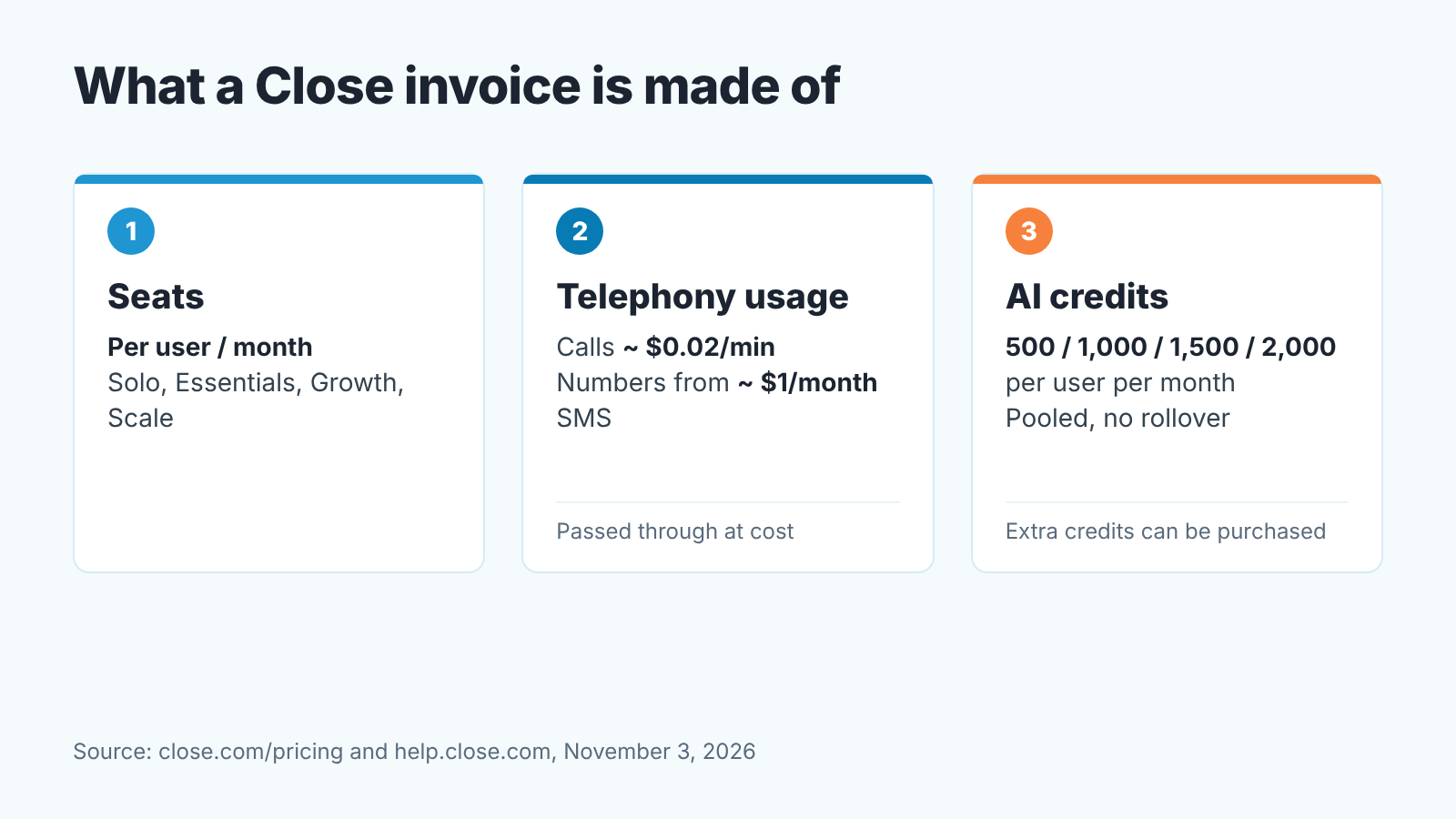
On November 3, 2026 the pricing page lists four plans, priced per user per month (Close pricing). Solo costs $9 billed annually or $19 billed monthly, is limited to one user and 10,000 leads, and comes with 500 AI credits. Essentials is $35 or $49 with 1,000 credits per user, Growth is $99 or $109 with 1,500, and Scale is $139 or $149 with 2,000. From Essentials up, credits go into a shared pool for the account, capped at 10,000, 15,000 and 20,000 a month respectively. Credits refresh monthly, don’t roll over, and extra ones can be bought.
On top of seats, from the same page:
- Calling and SMS are “passed through at cost”; most outbound calls run around $0.02 per minute, and numbers start at about $1 per month.
- Call Assistant (recording, transcription and summaries of synced calls) is an add-on at $50 per month per organization plus $0.02 per minute.
- Call recording retention is 30 days on Solo and Essentials, 90 days on Growth and unlimited on Scale. If you coach from recordings, write that number down.
One thing in the help center is easy to miss: there is no global credit cap and no per-Voice Agent limit for Chloe. You control spend by deactivating a Voice Agent, taking it out of Workflows or not running batch calls (Close help: Chloe FAQ). So the budget control is a person switching something off; settings have no ceiling. Decide who that person is.
If you’re a team of four or five comparing seat math across vendors, we did that exercise in how to choose a CRM for a sales team of five.
First setup: pipeline, lead statuses, who owns a lead
Every Close plan comes with a default pipeline, and the help center offers an example set of Lead Statuses to start from (Close help: Lead statuses; Opportunity Pipelines & Statuses). Spend the first afternoon on three settings before anyone dials; the reports below are built on them.
Lead Statuses describe the Lead’s relationship to your company; the deal has its own status on the opportunity. The vendor’s outbound example is Potential, Interested, Qualified, Customer, Not Interested, Bad Fit. Keep yours about that short; we’ve seen status reports get hard to read once a list passes eight or so.
Opportunity Statuses are the deal stages inside a Pipeline, and each one needs a type: Active, Won or Lost. You edit them under Settings › Statuses & Pipelines. Close’s own design guide says most high-velocity B2B teams run 5 to 7 stages and asks you to write exit criteria for each stage: the observable thing that has to be true before a deal moves on (Close help: Designing your sales pipeline). We’d add one thing: put the criteria where the rep sees them while moving a deal.
Lead ownership is the surprise. In Close you assign leads through a custom field: the help center walks you through a User-type field such as “Lead Owner”, with a separate field per role if SDRs hand off to AEs (Close help: Lead assignment). Once the field is filled the “me” filter in Smart Views lets one shared “New leads to call” view serve the whole team. You can also restrict the field so reps can’t reassign leads to themselves without admin approval. Do that before the first imported list lands and before anyone argues about who owns the account.
The three reports worth a Monday slot
Close’s Reports sit in the left sidebar next to Smart Views and Conversations (Close help: Reports). Three earn a weekly slot.
Start with Activity Overview, the first report under the Reporting heading. Filter it by Smart View, user and date range, then compare against an earlier range; Close adjusts the comparison period to the same number of days (Close help: Activity Overview Report). That’s your Monday talk about call volume by rep, no spreadsheet.
Status Change comes next. It shows how many Leads entered, left and ended each status in the period, with a net change (Close help: Status Change Report). Note what the help page admits, though: conversion percentages between statuses are something you calculate outside of Close from these numbers. Export it and keep a running sheet.
Opportunity Funnels gives the deal view: win rate, average time to advance, average value per won opportunity and a sales velocity figure, plus a stage-by-stage funnel (Close help: Opportunity Funnels Report). Read teh fine print before you present it. Opportunities that skip a stage aren’t counted in that stage, backward movement isn’t included and stage conversion only counts deals that went directly from one stage to the next. A rep who jumps deals from Discovery straight to Negotiation will make your Demo stage look empty.
What these reports don’t tell you is which open deals are quietly going stale, which customers stopped reordering, or where the money in your pipeline is actually stuck. That is the gap we built SalesBond for, and Close is one of the 15 CRMs it works with. The free CRM audit reads the last 30 days of your Close account and sends a PDF: money at risk, a CRM score, deal health by manager, the pipeline bottleneck, repeat customers, the top-10 clients and what to fix. Seven days later a second PDF shows what changed. If you’re a week into a Close trial, it’s a cheap way to see whether the stages and statuses you just set up are producing clean data. Check your CRM with SalesBond.
What to test in the 14-day trial
The trial lasts 14 days, needs no credit card and includes $5 of calling and enrichment credits (Close pricing). At roughly $0.02 a minute that is a few hours of outbound: enough to test the mechanics but too little for a campaign.
Make ten real calls from a rented number, then open the Lead pages. Each call should be there with its duration and the outcome the rep picked. If reps skip the outcome, your answer-rate report stays empty, so this is the moment to decide whether outcomes are mandatory.
Import your current list with a Lead Owner column and check that the names matched. The help page asks for an exact match between the name in your file and the user’s name in Close (Close help: Lead assignment). Then open a Smart View with the “me” filter logged in as a rep.
Connect one rep’s mailbox and send a templated email. Does the reply land on the right Lead?
Let Chloe call a handful of numbers on a throwaway list, then check what she wrote into the record and what it cost. Don’t hand the whole team Manage Voice Agents: that permission also runs batch calls. If the trial leaves you weighing a newer, data-model-first CRM, what Attio CRM is covers that alternative.
Enrich a few records and watch the balance. Each enrichment action, meaning one field filled on one record, uses 6 credits, so a bulk run on three fields costs 18 credits per record (Close help: Enrichment).
And check day 15, which is not a feature. The pricing FAQ says an account that doesn’t upgrade pauses, and its data “remains available for a limited period before deletion”. If you’re undecided, export before the trial ends.
Where Close fits and where it stops
Before you sign, put Close’s limits on one page. Chloe speaks English only and calls US and Canadian numbers only; calls to other countries fail (Close help: Chloe FAQ). SMS covers a bit over a dozen countries and needs A2P 10DLC registration for US numbers. Lead ownership lives in a custom field you create, as the help center’s assignment guide describes. Nothing caps AI credit spend except a person switching agents off. Workflows start at Growth, custom graphs in Explorer are Scale-only (Close help: Explorer), and call recordings are kept 30 or 90 days below Scale.
The vendor pitches Solo and Essentials at solo operators and teams of two or three, Growth at teams that want Chloe in Workflows, and Scale at high-volume outbound (Close pricing). Its FAQ adds that if reps spend most of their day prospecting and calling, Scale “is usually the right fit”. That is the vendor’s own recommendation, and we leave the ranking out.
If it’s calls and texts , put Close’s per-minute rate and recording retention next to a separate dialer on another CRM. If you sell mostly by email and meetings, need SMS outside the supported countries, or want an AI agent calling outside the US and Canada, compare by job rather than by brand: CRM tools for a sales team compared by job, no ranking, or CRM software by business type. HubSpot on the shortlist? Same kind of guide: what HubSpot CRM is, for a sales manager.
So: start the trial, set statuses and the Lead Owner field on day one, make the ten test calls, and on day 14 read the reports. Want a second pair of eyes on that data? Sign up for SalesBond and connect the account.


