
Attio CRM is a CRM for go-to-market teams built around a customisable data model: instead of a fixed pipeline template you get objects (Companies, People, and optionally Deals), attributes on those objects, and lists that put records into a process with their own stages. The vendor calls it “the CRM for agentic revenue” and sells it in four plans, Free, Plus, Pro and Enterprise, starting at $0 for up to three seats (Attio pricing, checked 2026-11-03). For a sales manager the real question is what you have to configure before a pipeline report means anything.
Quick answer: what Attio is
Attio is a CRM where the schema is yours to define. Every workspace has two objects, Companies and People, and an admin can enable more standard objects: Deals, Users and Workspaces (Attio Docs: standard objects). Records are instances of an object, attributes are the fields on them, and lists group records into a working process such as a sales pipeline (Attio Docs: objects and lists).
It is sold per seat. The Free plan is for up to three people, Plus goes to ten seats, Pro and Enterprise have no seat cap (Attio: plans and features). A new workspace begins with a 14-day free trial of Pro, so the first two weeks show you the paid product (same page).
If you are new to CRMs altogether, start with what a CRM is for a sales team, since the setup advice here assumes you have run a pipeline somewhere before.
Objects, attributes, lists: where Attio stops looking like a pipeline CRM
In a classic CRM the deal is the centre of everything. There is a deals table, a pipeline with stages, and reports hang off that. Attio CRM has the same things, but they’re assembled from three parts and a sales manager needs to know which part holds which data.
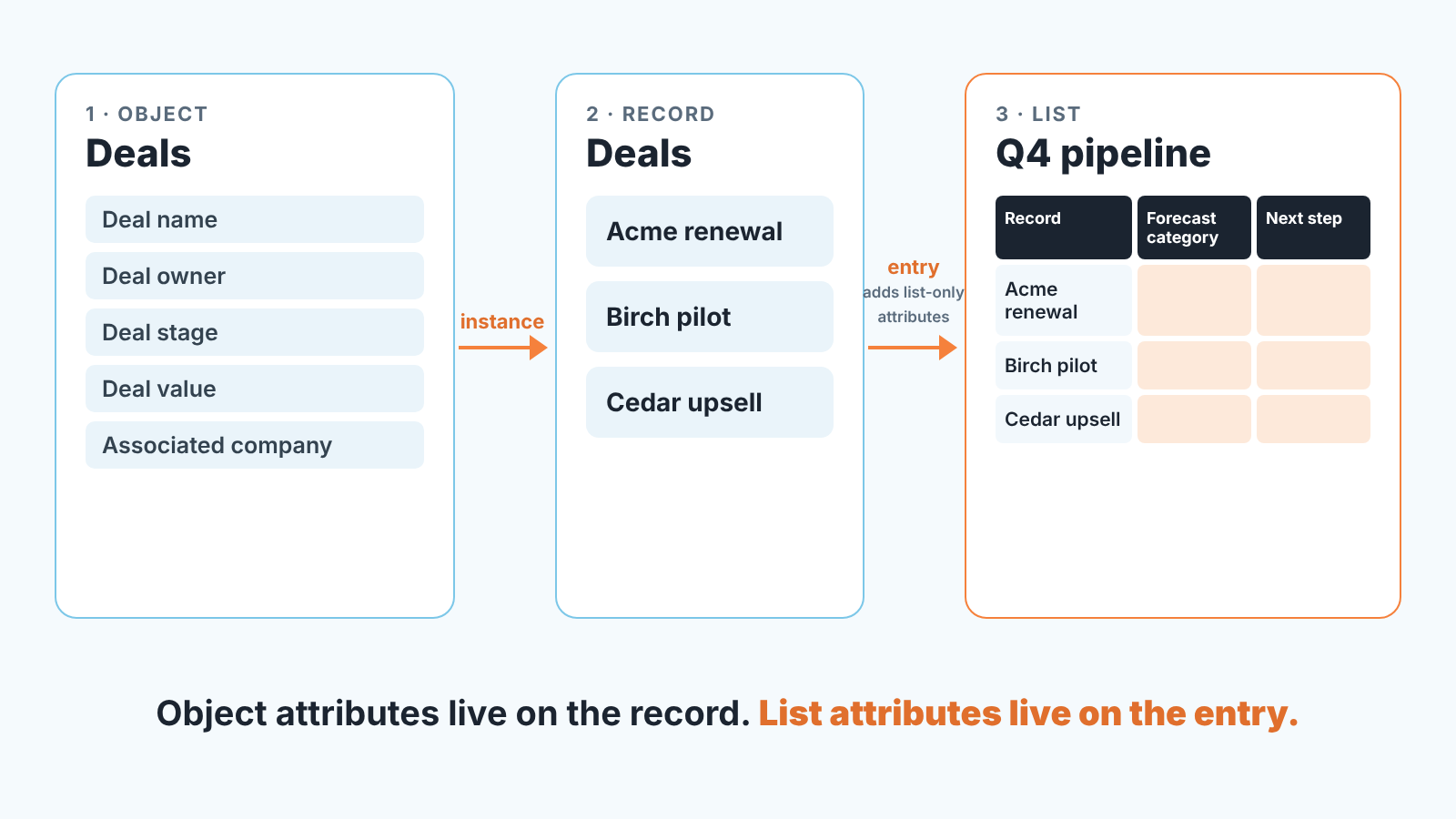
Objects are the tables: Companies, People, Deals. Each one carries system attributes that Attio creates and that you cannot delete, plus custom attributes you add (Attio: create and manage attributes). Relationship is one of the attribute types, so “Associated company” on a deal is itself an attribute pointing at a company record.
Lists are the processes. A list takes records from exactly one object and can add its own list attributes (Attio: create lists). The mechanic that matters: when you add a record to a list, Attio creates a list entry, and list attribute values are stored on the entry and leave the record itself unchanged. Attio’s own example is a recruiting list where the same person appears twice, once per application, while the underlying person record stays untouched (Attio 101: understanding lists). The kanban view of a list is built on that list’s Status attribute.
So what does this mean for a manager? Two things. First, you decide where the pipeline lives: on the Deals object itself (Deal stage is a system attribute there) or in a list with its own status attribute. Attio’s reporting guide covers both routes: “Deals (or the list where you’re tracking deal flow, if you aren’t using the Deals object)” (Attio: build a sales reporting dashboard). Second, the same freedom lets two reps keep two different pipelines of the same deals in two lists, and your report will only see one of them.
We would put the pipeline on the Deals object and use lists for temporary work, like a push on renewals or an event follow-up. Reports and rules are easier to to keep honest on one object.
Attio pricing: plans and limits as of November 2026
Attio has four plans: Free ($0, up to 3 seats), Plus, Pro and Enterprise, priced per user per month. The numbers below are from the pricing page and the help center on 2026-11-03; paid prices are per user per month, billed monthly / billed annually (annual billing is 20% cheaper on Plus and Pro) (Attio pricing; Attio: plans and features). Check both pages before you budget.
| Free | Plus | Pro | Enterprise | |
|---|---|---|---|---|
| Price per user/month, billed monthly / annually | $0 | $44 / $35 | $99 / $79 | custom quote, billed annually |
| Seats | up to 3 | up to 10 | unlimited | unlimited |
| Objects (Companies and People count) | up to 3 | up to 5 | up to 12 | unlimited |
| Records | 50,000 | 250,000 | 1,000,000 | custom |
| Reports | up to 3 (Insight only) | 15 on the pricing page, 20 in the help center | up to 100 | 100+ |
| Funnel reports | no | yes | yes | yes |
| Segment by (break a report down by another attribute) | no | yes | yes | yes |
| Rules on objects (required fields) | no | no | up to 8 per object | no limit |
| Custom objects | no | no | yes | yes |
| Access permissions | none | workspace-wide | workspace, team and individual | as Pro, plus admin controls such as SSO and export limits |
| API and webhooks | yes | yes | yes | yes |
The rows for funnel reports, rules, custom objects and permissions match the written plan descriptions in the help center. One number doesn’t: the help center lists the Plus report limit as 20 where the pricing page says 15, so ask Attio which one applies if that number matters to you.
A few lines deserve a comment. On Free, “3 objects” means Companies, People and one more standard object, so Deals uses your last slot. Each workspace also gets workspace credits for AI features and workflow automations: 250 a month on Free with no option to buy more, 1,500 on Plus and 10,000 on Pro, with extra credits for sale on paid plans. Seat credits for Ask Attio come separately: 100 per seat per month on Free, 500 on Plus, 1,000 on Pro (plans and features page). Email sending is capped too: 200 sends per user per month on Free and 1,000 on Plus, and every email sent on Free carries “Sent with Attio”.
None of this stops a small sales team from running a pipeline on Free. What it blocks is funnel reports, segmenting a report by owner, required-field rules and permissions, which are exactly the things a manager tends to want by month two.
First setup for a sales manager: Deals, three required attributes, an owner
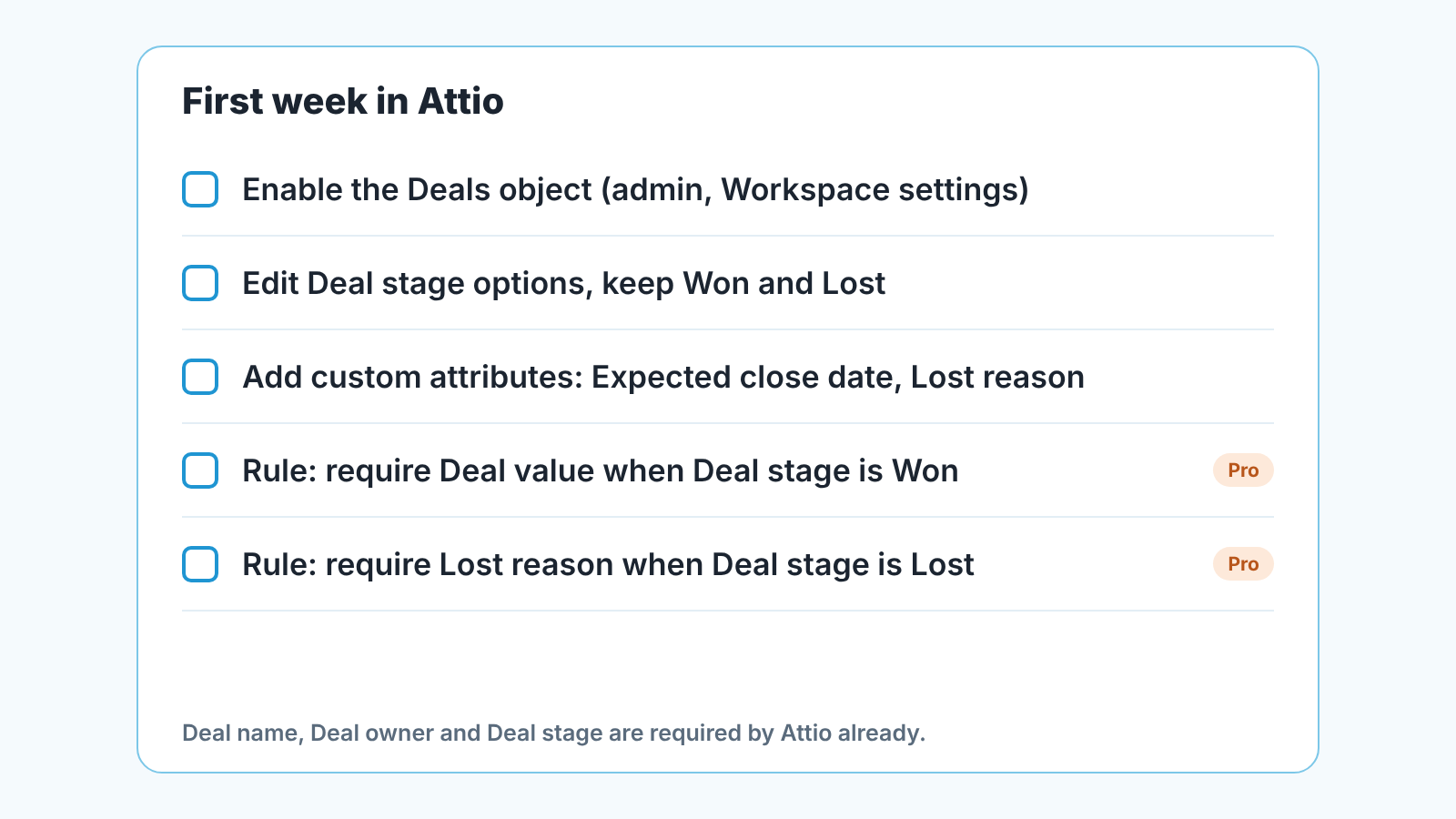
Enable the Deals object first. If it isn’t on by default in your workspace, an admin enables it in Workspace settings; only admins can enable objects (Attio: manage standard objects). Once it is on, three system attributes are already marked Required: Deal name, Deal owner and Deal stage, and Deals system attributes are not editable apart from the stage options (same page). Good. Owner and stage are the two fields that, when empty, make every report lie.
Deal value is not required by default. Neither is anything about the next step. So the second job is deciding what you’ll add:
- Edit the Deal stage options to match how you actually sell, and keep Won and Lost as stages so the reports can see them.
- A custom date attribute for the expected close and a custom select for Lost reason; both are plain custom attributes on Deals.
- Who may keep their own lists of deals. The pricing page names private lists as a Plus feature, and Free has no access permission settings at all, so on Free this is a team agreement rather than a setting.
Connect email and calendar in week one as well. Every plan syncs at least one mailbox per member, and with default settings Attio creates person and company records for everyone you have emailed or met (manage standard objects page). That is where the contacts on your deals will come from, so it’s worth doing before reps start creating people by hand.
On Pro or Enterprise, add rules. A rule is a condition plus one or more requirements, checked when records are created or updated; if the condition is met and a requirement is not, Attio blocks the change. Attio’s own examples are the two every sales manager wants: require Deal value before a deal moves to Won, and require Lost reason before it moves to Lost (Attio: create and manage rules). Rules are per object, up to eight per object on Pro, they aren’t available on lists, and they don’t modify existing records, so run a one-time cleanup of the backlog yourself.
One thing we would not do in week one is build custom objects. They need Pro, and a sales team of five rarely needs an entity that Companies, People and Deals cannot express. If someone has sold you on custom objects, write down the report you can’t build without them first.
The reports worth opening every Monday
Attio’s reporting lives on dashboards. A dashboard is a page with one or more reports, and a report is a chart or table over object, list or activity data (Attio: create reports). The vendor’s sales dashboard guide builds five: deals in stage, funnel analysis, average time to close, deals moving to each stage in a time frame, and win rate (Attio: build a sales reporting dashboard). Check the plan before you copy all five, because the help center lists Time in stage and Stage changed reports only from Pro up.
For a weekly pipeline review we would open two of them and ignore the rest until the data is clean.
Deals in stage is an Insight report: data source Deals, metric Count Records, grouped by Deal stage. The basic version works on Free. Segmenting it by Deal owner, which turns it into the Monday question “who has what, where”, uses Segment by, and that starts on Plus. The funnel report also needs Plus or above, and it measures something different: conversion between stages over time, counting every record that has ever been in the selected stages, including the ones that have since moved on (Attio: set up a funnel report). Two details from that page matter for how you read it. A deal that skips a stage still counts as having passed through it, and a deal moved backwards still counts as having reached the later stage. So a rep who drags deals to Proposal and back doesn’t improve or spoil the funnel; it records that the deal got there once.
Neither report tells you whether the deals are being worked. Attio shows a Next due task attribute on each deal, the due date of the next task linked to it (manage standard objects page), and you can filter a view by it. Still a stage count with no next task behind it is the gap we see most often in any CRM, Attio included. This is the part we build for. Attio is one of the 15 CRMs SalesBond works with, and the free CRM audit reads the last 30 days of the connected CRM and sends a large PDF report: money at risk, a CRM score, the pipeline bottleneck, managers and deal health, repeat customers and what to fix. Seven days later a second PDF shows what changed. If you’re setting up Attio and want a baseline before the team starts moving deals, check your CRM with SalesBond and keep that first report as your “before” picture.
Does Attio have an API?
Yes, and it’s on every plan including Free (plans and features page). The developer platform has four parts: a REST API with webhooks for real-time events, an App SDK for building apps inside Attio, an MCP server, and SQL (Attio Docs: overview). Apps from Attio’s App Store are also available on all plans.
For a sales manager the practical use is that any tool you add on top reads Deals, Deal owner and Deal stage through the same system attributes the help center documents, so you do not rebuild your schema for it. If you’re moving from another CRM, read Attio’s migration guide for importing data from another CRM before you export: objects from your old CRM map only to objects in Attio, not to lists, and the field mappings are worth reviewing before teh full run.
Fourteen days of Pro: what to test before you decide
The trial shows you Pro, and most of what you’ll test is not on Free or Plus. So test in this order and note which plan each item needs.
Start with the Deals object and stage edits , which are on every plan. Build the Deals-in-stage Insight report on day one and share the dashboard; that also works on Free, within the three-report limit, as long as you skip the owner segment. Then write the two rules (Deal value before Won, Lost reason before Lost) and try to break them: move a deal to Won with an empty value and watch the change get blocked. If the team can live without that enforcement, Plus might do. If not, you have found your price point before the trial ends.
Next, build the funnel report and compare it against the stage counts for the same week. The numbers won’t match, and they shouldn’t, for the reasons above. If the people who read your reports won’t accept two different “pipeline” numbers, decide now which one goes in the Monday deck.
Last, lists. Create one list of deals for a specific push, give it its own status attribute, and watch what happens to the object-level report: nothing, because list attribute values live on the entry and not on the record. That is the moment most managers get the model, and the trial is the cheap time to learn it.
Who should compare before committing? A team that needs required fields on a Free or Plus budget, because rules are Pro and Enterprise only. A team above three seats that wants to stay free, because it can’t. And a team whose pipeline logic already lives in HubSpot deal stages or Salesforce, because moving that into Attio’s objects and lists means rebuilding it, since in HubSpot the stages belong to a pipeline and in Attio they are values of an attribute on an object or a list. We keep guides for those two, what HubSpot is for a sales manager and what Salesforce is for a sales manager, a neutral comparison of CRM tools by the job they do, and a guide on how to choose a CRM for a sales team of five. None of them ranks the vendors.
FAQ
Is Attio free forever? Free is one of Attio’s four plans, separate from the 14-day Pro trial: $0 for up to three seats, with up to three objects, 50,000 records, three Insight reports, API access and 250 workspace credits a month (Attio: plans and features, checked 2026-11-03). A new workspace starts on a 14-day trial of Pro, and you choose a plan when it ends. Funnel reports, rules and permissions start on paid plans.
Does Attio have an API? Yes, on all plans: a REST API with webhooks, plus an App SDK, an MCP server and SQL, documented at docs.attio.com.
Is there a trial of the paid plans? New workspaces begin with a 14-day free trial of Pro, so the team can try Pro features before choosing a plan. All members of a workspace must be on the same plan (plans and features page).
How much does Attio Pro cost? $99 per user per month billed monthly, or $79 per user per month billed annually, on the Attio pricing page as of 2026-11-03. Plus is $44 or $35 on the same terms; Enterprise is a custom quote billed annually.
Does SalesBond work with Attio CRM? Yes. Attio is one of the 15 CRMs SalesBond works with, and the free CRM audit is the usual starting point: start with SalesBond.


