

HubSpot is a customer platform built around a CRM: it stores your contacts, companies and deals in one place and adds marketing, sales, service and content tools on top of that one database. You can start with a free CRM and add paid Hubs as the team grows. For a sales manager the part that matters is the deal pipeline and the reports built from it; everything else is optional until the pipeline is honest.
Why the shared database matters
HubSpot’s own FAQ lists software for marketing, sales, customer service, content and data management, all of it sitting on one CRM that HubSpot calls the Smart CRM (HubSpot: What kind of software is HubSpot?, FAQ, checked 2026-10-31).
That shared database is the point. A marketing email, a sales call, a support ticket and a quote all land on the same contact record. If you have ever worked in a company where marketing kept leads in one tool, sales in a spreadsheet and support in a third system you know what this fixes. Nobody has to ask “which version of this customer is right”.
HubSpot says it is used by over 306,000 customers in more than 135 countries (HubSpot: CRM software, checked 2026-10-31). That is the vendor’s own count, so read it as a scale signal rather than an audited figure. The scale matters for one practical reason: the help documentation is deep, and almost any question you have has been asked before.
The map: one Smart CRM, several Hubs
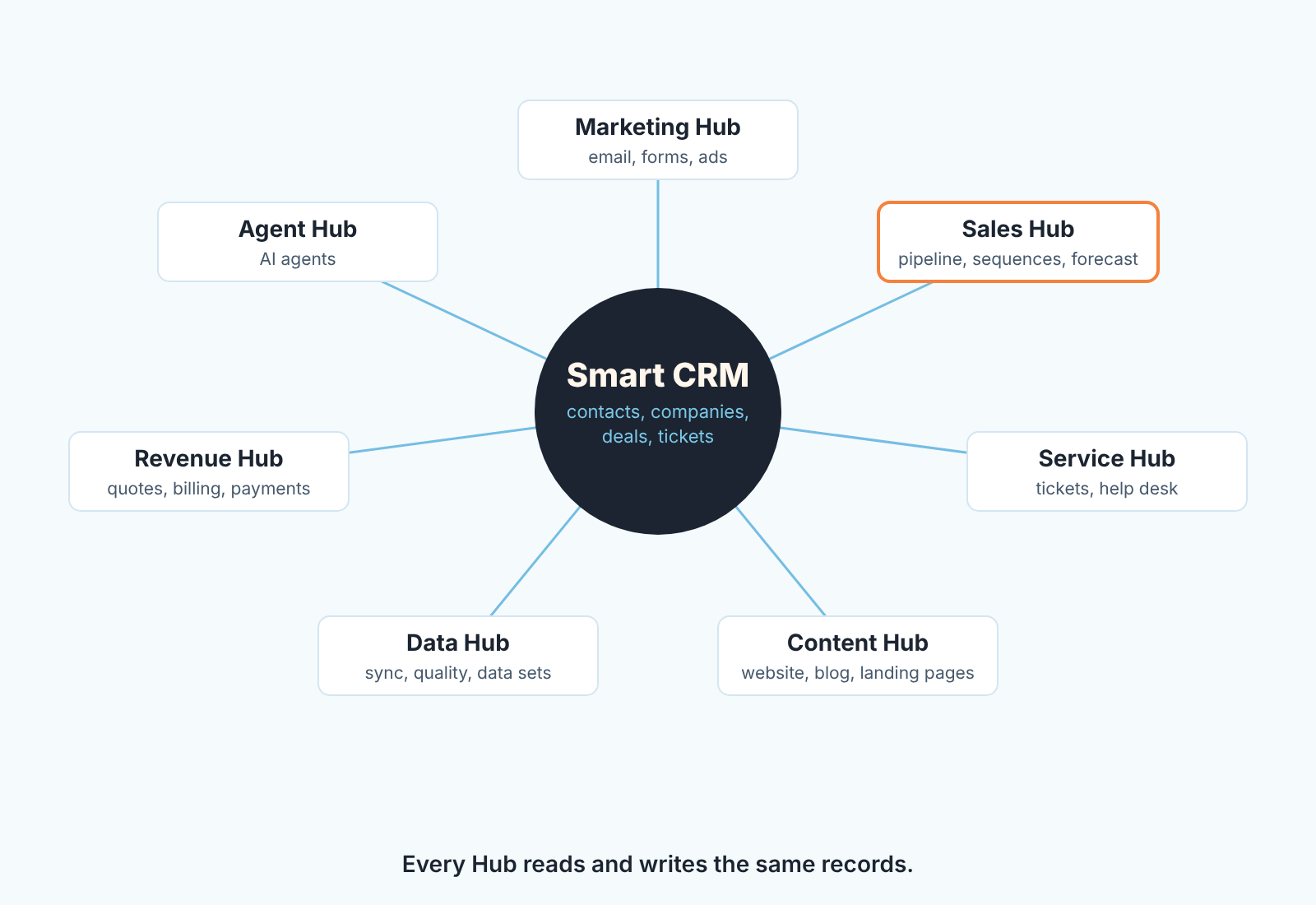
So what is HubSpot used for, day to day? Think of it as a wheel. The hub is the Smart CRM, which HubSpot describes as “AI-powered, flexible CRM software”. The spokes are the Hubs, and as of 2026-10-31 the products page lists seven of them plus two bundles (HubSpot: products):
Marketing Hub is the tool for attracting people: email campaigns, forms, landing pages, ad management. Sales Hub is where your team lives: pipelines, email tracking, sequences, meeting scheduling, forecasting. Service Hub handles tickets and a help desk after the sale. Content Hub builds the website, blog and landing pages. Data Hub is for cleaning, syncing and modelling data across systems; HubSpot’s own line is that it “breaks down data silos and creates a single source of truth”. Revenue Hub connects quotes, billing and payments. Agent Hub is the newest and is described as the home for “building and managing AI agents across the platform”.
On top of those, the Small Business Bundle packages “the Starter edition of each product”, and the Marketplace connects third-party apps.
What this means for you as a sales manager: you will almost certainly buy or use Sales Hub, you will touch Marketing Hub only to agree on how leads are handed over, and you can ignore the rest until someone else in the the company asks for it. The one exception is Data Hub, because duplicate contacts are a sales problem long before they are a data team problem.
What the free CRM includes
The free CRM is real, and it is the place most teams start. HubSpot’s product page describes it as “100% free with no expiration date” and puts the cap in one sentence: “up to two users, 1,000 contacts, and no limits on customer data” (HubSpot: CRM software, FAQ, checked 2026-10-31).
What you get at that tier, according to the same page: contact, deal and task management, deal pipelines, CRM import, email tracking and engagement notifications, email templates and scheduling, document sharing, meeting scheduling, live chat, sales quotes, a reporting dashboard, and the Breeze Assistant. The page also says that “every free HubSpot CRM account also includes essential marketing, sales, and service tools”: forms, a landing page builder, ad management, an AI email writer, email marketing and a meeting scheduler.
For a two-person sales team that is more than enough to run a pipeline honestly. You get one deal pipeline, deal stages with probabilities, tasks, and email logged to the contact. You can set required properties on a stage too; the help article on pipelines lists that feature under all products and plans (HubSpot: set up and manage object pipelines).
The user cap is the one that bites first, because it counts everyone who logs in. If you have three reps, the third one is either sharing a login (don’t) or you are paying. A five-person team runs into that cap on day one, and HubSpot free CRM for a five-person sales team works through what it leaves you.
Where the free CRM stops
The CRM database is free; the management features a sales leader needs once the team passes two people are not. Sales Hub comes in four tiers: Free, Starter, Professional and Enterprise (HubSpot: Sales Hub pricing, checked 2026-10-31). Free keeps the user and contact cap described above.
The split that matters sits between Starter and Professional. Professional adds the tools that hold reps to the process, such as pipeline rules that stop a rep skipping a stage or moving a deal backwards (HubSpot: set up pipeline rules), fully customizable workflows and the forecast tool. Free and Starter mostly store what reps log. If your job is to manage the process, Professional is the tier you are really comparing.
Seat prices change often, so we keep them out of this guide. What a paid team spends per seat is dated in HubSpot pricing for a five-person sales team, and how far the free tier stretches is in HubSpot free CRM limits for a five-person team.
Who HubSpot fits, and who should look elsewhere
HubSpot fits a company where marketing and sales will share the database. If your leads come from a website, from content, from ads or from events, the free forms and the lifecycle stage field save you an integration project on day one, and the handover from marketing to sales happens inside one record.
It also fits a team without a CRM administrator. A sales manager with “Edit property settings” permission can rename stages, add a required property and build the first report alone (HubSpot: set up and manage object pipelines). That is a real difference from systems where the rules live with an admin.
Now the other side. Vendors rarely say this part out loud.
If you are a two- or three-person sales team with no marketing function, teh platform is bigger than your problem. You will use one pipeline and a task list and pay for nothing, which is fine, but you will also spend time switching off tools you do not need. A sales-only CRM may feel lighter. Pipedrive is one, and Pipedrive vs HubSpot: a sales manager’s checklist puts the two side by side. If calls and email make up most of your team’s day, Close is worth a look too, and our guide to what Close CRM is covers it for a sales manager.
If your sales are complex, with multiple products on one deal, territory rules, approval chains and a forecast that finance signs off, you will hit the edges of Starter quickly and live on Professional or Enterprise. It is a budget decision to make before the trial starts.
If you already have an admin and a Salesforce org, the question is rarely “should we move to HubSpot”. It is “which system owns which field”, and we covered that one separately in HubSpot and Salesforce integration: which CRM owns which field.
And if you are choosing between HubSpot and Zoho CRM on price, read the stage rules first; we went through them in Zoho CRM vs HubSpot.
HubSpot vs Salesforce in five lines
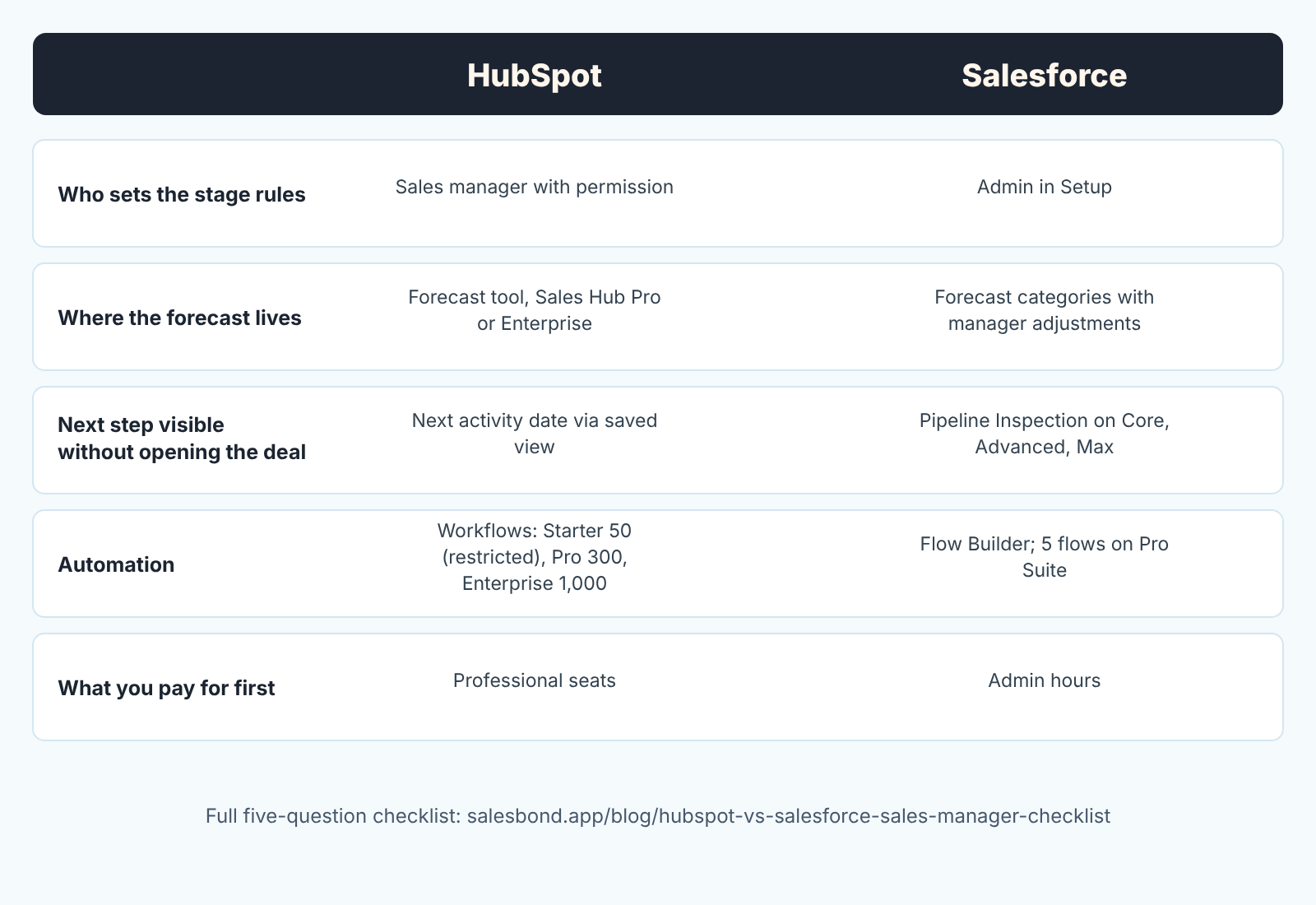
People ask this one in the search results right after “what is HubSpot”, so here it is in five lines. Each line comes from our longer HubSpot vs Salesforce checklist, where the sources are linked row by row.
Stage rules. In HubSpot a required stage property is set in pipeline settings by a sales manager with the right permission, and stricter pipeline rules need Professional or Enterprise. In Salesforce the equivalent gate is a validation rule, and it lives in Setup with an admin.
Forecast. HubSpot forecasts from the stage, with a probability per stage and a forecast tool on Sales Hub Professional or Enterprise. Salesforce forecasts from categories, and a manager can adjust the rollup without touching the opportunities.
Next step. HubSpot has no standard Next Step field; the nearest thing is the next activity date, which you surface with a saved view. Salesforce shows next steps in Pipeline Inspection, which the pricing page ticks for Core, Advanced and Max editions.
Automation. HubSpot Starter allows up to 50 workflows with restricted triggers and actions; Professional and Enterprise go to 300 and 1,000 fully customizable ones (HubSpot: Sales Hub pricing, checked 2026-10-31). Salesforce Flow Builder is marked “5 flows per org” on Pro Suite and unrestricted on the higher editions.
The real cost. HubSpot’s bill grows with the number of Professional seats, and Salesforce’s grows with the hours an admin spends in Setup, so write down the seat count and the admin hours before you compare list prices.
If Microsoft is on your shortlist too, run the same two numbers for Dynamics 365; our guide to what Dynamics 365 CRM is walks a sales manager through it. For a board-style CRM, what monday CRM is follows the same format.
A sales manager’s first week in HubSpot
Our position: a sales manager should configure five things in the first week and nothing else. Every extra property or workflow added before these five is noise that you will delete in month two.
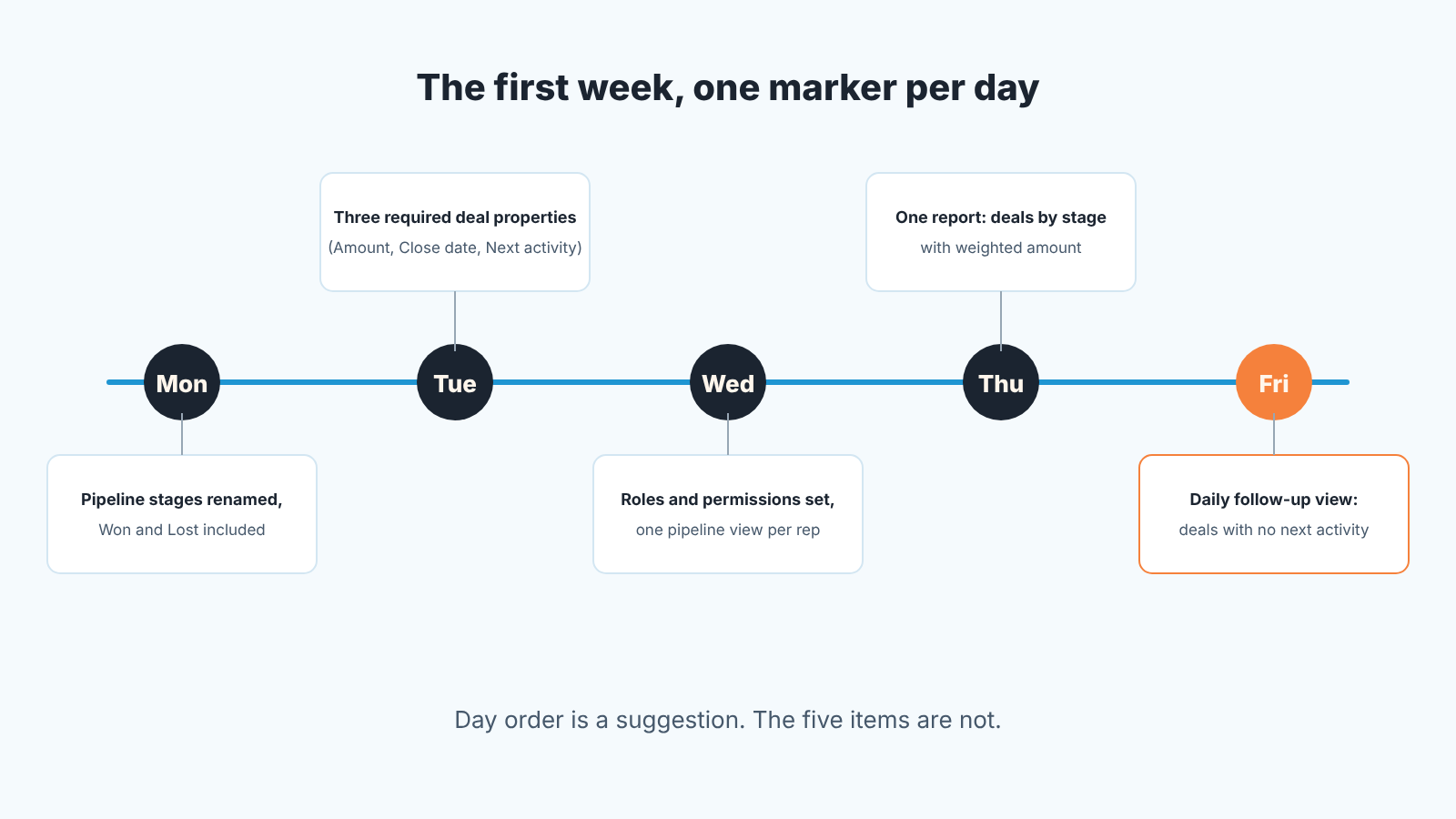
Day one: the pipeline. Open the default Sales Pipeline and rename the stages to the words your team actually uses. HubSpot requires that the pipeline includes stages for both Won and Lost, and each stage carries a probability that drives the weighted amount on the board (HubSpot: set up and manage object pipelines). Keep it to five or six open stages. If you cannot say in one sentence what has to be true for a deal to enter a stage, the stage should not exist. We wrote a longer piece on this in renaming HubSpot’s default deal stages.
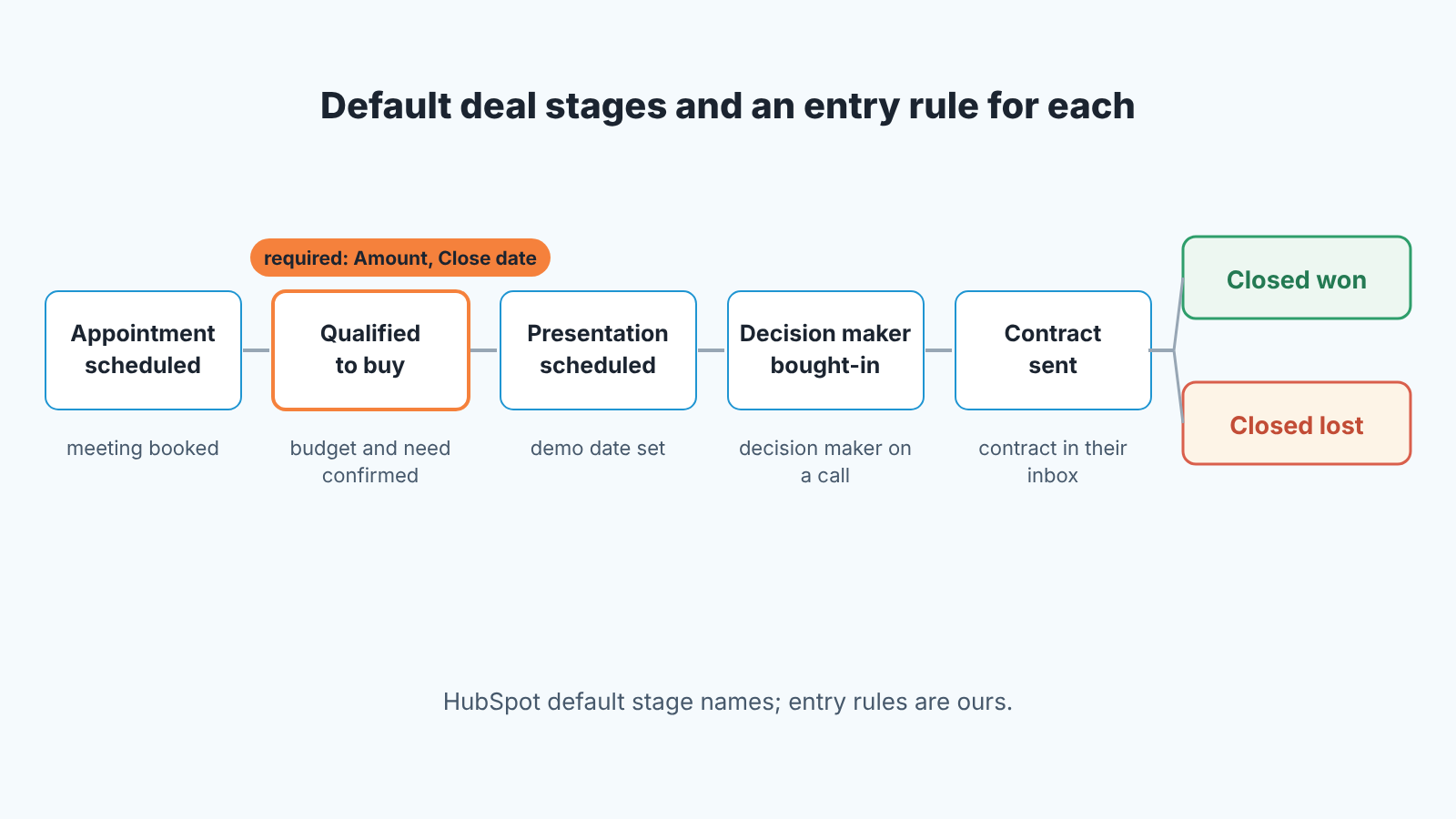
Day two is for required deal properties. In pipeline settings, pick the properties a deal must have when it enters a stage and tick Required. The help article is blunt about the effect: “users cannot create or update the record until they set a value for it” (HubSpot: set up and manage object pipelines). Three are enough to start: Amount, Close date, and whatever your team uses as the next step. More than five and reps start typing “tbd”. The step-by-step is in required properties on HubSpot deal stages.
Day three: roles and permissions. Decide who can see whose deals, who can edit properties, and who can delete. On the free tier with two users this takes five minutes; on a paid tier with a team it is where most “who moved my deal” arguments are prevented. Which role sees and edits which deals is set out step by step in HubSpot user permissions for a sales manager.
Day four: one report, open deals by stage with the weighted amount. The reporting dashboard is on the free tier, so there is no excuse to run the Monday meeting from a spreadsheet. Build the second report only after you have looked at the first one for two weeks. When you are ready for the full set, the HubSpot dashboard a sales manager actually uses is the one we hand to teams.
Day five: the daily follow-up view. Save a deal view filtered to open deals with no next activity scheduled, and open it every morning. A deal without a next activity is not being worked, whatever its stage says. This is the single most useful view in HubSpot for a manager and it costs nothing. Copy the exact filters from HubSpot deals without next activity: the saved view and you have it running before lunch.
That is the week. Sequences, workflows, lead scoring and the forecast tool all come later, and most of them come with a paid tier. If the five items above are in place, you can run a pipeline review on Friday that is about deals rather than about the CRM.
We build SalesBond, a sales management layer on top of the CRM a team already uses, and HubSpot is one of the CRMs it works with. Once the pipeline has a month of history, the free SalesBond CRM audit reads the last 30 days and sends a PDF with money at risk, a CRM score, deal health and what to fix, then a second PDF a week later with what changed.
Mistakes we see in the first month
The most common one is treating Lead Status and Lifecycle Stage as the same thing. Lifecycle stage is the company-wide journey, from Subscriber to Customer, and HubSpot’s automatic updates only move it forward. Lead status is the rep’s working state for a lead, the day-to-day “where is this one” field. Mix them up and marketing’s funnel report and your pipeline stop agreeing. Before you fix the report, check how your reps use each property against the split in HubSpot lead status vs lifecycle stage.
The second is duplicates. Free forms, imports and the email extension all create contacts, and three versions of the same person means three versions of the truth. Put a weekly dedupe check in the calendar from week one rather than discovering the problem when a rep emails a customer who already said no to a colleague. Book it with the routine from HubSpot duplicates: the weekly check so it runs on the same day every week.
The third is property sprawl. Every time someone says “can we add a field for”, the answer should be “what report will read it”. A property nobody reports on is a property reps stop filling in, and once two properties go stale, the rest follow. If you are tempted to model something complicated, read custom objects vs deal properties first.
A fourth, smaller one: confusing a workflow with a sequence. A sequence is a rep’s personal email series to one contact; a workflow is company automation. Teams sometimes build a sequence to do a workflow’s job and wonder why it stops when the contact replies; workflows vs sequences sorts the jobs between the two.
Does HubSpot track you?
Short answer: HubSpot’s own websites use cookies and tracking pixels like most commercial sites, and HubSpot’s customers can install a tracking code on their websites that records visitor data. The data you store in HubSpot as a customer is a separate matter, and HubSpot processes it on your instructions. All of this is in HubSpot’s privacy policy, last modified September 16, 2026 (HubSpot: privacy policy, checked 2026-10-31).
The details, by section of that policy. On its own sites HubSpot says it “collect[s] information automatically using tracking technologies, like cookies and tracking pixels” to analyse trends and see how visitors move around (section 6.1), and that third-party advertising networks use cookies and web beacons for targeted ads (section 6.2). The policy points to a separate Cookie Policy for managing preferences, and to industry opt-out pages for advertising.
The tracking code is the part that surprises people. When a HubSpot customer installs it on their own website, HubSpot stores information about that site’s visitors, including IP addresses and online identifiers, and the policy says HubSpot processes this data “for our own purposes as a controller”, including improving its products and its commercial dataset (section 1.6). If you are the HubSpot customer that is a disclosure you need to make on your own site.
For the contacts and deals your team stores, HubSpot describes itself as “a processor (or service provider)” acting under the customer’s instructions, and states that “each customer controls and is responsible for the information they process using the Subscription Service” (section 1.2). In plain terms: your CRM data is yours to manage, and for data HubSpot holds on a customer’s behalf the policy tells people to contact that customer directly. So a person asking to be deleted from your HubSpot should come to you directly.
We are not lawyers, and this is a summary of a document that changes. Read the current version before you answer a customer’s question about it.
FAQ
What is HubSpot and how much does it cost?
HubSpot is a customer platform built on a shared CRM, with Hubs for marketing, sales, service, content, data and revenue (HubSpot: products). The CRM is free with no expiration date, within the user and contact cap covered above (HubSpot: CRM software, checked 2026-10-31). Sales Hub then has three paid tiers, Starter, Professional and Enterprise; what a team actually pays is in HubSpot pricing for a five-person sales team.
How is HubSpot different from Salesforce?
In one line: HubSpot puts the stage rules, forecast and reports in the hands of a sales manager with the right permission and charges for them by seat on Professional; Salesforce puts the same rules in Setup with an admin and charges, in practice, in admin hours. The full checklist, with a source for each row, is our HubSpot vs Salesforce checklist.
Is HubSpot a CRM or a marketing tool?
Both, on the same database. HubSpot’s FAQ says it “offers marketing, sales, content, customer service, and operations products” built on its Smart CRM (HubSpot: products). If you never touch Marketing Hub, it is a CRM with a pipeline. If you never open a deal, it is marketing automation. Most companies use it as the first and grow into the second.
What companies use HubSpot?
HubSpot publishes its own customer count, quoted near the top of this guide (HubSpot: CRM software, checked 2026-10-31). We have not verified that number and would not build a decision on it. The practical profile, from the teams we see: companies where marketing and sales share leads and nobody is a full-time CRM administrator.
Is HubSpot HIPAA compliant?
HubSpot says it provides protections, among them audit logging, advanced authentication and per-tenant encryption, that let customers “operate our products in compliance with HIPAA”, and that “the HubSpot BAA is included by reference in the Sensitive Data Terms” (HubSpot: products, FAQ, checked 2026-10-31). That is a vendor statement about its own terms. If you store protected health information, read the Sensitive Data Terms and talk to your compliance person before you import anything.


