

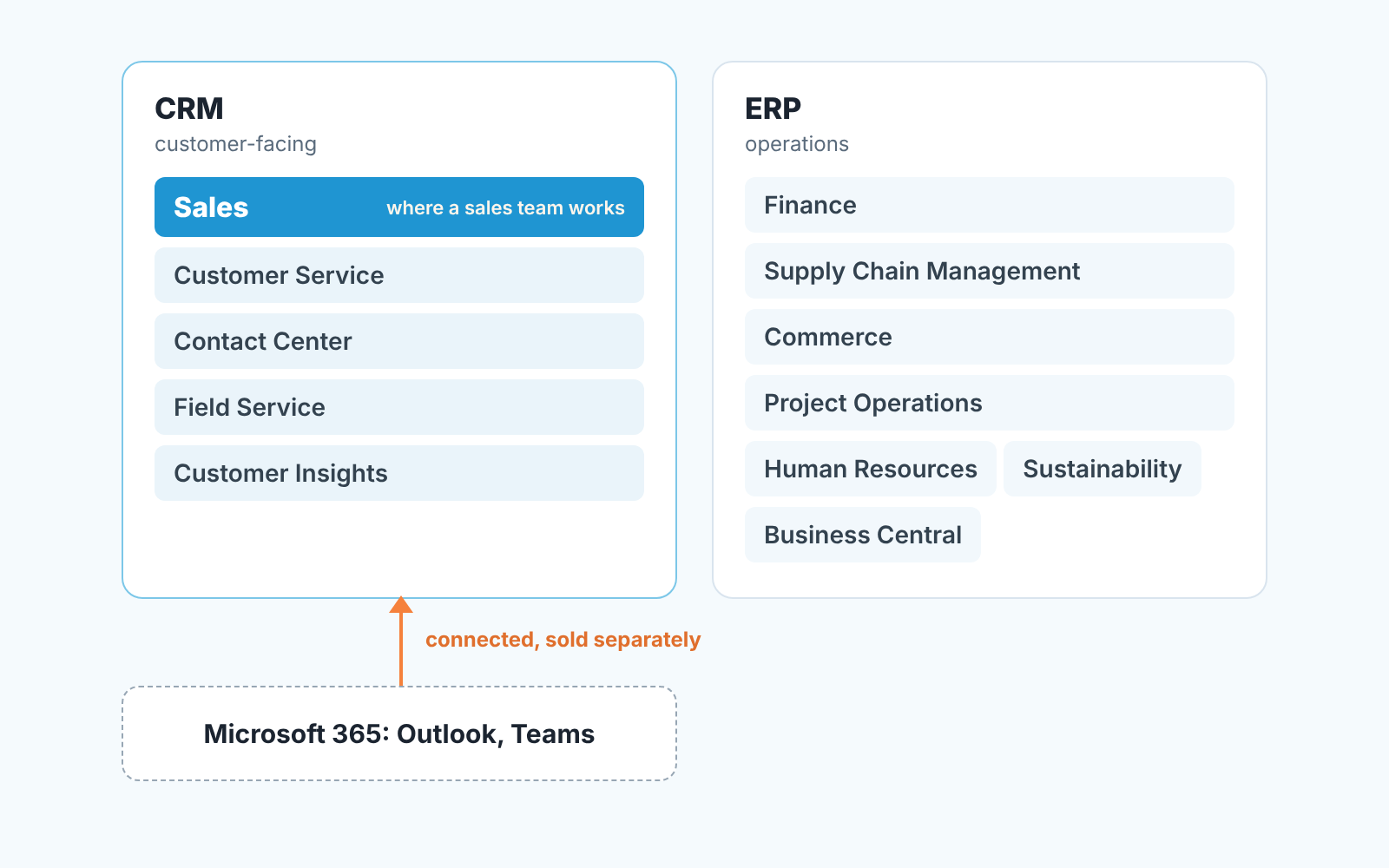
Dynamics 365 for Sales, which Microsoft’s documentation calls Dynamics 365 Sales, is the app a sales team works in. It belongs to Microsoft Dynamics 365 CRM, the customer-facing half of Dynamics 365, Microsoft’s family of business apps. The other half is ERP: finance, supply chain, commerce. None of it comes with Microsoft 365, the subscription with Outlook and Teams.
This guide is for the sales manager who has been told “we’re moving to Dynamics” and wants to know what Dynamics 365 Sales covers, what it costs (prices checked on 2026-11-03), which part of the Dynamics family is theirs, what to set up first in Sales, and what to check on the trial before anyone signs.
What Dynamics 365 Sales actually covers
Here is how Microsoft describes Microsoft Dynamics 365 Sales in its own documentation: “Dynamics 365 Sales enables salespeople to build strong relationships with their customers, take actions based on insights, and close deals faster. Use Dynamics 365 Sales to keep track of your accounts and contacts, nurture your sales from lead to order, and create sales collateral” (Microsoft Learn, checked 2026-11-03).
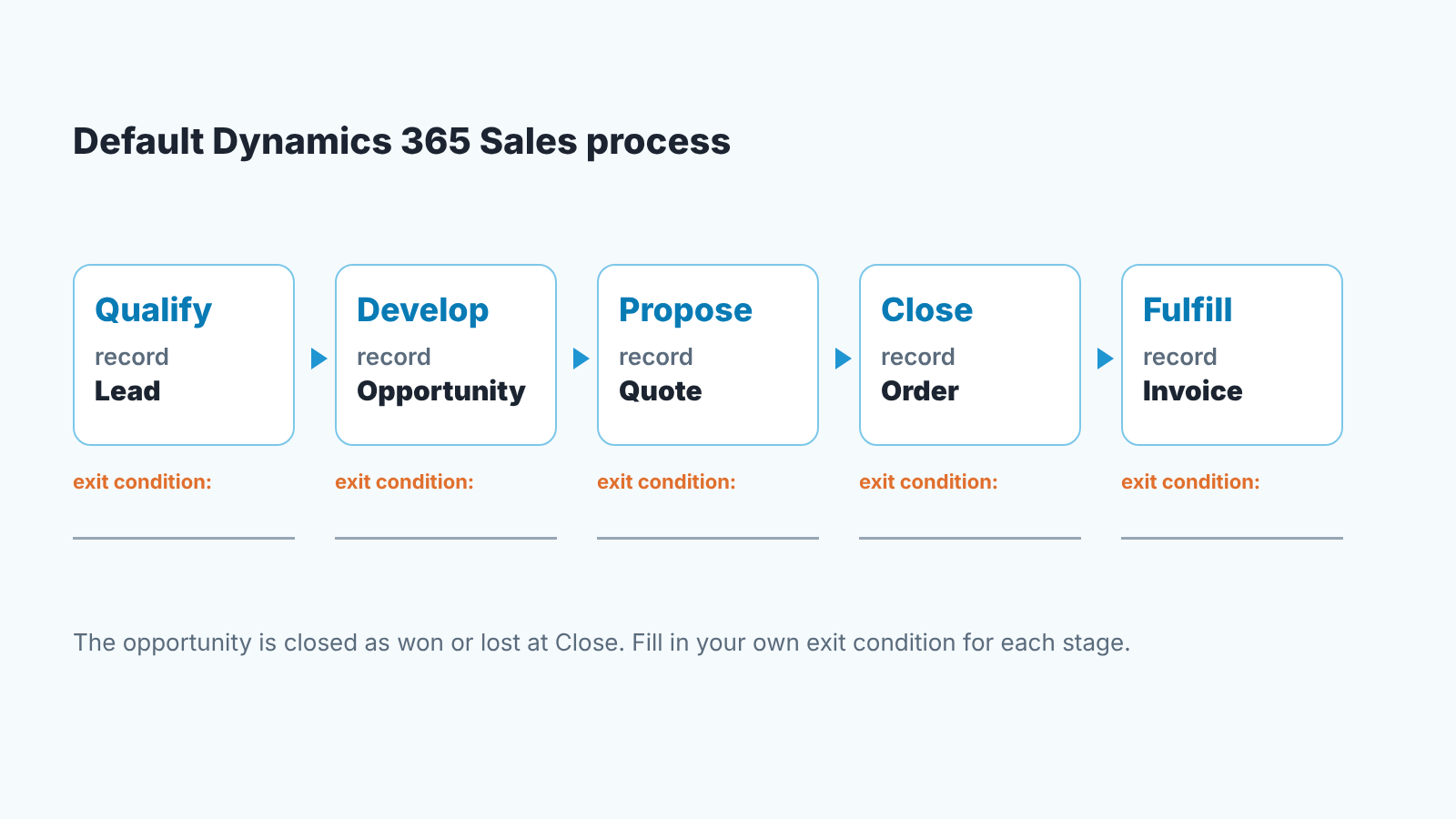
Strip the marketing and the structure is the classic one. The documentation walks the sales process in five stages, each tied to a record type. Qualify works on a lead, and qualifying it converts it to an opportunity. Develop is the opportunity, where products, estimated revenue and timelines live. Propose is a quote. Close is an order, and the opportunity is closed as won or lost. Fulfill is an invoice (Microsoft Learn: Understand the sales process, page dated 2025-06-18, checked 2026-11-03). Accounts and contacts sit underneath all of it.
If you have used Salesforce, that will look familiar: lead, opportunity, quote, with accounts and contacts attached. “Which is better, Salesforce or Dynamics 365?” is a question we won’t answer for you, but we walked through the equivalent layout in our Salesforce guide for a sales manager, and there is a HubSpot one too if that’s the other name on your list.
One detail explains a lot of what an admin will tell you. Dynamics 365 Sales runs on Microsoft Dataverse and uses Power Apps model-driven app design (Microsoft Learn, checked 2026-11-03). Forms, fields and views are changed with Power Platform tools, so when you ask for a new field on the opportunity, you are often asking a Power Platform admin rather than a “CRM admin”.
The same page names the pieces a manager cares about: an opportunity pipeline view, sales forecasting with individual performance tracked against quotas, sequences of activities that land in a seller’s work list, Power BI dashboards and a mobile app. Which of those you get depends on the plan.
Dynamics 365 Sales pricing, as of 2026-11-03
These are the figures on the US pricing page on 2026-11-03. The page itself warns that “Prices shown are for informational purposes only and may not be reflective of actual list price”, with a note about currency and region (Dynamics 365 Sales pricing). Check it again before you quote a number to your CFO.
Dynamics 365 Sales Professional is listed at $65.00 per user per month, paid yearly. Microsoft’s line for it: “Core sales force automation, Microsoft 365 interoperation, reporting, and dashboards.” The documentation calls it the smaller app, with entities that are “a subset of the entities included in Sales Enterprise”. Read the fine print here if you want forecasting or sequences: the predefined Forecast Manager, Forecast User and Sequence Manager roles apply to Sales Enterprise and Sales Premium, not to Professional (Microsoft Learn: Predefined security roles for Sales, page dated 2026-07-20, checked 2026-11-03).
Dynamics 365 Sales Enterprise Edition is $105.00 per user per month, paid yearly: “Industry-leading sales force automation with contextual insights, AI, and advanced customization.” In the documentation this is where “lead to cash” lives, along with forecasting against quotas and in-app marketing campaigns. Enterprise also gets some Premium features (sales accelerator, conversation intelligence, predictive scoring) with a limited monthly capacity.
Dynamics 365 Sales Premium is $150.00 per user per month, paid yearly: “Advanced sales intelligence, agentic insights and automation.” It adds the AI layer on top of Enterprise, which means guided selling through the sales accelerator, relationship analytics and health scores, predictive lead and opportunity scoring, and predictive forecasting.
Microsoft Relationship Sales has no fixed price on the page (“Variable”) and a 10-seat minimum. Microsoft describes it as “Dynamics 365 Sales Enterprise plus LinkedIn Sales Navigator.”
There is also a Sales agent that works from Outlook and Teams. The documentation says Enterprise, Premium and Relationship Sales include limited capabilities, and the full functionality comes with a Microsoft 365 Copilot purchase. When someone demos the AI features, ask which license the demo environment is on.
For a five-person team the honest question is “do we need forecasting in the CRM this year”. If no, the cheaper plan plus a spreadsheet forecast is a legitimate choice. If yes, you are on Enterprise. We wrote about sizing that decision in how to choose a CRM for a sales team of five.
The family, and the one app that is yours
Microsoft’s product page sums up Dynamics 365 as “agentic apps for sales, service, finance, and supply chain operations” (Microsoft Dynamics 365, checked 2026-11-03). The apps are listed by name. On the customer side: Dynamics 365 Sales, Customer Service, Contact Center, Field Service and Customer Insights. On the operations side: Finance, Supply Chain Management, Commerce, Project Operations, Human Resources, Sustainability and Business Central.
So “we use Dynamics” tells you almost nothing until you ask which app. A company can run Business Central for accounting and have no CRM at all, or run Dynamics 365 Sales for the pipeline and keep its books somewhere else. When a candidate says they know Dynamics ask which one.
A sales manager lives in Sales. Customer Service, Field Service and Contact Center are for support and service teams. Customer Insights is pitched for “personalized customer journeys”, which in most companies means marketing. You may never open them, but their names will come up in meetings, usually from someone who wants to sell you one more license. If the term CRM itself needs unpacking first, what a CRM is, for a sales team, with diagrams covers it in plain language.
Where Dynamics 365 ends and Microsoft 365 begins
Microsoft describes Microsoft 365 as services such as Teams and SharePoint plus the Microsoft 365 Apps: Outlook, Word, Excel and PowerPoint (Microsoft 365 documentation, checked 2026-11-03). In other words, the mail, the meetings and the documents. Dynamics 365 is the business applications: the pipeline, the invoices, the service cases. The two are licensed separately, so check both lists when you count seats.
What confuses people is that the two are built to sit next to each other. Microsoft’s documentation describes the Dynamics 365 App for Outlook, which puts sales data inside the mailbox, and Teams integration with embedded chats inside Dynamics 365 (Microsoft Learn: Welcome to Dynamics 365 Sales, page dated 2026-06-22, checked 2026-11-03). That is why the Sales Professional description quoted in the pricing section names Microsoft 365 interoperation (Dynamics 365 Sales pricing, checked 2026-11-03).
So when your IT lead says “we already have Microsoft”, check what that means. Usually it means Microsoft 365. The CRM is a second purchase.
First setup in Sales: pipeline, required fields, roles
Assume the admin has created teh environment and you have a login. Three things to settle in the first week, in this order, because each one depends on the one before.
Pipeline first. Microsoft warns that your system may look different from the documented five stages because it was customized (Microsoft Learn, checked 2026-11-03). Before anyone renames a stage, write down what has to be true for a deal to leave each one. “Develop” is finished when the opportunity has products, an estimated revenue and a close date on it; “Propose” is finished when a quote has gone out. If you can’t write an exit condition for a stage, the stage is decoration and your pipeline report will be too.
Required fields second. This one is our own opinion. We think three required fields on the opportunity are enough to start: estimated revenue, estimated close date and the next activity. Add more and reps start typing “TBD” just to get past the form. Go below that and your forecast is a guess. Ask whoever customizes the app to make exactly those required on the opportunity form, and leave the rest optional until the team has lived in the system for a month. Field setup is a Dataverse and Power Apps job, so the request goes to your admin or partner.
Roles third. Dynamics 365 Sales ships with predefined security roles, and the names are plain. On Sales Enterprise and Premium the primary ones are Salesperson, Sales Manager and Vice President of Sales; Sales Professional has its own pair, Sales Professional Manager and Sales Professional Person. There are functional roles too, such as Forecast Manager, Forecast User and Sequence Manager, and a Sales team member role with read access to contacts, accounts, leads and opportunities (Microsoft Learn: Predefined security roles for Sales, checked 2026-11-03). The documented path to assign them starts in the sales app: Settings, Advanced Settings, then System, Security (Preview), Users, and Manage security roles on the command bar.
Two practical notes from that same page. A sales manager who also runs sequences needs both the Sales Manager and the Sequence Manager roles, one doesn’t include the other. And a custom role built from a predefined one does not pick up new permissions when Microsoft adds features to the original, so if your admin clones Sales Manager into “Our Sales Manager”, someone has to maintain it. For a small team we would stay on the predefined roles until a real reason appears.
What a sales manager opens on Monday
The documentation describes interactive dashboards, Power BI reports, forecasts tracked against quotas and the opportunity pipeline view (Microsoft Learn, checked 2026-11-03). What you build on top of those is up to you. Here is what we would build.
A pipeline view filtered to opportunities with an estimated close date in the current month, sorted by revenue. That’s the deal review list, and it should fit on on one screen.
A view of opportunities with no activity in the last 14 days. The 14 is our own habit; pick your own number. This is the list of deals quietly dying, and until the team is too big for anyone to read it, it beats any score.
The forecast, if your plan has it, next to the same view a week earlier, so the review starts with what moved since last Monday.
And a view of opportunities that moved stage this week. If nothing moved, the stages aren’t being used, and the first two reports are already wrong.
We do this kind of check as a product, so we may as well say so. SalesBond works with Microsoft Dynamics 365, and its free CRM audit looks at the last 30 days of your CRM and sends a large PDF: money at risk, a CRM score, the top findings, managers and deal health, the pipeline bottleneck and what to fix first. Seven days later a second PDF shows what changed. If you want to see what your data looks like before you build the Monday views by hand, check your CRM with SalesBond.
What to test on the trial, and who should test it
The documentation offers a 30-day trial of Dynamics 365 Sales (Microsoft Learn, checked 2026-11-03). Thirty days is enough if you go in with a script. Its wasted if you go in to “have a look”.
Start with your own data and leave the sample data alone. Import twenty real leads and twenty real open opportunities, with the real owners. Most of the problems you will have in production show up right in the import: duplicate accounts, contacts with no company, deals with no close date.
Then run one week of the Monday routine on that data. Can you build the four views without the admin? Does the forecast match what you would have said from the spreadsheet, and if not, which one is wrong?
Have one rep, not the keenest one, work their real deals in the trial for a week: create a lead, qualify it, add products to the opportunity, send a quote, close it. On Friday, ask whether they updated the CRM as they went or copied their notes in later. The second answer is the normal one. It tells you what the required fields should be.
Who compares first: the sales manager and one rep, before IT and before finance. IT will look at Dataverse, security and the Microsoft 365 connection, and those matter, but they won’t tell you whether a rep will keep the close date current. If Dynamics is one of several candidates, our CRM tools compared by job, without a ranking is the format we use: one row per task, with no score.
Two questions that come up in every evaluation
Is Dynamics 365 hard to learn? For a rep, not really. The daily path is lead, opportunity, quote, order, the same shape as any CRM, and the learning is in your team’s own stages and fields. The admin side is where it gets harder, because changes go through Power Platform and Dataverse, and that’s a different skill from using a CRM. Our view: budget for an admin, on staff or from a partner, and don’t expect the sales manager to be that admin.
Is Microsoft Dynamics being discontinued? We can only tell you what we saw. On 2026-11-03 the Dynamics 365 product page was live, the Sales plans were priced, and the documentation pages we used were dated 2025 and 2026. If someone tells you it’s going away, ask for the Microsoft announcement they read it in.
Ready to try it on your own pipeline? Start with SalesBond: the free CRM audit works with Dynamics 365 and takes your last 30 days as they are.


