
A healthcare CRM runs the relationship side of a clinic, specialty care practice or provider: inquiries, appointment requests, referrals, reminders and the follow-up after a visit. Clinical records stay in the EHR (electronic health record). The choice is between a healthcare-specific platform, such as Salesforce Health Cloud or WebMD Ignite, and a general CRM with a healthcare page, such as HubSpot or Zoho CRM. The data-protection terms (HIPAA, a business associate agreement, where the data is stored) are something the vendor confirms to you in writing. Pick by the job you cannot drop, then ask for the paperwork.
Quick answer: match the job to the system
We did not rank anything here. We opened the vendors’ own pages and wrote down which job each healthcare CRM claims to cover, with the link, so you can check the wording yourself. A couple of pages would not open for us (Creatio’s returned an access error, and the Dynamics 365 healthcare address we tried returned not-found), and we say so where it matters. Every quote in the table below was checked on the vendor’s page in November 2026. The same exercise for other industries is in a shortlist of CRMs by business type and our comparison for real estate agents and brokers.
| The job you cannot drop | Type of system | Where we saw it |
|---|---|---|
| Diagnoses, treatment plans, clinical notes | An EHR or EMR, not a CRM | Zendesk’s healthcare CRM guide: “An EMR stores clinical data… while a CRM is its own system that manages non-clinical patient data” |
| Inquiries and appointment requests coming in from the website and phone | Any CRM with a pipeline and reminders | HubSpot, CRMs for Health Care: “Respond to patients’ appointment requests and inquiries”, “Automate tasks and workflows such as appointment reminders” |
| Online booking, reminders, recalls and intake forms on top of the EHR a practice already has | Practice-level patient engagement software | NexHealth: Online Booking “Syncs directly to your health record system”, “One-Click Recalls”, Forms |
| One system for the chart, billing, scheduling and reminders in a private practice | An all-in-one practice platform with the EHR included | Tebra: “Tebra’s EHR+ platform connects care, billing, scheduling, and more” |
| Referrals from other providers, tracked by who sent them | A healthcare-specific platform, or a general CRM with a referral pipeline you build | WebMD Ignite: “Referral Growth Targeting”, “Referral Growth Analytics” |
| Reminders, post-discharge check-ins, care-gap outreach | Healthcare-specific “automated journeys” | WebMD Ignite, same page: “appointment reminders, post-discharge check-ins, care gap notifications” |
| A patient view that reads from the EHR | Salesforce Health Cloud | Salesforce for Healthcare: “Health Cloud complements your EHR rather than replacing it”, FHIR R4 and HL7 |
| A small practice that wants to start on a free plan | HubSpot’s free CRM; the sensitive-data controls sit higher up | HubSpot, same page: “Get free CRM”; “HubSpot’s enterprise tier includes these controls for healthcare organizations handling sensitive data” |
Healthcare CRM vs EHR: what each one holds
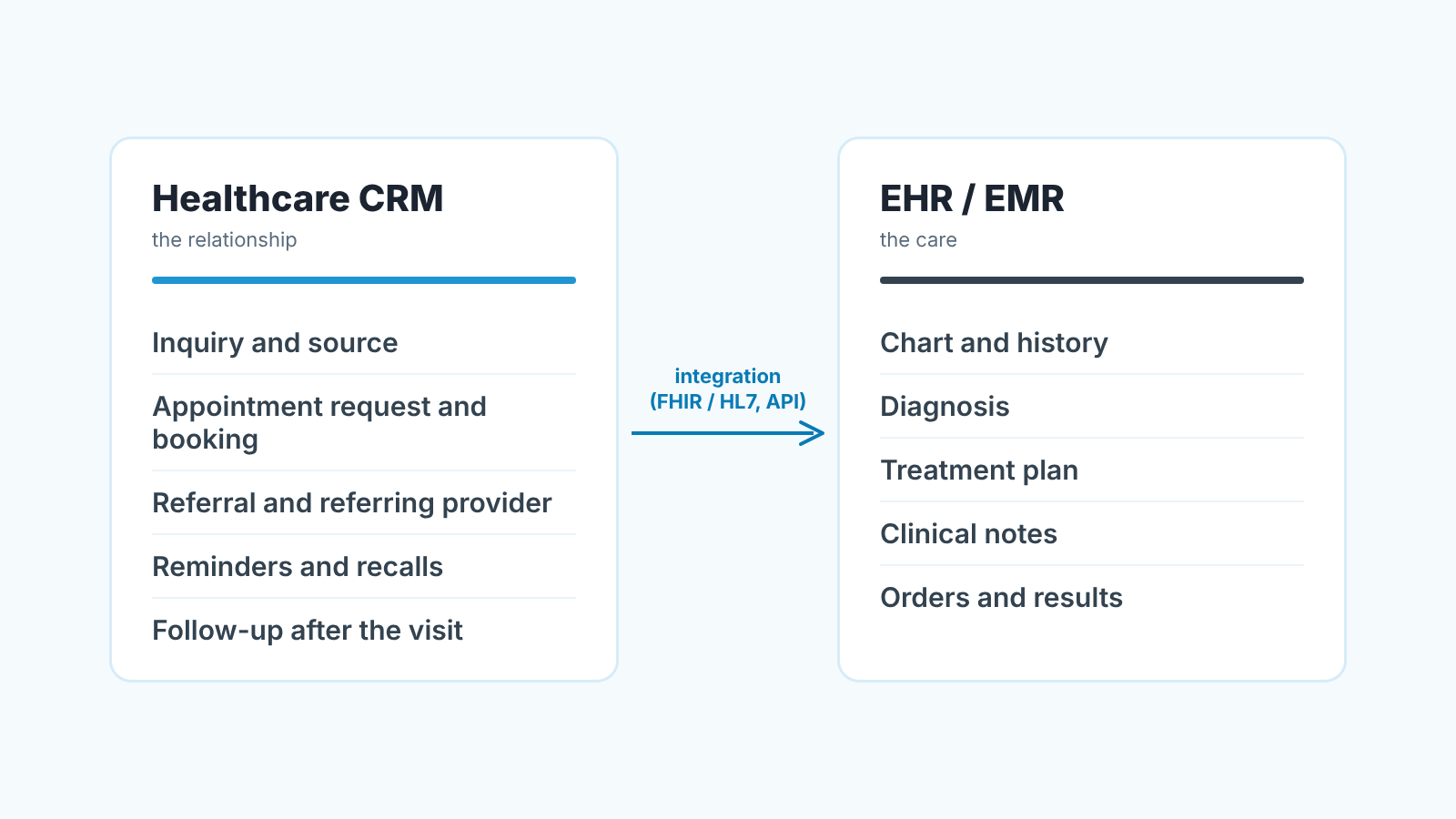
The question that trips people up is which system a record belongs in. A CRM holds the relationship: where the person heard about you, which inquiry they sent, who called them back, when the consult is booked, who referred them, and when they are due to come back. An EHR holds the care: the chart, the diagnosis, the treatment plan, the notes a clinician writes. Zendesk’s guide says the same in its FAQ: an EMR “is not a CRM”, it stores clinical data while the CRM manages non-clinical patient data such as interactions.
Why does the split matter for the purchase? Because it decides how much sensitive data the CRM ever needs to touch. A practice that keeps the CRM to inquiries, bookings, referrals and reminders is asking its vendor a much smaller question than one that wants the CRM to show the chart.
The two systems talk through integration standards. You will see two names on vendor pages: HL7, the organisation and family of standards behind most health data exchange, and FHIR, which HL7’s own overview calls “a standard for exchanging healthcare information electronically”. Salesforce’s healthcare page says Health Cloud “complements your EHR rather than replacing it”, with FHIR R4, HL7 and bi-directional EHR integration. That is the big-system version of the same idea: the EHR stays the EHR.
We think most small and mid-sized practices should start on the narrow side of that line. Widen it only when a specific job needs it. It keeps the vendor conversation short, and it keeps the CRM honest about what it is for.
What a healthcare CRM does all day
Walk one person through it. Someone fills in the form on your site asking about a procedure. The CRM creates a contact with a source (website form), a pipeline entry at the first stage (Inquiry) and a next activity (call back today). The front desk calls, books a consult, and moves the entry to Consult booked. After the consult the clinician proposes a plan; the entry moves to Plan proposed, then Accepted or Declined. If its accepted, the treatment is scheduled and completed, and a recall activity is set for the next check-up.
Every one of those moves is a field change in the CRM and every field is one you can report on later: inquiries by source, time from inquiry to first call, consults booked versus consults kept, plans accepted, recalls due this month.
Referrals and repeat visits in a specialty practice
Referrals are the second pipeline. A referring provider is a contact of a different kind, and the useful field on each referred patient is “referred by”. WebMD Ignite sells this as a product line (Referral Growth Targeting and Referral Growth Analytics). In a general CRM you build the same thing with a second pipeline and one custom field, and you lose the market data WebMD Ignite layers on top. For a single practice that trade is usually fine. For a health system it often is not. Pharma and device reps who call on these practices keep a CRM of their own, compared in the best pharma CRM for sales reps.
Messaging is where the healthcare-specific platforms earn their price. WebMD Ignite’s page lists automated journeys with appointment reminders, post-discharge check-ins and care-gap notifications, and “preferred-channel delivery” of clinically reviewed content. HubSpot’s healthcare page covers appointment reminders as a workflow, plus outreach campaigns, which is the general medical CRM version: you write the content and decide the triggers.
Healthcare-specific platforms: what their pages claim
Salesforce Health Cloud is the one most people mean by “healthcare CRM” at the enterprise end. Salesforce describes it as a platform for providers, payers and public health agencies, “built on Salesforce’s deeply unified platform”, and its page is built around a patient view fed by the EHR (FHIR R4, HL7, MuleSoft Direct for Health) and around AI agents for patients, members and providers. If your job is the EHR-connected patient view, this is the page to read first. If your job is “answer inquiries faster”, it is more platform than you need.
WebMD Ignite is a growth platform for health systems, with referral targeting, automated patient journeys, patient education, and a “Provider Finder”. Its own page says it integrates patient education into “your Salesforce CRM” and distributes it through Epic, Oracle/Cerner, Meditech and other EHRs. So it sits beside a CRM rather than replacing it, and it assumes a health system’s scale.
At the practice end the products look different. NexHealth, which calls itself software for dental and medical practices, sits on top of the practice’s existing health record system: online booking that syncs to it, reminders, one-click recalls, a waitlist, digital forms, payments and insurance checks. Tebra goes the other way and bundles everything; its homepage describes “EHR and practice management software built for private practices”, with scheduling, digital intake, reminders and patient messaging inside the same EHR+ platform. Neither is a CRM in the pipeline sense, but for a small practice they often cover the jobs a CRM would, which is why other reviews, such as crm.org’s healthcare CRM roundup, list them.
Creatio describes its healthcare offering as patient relationship management with automation (that is the search snippet; the page itself refused our request, so we are not quoting more). Zendesk’s guide is titled “the 14 best healthcare CRM”, and the list under it numbers its entries from 2 to 14, so thirteen named systems, among them Epic, Salesforce Health Cloud, Microsoft Cloud for Healthcare, Healthgrades, Optum, Trella Health, LeadSquared and Bitrix24. It notes that Trella Health is “focused specifically on the post-acute care industry” and works from referral sources and market data. We have not opened most of those vendors’ pages, so treat the list as a map of who is in the market.
General CRMs with a healthcare page
HubSpot’s “CRMs for Health Care” page (checked November 2026) is the most concrete of the general ones we opened. It lists what the CRM does for a practice (respond to appointment requests, keep a patient care pipeline with follow-ups, run outreach, automate reminders) and it is unusually plain about compliance: it names a Business Associate Agreement from the CRM vendor, audit logs on patient records and access limited to authorized staff, then says those controls are in the enterprise tier. On EHRs it says enterprise customers connect via API or third-party connectors, and that confirming compatibility with your specific EHR platform with the vendor “is the recommended approach”. That last sentence is the honest one, and it applies to every CRM in this article.
Salesforce appears in both lists because its industry page is Health Cloud; there is no separate “plain Salesforce for clinics” page that we found.
Zoho has a healthcare CRM page that reads like a practice’s front desk: lead management, appointment scheduling, follow-up reminders, telephony, EHR/HIMS integration and digital signatures, with patient information captured from web forms and “referrals from clinics and hospitals”. It is also framed as a build: “our solutions team will help you create a customized CRM”. Microsoft is harder to pin down. Its health page is about the wider platform, clinical documentation with Dragon Copilot and “unifying clinical and operational data”. It does not list Dynamics 365 features. For both, the practical advice is the same: ask the vendor which product and plan the healthcare page means, and for the data-protection terms, before you compare features.
If you are a small team choosing between general CRMs, our guide on how to choose a CRM for a sales team of five and the CRM tools compared by job cover the pipeline side without the healthcare layer. If you also look after an insurance agency, read the best insurance CRM for agents and brokers.
HIPAA-compliant CRM: what to get from the vendor in writing
We are not lawyers and this is not legal advice. We also do not state that any system in this article is HIPAA-compliant, because that is a claim only the vendor can make to you, for your contract and your tier. What we can do is list the questions the vendors’ own pages point at.
The first is the business associate agreement. HubSpot’s page says a BAA “from the CRM vendor confirming HIPAA accountability” is one of the controls to look for and places it in its enterprise tier; WebMD Ignite’s FAQ says to “confirm that the vendor supports HIPAA-compliant data handling, storage, and transmission”, including for landing pages and forms. So ask: will you sign a BAA, on which plan, and does it cover the forms and email tools as well as the database?
The second is where the data is stored and who at the vendor can see it. Get the region and the access policy written into the contract.
The third is what the CRM will hold. If you keep clinical data in the EHR and the CRM to inquiries, bookings, referrals and reminders, say so in the vendor conversation; it changes the answer to the first two questions.
The fourth is the EHR connection. HubSpot says to confirm compatibility with your specific EHR platform, Salesforce names FHIR R4 and HL7. Ask which EHR, which direction the data flows, and whether the connector is the vendor’s or a third party’s.
Get all four answered by email before the the trial starts. A trial that runs on real patient data without the BAA in place is a problem you created yourself.
The numbers to look at every week, and how to check later
Six numbers cover a practice’s weekly CRM review. New inquiries by source. Time from inquiry to first contact. Consults booked and consults kept. Plans proposed and plans accepted. Referrals by referring provider, with the ones that have gone quiet. Recalls due and recalls booked. One screen, and every line is a field someone either filled in or did not.
That last point is where it goes wrong. A referral with no “referred by”, an inquiry with no next activity, a consult that was “booked” three months ago and never moved: the report looks fine and teh practice is losing people quietly.
We build SalesBond, a sales management layer on top of the CRM a team already uses, and the first thing it does is a free CRM audit: it reads the last 30 days of your CRM and sends a PDF report with money at risk, a CRM score, the top findings, managers and deal health, the pipeline bottleneck, repeat customers and what to fix. Seven days later a second PDF shows what changed. It works with Pipedrive, HubSpot, Salesforce, Zoho CRM, Microsoft Dynamics 365, Freshsales, Close, monday CRM, Copper, Zendesk Sell, Nutshell, Insightly, Attio, Bitrix24 and Kommo (amoCRM), and it looks at the pipeline, deals and activities there. It is not a healthcare product and we make no claims about medical data. If your pipeline lives in a platform outside that list, such as WebMD Ignite, NexHealth or Tebra, the audit does not apply to it.
Check your CRM with SalesBond, or read what a 30-day CRM audit usually finds first. If you are still deciding what the pipeline should look like, what a CRM is for a sales team has the diagrams.
FAQ
What CRM is used in healthcare?
Both kinds. Health systems tend toward platforms built for them (Salesforce Health Cloud, WebMD Ignite, and others in Zendesk’s list such as Epic, Optum and Trella Health). Clinics and practices often run a general CRM with a healthcare page, such as HubSpot or Zoho CRM, or practice software such as NexHealth or Tebra that covers booking and reminders. The deciding factor is whether the CRM needs to touch clinical data at all.
What are the top 3 CRM platforms for a practice?
We do not rank, because the pages we can check describe features and say nothing about outcomes. The three with the most specific healthcare pages we opened are Salesforce (Health Cloud), HubSpot (CRMs for Health Care) and WebMD Ignite (a growth platform beside the CRM). Which is “top” for you depends on the job in the table above and on the written data-protection terms.
How do I know if a CRM is HIPAA compliant?
Ask the vendor, in writing. The usual sign is a business associate agreement the vendor signs for your plan (HubSpot’s FAQ says it signs one “with qualifying enterprise customers”), plus written terms on where data is stored and who can access it. A comparison article, ours included, cannot settle it for you.
What are the four types of CRM?
Salesforce’s explainer lists operational, analytical, collaborative and strategic; some vendors count only the first three. For a practice it is the wrong question. The splits that change your decision are CRM versus EHR, and healthcare-specific versus general with a healthcare page.


