
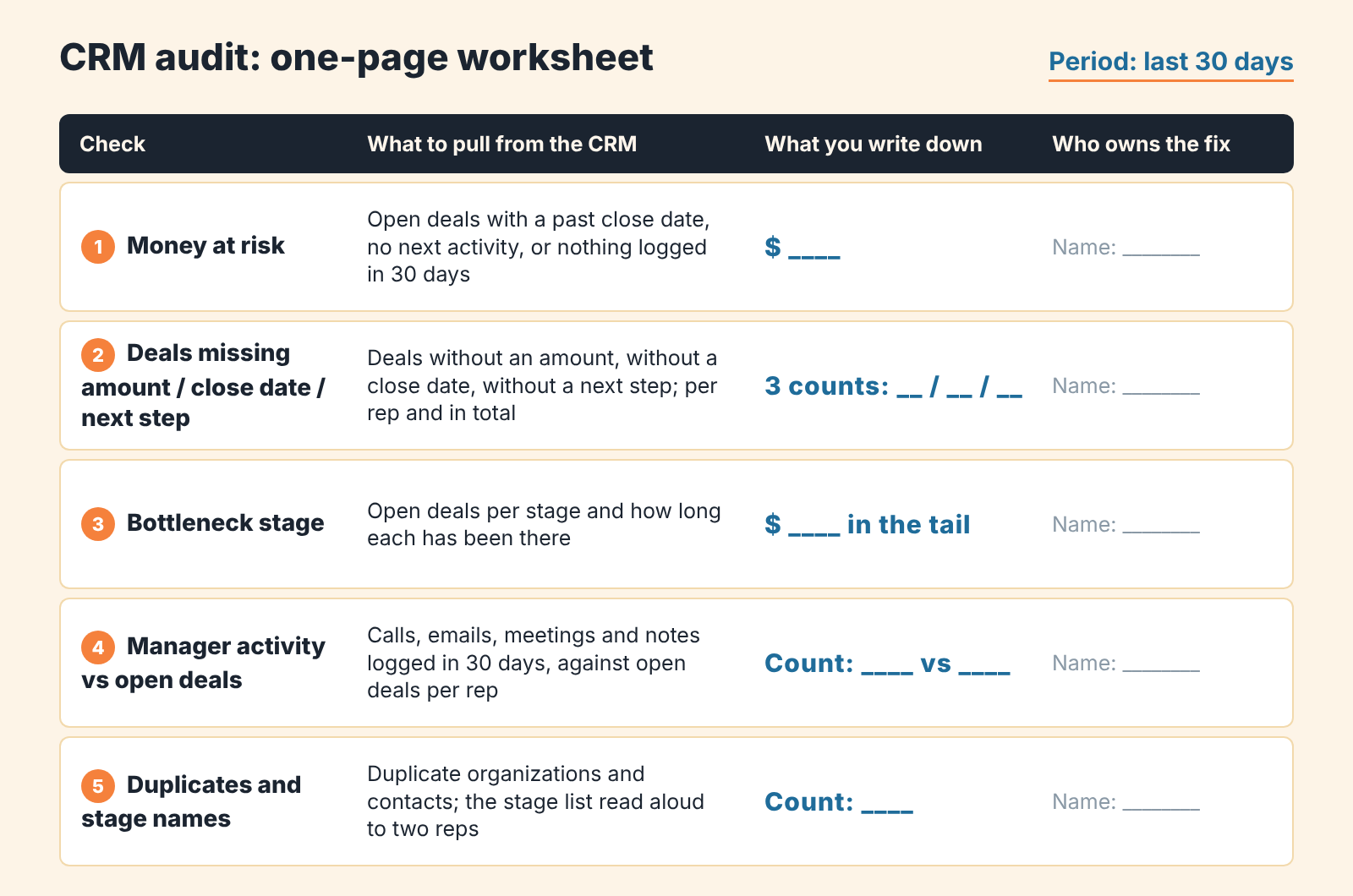
A CRM audit is a structured review of the last 30 days of CRM data that ends in a short list of fixes ranked by the money they protect. The CRM audit checklist has five checks: money at risk; deals missing an amount, a close date or a next step; the stage where deals stall; rep activity against open deals; duplicates and stage names.
Some teams call this a CRM review or a CRM health check; the work is the same. Write down at most five fixes with a money figure next to each, and measure again a week later. An owner or a head of sales can do the first pass alone.
The five checks
This is the CRM audit checklist, and it is deliberately short. You won’t find the usual twenty-row column of “verify this field is populated” here; the metrics for that live in CRM data quality metrics, and an audit that starts from fields rarely gets to the money. Run the checks in this order. The first tells you how big the problem is, the other four tell you where it comes from. For a team on Pipedrive we wrote a separate step-by-step with the exact filters (Pipedrive audit); this version is CRM-neutral and works from any pipeline export.
- Start with money at risk. Add up the value of open deals that fail at least one basic test: the expected close date has passed, there is no next activity scheduled, or nothing has been logged on the deal in the last 30 days. That total is your headline. Write it on the first line of the audit, with the period and the currency. It measures how much of the forecast leans on deals without evidence, a narrower claim than a loss forecast (what revenue at risk means and what it does not).
- Then count the gaps: deals without an amount, without a close date, without a next step. Three separate counts, plus the sum of deal values where a value exists. A deal with no amount is invisible in the forecast. A deal with no close date lands in whatever month the report defaults to. And a deal with no next step is one nobody has decided what to do with. Count per rep as well as in total, because the pattern is usually one or two people rather than the whole team.
- Find the stage where deals go to wait. For each stage, list the open deals and how long each has been there. One stage will have a tail: deals sitting for weeks past your usual cycle. That is your bottleneck, and its tail is usually the second-largest pile of money in the audit after check one. Often it is the stage after the proposal, because sending a proposal feels like progress and nobody schedules what comes next. On Pipedrive, a report of how old deals are in each stage does the listing for you.
- Compare each manager’s activity with the deals they own: calls, emails, meetings and notes logged in 30 days, against open deals. You are not grading effort. You are looking for the rep with the most open deals and the fewest logged activities, because that is where the money at risk from check one tends to hide. If a rep works outside the CRM and logs nothing, the audit can’t see their deals, and neither can the forecast.
- Last, duplicates and stage names. Duplicate organizations and contacts split one customer’s history across two records, so the biggest-clients list and the repeat-purchase view both lie. Stage names are the quieter problem. A stage called “Negotiation” that half the team uses for “sent a quote” and the other half for “verbal yes” produces a conversion report nobody can act on. Read the stage list aloud and ask two reps what each stage means. If their answers differ, that is a finding.
On a small pipeline with clean exports this is a manual job you can finish in one sitting. On a large one it stops being manual, and we come back to that below.
A CRM audit is not an audit log
The same name also covers the audit entity in Microsoft Dynamics and the audit logs in Zoho, meaning who changed which field and when. That is security and compliance work. It matters. It just tells you nothing about whether the pipeline number on your dashboard is true.
The audit we mean asks a business question. How much of the money in the CRM is real, and what is the cheapest change that makes more of it real? The checks look at deals, stages, dates and people. If your admin wants to review user roles at the same time, fine, but keep that out of this document. The fix list has to fit on one page.
We also keep it apart from a data cleanup. Cleanup is a routine: duplicates, formatting, empty fields, done every month (a monthly data cleansing routine for a small team). An audit happens when you suspect the number is wrong and want to know by how much. The cleanup fixes fields. The audit decides which fields are worth fixing first.
Why 30 days of data is enough
Thirty days shows the habits behind today’s pipeline: who logs calls, who schedules next steps, which stage deals pile up in, which reps touch their deals and which ones let them rot. Older data mostly shows habits the team no longer has.
A month also keeps the audit honest about size. Review every open deal, however old, and you are in for a day of archaeology. A 30-day window gives you the deals that moved and the deals that should have moved and didn’t. Both lists are short enough to read deal by deal.
There is one case for widening the window. If your sales cycle is longer than a quarter, a deal with no activity in 30 days may be perfectly normal. Keep the 30-day window for activity, but pull the full list of open deals for the stuck-deal check and compare time in stage against your own cycle rather than a generic threshold (how a deal health score sets that threshold).
Rank findings by money, not by count
Rank audit findings by the total deal value behind each one; the record count comes second. Here is where most audit checklists stop and where the useful work begins. A checklist gives you counts: so many deals without a close date, a handful of duplicates, a few deals stuck in Proposal. Counts invite the wrong fix. The long list of missing dates sounds like the biggest problem, but if those deals are small and the few stuck proposals are the largest deals in the pipeline, the stuck proposals come first.
So for every finding write the sum of deal values involved next to it. Where the amount is missing (check two), note the count and mark the value as unknown. That is itself a reason to fix amounts early, because you can’t rank what you can’t price.
Then sort. The top of the list is the finding with the most money behind it that a single person can act on this week. A finding with a large sum and no clear owner moves down. It matters just as much; it simply won’t get done. Stage-naming confusion usually lands near the bottom by money and near the top by how much it distorts every other number, so we give it a fixed place: last on the list, with a date.
We think this ordering is the whole point of the audit, and it is where we part ways with the usual twenty-row checklist, because a CRM with perfect fields can still carry a forecast nobody believes.
The five-item fix list and who owns each
Five items, no more. Each one is a sentence someone can act on, with a name and the money it protects. Here is the shape, minus the money figures, which will be yours:
- Reschedule or close every deal that is past its close date with no next step. Each rep owns their own deals; the manager reviews on Friday.
- No deal leaves qualification without an amount. The manager enforces it in the Monday review.
- Work the tail of the Proposal stage: call every deal that has sat there longer than the usual cycle, and move the dead ones to lost with a reason (owner: the two reps who hold most of them).
- Merge the duplicate organizations found among the top-10 clients. Whoever administers the CRM.
- Head of sales rewrites the stage definitions in one line each and agrees them with the team by a set date.
Notice what is not on the list: “improve data quality”, “use the CRM more”, “train the team”. Those are wishes. If a finding can’t be turned into a sentence with a verb, a deadline and a name, it stays in the appendix until it can. And keep one owner per item. Two owners means the item is nobody’s, and you will find it untouched at the seven-day check.
Seven days later: what should have changed
Run the same five checks on the same pipeline a week after the fix list goes out. Same period length, same definitions, so the numbers compare.
What you expect to see is narrow and specific. Money at risk should go down, because every deal past it’s date was either rescheduled with a next step or closed as lost. The count of deals without amounts should drop to near zero for anything past qualification. The Proposal tail should be shorter. Activity on the reps named in the list should be up, and if it isn’t, the Friday conversation is about that rather than about the CRM.
Say one thing out loud to the team before the second reading: lost deals going up in the first week is normal. The audit found deals that were already lost and nobody had admitted it. A pipeline that shrinks after an audit has just told the truth, and the forecast built on it is smaller and real.
If nothing moved, the list was wrong or the owners were. The second measurement is what tells you which, and that is why the audit is two readings.
How often after that? We think a full audit twice a year is enough, plus one whenever the forecast and the result disagree by more than you can explain. Between full audits, a weekly look at the same numbers does the job. If you find yourself re-auditing by hand every month, what’s missing is a weekly review.
Manual audit vs CRM Report
Who should run the manual version? The person who owns the pipeline number: the head of sales in a team that has one, the owner in a team that doesn’t. Not the CRM admin and not the most senior rep. The admin can pull the exports, but ranking by money is a management decision.
Everything above can be done with exports and a spreadsheet. We think an hour or two is a fair budget for a pipeline of around 30 deals, if the exports are clean; the fix list takes longer than you’d expect, mostly because of the arguing about owners. Past that size the manual version gets skipped. People still care. But check three means reading every deal in every stage and check five means reading every organization, and nobody does that on a Tuesday afternoon with a quarter to close.
That is the problem we built CRM Report around. It is SalesBond’s free CRM audit: you connect your CRM, SalesBond looks at the last 30 days, and you get a large PDF with the same structure this article describes, run across every deal rather than a sample. Money at risk comes first, with a CRM score made of five sub-scores and the top three findings. Then what is happening: managers, deal health, the pipeline bottleneck, repeat customers, the top-10 clients. Then what to fix: up to five cards sorted by the money behind them, which is the fix list from above, already ranked. The report also reviews your pipelines and stage names, the part of the manual audit that tends to get skipped.
Seven days later a second PDF arrives showing what changed, if the team worked on the findings. After that the report stays weekly, so the re-check stops being a thing someone has to remember.
Two honest limits. The numbers in the report are computed directly from the CRM data; AI writes only the summary text and the stage-name suggestions, so what you get is the same arithmetic you would do by hand. And the report finds and ranks. It does not have the Friday conversation for you. If one rep holds most of the open deals and logs almost nothing, the PDF will show it on the managers page, and the fix is still a person’s job.
CRM Report works with Pipedrive, HubSpot, Salesforce, Zoho CRM, Microsoft Dynamics 365, Freshsales, Close, monday CRM, Copper, Zendesk Sell, Nutshell, Insightly, Attio, Bitrix24 and Kommo (amoCRM). If you want the 30-day check without the spreadsheet: Check your CRM with SalesBond.
For the weekly rhythm after the audit, the same checks fold into a 15-minute weekly pipeline review. The ongoing per-deal version of checks one and two is what Deal Health runs on every deal, all the time (SalesBond’s at-risk deals view).
Want the the second reading without doing the first by hand? Start with SalesBond and your first report covers the last 30 days.