
Salesforce is a cloud software company and platform best known for its CRM, Sales Cloud: it keeps leads, accounts, contacts and deals in one place so a team can see the pipeline and forecast from the same records. It is flexible and widely used from small teams to very large companies, which is also why it takes some setup.
Before the first login, a sales manager needs a little more: how the data is organized, what you will actually see on your screen, what it costs, how hard it is to learn, and what to do in the first 30 days so the numbers you report are numbers you can defend.
The short answer, and what SFDC means
If someone says “we’re on SFDC”, they mean Salesforce. The company’s own FAQ puts it this way: “SFDC stands for Salesforce.com, which is a cloud-based customer relationship management (CRM) and agentic AI platform” (Salesforce: What is Salesforce?, checked 2026-10-31). People use the two names interchangeably.
Three words get mixed up in conversations about Salesforce, so here they are side by side.
Salesforce is the company and the whole platform. Sales Cloud is the product inside it that a sales team uses: leads, accounts, contacts, opportunities, reports, forecasts. Your org is your company’s own instance of Salesforce, with its own users, fields and settings. When an admin says “it’s not in our org”, they mean your company’s copy does not have that field or feature turned on. Salesforce itself may well have it.
You will also see the phrase “the world’s #1 AI CRM” on Salesforce’s CRM page. That is Salesforce talking about itself. The ranking behind it comes from IDC: Salesforce’s ranking page cites IDC’s Worldwide Semiannual Software Tracker (April 2026) for CRM revenue market share, checked 2026-10-31. For a sales manager the size matters for one practical reason. Most hires, consultants and tools already know the system.
Salesforce CRM in one picture: Sales Cloud and the other clouds
A sales manager rarely needs more than one of the Salesforce products, but you will hear all of their names in the first week, usually from someone trying to sell you another one. The product menu on Salesforce’s own site lists Agentforce, Sales, Service, Marketing, Commerce, Analytics, Slack, Small Business, Data and Salesforce Platform (Salesforce product menu, 2026-10-31).
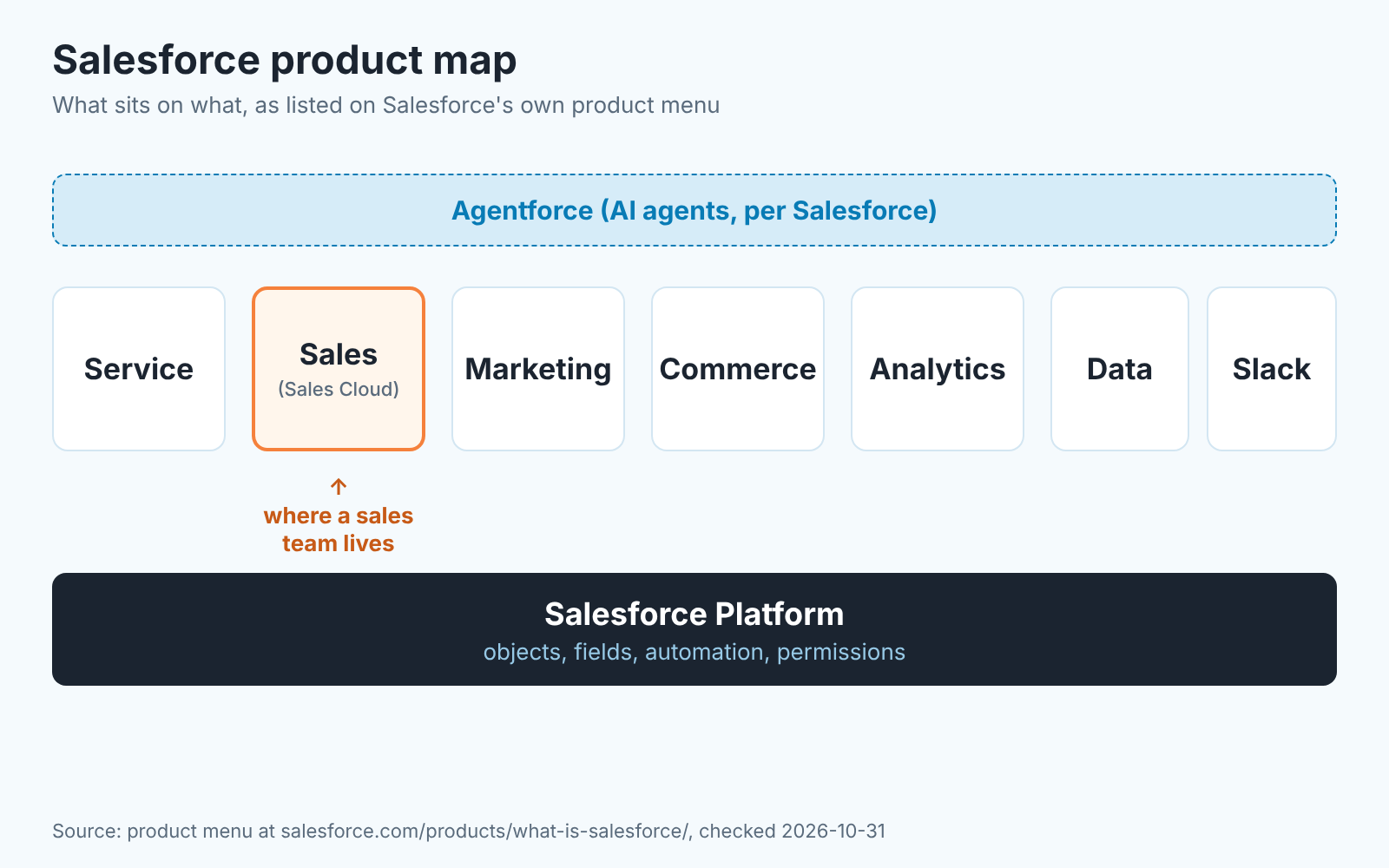
Read it like this. The Platform is the floor: the database of objects, the permission model, the automation tools. Each “cloud” is a set of screens and logic built on that floor for one department. Service is for support cases, Marketing for campaigns and email, Commerce for online stores, Analytics and Data for reporting and data pipelines. Agentforce is the name Salesforce gives its layer of AI agents. We have not tested it against sales data, so we leave it at that.
For a sales team, the picture collapses to two things: Sales Cloud, where your reps work, and the Platform underneath it, which is what your admin edits. Almost every “can Salesforce do X?” question has teh answer “yes, on the Platform, if someone builds it.” That flexibility pays off only when someone has the time to build on it.
How the data is organized: four objects and one conversion
Salesforce stores data in objects, which are the equivalent of tables. Trailhead, Salesforce’s own training site, puts it plainly: “we think about database tables as objects, we think about columns as fields, and rows as records.” The same unit names Account, Contact, Lead and Opportunity as common standard objects, the ones “included with Salesforce” (Trailhead: Data Modeling, objects intro). You can add custom objects for anything your business tracks that Salesforce does not ship with.
Those four standard objects are the ones a sales manager must understand, because every pipeline number is built from them.
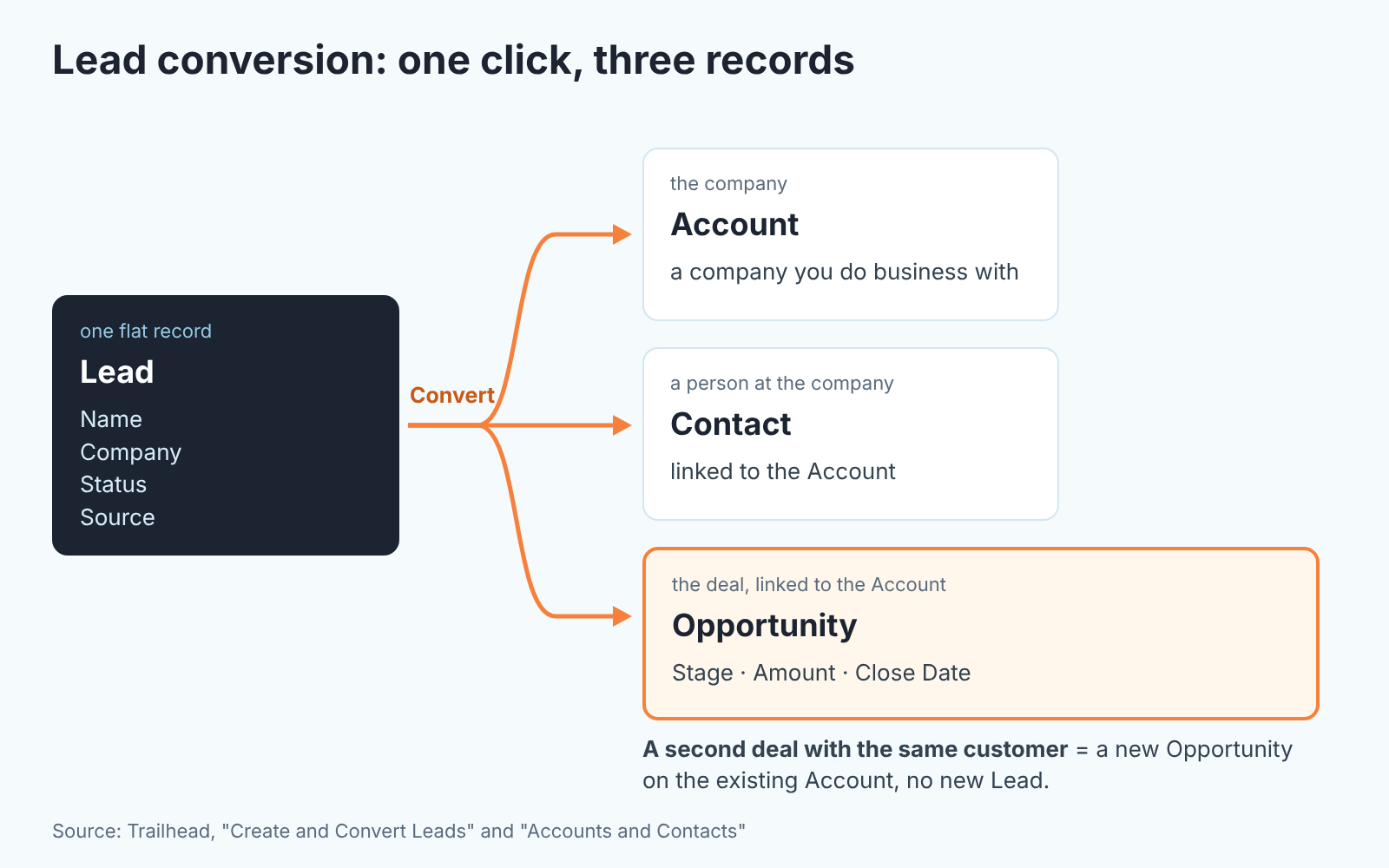
A Lead is someone who has shown interest but is not yet a customer. Trailhead’s wording: “a lead refers to a potential sales prospect, person, or company that expressed interest in a product or service, but hasn’t yet become a customer” (Trailhead: Create and Convert Leads). A lead is a single flat record. The company name, the person’s name and the potential deal all sit on one card.
An Account is a company you do business with, and a Contact is a person who works there (Trailhead: Accounts and Contacts). One account, many contacts. This is where Salesforce differs from a spreadsheet: the person and the company are separate records that point at each other.
An Opportunity is a deal. Trailhead says “opportunities represent potential sales” and that you can create them “for existing accounts or by converting a qualified lead” (Trailhead: Work Your Opportunities). An opportunity has a stage, an amount and a close date, and it belongs to an account. Your pipeline and forecast are made of these records and nothing else.
The hinge between the two halves is conversion. When a rep converts a lead, “Salesforce uses the information stored in the lead record to create a business account, a contact, and an opportunity” (Trailhead). One click, three records. If the company already exists as an account, the rep picks the existing one instead of creating a duplicate.
Why should a manager care? Because this mechanic decides where your conversion rate lives. Lead-to-opportunity conversion is measured at the Convert button. Win rate is measured on opportunities. If your reps create opportunities directly and skip leads for inbound requests your lead conversion report will be empty and your win rate will look inflated, because the unqualified work never entered the system. We cover the practical split in when a Salesforce lead should become an opportunity, and the related question of who gets credit in opportunity teams vs account teams.
One more thing the diagram hides. Salesforce lets an org use several record types for the same object, so a “New business” opportunity and a “Renewal” opportunity can have different stages and fields. Useful, and also the first place where forecasts quietly stop adding up; read record types for new vs renewal opportunities before you turn it on.
What a sales manager sees: pipeline, forecast, reports
Open Sales Cloud as a manager and you are looking at opportunities grouped three ways: by stage (the pipeline), by close date (the forecast), and by whatever you ask for (reports). The same records, three cuts.
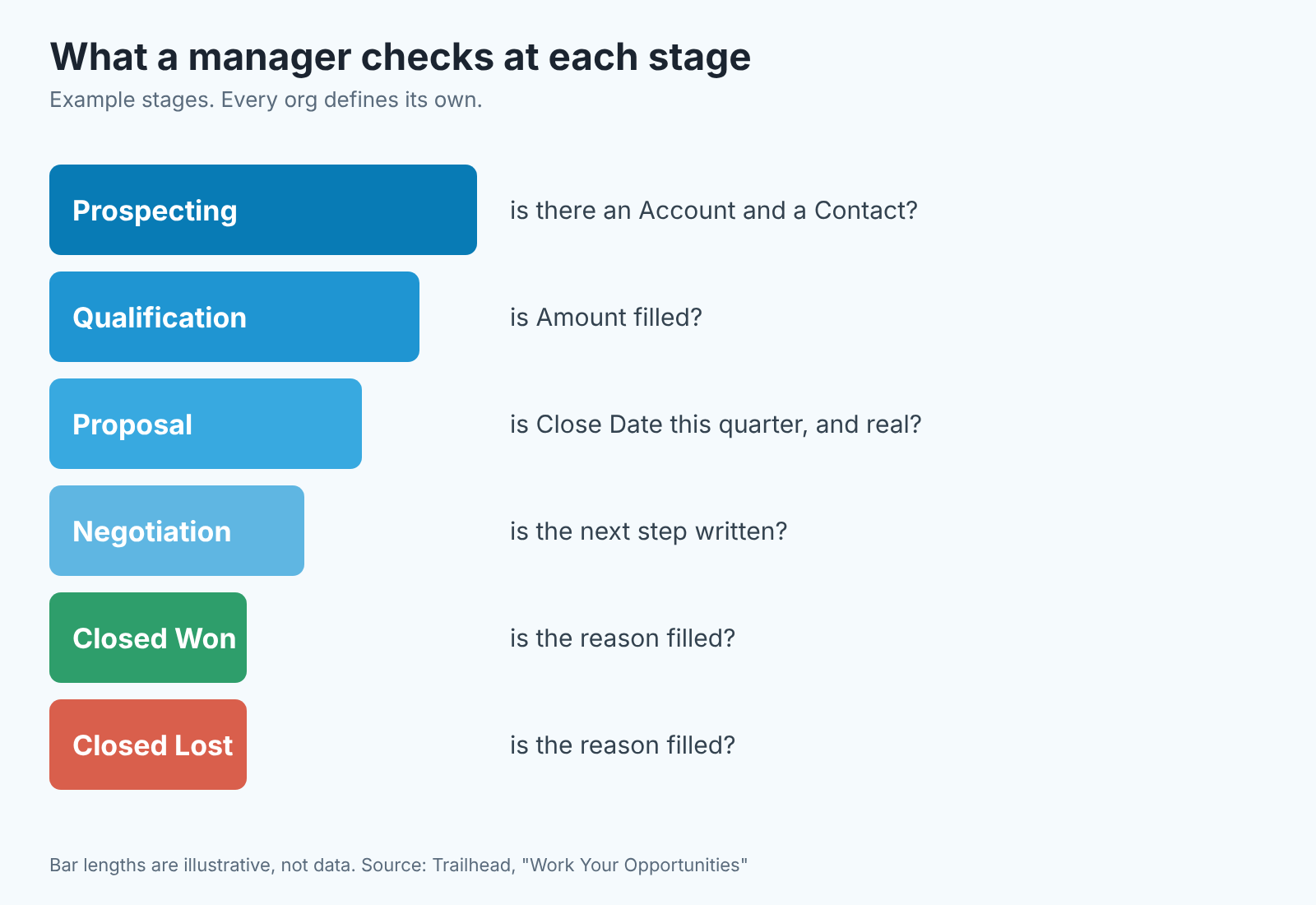
Start with the pipeline. Each opportunity sits in one stage. Trailhead describes stages as “linked to the types of tasks being performed, and the likelihood of completing the sale”, gives Prospecting through Closed/won and Closed/lost as an example, and then adds the sentence every new manager should underline: “every company has a different sales process. The stages your company uses for opportunities may differ” (Trailhead). Salesforce does not know what “Proposal” means at your company. Your admin typed that word in, and your reps decide when to move a deal there. The pipeline view is honest exactly to the degree that the stage definitions are written down and followed.
Reps move deals between stages with Path, a strip of stage buttons at the top of the opportunity record, or by dragging cards between columns in the Kanban view, which “by default” is organized by Stage (Trailhead: Path and Kanban). Watch the Kanban board for a week and you learn more about your team’s habits than from any report: deals that jump two columns at once, deals that never move at all.
The forecast is the same opportunities read by close date and stage: what is expected to close this month or quarter, and how confident the rep is. Our position: do not trust the forecast number until you have checked two fields on the deals behind it, Close Date and Stage. A close date that moves every Monday means the rep does not know when the deal will close, and Salesforce will add it to the total anyway.
Reports are where Salesforce earns its reputation in both directions. You can build almost any cut of the data without code: opportunities by owner by stage, activities per rep per week, accounts with no open deal. You can also build a report that looks right and is wrong, because you picked the wrong report type or joined two objects that do not relate the way you assumed. For a weekly review, Pipeline Inspection is often enough; Trailhead calls it “a consolidated view of your entire sales pipeline, offering insights into the number, value, and stages of opportunities” (Trailhead). When you need something custom, start with our comparison of joined reports vs matrix reports. Picking the wrong one is the most common reason a manager’s first report “doesn’t match”.
What reps do in Salesforce all day
A rep’s Salesforce day is mostly small writes: a call logged, a task closed, a next step typed, a stage changed. Your reports are made of those small writes, so the the manager’s job is to make them cheap and to decide which ones are mandatory.
Our rule for a team new to Salesforce: every open opportunity has a next step written in words and a dated task behind it. Two fields, no more. Ask for ten and you get ten blanks. Where the narrative goes, into Chatter posts on the deal or into Notes and Tasks, has a real answer that depends on how your team reads deals; we worked it through in Chatter deal updates vs notes and tasks.
The second habit worth setting early is who writes the next step. Salesforce can suggest actions, and a manager can also simply check that a rep’s own next step makes sense. Those are different things, and the difference shows up in how much reps trust what the CRM tells them. We compared the two in Next Best Action vs a rep’s next step with a manager check.
Fixing fifty records at once after a territory change is neither a rep task nor a manager task. It is an admin job with two standard tools; see Data Loader vs Workbench for bulk updates.
What Salesforce costs
Sales Cloud runs from $0 to $550 per user per month. On the Salesforce Sales pricing page, checked 2026-10-31, Free Suite is $0, Starter Suite $25, Pro Suite $100, Core $195, Advanced $395 and Max $550, all in USD per user per month. Starter Suite is the only paid edition billed monthly or annually; from Pro Suite upward, billing is annual. The page calls itself “provided for information purposes only and subject to change” and sends larger buyers to a sales representative, so read these numbers as a dated snapshot.
The annual billing is the part people miss. Past Starter you are committing for a year, and a feature your reps saw in a demo may live two editions up. Write down what you actually need before you buy and check which edition has it. Quoting is a good example: Salesforce has standard quotes and a separate, more complex CPQ product, and a small team rarely needs the second; see CPQ vs standard quotes for a small team. The price list also leaves out the time of whoever configures and maintains the org.
Is Salesforce hard to learn?
For a rep, no. The daily screens (a lead, an opportunity, a task list, Path at the top of the record) are learnable in a week, and the Kanban view is as simple as a board of cards.
For the person who sets it up, yes, and the reason is the same reason Salesforce is popular. Almost everything is configurable: which fields exist, which are required at which stage, what the stages are called, who can see what, what happens automatically when a deal closes. That flexibility is why large companies choose it and it is also why a ten-person team can end up with a system nobody understands six months later, because three people configured it in three different ways.
We think Salesforce needs an owner. It can be a part-time role: one named person who approves every new field and every change to stages, and who knows their way around Setup. In a small company that is often the sales manager, which means the sales manager has to learn more than the reps do. Budget time for it. Trailhead is free and genuinely good for this. We linked its units throughout this article instead of paraphrasing them on purpose, because the vendor documents its own data model well.
Then there is the vocabulary: org, object, record type, page layout, profile, permission set, report type, Path, Kanban, Sales Cloud, Platform. None of it is hard but there is alot of it at once, and the first month feels like learning a language where every word is almost English. It passes.
Who Salesforce fits, and who should look at a simpler CRM
Salesforce fits a team that already knows its sales process and wants the system to enforce it. If you can write down your stages, your required fields and your approval rules, Salesforce will hold the line on all of them, and it will keep holding the line as you grow from ten reps to two hundred. Multiple products with different sales motions, several regions, a renewal business alongside new business: these are the situations where the record types, custom objects and permission model stop being overhead and start being the reason you bought it.
A simpler CRM is often the right call when the process is still forming. If the honest answer to “what are our stages?” is “it depends on who you ask”, then configuring Salesforce means freezing an argument into software. A team of three to eight reps selling one product with one motion usually gets more from a CRM that works well on the first day and is harder to misconfigure.
A test we use: who would own the configuration a year from now? If you can name the person, Salesforce is a reasonable choice at almost any size. If the answer is “we’ll figure it out”, pick something that does not need figuring out, and come back when the process is stable.
Salesforce vs HubSpot, Zoho CRM and Pipedrive, briefly
Each pairing has its own checklist, and all three start with the data model. Salesforce keeps Lead, Account, Contact and Opportunity as separate standard objects joined by lead conversion, so check how the other tool handles the same split before anything else. Against HubSpot, the decision usually turns on the marketing-to-sales handoff and how much configuration you want to own; our HubSpot vs Salesforce checklist for sales managers goes field by field. With Zoho CRM, price per seat and the breadth of the surrounding suite come up first, and the Zoho CRM vs Salesforce checklist lists what to verify in a trial. Pipedrive is almost always a question of process maturity, a pipeline-first tool against a platform; see the Salesforce vs Pipedrive checklist. Teams that also have a board-style CRM on the shortlist can start with what monday CRM is.
If you have not settled what a CRM should do for your team at all, start one step back with what a CRM is, for a sales team, with diagrams (or Salesforce’s own general explainer, What is CRM?).
A sales manager’s first 30 days in Salesforce
You do not need to learn Salesforce in 30 days. You need the numbers coming out of it in month two to be numbers you believe. Here is how we would spend the month.
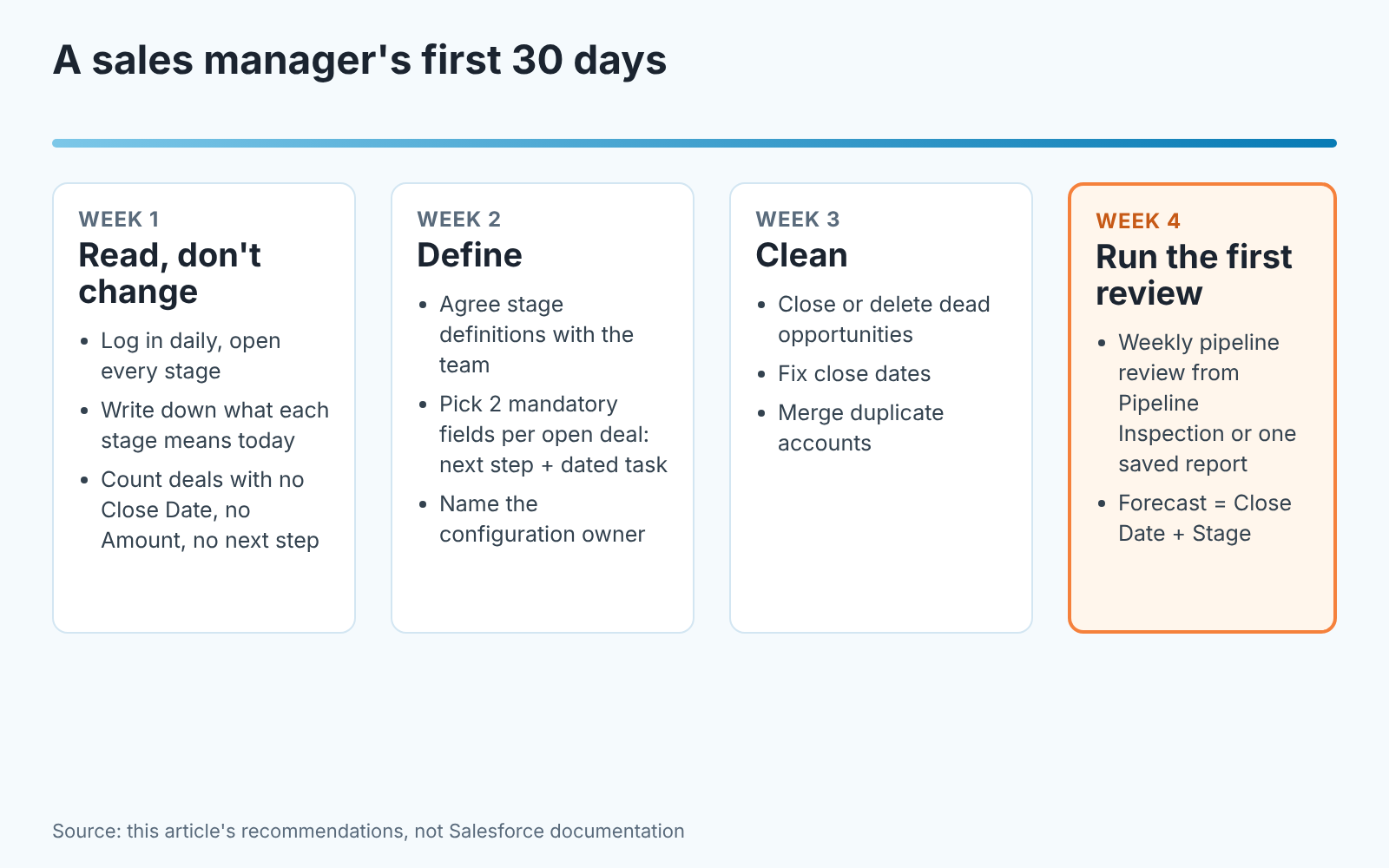
In week one, read and do not change anything. Log in every day. Open the pipeline by stage and the Kanban board. Click into twenty opportunities and look at three fields on each: Stage, Amount, Close Date. Count how many have a close date in the past, how many have no amount, how many have no activity logged in the last month. Write the counts down. That is your baseline, and it is usually worse than anyone expected, which is fine; nobody was looking. If you would rather not count by hand, SalesBond’s free CRM audit reads the last 30 days of a connected Salesforce org and sends a PDF report with deal health and what to fix, then a second report a week later showing what changed.
Week two is for definitions. Sit with the reps and write one sentence per stage: what has to be true for a deal to be here. Pin it somewhere visible. Decide the two fields every open opportunity must have (we recommend a written next step and a dated task) and ask your admin or configuration owner to make them required at the stages where they matter. Name that owner out loud. From now on, new fields go through them.
Week three is cleanup. Go through every opportunity with a past close date and either move the date to a real one or close it as lost with a reason. Merge duplicate accounts. Convert or disqualify leads that have sat untouched. This is boring and its the single highest-return week of the month, because every report after this one is built on cleaner records. If there are hundreds of records to fix, reach for the bulk tools and spare a rep’s Saturday.
In week four, run the first real review. Pick one view (Pipeline Inspection or a saved report by owner and stage) and hold the weekly pipeline review from it and only from it. Read the forecast as what it is: opportunities with a close date in the period, by stage. Ask about the deals behind the number. If a rep cannot say what the next step is, the deal moves back a stage. Say upfront that this move keeps the pipeline honest, so nobody reads it as a penalty.
By the end of the month you will know your pipeline, even with most of Salesforce still unfamiliar. Next month, pick the one report you trust most and make it the only number you bring upstairs.
FAQ
What is Salesforce and why is it used? Salesforce is a cloud CRM platform; its sales product, Sales Cloud, stores leads, accounts, contacts and opportunities so a team can run its pipeline, forecast and reports from one set of records. Companies use it because it is highly configurable and scales from small teams to very large ones (Salesforce).
What does SFDC stand for? Salesforce.com, per Salesforce’s own FAQ (source, 2026-10-31). People use SFDC and Salesforce interchangeably.
What is an opportunity in Salesforce? A deal: a record with a stage, an amount and a close date, attached to an account. Opportunities are created for existing accounts or by converting a qualified lead (Trailhead).
Who is Salesforce’s biggest competitor? It depends on the segment. For small and mid-size sales teams the alternatives most often weighed against it are HubSpot, Zoho CRM and Pipedrive; our checklists for each pairing are linked in the comparison section above. We do not rank them.
How do I explain Salesforce to someone? “It’s a database of our customers and deals that everyone on the team works in, and it can be shaped to match how we sell.” If they ask a second question, show them the Kanban board. Microsoft shops ask the same question about Dynamics, and for them we wrote up what Dynamics 365 CRM is for a sales manager.


