
monday CRM is a sales CRM built on the monday.com platform: leads, contacts, accounts and deals live on boards, the same board-and-column interface monday sells for project work. It is a separate product from monday work management, which the help center now calls the monday AI work platform. The CRM is sold per seat per month in four tiers, with a 14-day free trial and no permanent free plan (monday CRM pricing, checked 2026-11-03).
What is monday CRM? The short answer
The vendor’s page title reads “AI CRM Software | monday CRM – Revenue Execution Platform”, and the page pitches it to marketing, sales and delivery teams (monday.com/crm, checked 2026-11-03). Strip the positioning and you get four core boards, Leads, Contacts, Accounts and Deals, tied together with Connect Boards columns (monday: Get started with monday CRM).
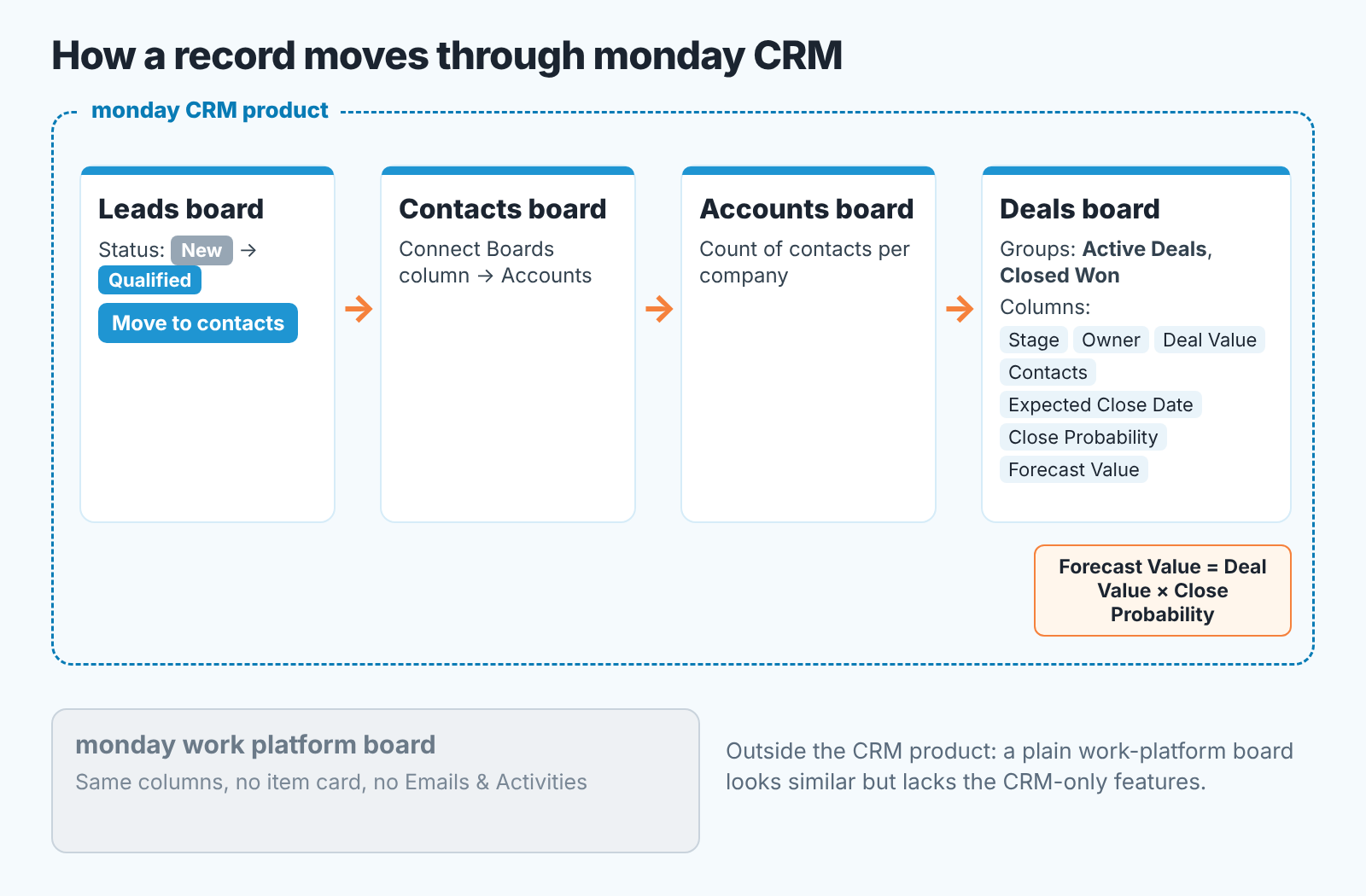
Here is how a record moves. A lead lands on the Leads board. A rep qualifies it, sets the status to Qualified and clicks Move to contacts. From the Contacts board it gets linked to an account, and from there to a deal. The core boards and their columns cannot be deleted or duplicated; the help center calls them “essential to the product’s workflow”.
If your team has never run a CRM, this is an easy model to explain, because a board looks like the spreadsheet they are probably using today. What a CRM should do for a sales team in general is covered in What is a CRM: a sales team guide with diagrams.
monday CRM vs monday work management
Half the confusion around “monday” comes from one company selling two products on one interface, which is why people still ask whether monday is a CRM at all, and why a Reddit thread on the question had to put “not Monday Workmanagement, CRM” in its title to get the right answers.
Both products are built from the same boards, columns, views and automations. The difference is what ships on top. The work platform gives you generic boards you shape yourself. The CRM ships the entity boards with CRM-only features attached, such as the item card and Emails & Activities, plus a dedicated CRM view in the mobile app. monday’s own migration guide draws the line clearly. You can move an existing work-platform board into monday CRM as it is, but then you “need to manually add exclusive monday CRM features to the desired boards”, and in the mobile app the board “will behave like a regular board rather than a CRM board” (monday: Migrate your data from monday AI Work Platform to CRM). One detail from the same article that catches people out: teammates assigned to the moved boards become viewers, and you have to give them full member access again.
So if your company already runs projects in monday, the CRM is still a separate product you install and buy on its own. That matters for the budget conversation, and for the “we already pay for monday” objection you will hear from finance.
monday CRM pricing and plan limits (checked 2026-11-03)
monday CRM pricing depends on two things the page asks you to pick: the plan and the team size. The figures below are what the pricing page showed on 2026-11-03 with its default of 10 seats selected, per seat per month. The first number is yearly billing, the one in brackets is month-to-month. Change the seat count and the page may show something else, so treat these as a snapshot.
Basic costs $12 ($18). It covers leads, contacts and deals on boards, with 1 workspace, 1 custom dashboard, 1,000 active contacts & deals, 5 columns per board max and 20 quotes & invoices a month. The card lists no custom automations.
Standard costs $17 ($25). The caps rise to 3 workspaces, 5 custom dashboards, 10,000 active contacts & deals, 15 columns per board and 50 quotes & invoices a month, and you get 250 custom automations a month. It adds the centralized comms hub (every email, call, meeting and note for a person in one timeline), the iOS and Android apps, and AI credits.
Pro costs $28 ($41): 15 workspaces, 50 custom dashboards, 100,000 active contacts & deals, 75 columns per board, 250 quotes & invoices and 25K custom automations a month. On top of Standard it adds mass emails, email sequences and the AI workflow builder.
Ultimate is a custom price through sales; the page notes that “Ultimate is a new name for our Enterprise tier”. Contacts & deals, columns, dashboards and quotes are unlimited, automations are “enterprise-scale”, and the API allowance is 25,000 calls a day. It adds security and governance controls, advanced permissions, HIPAA compliance, advanced log rules and white-glove migration.
The FAQ on the same page fills in the rest. Plans start from 3 users, teams above 40 users request a quote, prices exclude tax and depend on your billing country, and monthly plans are not discounted.
Two lines deserve a second read. “Active contacts & deals” is listed as one shared figure, so on Basic your contacts and your open deals draw on the same 1,000. And Basic’s “5 columns per board max” is worth holding up against the board you plan to build before you pick that tier.
The sentence that matters most for a small team is in the FAQ: the “first option to use monday CRM for free is a 14-day trial”, after which you need a paid plan. There is no free-forever tier, which is the clearest difference from the HubSpot setup many teams compare it with.
First setup: pipeline, required fields, owner
Open the Deals board before you touch anything else. It comes with two groups, Active Deals and Closed Won, and seven columns: Stage (a Status column), Owner (People), Deal Value (Numbers), Contacts (Connect Boards), Expected Close Date (Date), Close Probability (Numbers) and Forecast Value, a Formula column that multiplies Deal Value by Close Probability (monday: Sales pipeline management with monday CRM). The Kanban view on the same board is your pipeline. Drag a card between Stage labels and the deal moves.
Your pipeline, then, is the list of labels on the Stage column. Rename them to the words your team uses on calls, keep five or six open stages, and give each one an entry rule you can say in one sentence. A stage without a rule becomes a parking lot within a month. I would also hold off on a Closed Lost group on day one; mark lost deals with a Stage label first and see whether the team actually fills in a reason before you build structure around it.
Required fields go through the item creation form. monday lists it for monday CRM on the Basic, Standard, Pro and Ultimate plans, and only a board owner can switch it on: three-dot menu in the upper-right corner of the board, Board options, Enable item creation form. To make a field required, click to create a new item, hit the pencil icon in the top-right corner of the form, select the field and turn on the required setting. A field has to be visible in the form before it can be required. monday’s own example is making sure “every new deal has an owner assigned” (monday: Customize Item Creation Form in monday CRM).
Three required fields are enough to start: Owner, Deal Value and Expected Close Date. Keep in mind the form appears when someone adds a new item by hand. Deals already on the board are not touched by it.
You may also run into the board-level “Set column as required” setting. Its help article lists the monday AI work platform, monday dev and monday service, on Pro and Enterprise plans, and does not list monday CRM (monday: Required columns). For a CRM board, the item creation form is the route monday documents.
Owner is a People column, and the help center is plain about why it exists: “visibility and accountability”. Every deal gets exactly one owner on day one, because a deal two people share tends to wait for each of them to move first.
The reports worth opening every Monday
Start with the funnel chart. It is available only on monday CRM, shows the current count or value per Stage label and calculates the conversion percentage between labels, from New through to Won. You pick a Status column for the X axis and a Numbers column for the Y axis (sum, average or median), and you can filter by owner (monday: The Funnel Chart). Filter by owner before your one-to-ones. The conversion step that drops for one rep and not the others is your coaching conversation.
The Deal Stages widget lives in the Overview tab of a deal’s updates section on the Leads and Deals boards and shows how long the deal spent in each stage (monday: The Deal Stages widget). It works one deal at a time, so it answers “why is this one stuck”, and the funnel chart answers “where do we lose deals”.
For the plan number, the Sales Gauge widget is on all monday CRM tiers. It reads an actual value from a column, deals won for example, against a target you type into the widget settings (monday: Sales Gauge Widget). The fuller Forecasting view, with sub-targets per rep and a breakdown by stage or by forecast category such as Commit, Best Case and Pipeline, is a board view on the Deals board for Pro and Ultimate. The help article notes it is “being rolled out gradually” (monday: The Forecasting View).
Pro and Ultimate also list a Deal Insights widget that flags at-risk deals on the item card. It is in BETA, being released to Ultimate customers first, and the article says it “may require an additional charge in the future” (monday: The Deal Insights Widget).
What to test in the 14-day trial
Fourteen days is enough if you test the things that are hard to undo later and leave the easy ones for after you buy. The same logic holds for any CRM trial, including Attio’s, covered in what Attio CRM is.
Start with the cap. Import your real contacts and open deals, the full set, and watch the “active contacts & deals” count against the plan you intend to buy. If a clean import already puts you near the Basic limit, you are on Standard, and the price conversation changes before anyone has fallen in love with the Kanban view.
Then automations, if Standard is on the table. Build the two or three you would actually run (deal moves to Proposal, create a task for the owner; close date passes, notify the manager) and work out how fast 250 a month goes at your real deal volume.
Next, required fields. Enable the item creation form, make Owner, Deal Value and Expected Close Date required, and have a rep create five deals. Watch what they type into Deal Value when they do not know it yet. Zero, 1 and 999999 are the usual answers, and each one breaks the Forecast Value column in its own way.
Email is the fourth check if you are weighing Standard or Pro. Connect one rep’s mailbox, log a week of real activity, and see whether the the timeline on the item card is complete enough that you would stop asking “did you follow up?” If the team lives in a shared inbox or in WhatsApp, you may be paying for a view nobody opens.
Fifth, the Monday meeting. Run one real pipeline review from the funnel chart filtered by owner, with no spreadsheet open . If you reach for the spreadsheet within ten minutes, write down why. The reason is either a missing column or a missing report, and both are cheaper to fix during the trial.
Last, mobile. Open the dedicated CRM view in the app and hand it to a field rep for an afternoon. They will tell you quickly whether they can update Stage from their car.
Who it fits, and who should compare first
We are not going to grade monday CRM, because a verdict without your pipeline in front of us would be a guess. What the vendor pages do show is the kind of team it was built for: one that already thinks in boards, wants pipeline, contacts and accounts on one familiar interface, and is fine paying from day one, since there is no free tier after the trial.
A disclosure before the links. I build SalesBond, a sales management layer on top of the CRM a team already uses, and it works with monday CRM. If the trial ends and you are still not sure the Deals board can be trusted, our free CRM audit is one way to find out: SalesBond looks at the last 30 days of your connected CRM and sends a PDF with the money at risk, a CRM score, deal health, the pipeline bottleneck, repeat customers, the top-10 clients and what to fix. Seven days later a second PDF shows what changed. Check your CRM with SalesBond.
If you are choosing by the jobs a CRM has to do for a manager rather than by brand, CRM tools for a sales team compared by job runs the same checks (stage rules, required fields, next-step visibility, reports) across the tools we see most often. For the two systems people search against monday, What is HubSpot: a sales manager’s guide covers the free CRM and its caps, and What is Salesforce: a sales manager’s guide covers what an admin-run CRM asks of a small team. Picking a first CRM for a team of about five? How to choose a CRM for a sales team of five has the questions to ask before any trial.
FAQ
What is monday CRM used for? Running a sales process on monday.com boards: leads on a Leads board, qualified leads moved to Contacts and Accounts, and open opportunities tracked on a Deals board with Stage, Owner, Deal Value, Expected Close Date and a forecast formula (monday: Get started with monday CRM; Sales pipeline management with monday CRM). Reporting comes from dashboards and widgets such as the funnel chart.
Is monday a CRM? monday.com is a platform with several products. One of them, monday CRM, is a CRM; the work platform (monday work management) is not, although it uses the same boards. Work-platform boards can be moved into monday CRM, and the CRM-only features are then added on top (monday: Migrate your data from monday AI Work Platform to CRM).
Is there a free version of monday CRM? No permanent one. There is a 14-day trial, after which you need a paid plan; according to the pricing FAQ, nonprofits may qualify for free access or a discount after filling out monday’s forms (monday CRM pricing, checked 2026-11-03).
If you want the pipeline checked before you commit to a plan, start with SalesBond and run the free CRM audit on your trial account.


