
A roofing CRM tracks each lead from the first call or storm response through inspection, estimate, insurance approval, signed contract and installation. Pick a roofing-specific platform such as JobNimbus or AccuLynx if insurance restoration, crews and material orders drive the business. Pick a general CRM (HubSpot, Salesforce, Zoho CRM, Pipedrive or Microsoft Dynamics 365) set up with roofing stages if estimating and production already have their own tools and the sales pipeline is what you want under control.
We build SalesBond, a sales management layer on top of the CRM a team already uses, so the second class is the one we see from the inside. We will still tell you where the first class is the right call.
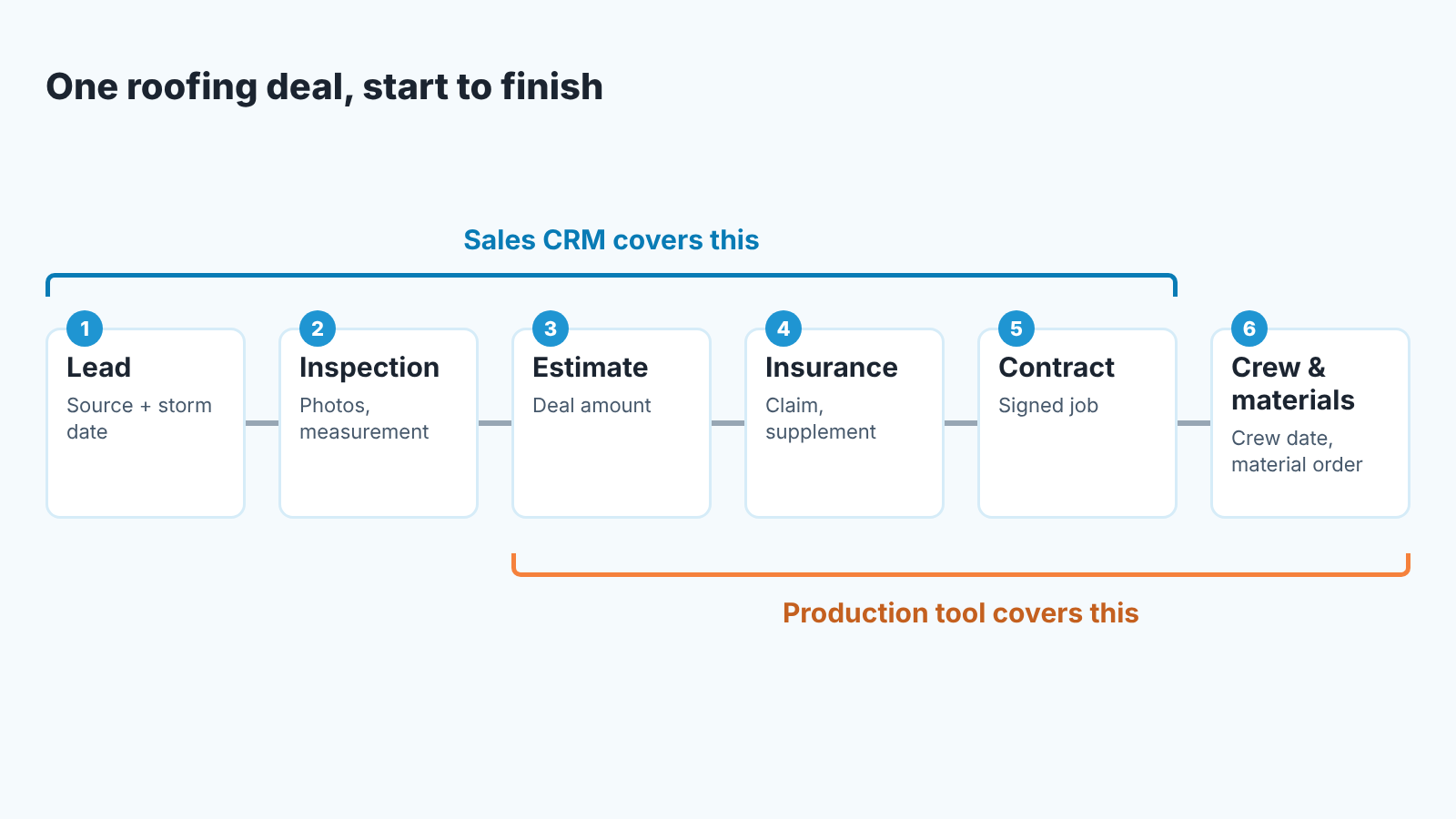
Sales jobs (an owner for each storm lead within the hour, weekly pipeline numbers, stale deals, duplicate customers) favour a general CRM. Production jobs (inspection with photos, the estimate, insurance claims, crew dates, material orders) favour a roofing platform, and each of them is something specific to ask for on a demo.
What a roofing CRM has to hold
A roofing deal is not a SaaS deal. It has five things attached to it that a plain contact-and-deal record does not carry on its own.
The lead source, with the storm date if there was one. A door knock after hail, a Google call, a referral from a past customer and an insurance adjuster’s list are four different pipelines in disguise, and they close at different rates. If the source is not a field on the deal, you will never know which marketing dollar to cut.
The inspection. Who climbed, when, with what photos, and whether a measurement was ordered. JobNimbus sells this as “Order precise roof measurements for any job” (JobNimbus features); in a general CRM it is an activity plus an attachment.
The estimate. In a roofing platform the estimate is the document that becomes the contract. In a general CRM the estimate is a number in the deal value field and the document lives in whatever tool produced it. Both work. What does not work is an estimate that is sent to the homeowner but never written back to the deal, because then the pipeline total is fiction.
The insurance file. For restoration work the claim, the adjuster’s scope and the supplement are their own timeline, often longer than the sales timeline. SimplyWise, in the most thorough competing roundup we found, scores roofing CRMs on five weighted criteria: pipeline and lead source tracking, insurance and supplement handling, production and crew scheduling, pricing transparency and mobile usability (SimplyWise: 12 picks for 2026). We agree with the list. We would add one thing it leaves out: how the system behaves when the same homeowner calls twice.
The crew. A signed job needs a crew date and a material order. This is production, not sales, and it is the job where the two classes of software differ the most.
Roofing CRM software: JobNimbus, AccuLynx and the ones we could not check
JobNimbus describes itself on its homepage as “Roofing CRM & Business Software Built to Scale” and lists four jobs in order: organize leads, optimize sales, manage projects, billing. The same page shows integrations with QuickBooks Online, CompanyCam, EagleView and SumoQuote (JobNimbus). The features page names estimates, measurements, invoicing, payments, a profit tracker and material orders sent from your estimates, and says SumoQuote is now part of JobNimbus (JobNimbus features). It also serves siding, gutter and fence contractors, so the roofing-only label is marketing; the product is an exterior-contractor platform.
AccuLynx splits its features into Sales/CRM, Production, Finance and Business Management, with crew management, a customer portal, text messaging and payments as named solutions (AccuLynx features). Its homepage says it is designed for roofing companies that primarily focus on residential insurance restoration and retail roofing (AccuLynx). If insurance work is most of your revenue, that sentence is the reason to put AccuLynx on the demo list.
Two more belong on most shortlists. Roofr calls itself an integrated workflow built for roofers: a CRM, instant estimates, proposals, measurements, payments and invoicing, and material ordering (Roofr). Leap sells two products, Leap CRM and an in-home sales app called Leap SalesPro, to roofing, remodeling and window contractors, and lists integrations with ABC Supply, CompanyCam, EagleView, QuickBooks, QXO and SRS (Leap). Both read like the JobNimbus pitch, which is exactly why the demo tests below matter more than the feature lists.
QuoteIQ ranks first in the search results for “roofing crm” and its snippet talks about satellite measurement and AI visualizations. Its website did not render in our text fetch, so we have no page to quote and we are not going to describe it from a snippet. Put it on the demo list if you like; don’t put it in a decision until you have seen it.
One more honest line. We did not confirm pricing for any roofing platform, so there are no prices in this article. Vendors change them, and a number copied from a roundup is a number you cannot defend to your partner.
General CRMs set up for roofing
A general CRM does not know what a shingle is. It knows deals, stages, owners, activities and custom fields, and that turns out to be most of the sales jobs listed at the top.
The setup is the same in all four (Pipedrive, HubSpot, Salesforce, Zoho CRM), and in Dynamics 365 Sales. One pipeline with the stages a roofing sale really passes through: new lead, inspection scheduled, inspected, estimate sent, insurance pending (if you do restoration), contract signed, scheduled for install. Then four custom fields on the deal: lead source, storm date, measurement ordered (yes/no), claim number. Then one rule: a new lead gets an owner automatically.
What each CRM gives you for that, from its own documentation:
In Pipedrive the pipeline view is the deal board, and the automatic assignment tool lets you set rules that give a new lead or deal to an owner; it is available on Professional and higher plans, with up to 50 rules per entity type (Pipedrive: automatic assignment, Pipedrive: pipeline view). Custom fields are there on every plan, but the number you can add depends on the plan (Pipedrive: custom fields).
In HubSpot, deal pipelines with custom stages are standard, and the limit on custom pipelines is the thing to check: free tools get none, Starter gets 15, Professional 100 on seat-based pricing (HubSpot: set up and manage object pipelines). One pipeline is enough for a roofing company; a second one for insurance claims is a reasonable use of the the second slot. HubSpot’s duplicates manager, which compares record properties daily and lets you merge pairs, needs a Professional or Enterprise subscription (HubSpot: review and manage duplicate records).
Salesforce offers small companies Free, Starter and Pro suites that put sales, service, marketing and commerce in one app (Salesforce for small business). Opportunity stages and lead assignment rules are standard Salesforce; we could not load the help pages in a text fetch, so set up a trial and check both before you commit. Zoho CRM’s homepage leads with free AI agents and 1,200 integrations (Zoho CRM); pipelines, assignment rules and duplicate merging are in its help center, which again did not load for us, so verify them on the trial.
Outside those four, Microsoft is the route roofers search for as “Dynamics 365 for roofing”. Business Central is the accounting and operations side, and its Microsoft Learn overview lists a sales area that manages “quotes, orders, returns, and customer accounts” (checked November 2026). The pipeline lives in Dynamics 365 Sales, and Microsoft’s Business Central guide to managing customers with Dynamics 365 Sales says the two can “synchronize data that both services have in common. For example, customers, contacts, and sales information.” Neither page describes a roofing edition, so the stages and the four custom fields above are set up by hand there too. For a roofer who already keeps the books in Business Central, that pairing puts quotes and orders next to the pipeline.
Who should take the general-CRM route? A company where sales and production are already two different people with two different tools, where the owner wants the pipeline report every Monday, and where the estimate is produced in a dedicated estimating app anyway. If that is you a general CRM plus your estimator plus QuickBooks is easier to swap one piece of than a platform that does everything. The series hub on CRM by business type has the same question for other trades, the sales-team CRM comparison on this blog goes deeper on the four general CRMs, and the real-estate version of this article has the same structure for a neighbouring trade.
What the demo has to show you
Vendors run demos on a clean account with three perfect deals. Ask for your own scenario instead, and make them do it live. Four tests, in the order they bite.
A lead arrives after a storm. You call the office number, the rep types it in. Does the lead get an owner without anyone deciding? Does the storm date and the lead source land on the record, or in a note nobody will ever filter on? If the answer is “we’d set up a workflow for that”, ask to see the workflow being set up.
The estimate becomes the deal. Send a quote from inside the system, or from the estimating app they claim to integrate with. Then open teh pipeline report. Is the quoted amount the deal amount, or is it zero until someone retypes it?
The same homeowner calls again. Say a homeowner, call her Mrs. Alvarez, rings two months after the first quote, this time from her husband’s phone. Have the rep enter her. Does the system catch the duplicate, or do you now own two Alvarez deals, one of which will be reported as lost? Vendors rarely show this unprompted, so ask to see it live. It is also the one thing SimplyWise’s criteria leave out.
A repeat visit under warranty. Mark a job as installed, then book a service visit a year out. Does the customer keep a history, or does every visit start a new “lead” and inflate your pipeline?
Write the answers down during the demo and compare the vendors on them afterwards.
Pipeline numbers worth looking at every week
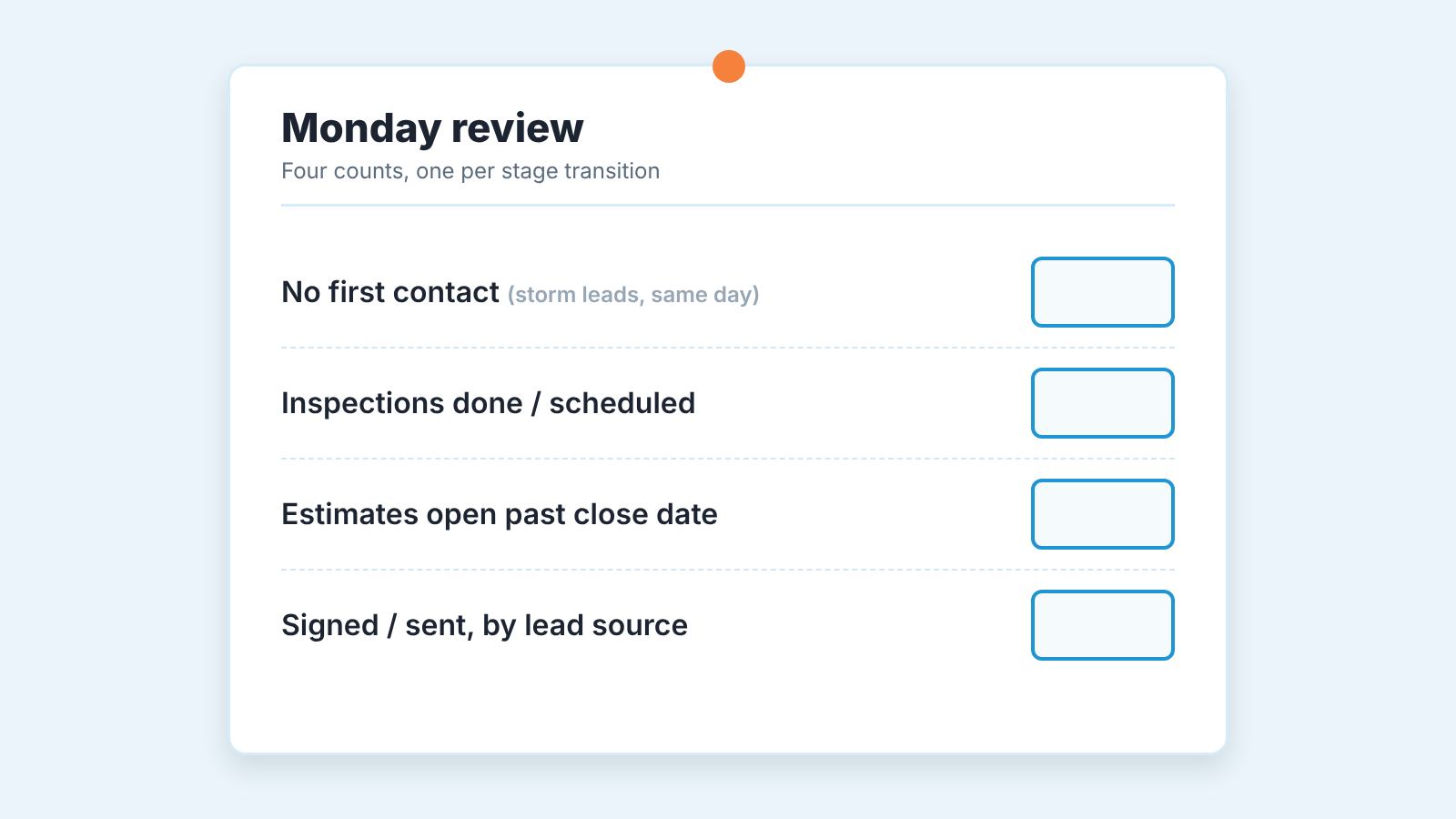
Whatever system you pick, the Monday review is the same four counts, one per stage transition. Leads that got no first contact within your own rule (we like same day for storm leads; pick yours and write it into the CRM). Inspections done this week versus inspections scheduled. Estimates sent versus estimates still open past their own close date. Contracts signed versus estimates sent, by lead source.
That last one is where the roofing-specific fields pay off. Referral leads and hail-storm door knocks will show you very different signed-to-sent ratios, and that is a marketing decision you can act on next week. If your CRM cannot group the signed ratio by lead source the lead source field is decoration and you should go back to the setup section.
One thing we would not do is score reps on their close rate alone. A rep who inherited the storm territory will beat teh rep working referrals on volume and lose on ratio, and neither number says who sells well. Look at the stage where each rep’s deals stall instead. Our guide to choosing a CRM for a team of five walks through the same weekly numbers for a general sales team.
Checking the pipeline afterwards: a free CRM audit
Three months after the switch, the question is whether the data in the CRM is still true. Stale estimates nobody closed, deals with no next activity, two records for one homeowner, a stage called “Pending” that means six different things to six reps.
If you went the general-CRM route, this is where SalesBond fits. It works with Pipedrive, HubSpot, Salesforce, Zoho CRM, Microsoft Dynamics 365, Freshsales, Close, monday CRM, Copper, Zendesk Sell, Nutshell, Insightly, Attio, Bitrix24 and Kommo (amoCRM). The free CRM audit looks at the last 30 days of your connected CRM and sends a PDF report: money at risk, a CRM score, the pipeline bottleneck, deal health, repeat customers, the top-10 clients and up to five things to fix, sorted by money. A week later a second PDF shows what changed. The report also reviews your pipelines and stage names, which is where a vague “Pending” stage gets caught.
A plain limit: SalesBond does not connect to JobNimbus, AccuLynx or the other roofing platforms. If your pipeline lives there, the audit in what a 30-day CRM check finds is a manual checklist you can run yourself with the platform’s own reports.
Check your CRM with SalesBond if the pipeline is in one of the CRMs above.
FAQ
Do I need a roofing-specific CRM at all?
Not if estimating and production already live in their own tools and you mainly want the sales pipeline under control. You need one if you want measurements, estimates, insurance files, material orders and crews in the same record as the lead, which is what JobNimbus and AccuLynx sell.
Can a general CRM handle insurance claims?
It can hold a claim number, an adjuster contact and an “insurance pending” stage. It has no claims logic, no supplement workflow and no scope comparison. For a restoration-heavy company that gap is the argument for a platform.
Which general CRM is the easiest to set up for roofing?
The one your office already knows. The setup is the same pipeline, four custom fields and one assignment rule in all four, and in Dynamics 365 Sales; the differences are in plan limits (HubSpot’s custom pipeline count, Pipedrive’s assignment rules on Professional and up) rather than in capability.
What should I check first on a demo?
Enter the same homeowner twice and watch what happens. If the system creates two deals and says nothing, every number it reports later is suspect.
How do I know the CRM is still clean after six months?
Run a pipeline audit: deals with no next activity, estimates past their close date, duplicate customers, stage names that mean different things to different reps. SalesBond’s free CRM audit does this for the general CRMs listed above; for a roofing platform, use its reports and the manual checklist linked in the previous section.


