
A marketing, creative or digital agency does three jobs: it sells to clients, it delivers the work, and it tracks whether each project made money. Most of them end up with an agency CRM for the first job (Pipedrive, HubSpot, Zoho CRM, monday CRM, Copper, Salesforce) and a PSA or project tool for the other two (Accelo, Productive, Teamwork.com). This article is about that kind of agency. If you came here for an insurance agency, the tools below are built for a different business and we have not checked them for yours.
Quick answer: which system for which job
Each “built for” line below comes from the vendor’s own page, opened on 2026-11-03. None of it says one product is worse than another. They are built for different parts of the agency.
| Agency job | What the tool has to hold | Type of system | Examples (vendor’s own wording) |
|---|---|---|---|
| Selling to clients: new logos, retainers, repeat projects | Deals in stages, next activity, deal value, the client company | General CRM | Pipedrive: “Sales CRM & Pipeline Management Software” (pipedrive.com); HubSpot: “organize your contacts, track deals” (hubspot.com); Zoho CRM (zoho.com); monday CRM: “marketing, sales, and delivery teams” (monday.com); Copper: “leads, deals and projects in one CRM platform” (copper.com); Salesforce (salesforce.com) |
| Delivering the work: projects, hours, who is free next week | Tasks, time entries, capacity, resource plan | PSA or project management | Accelo: “Connect projects, resources, financials, and forecasting” (accelo.com); Productive: “resources, projects, and finances in one platform” (productive.io); Teamwork.com: “optimize resources, forecast capacity” (teamwork.com) |
| Project margin: did this retainer pay for the hours? | Deal value next to hours logged and cost per hour | The join between the two | Accelo’s page says “to protect margins”; Teamwork.com’s says “visibility into performance and profitability”. A general CRM holds the value side only |
Project margin is the row nobody owns until the owner asks why a busy quarter produced no cash. Prices live on each vendor’s page, and that is where to compare them; we do not quote numbers here.
CRM vs PSA: what each one holds
The word that confuses agency buyers is PSA, professional services automation. Three of the tools on this list use it. Accelo calls itself “AI-powered PSA software for professional services firms” (accelo.com). Productive’s page says “Agency Management & Professional Services Automation Software” (productive.io). Teamwork.com describes a “PSA platform” that lets you “manage projects, optimize resources, forecast capacity” (teamwork.com).
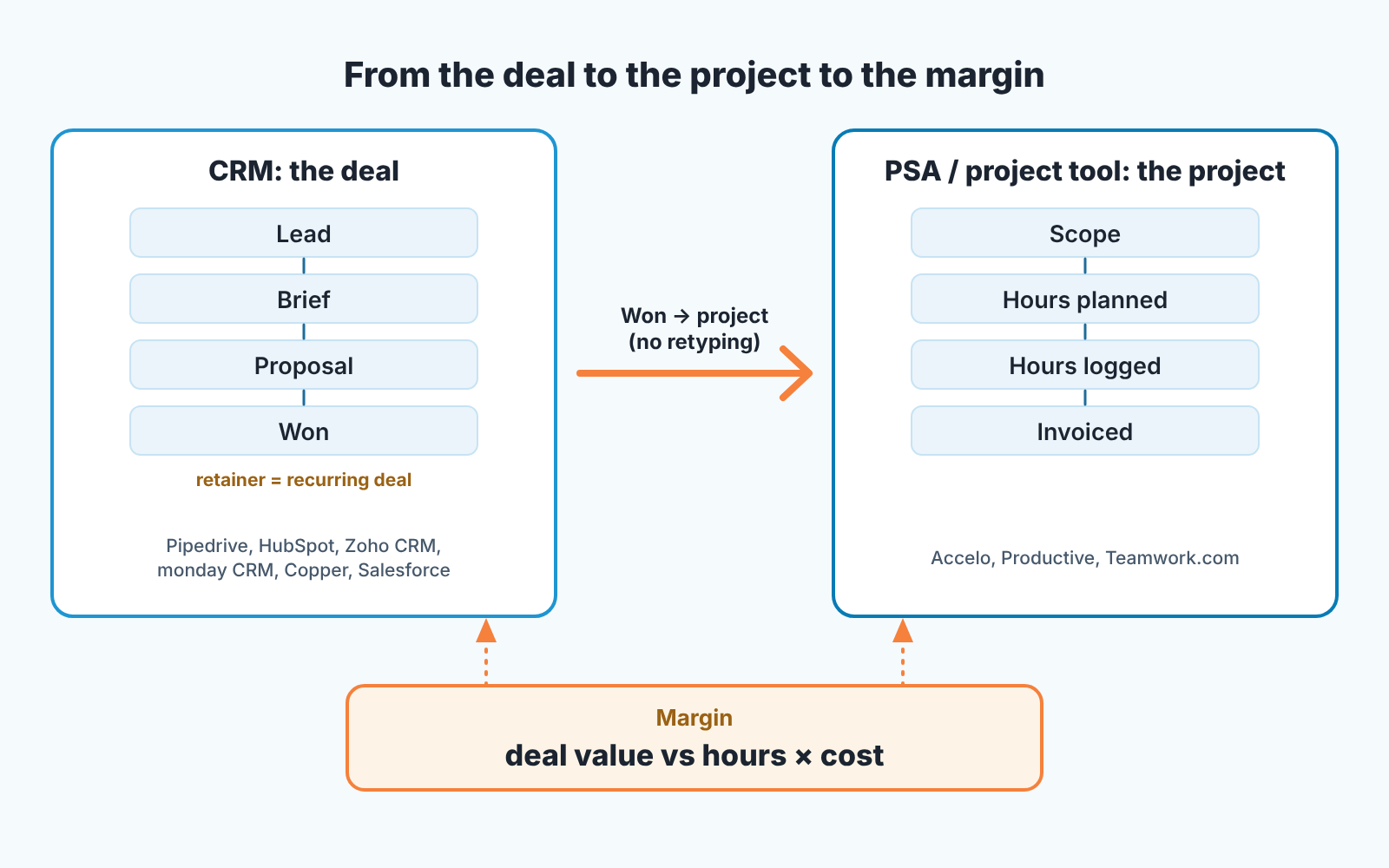
The split is simpler than the category names. A CRM’s unit of work is the deal: who the client is, what stage the conversation is in, how much it is worth, when you next talk to them. It ends when the deal is won or lost. A PSA’s unit of work is the project: who is on it, how many hours were planned, how many were logged, what is left in the budget. It starts roughly where the CRM stops.
Every PSA on this list has some kind of deal or quote object, and every CRM on this list has some kind of project or task object. That overlap is were agencies waste a year. We think the useful question is which object you look at on Monday morning. If the meeting is about proposals, renewals and who went quiet, you are running a sales pipeline and the CRM is the system of record. If the meeting is about overrun hours and who is free next week, the PSA is. A ten-person agency usually holds both meetings, back to back, and that is why the honest answer is two tools, or one tool that treats both halves seriously.
Agency CRM for selling to clients: pipeline, retainers, repeat projects
The client side of an agency is an ordinary B2B pipeline with two quirks. A retainer is a deal that pays every month, so it has to live somewhere as a recurring amount and come back up for renewal. A repeat project from a client you already work with has no “Lead” stage, it starts at “Brief”. Any general CRM can model both. Consulting firms run a similar pipeline, which we compared in the best consulting CRM for firms and consultants, and a travel agency has the same split between selling and delivery, covered in the best travel agency CRM for agents and agencies. What differs is where each vendor starts from.
Pipedrive starts from the pipeline. Its page says “Sales CRM & Pipeline Management Software” and offers a 14-day free trial (pipedrive.com). For a small agency whose business development is one founder and a part-time salesperson, a tool whose home screen is the pipeline is the the one that gets opened.
HubSpot starts from contacts. The CRM page describes free software to “organize your contacts, track deals” (hubspot.com). Agencies that already run client email campaigns from HubSpot have a reason to keep the client pipeline next to the marketing data, even if the deal view is not what they picked it for.
Zoho CRM starts from automation and breadth. Its page lists built-in AI agents, advanced automation, reporting, and integrations with more than 1,200 business apps (zoho.com). The number worth noticing is the integration count, because an agency’s stack is rarely one vendor.
monday CRM starts from the team board. The vendor describes an “AI-powered platform for marketing, sales, and delivery teams” (monday.com). Delivery sits right next to sales in the vendor’s own description. If your account managers already live in monday boards, the pipeline as another board is a short jump.
Copper starts from Google Workspace. The page says “CRM software built into Google Workspace. Manage leads, deals and projects in one CRM platform”, and the page title calls it a CRM for service businesses (copper.com). An agency that runs on Gmail and Google Calendar will find its client history already attached.
Salesforce starts from scale. The vendor’s own line is “Try The World’s #1 AI CRM” (salesforce.com); that is their wording, and we did not check the ranking. For an agency with a dedicated sales team, a sales ops person and a budget for configuration, it is on the list. For five people it is usually more system than the pipeline needs.
We wrote a longer comparison of general CRMs for a sales team, without a ranking, in CRM tools for a sales team, compared by job.
Delivery and margin: where the Won deal becomes a project
Here is the moment that decides whether the two tools are worth it. A proposal is marked Won in the CRM on Tuesday. On Wednesday a project manager opens the project tool and types the client name, the scope, the budget and the deadline, from memory or from a PDF. Two weeks later the designer logs hours against a project that says “Website redesign” while the CRM deal says “Website redesign + 3 months retainer”. The margin report, if anyone runs it, compares hours to the wrong number.
The PSA vendors sell exactly this join. Accelo’s page connects “projects, resources, financials, and forecasting to protect margins” (accelo.com). Productive puts “resources, projects, and finances in one platform” (productive.io). Teamwork.com promises “real-time visibility into performance and profitability” (teamwork.com). All three hold the hours and the cost side. What they need from the CRM is the deal value and the scope, arriving once, without retyping.
A general CRM holds the other half. Copper and monday CRM both put “projects” or “delivery” on their CRM pages, so for a small agency one of them may cover delivery well enough that a separate PSA waits a year. We cannot tell you where that line is for your agency. What we can say is that project margin lives in neither tool by default. It is a report someone has to build once the deal value and the hours sit in systems that know about each other.
What to break in the trial
Every demo shows a clean deal turning into a clean project. Your data is not clean, so test the ugly cases in the first week, with your own clients.
Start with the handover. Win a real deal in the CRM trial and watch what appears in the project tool, or in the CRM’s own project object. If the scope, value and client have to be typed again, the join you are paying for does not exist, whatever the integration page says. Then enter a retainer. A monthly retainer is one client, one agreement and twelve payments; see wether the system can show it as a recurring amount that comes up for renewal, or whether you are expected to clone a deal every month by hand. Cloning works for three retainers and stops working at thirty.
Last, make a duplicate on purpose. Add the same client twice, once as “Acme Ltd” and once as “ACME”, with two contacts, and see whether the tool flags it, merges it, or cheerfully gives you two clients with half a history each. Duplicate clients are how an agency’s repeat-project history disappears, and that history is the first thing you want on screen before you pitch an existing client again.
Two of those tests cover selling and one covers the handover to delivery, a fair split for an agency whose problem is a pipeline nobody trusts.
If you picked Pipedrive
Then the setup is already written. We documented the four sales stages, the project-or-retainer field and the scope fields that have to be filled before a deal can be marked Won in CRM for agencies: pipeline setup for retainers and projects. Nothing in the stage logic is Pipedrive-only, so it should carry over to HubSpot or Zoho CRM under different menu names.
After you pick: check the client pipeline, not the project board
Once the tools are in, the project board gets looked at every day because deadlines hurt. The client pipeline gets looked at when a slow quarter arrives which is late. Three questions tell you whether it is healthy: does every open deal have a next activity, has “Proposal sent” become a parking lot, and does each retainer renewal have an owner and a date?
A disclosure here. We build SalesBond, a sales management layer on top of the CRM a team already uses; we started with Pipedrive. SalesBond works with Pipedrive, HubSpot, Salesforce, Zoho CRM, monday CRM, Copper and the other CRMs on its integration list. It does not connect to Accelo, Productive or Teamwork.com, so this section is about the sales side only, the deal before it becomes a project.
If your client pipeline lives in one of those CRMs, the free CRM audit answers the three questions with data rather than a feeling. SalesBond reads the last 30 days of the connected CRM and sends a PDF report: money at risk, a CRM score, the top findings, managers, deal health, the pipeline bottleneck, repeat customers, top-10 clients and a short list of what to fix first. Seven days later a second PDF shows what changed, if the team acted on it. We listed the usual findings in what a 30-day CRM audit finds. Check your CRM with SalesBond and read the first report before you decide which tool to add next; twenty deals stuck at “Proposal sent” are worth clearing before any new tool arrives.
FAQ
Is a PSA a CRM?
No, although most PSAs include a deal or quote object. A CRM is organized around the deal and the client relationship before the sale; a PSA is organized around the project, hours and budget after it. Accelo, Productive and Teamwork.com describe themselves as PSA or agency management software on thier own pages; Pipedrive, HubSpot and the others describe themselves as CRM. If one product covers both for your size of agency, fine, but check which half it was built for first.
Does a small agency need both?
A three-person studio can run the client pipeline in a CRM and the projects in a task list for a long time. The need for a PSA usually shows up with the first argument about whether a retainer is profitable, because that question needs hours and deal value in the same place. Until then, a CRM with a clean pipeline and a project tool your team actually updates will do. The wider comparison across industries, including recruitment and other service businesses, is in which CRM fits which business type and, for a close cousin of the agency problem, the best recruitment CRM for agencies, compared by job.
What should the CRM hold for a marketing agency?
At minimum: the client company, the deal with its stage and value, whether it is a project or a retainer, and the next scheduled activity. Everything else is nice to have. If you are new to the vocabulary, what a CRM does for a sales team covers the basics with diagrams.
Is there a free agency CRM?
HubSpot offers free CRM software for small businesses, and its CRM page lists what the free tier includes (hubspot.com). For everything else on this list, check the vendor’s pricing page; Pipedrive, for example, offers a 14-day free trial.
SalesBond’s first report is built from your own CRM data, so the client pipeline can be seen from the outside before anyone changes tools.


