
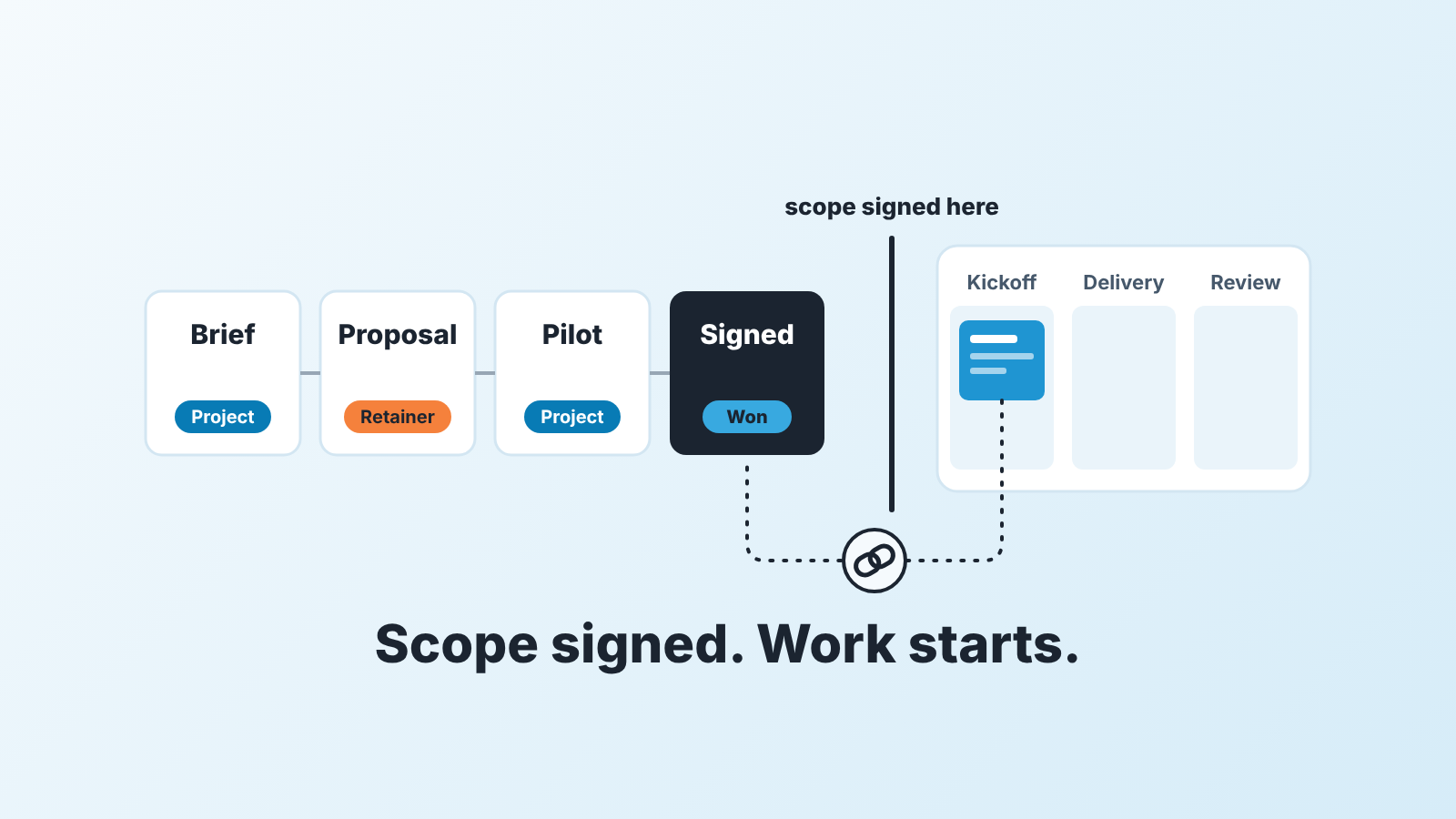
In a CRM for agencies, the pipeline ends at a signed scope, not at delivery: track briefs, proposals and pilots as deals with a type field (project or retainer), create the delivery work as a linked Project only after the deal is Won, and let the manager review proposals out, proposals aging and renewals every week.
This is for a marketing, creative or web agency, or a consultancy, that already uses a CRM (in our case Pipedrive) and keeps finding that the deal and the work have blurred into each other.
You know the symptoms. A deal sits at “Proposal sent” for, say, two months because the client said yes on a call and the team started working. The scope lives in a note from March, and nobody can find it in July. That isn’t a CRM problem. It’s a pipeline design problem, fixed by a handful of decisions you make once.
What an agency CRM has to handle that a product CRM doesn’t
A product company sells the same thing to everyone, so its pipeline mostly answers one question: how close is this buyer to paying? An agency sells its own time, shaped differently for each client. That puts three requirements on the CRM.
First, a pipeline that ends at a signed scope, with the delivery work linked to it. “Won” doesn’t mean “paid for a known thing”, it means “agreed to a described thing”. Until that description exists in a form both sides can read, the deal isn’t done, whatever the client said on the call. Insightly’s write-up on agency CRMs makes the same point: closed-won is the beginning of the client relationship, and agencies need to associate campaigns or projects with the deals that sold them and see team workload (Insightly: best CRM for marketing agencies).
Second, several stakeholders per account (the same source again): the person who signs is rarely the person who approves the work.
Third, two shapes of revenue. A retainer and a project can carry the same deal value and mean completely different things for next quarter. A CRM that can’t tell them apart produces a forecast that is right by accident.
In Pipedrive the first requirement maps onto two objects, Deals for the sale and Projects for the delivery, linked to each other; Projects is included on Premium and higher plans and sold as a paid add-on on Growth and lower (Pipedrive: deals vs. projects). The rest of this article is the setup.
Stages for services: brief, proposal, pilot, signed
We would run a services pipeline on four working stages, plus whatever qualification stage you already have in front of them.
Brief. The client has described a problem and you have written it back to them in your own words. The exit criterion: the client has confirmed your one-paragraph restatement of what they want. Deals that skip this are the ones that later generate three proposal revisions.
Proposal. A priced document is with the client. This is the stage that ages, so date it. Keep the validity date in a field, not only in the PDF, and treat a changed proposal as a new version of the same deal rather than a new deal (we covered both in quote expiry and validity dates and revised quote versions).
Pilot. Optional. A pilot is paid or unpaid work done before the main agreement, and if it sits inside Proposal the manager can’t tell a client who is thinking from a client who is already consuming your team’s hours. Don’t sell pilots? Delete the stage.
Signed. Scope and price are agreed in writing. This is the last open stage, and the deal moves to Won once the required fields are filled. We keep Signed separate from Won because the gap between “they signed” and “we checked that everything is in the deal” is exactly where the closed-won handoff gets lost.
Notice what isn’t here: no “Onboarding”, no “In delivery”, no “Active client”. Those aren’t sales stages. Add them and your pipeline report mixes work in progress with money not yet earned, and the conversion numbers stop meaning anything.
Project or retainer: one field that changes the forecast
Add a custom deal field called “Engagement type” with two options, Project and Retainer. In Pipedrive that’s the account menu, Personal preferences > Data fields, pick the lead/deal entity and click “+ Custom field” (Pipedrive: custom fields). Make it required from the Proposal stage onward, because a priced proposal already knows which of the two it is.
Why a field and not two pipelines? The sales process is the same in both cases, and two pipelines double the stage maintenance and split the manager’s view of proposals for no gain.
What the field changes is how you read the value. A Project deal’s value is the total you will invoice for that scope. A Retainer deal’s value is the monthly amount, and the forecast question becomes “how many months are we confident about”, which is a different conversation from “will this close”. For what Pipedrive itself calculates on recurring revenue, see recurring products vs installments in Pipedrive.
A retainer also has a renewal date and a project doesn’t; with the type on the deal, the renewal can live in a date field only Retainer deals carry. Project deals split once more: time and materials vs fixed price decides whether the value is a price or an estimate.
Deal vs Project in Pipedrive: where sales ends and project management starts
The deal ends when the scope is signed and the required fields are complete. The project starts when the deal is won. Pipedrive’s own split follows the same line: deals help you track and close sales opportunities, projects organize the work tied to a customer, and linking the two keeps sales and delivery information connected (Pipedrive: deals vs. projects).
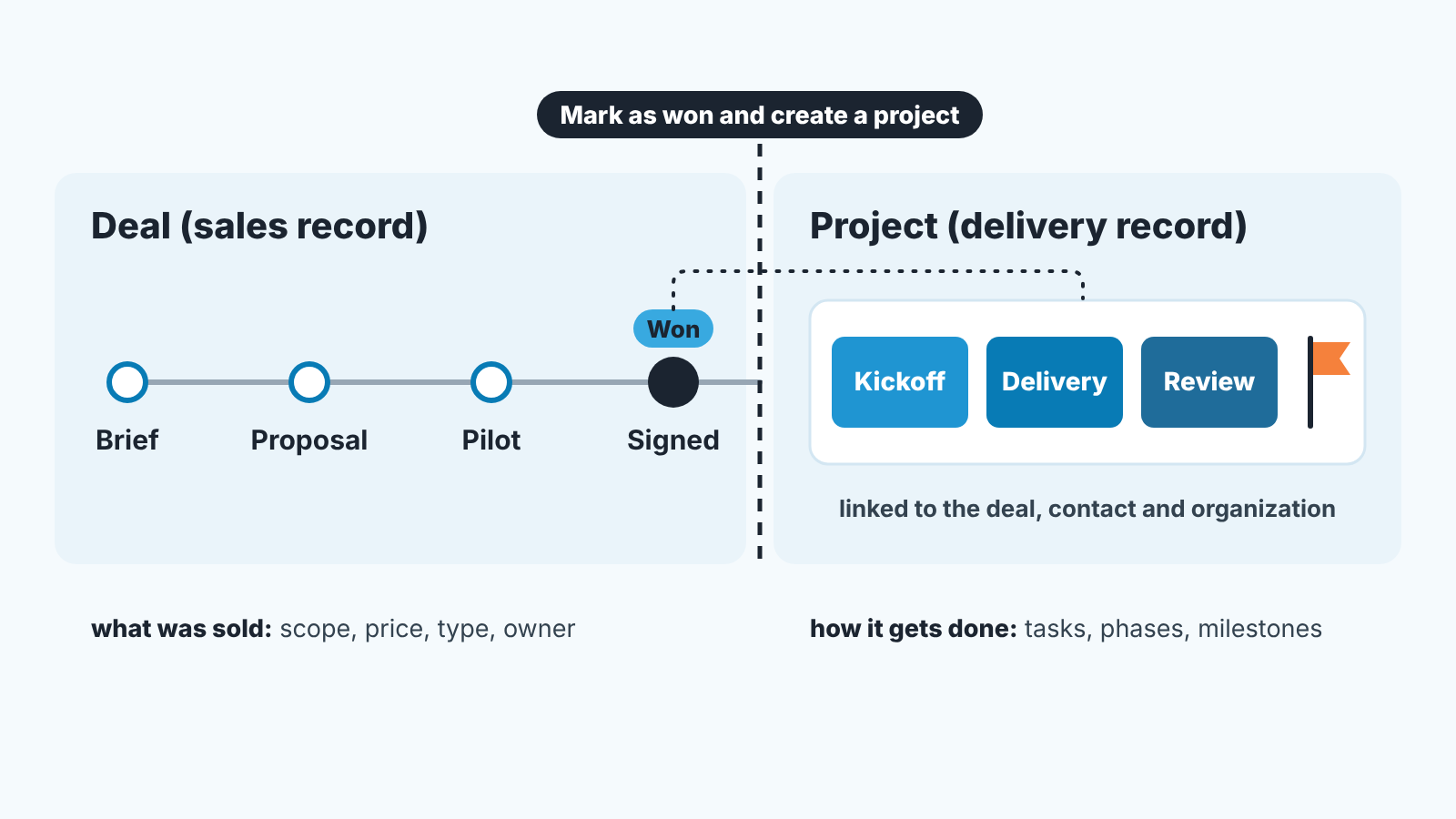
The default we recommend is the simplest one. Open the won deal dropdown in the deal detail view and choose “Mark as won and create a project”: one action closes the sales record and opens the delivery record, already linked (Projects by Pipedrive). If a pilot means work starts before signature, the same page describes a projects panel in the sidebar of the deal detail view, where you create or link a project while the deal stays open. Use it for pilots, not to hide an unsigned deal behind a busy-looking project. A project from scratch, with no deal behind it, is fine for internal work and a warning sign when it becomes common.
Inside, projects sit on boards with phases and hold tasks, subtasks, activities and milestones, linked to the deal, a contact and an organization. For repeatable first steps there are project templates; we built one in the client onboarding checklist as a Pipedrive Projects template, and this article stops where that one starts.
The rule we hold to: the deal answers “what was sold, to whom, for how much, of which type”. The project answers “how is it getting done”. When someone opens the deal to check whether the kickoff happened, the line has moved and its time to move it back.
Proposal and scope fields to require before Won
Pipedrive’s required fields let an admin choose which deal fields must be filled, and in which pipelines and stages; anyone who tries to move a deal to a new stage with one blank is prompted to fill it (Pipedrive: required fields). Required fields come with Premium and higher plans (Pipedrive: custom fields; the older required-fields page still calls that tier Professional). The required-fields page is honest about a gap: required fields don’t stop deals updated through import, bulk editing, API, automations or third-party integrations. For a team moving deals by hand, that is enough.
Here is what we would require at Signed, so the deal can’t be won without it:
- Engagement type (Project / Retainer). Required from Proposal already, still required here.
- Scope document: a pointer to the signed statement of work, exclusions included, not a note (statement of work in Pipedrive deals covers what goes in it).
- Delivery owner, meaning the person who will run the account or the project. Often not the rep, and a project with no owner on the delivery side is a project nobody opens.
- Start date, as agreed with the client. For a retainer it doubles as the anchor for the renewal.
- The day-to-day client contact, added to the deal, because the signer is frequently not the person who approves the work.
One honest limit. Required fields guard stage moves, not quality, and a rep can type “see email” into a text field. Nothing in the setting fixes that; the Monday review does.
The fields also pay off one step later. When you add a project and link it to a deal, Pipedrive has a beta option, “Generate a project brief from deal data using AI”, that summarizes what was sold and suggests project field values you accept, edit or decline one by one (Pipedrive: deals vs. projects). If the scope is in a note from March, it will summarize the note.
The Monday meeting: proposals out, proposals aging, renewals
Save three filters and look at them every Monday, in the same order.
Start with proposals out: deals at the Proposal stage, grouped by owner, with value and type visible. This is your real pipeline. Everything before Proposal is conversation and everything after it is paperwork. If the list is short, the problem is upstream, and no amount of closing skill fixes it this week.
Then proposals aging: the same list, sorted by how long each deal has sat at Proposal, or filtered to deals past their validity date. Every item gets one of three outcomes in the meeting: a dated follow-up activity, a revised version, or Lost. To take an example a proposal three weeks past its validity date with no activity isn’t a proposal any more. It’s a hope, and the forecast should not carry it.
Last, renewals: Retainer deals whose renewal date falls in the next two months (pick whatever horizon your contracts need). The filter is only as good as where you keep the date, which is why the type field came first. Each renewal needs a named owner and a planned conversation before the date. The retainer entered once as a deal and never again is the one to watch: no renewal on record, so the forecast doesn’t know it exists. Log each renewal as its own deal or dated activity, whichever your team will actually maintain.
We build SalesBond, a sales management layer on top of the CRM a team already uses; we started with Pipedrive. Its Deal Health checks every deal against a set of rules and explains what it finds, so a deal whose expected close date has passed with no next activity scheduled is flagged with that reason before the meeting starts. Check your CRM with SalesBond. The filters above work without it.
Your next step is small. Open your pipeline settings today, add the Signed stage and the “Engagement type” field, and run the first Monday review with the the proposals you already have out.


