
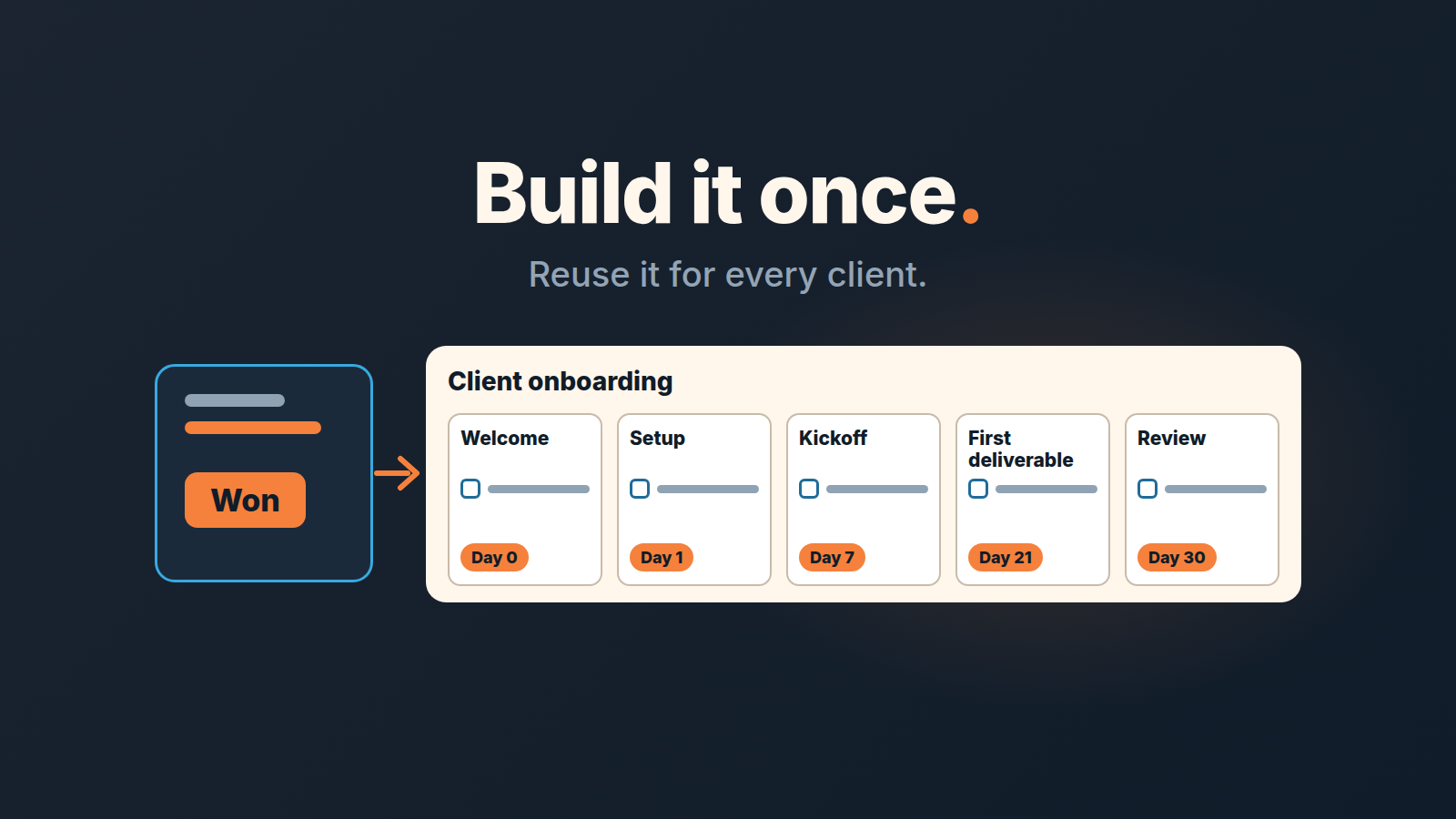
A client onboarding checklist is the fixed list of steps between “deal won” and “the client is getting value”: welcome, kickoff, access and data collection, first deliverable, first check-in. In Pipedrive, build it once as a Projects template with phases and due dates counted from the start date, then create the project straight from the won deal. Every new client gets the same plan and the same deadlines, and nobody has to carry the list in their head.
This article covers the first 30 days of doing the work. What the rep hands over to whoever runs the account is a separate piece, the closed-won handoff in Pipedrive; we start the morning after that conversation. And if you came here for onboarding a new seller rather than a new client, that is a different list: the 30-60-90 plan for a sales rep.
The onboarding that lives in one person’s head
Picture a four-person agency. The founder closes most deals and, for years, also ran onboarding herself: welcome email the same day, a call within the week, access requests from memory. It worked because one person held the whole list. Then a second seller joined, closed a few deals in his first month and sent each client a different first email. One client was asked for logins twice. Another waited until they wrote in to ask when the kickoff was, because the seller assumed the account manager had booked it and the account manager assumed the seller had.
Nothing was lost in the CRM. The deals were marked won, the notes were there. What was missing was a plan that existed outside one person’s habits: which steps, in what order, owned by whom, due when. A checklist in a doc fixes the first of those. A project template in the CRM fixes the steps, the order and the dates, and turns “owned by whom” into a two-minute assignment on each new project. It sits next to the deal that just closed, and it is created by the same click that marks the deal won.
The client onboarding checklist, before any tooling
Write the list in plain words first. Most published onboarding checklists cover roughly this ground, and they are right about it; the difference is what happens to the list on client number two. Ours looks like this:
- Welcome message on the day the deal is won: who the client hears from next and when.
- Contract signed and invoice sent. Payment confirmed before any setup starts.
- Access and data collected: logins, files, brand assets, whatever the work needs.
- Internal briefing, so the person doing the work has read the deal before meeting the client.
- Kickoff call. Goals restated in the client’s words, a named contact on each side, dates agreed.
- Setup or configuration.
- First deliverable, kept small enough to land inside the first few weeks.
- The client reviews it, and you make the corrections that review produces.
- Day-30 check-in: is the client using what they bought, and what would they change.
- Handover to the regular rhythm, with the next review date and the renewal or reorder date in the CRM.
A software implementation and a design retainer will not share step six, so edit freely. What they share is the shape: a payment gate, a kickoff, a first result, a check-in. Keep the list short enough to fit on one screen. Then stop polishing the doc and open Projects.
A deal sells, a project delivers
In Pipedrive, deals are for the sale and projects are for the onboarding and delivery that follow it (Pipedrive: projects vs deals). A won deal has a value, a close date and a stage. None of that tells you whether the client has sent their logins yet. A project lives on a board with phases and holds tasks, subtasks, activities and milestones (Pipedrive: Projects), which is exactly the vocabulary of the list above.
The link between a deal and a project is optional, and that is why teams skip it. Don’t. A project linked to its deal shows the deal’s files, notes and emails in its tabs, and you can filter them by deal or by project (same source). The account manager reads the sales conversation without asking the rep; the rep sees the kickoff happened without asking the account manager. This is also where good note habits pay off, because a pinned note on the deal is the first thing the next person reads: notes, mentions and pins as the handoff layer in Pipedrive.
One more split worth making explicit. The deal owner stays the seller. Whoever runs delivery owns the project. In a two-person company that is the same person, and the split still helps, because “sold” and “delivered” stop being one blurred state.
Build the template: board, phases, tasks, days from start
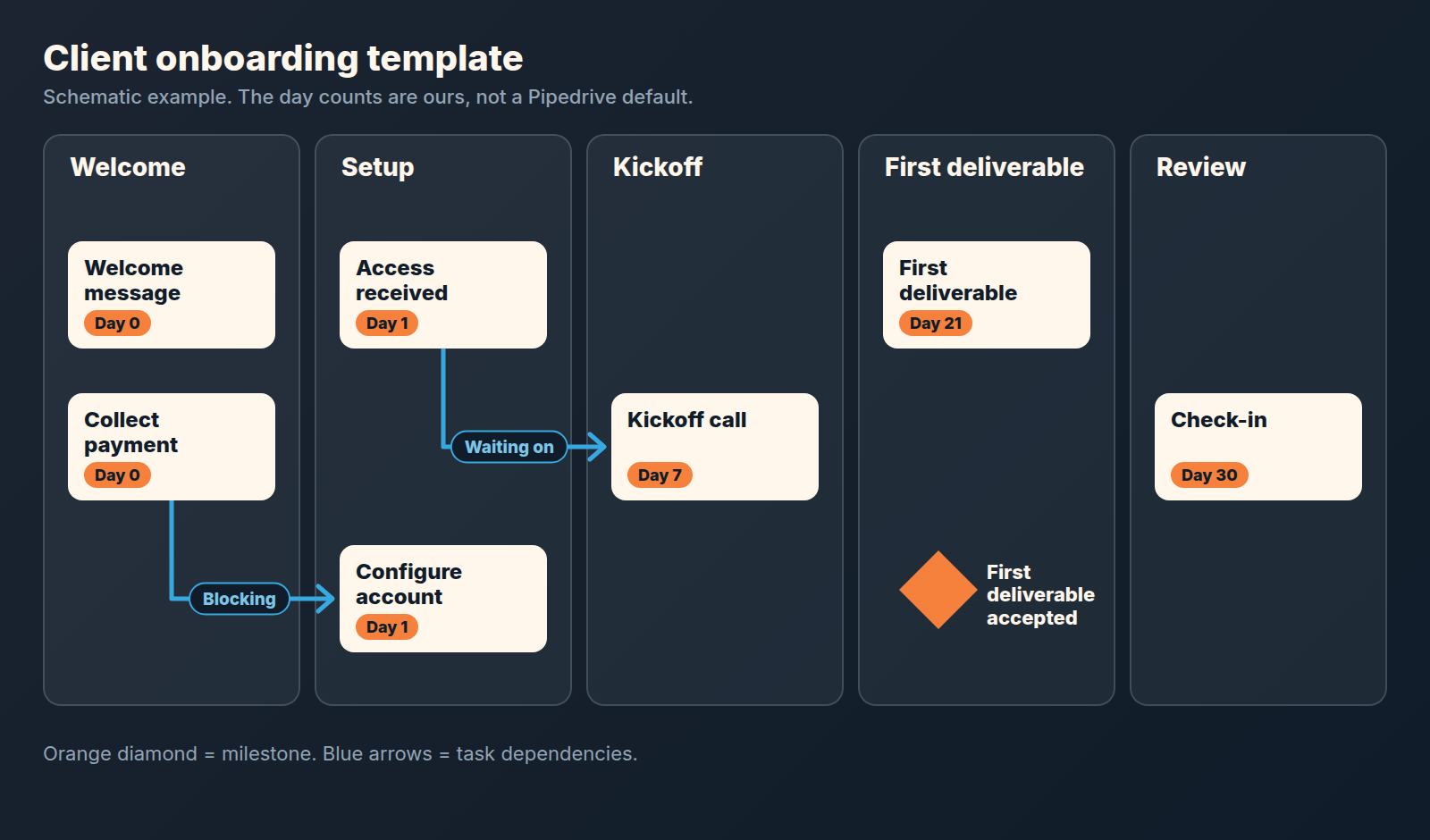
Go to Projects > Templates > + Template and choose a board (Pipedrive: project templates). The board’s phases are the columns a project moves through; for onboarding we use the shape from the list: Welcome, Setup, Kickoff, First deliverable, Review. The template lets you organise tasks by phase or by group (same source). We prefer phases here, because a phase doubles as the status you read at a glance.
Then add the tasks, activities and milestones. Tasks are the checklist items. Activities are the things that belong on a calendar: the kickoff call, the day-30 check-in. Milestones are the moments you will want to look back on later, such as “Payment received” and “First deliverable accepted”.
As you add each task, activity or milestone, you set its due date relative to the project’s start date (same source). This is the part a doc cannot do. Our offsets are plain: the welcome message on day 0, the access request on day 1, the kickoff within the first week, the first deliverable by the end of week three, the check-in on day 30. Those are our numbers, not Pipedrive’s; pick ones that match how long your setup really takes. The point is that nobody calculates dates for a new client ever again.
People are the one thing we leave for later. Assign the work to team members on the project once it exists (Pipedrive: Projects), or let an automation assign project tasks to specific users (Pipedrive: workflow automation).
Already ran one onboarding that went well? Convert that project into a template (Pipedrive: project templates) instead of building from a blank board. Pipedrive’s own help names client onboarding as a use for templates, so the fit is not a stretch.
Dependencies: nothing gets configured before the invoice is paid
Templates support two relations between tasks, Blocking and Waiting on (Pipedrive: project templates). Use them for the two or three places where order is not obvious to someone who did not write the checklist.
The one we never leave out: “Confirm payment” blocks “Configure the account”. We put that in as a hard dependency because the alternative is the account manager deciding each time whether to start, and the answer under pressure from a friendly client is always yes. The second: “Kickoff call” waits on “Access received”, so the call is spent on goals rather than on watching someone reset a password. A third, if your work has it: “Client review” waits on “First deliverable”.
Resist the urge to chain everything. If every task waits on the previous one, the the template becomes a straight line and a single late reply from the client stalls all of it. Three gates is usually enough.
One button on the won deal
When the deal closes use “Mark as won and create a project” right on the deal (Pipedrive: Projects) and create the project from your onboarding template. Set the start date, and every relative due date lands on a real calendar day. Once one team runs all onboarding the same way, let an automation create the project from the template instead (Pipedrive: project templates).
Pipedrive can also draft an AI brief from the deal when the project is created. It is a beta feature and an admin has to agree to it first (Pipedrive: projects vs deals). Treat it as a first draft of the internal briefing in step four, not as the briefing.
Work sometimes starts before the deal is formally won: the client says “go” by email while the contract is still with thier legal team. Create the project from the open deal’s sidebar instead (Pipedrive: Projects), with today as the start date, and leave the deal open. The payment dependency still holds, so setup waits while the welcome and access steps run. When the deal is later marked won, the project already exists and is linked; do not create a second one.
Project fields and task automations as the control
Two 2026 additions make the project itself the control, so the manager does not have to be. Project fields can now be required, grouped, and shown only for chosen pipelines (Pipedrive product updates, May 2026). We make two of them required: the client-side contact for onboarding, and the outcome of the day-30 check-in. A project that cannot be created without a named client contact is a project that will not stall on “who do we even email”.
Task automations fire when a task is created, completed, assigned, overdue or updated (same source, March 2026). The two triggers we use are overdue and completed. Overdue, so the project owner sees a stalled step the day it stalls rather than at the monthly review. Completed on the payment task, so whoever owns setup learns the gate has opened without anyone telling them. Pipedrive’s help suggests a completion rule that suits onboarding well: when a task is done, move the project to its next phase or create the next task (Pipedrive: Projects). Keep the action modest, an activity or a note for the person who needs to act; the point is that the plan speaks, not that the manager chases.
Since June 2026 project tasks also appear in the Activities list (Pipedrive product updates), so an account manager’s day shows the onboarding tasks next to their calls. That is the practical answer to “I forgot about the project board”: they no longer have to open it.
A monthly look at where onboarding stalls
The template is only as good as what you learn from it, and the question to ask each month is small. Of the clients who started onboarding this month, how many had “First deliverable accepted” done by its due date? And for the ones who did not, in which phase did the time go? Project reports in Insights, added in April 2026, show completion rates and delivery speed (Pipedrive product updates), which gets you most of the way. When a phase keeps slipping, change the template: a longer offset, an extra access step, a dependency that was missing. Fix the plan before you talk to the people.
A disclosure, since we are at the “what happens after” point: we build SalesBond, a sales management layer on top of the CRM a team already uses; we started with Pipedrive. It does not score onboarding. Where it starts is afterwards, with Customer Health, which watches the time since each customer’s last purchase against that customer’s own buying cycle, so a client who onboarded well and then went quiet is visible before anyone remembers to look. Check your CRM with SalesBond. The renewal conversation itself is its own process: the customer renewal process in Pipedrive.
FAQ
Can we do this without Projects?
Yes, with less. A checklist doc plus activities on the won deal covers the steps and the dates for one client. What you lose is what made the list repeatable: due dates relative to a start date, dependencies between steps, and creating the whole plan from the won deal in one click. For one new client a quarter the doc is fine; past that, the doc is where the second seller’s version of the process comes from.
Who owns client onboarding, the rep or the account manager?
The person who will be doing the work in week two, which is rarely the rep. The rep owns the deal and stays on the kickoff call, because the client knows them. The account manager owns the project, every task in it, and the day-30 check-in. When the client’s contact changes mid-onboarding, change it on the deal too, so the sales history follows the right person: switching the contact and participants on a Pipedrive deal.
How do we give the client their own checklist?
Keep the project template internal and give the client a shorter, shared version of the same plan: the steps that are theirs (send logins, attend the kickoff, review the first deliverable), with dates. That shared list is a mutual action plan, and we wrote up how a small team keeps one alive without a portal: a mutual action plan for small teams. Dates on the client’s list should match the due dates in your project; when one moves, move the other the same day.


