
The best CRM for startups gets your first deals into a simple pipeline within a day and keeps every record exportable, because the team, the offer and the sales process will all change before the year is out. Free plans and startup programs, such as HubSpot’s free CRM or Zoho for Startups credits, fit the stage where one founder sells. Pipeline-first tools fit a team that already sells every week. Data-first tools fit a startup whose investors or board will read the CRM.
We would pick by the job the CRM has to do this quarter, whatever its place in someone’s list. Most lists in the search results are written by a vendor who ranks itself first, and few of them say what happens when a startup outgrows its first CRM.
Quick answer: match the CRM to this quarter’s job
First customers, one person selling, no budget: start on a free plan or a startup program, such as HubSpot’s free CRM or Zoho for Startups. On the vendor page, check the user and contact limits, who is eligible and how long the benefit lasts.
Two to five people selling every week and nobody to administer the tool? That is a job for a pipeline-first CRM: Pipedrive, Close or Freshsales. Check how long it takes to get a first deal into a pipeline, how the spreadsheet import goes, and whether calling and email are built in.
When investors and the board read the pipeline, look at data-first tools such as Attio or Salesforce. Here the question is the record model, meaning how the CRM stores companies, people and deals and links them to each other, plus reporting, export and who will maintain it all.
Most startups pass through these three in that order. The switch between them is where data gets lost.
What a startup needs from a CRM in the first twelve months
Not much, and that is the point. We have watched the same four things matter at nearly every startup we worked with.
A pipeline the founder will actually open. Three to five stages, each named after a step the buyer took: “Intro call held”, “Proposal sent”, “Verbal yes”. If the founder stops opening the CRM, the data stops, and a month later the spreadsheet is back.
Import from the spreadsheet you already have. Every startup has one. If the import takes an afternoon of column mapping, half the records stay behind and you now run two systems.
Export at any time, in a format another tool reads. You will probably change CRM or plan at least once in the first two years, and a CRM that holds your contacts hostage is a cost you pay later.
Room for the next two quarters. A two-user limit is fine for a solo founder and a wall for a team of five. Read the limit on the plan page itself.
Reports can wait. At this size a pipeline with honest stages tells you more than a dashboard, and when the board asks for a forecast you can build it from teh stage data in an hour. For a team that already has to forecast, we compared the options in CRM tools for a sales team, compared by job.
Free CRM for startups and startup programs: HubSpot, Zoho
The free route works when one or two people sell and the price of the tool matters more than the cost of switching later. For a bootstrapped startup it is often the only route that makes sense in year one.
HubSpot’s product page calls its offer “free CRM software for small businesses” and puts the limits in one sentence: “With up to two users, 1,000 contacts, and no limits on customer data, HubSpot’s free CRM functionality is 100% free, with no expiration date” (HubSpot CRM, checked November 2026). CRM import is on the list of free features. That covers a founder and a first hire. It does not cover a team of five, so treat the free plan as a start.
The startup program is a separate thing. According to the HubSpot for Startups page (checked November 2026), the program “gives Seed and Series A founders 90% off Year 1”, and the way in is “See if you’re eligible”. So the discount comes with conditions: a funding stage, an application and a first-year term. Check the current terms before you plan a budget around them.
Zoho goes through credits instead of a free tier. The Zoho for Startups page (checked November 2026) describes a program that gives startups “access to Zoho’s suite of apps through Zoho Wallet credits”, says the credits “are valid for 360 days” and that the program “is not open for existing paid Zoho users”. Applications go through what Zoho calls ecosystem enablers, the incubators and accelerators it works with, and the program is live only in the countries listed on the page. Not in an accelerator? Read that page before you count on it.
Our view: take the free or program route when you expect to export and move within a year, and put the day the limit or the credits run out in your calendar. The teams that get hurt are the ones who hit the two-user wall mid-quarter and migrate in a hurry.
Pipeline-first tools: Pipedrive, Close, Freshsales
Once two or three people sell every week, nobody has time to administer a CRM. The pipeline has to be the product.
Close puts calling and qualification up front. Its home page describes it as “the CRM with a built-in AI teammate that works with your team to call leads, qualify prospects, book meetings” (Close). If your startup sells by phone and the founder is still dialing, that is the job you are hiring for. If you sell through long email threads and demos the calling matters less.
Freshsales calls itself an “AI-powered CRM to boost your sales efficiency” (Freshsales). That is a broad claim, so ask the narrow question in the demo: how many clicks from a new lead to a deal in a stage, and can a rep do it from a phone?
We started building SalesBond on Pipedrive, so we know it from the inside. The pipeline is the home screen, stages are columns and each deal card shows what happens next. That shape is why startups land on it, and also why the data goes stale when nobody plans the next step. Its a habit problem, and it follows you to the next CRM.
All three make the same trade. They are fast to set up and light to maintain, and thin on the record model when a board member asks “how many customers do we have in fintech with more than fifty seats”. If that question is coming, the data-first tools are the ones to test.
Data-first tools: Attio, Salesforce
Some startups treat the CRM as a product for their investors. The pipeline is still there, but the board, the investors and later the data team are the real readers, and whether a rep can move a card matters less than whether anyone can trust the record.
Attio describes itself as “The system for revenue teams to build pipeline, accelerate deals, and grow accounts” (Attio), and its site lists a Data Model to “Sync and structure your data”. The upside is that a founder who thinks in data gets exactly the structure they want. The downside is the same sentence: someone has to design it, and in a startup that someone is usually the founder.
Salesforce is here because of what it asks of you. Choose it when you already know you will have an admin, or a partner who acts as one, within the year. Without that person it becomes the project nobody finishes.
Our position: data-first is the right call for a minority of seed-stage startups, the ones whose model depends on account data from day one. For the rest, a pipeline-first tool with clean stages and a weekly export gives the board what it needs and the structure can come later. We laid out the same reasoning for other business types in CRM software by business type.
The demo test: import, stages, export, limits
Every vendor demo shows you the happy path. Run your own, with your own spreadsheet, during the trial. It takes about an hour and it settles most arguments.
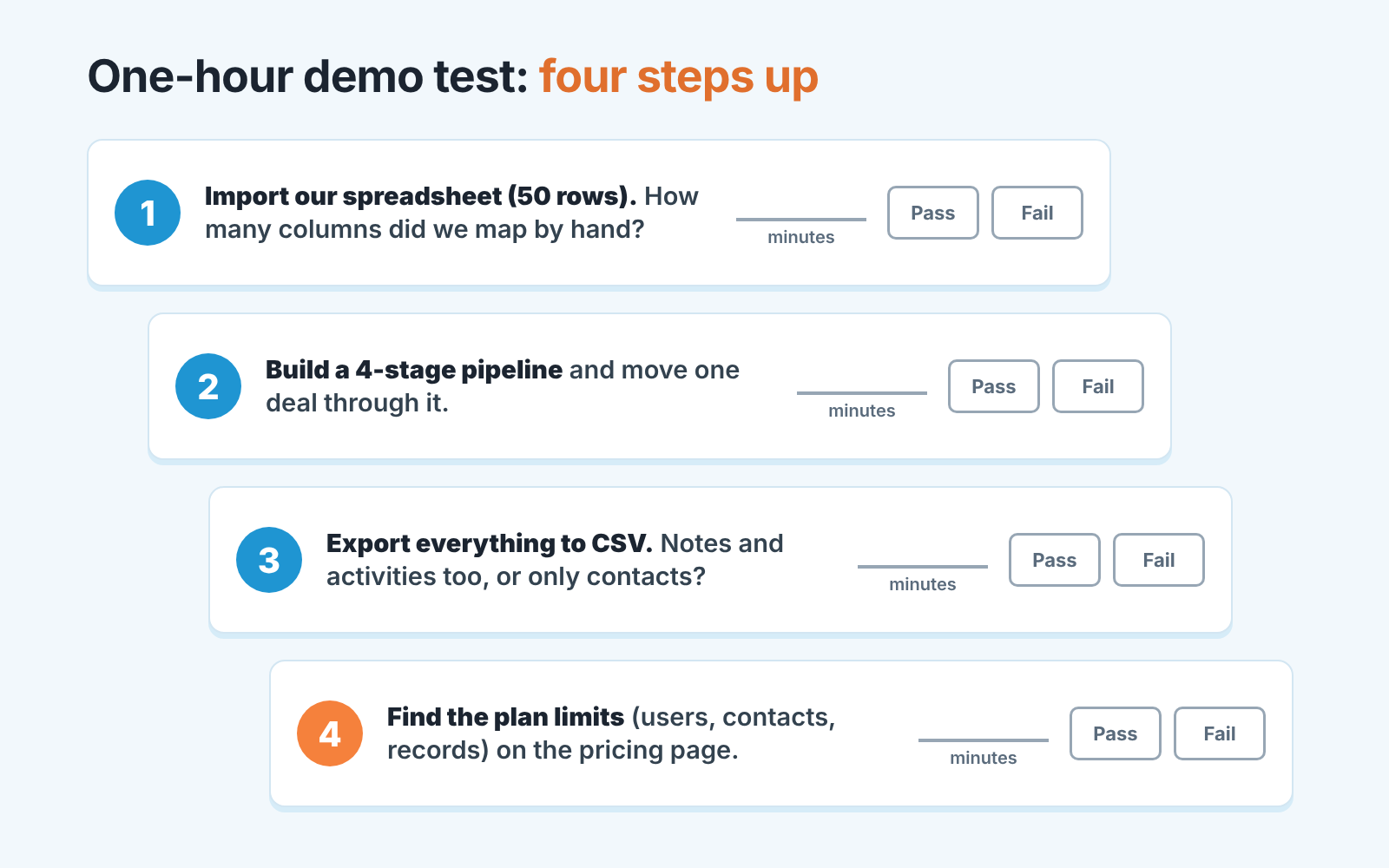
Import first. Take fifty real rows from your spreadsheet, with the messy column names you actually use, and import them. Count the minutes and the columns you had to map by hand. If a field you care about, say “source” or “ARR”, has nowhere to land, you have learned something before you paid.
Then stages. Build a four-stage pipeline and move one imported deal from the first stage to the last, with a next step set on it. If this takes more than a few minutes the tool wants an admin, and you should know that now.
Export is the test everyone skips. Export everything, open the file and look for the notes and the activity history. Many exports give you contacts and deals and leave the conversation behind, and the conversation is what a new rep needs most when they inherit an account.
Limits last. Write down the user, contact and record limits of the plan you would actually buy, from the vendor’s page today, with the date next to them.
Do these four tests in two tools side by side and you have a defensible decision in an afternoon. The founder’s sense of which one “feels right” still counts, and after the four tests it rests on your own data.
When a startup outgrows its first CRM
The signs are plain. The newest hire works from a shared login because of the free plan’s user limit. The pipeline has twelve stages because every edge case got its own column. The founder stops being the person who sells, and the first sales manager asks for a report the tool cannot produce. Or the board asks a question about customers that nobody can answer from the CRM in under a day.
Switching is less painful than the stories suggest, provided the first CRM passed the export test. What hurts is finding out that six months of activity history is not in the export, or that the stages were so inconsistent that the new tool’s pipeline report is wrong on day one. Clean the data before you move it; the move is the one time everyone agrees to do it.
The switch also gets blamed for problems that were already there. Deals with no next step, close dates pushed every Monday, half the pipeline sitting in one stage: those travel with the team. A disclosure, since this is the part we build: SalesBond is a sales management layer on top of the CRM a team already uses, and its free CRM audit is made for this moment. It reads the last 30 days of the connected CRM and sends a large PDF report with money at risk, a CRM score, the main findings, managers and deal health, the pipeline bottleneck, repeat customers, the top ten clients and up to five fixes sorted by money. Seven days later a second PDF shows what changed. SalesBond works with Pipedrive, HubSpot, Salesforce, Zoho CRM, Microsoft Dynamics 365, Freshsales, Close, monday CRM, Copper, Zendesk Sell, Nutshell, Insightly, Attio, Bitrix24 and Kommo (amoCRM), which covers every tool in this article. Run it on the old CRM before the move and you will know which problems are the tool’s and which are yours. Check your CRM with SalesBond.
What the audit looks for, and how to run the same checks by hand in a spreadsheet, is in CRM audit: what a 30-day check finds. If you are not sure the startup framing fits, the small business CRM shortlist covers the same choice for a company that is not planning to triple the the headcount.
FAQ
Is a free CRM enough for a startup? For one or two people selling, yes. HubSpot’s own page sets the free CRM at up to two users and 1,000 contacts with no expiration date (HubSpot CRM). Past that team size the limit itself tells you it is time to decide.
When should a startup start using a CRM? When deals stop fitting in one person’s head and the spreadsheet has more than one editor. Start with a pipeline of three to five stages and an export you have tested.
Do startup programs require funding? The HubSpot for Startups page ties its offer to “Seed and Series A founders” and asks you to check eligibility (HubSpot for Startups). Zoho’s program goes through incubators and accelerators and is “not open for existing paid Zoho users” (Zoho for Startups). Both are conditional, so read the current terms on the page.
Can a startup just use a spreadsheet instead of a CRM? For the first handful of deals, yes. Once two people sell, the spreadsheet loses next steps and history, so import it into a CRM that passes the export test above.
How many pipeline stages should a startup have? Three to five, named after what the buyer did. More than that usually means the stages record the rep’s to-do list rather than the buyer’s progress, and the conversion numbers between them stop meaning anything.
If you want to see what your current CRM already says about the pipeline before you change anything, Start with SalesBond and the first report arrives from the last 30 days of data.


