
Redtail CRM is the CRM that Redtail Technology builds for financial advisors, sold per user per month in two published tiers, Launch and Growth, with Enterprise pricing agreed with sales. The vendor says it helps advisors “simplify the busywork, stay connected, and focus on your clients”, with “automation, intuitive design, & deep integrations” that “support firms of any size” (Redtail CRM, checked 2026-11-05).
An advisory firm weighing Redtail against a general CRM such as Salesforce, HubSpot, Zoho CRM or Pipedrive should compare them on the jobs an advisor actually does in a CRM: the household record, the review-meeting cycle, tasks and reminders, the link to planning and custody tools, and the record of who said what to a client.
Quick answer: what Redtail CRM is
The vendor’s page says Redtail is “purpose-built for financial advisors to simplify your day, strengthen client relationships, and support compliance” (Redtail CRM). Its page title reads “The #1 CRM for Financial Advisors”. The footnote behind that number one cites the “T3/Inside Information Advisor Software Survey, 2026” and says “Orion’s Redtail CRM holds the #1 market share for CRM”. That is the vendor’s claim with the vendor’s source, and market share tells a firm nothing about whether the household record fits its own clients. The same footnote is where the wording “Orion’s Redtail CRM” comes from, and the page names Orion first among the tools it connects to.
What the page states about the product: “templates, task tracking, and automation”; “100+ deep integrations”; connections to tools “like Orion, Schwab, and eMoney”; and three companion products next to the CRM, Speak (“Compliant texting for advisors”), Imaging (“Secure document organization”) and Email (“Auto-archive every email”). It also names the moments it is built around: “handling onboarding, managing reviews, or preparing for client meetings”.
Prices sit on a separate Pricing page. On 2026-11-05 it listed a Launch plan at $39 per user per month billed yearly or $45 billed monthly, for up to 5 users, and a Growth plan at $59 billed yearly or $65 billed monthly, with unlimited users and Imaging and Speak included. Enterprise pricing is by agreement. What neither page shows is what a household record looks like. That one is for the demo.
What an advisor CRM holds (household, meetings, tasks)
An advisor’s CRM is a service tool first and a sales tool second. That is the opposite of the CRM most sales teams run, and it changes what the record has to hold.
The unit of work is the household. Two spouses, their children, a trust, and the accounts under each of them belong together, and the advisor has to land on that whole picture from any one name. In a CRM built for advisors, the vendor made this decision for you. In a general CRM you build it yourself: an organisation record for the household, person records for its members, custom fields for the accounts, and a rule about who maintains all three. We think this is where an industry CRM and a general CRM differ most, and the difference is setup effort; both can get there. Check it on the demo instead of taking anyone’s word for it. Banks face the same household question at a larger scale, which we cover in the best banking CRM for banks.
The second job is the review cycle. Clients are met on a rhythm. A review is prepared, held and followed up, and the next one gets scheduled before the advisor forgets. The CRM has to show which households are due, which are overdue, and what was promised at the last meeting.
Then come tasks and reminders. Paperwork deadlines, documents to collect, a birthday, a call the client asked for. The vendor page calls this “templates, task tracking, and automation”; in a general CRM it is activities and workflow rules that someone configures.
Then there is the record of communication. The vendor page says the product is built to “support compliance” and mentions “supervision workflows” and the ability to “maintain audit trails”. In practice that comes down to where a text, an email and a meeting note end up, and who can edit them afterwards. A general CRM keeps the same note-and-activity log, with the configuration left to the firm.
And the prospect pipeline, the job a sales team cares about most? Here it comes after all of these. It matters for a growing firm, and it is the one job general CRMs were built for in the first place.
Redtail and general CRMs by job (no ranking)
The table keeps to what the vendor pages state and to what a firm has to configure itself. Where a page says nothing, the cell says so, and that is a demo question rather than a mark against the product. For what the general CRM vendors state about pipeline, forecast and reporting, see CRM tools for a sales team, compared by job.
| Job | Redtail (vendor page) | General CRM (Salesforce, HubSpot, Zoho CRM, Pipedrive) | What to check |
|---|---|---|---|
| Client and household record | Built for financial advisors; the structure of a household is not shown on the page | Organisation plus person records and custom fields; the firm designs the household itself | Create one household with two people and three accounts on the demo and open it from either person |
| Review meetings and follow-up | “Managing reviews” and “preparing for client meetings” named as core moments | Activities and a calendar; a review cycle is a recurring activity or a date field the firm adds | Where the list of households due for review lives, and who sees it |
| Tasks, templates, automation | “Templates, task tracking, and automation” | Workflow or automation rules, configured by the firm | Ask to see one template fire end to end |
| Integrations with planning and custody tools | “100+ deep integrations”; Orion, Schwab and eMoney named | Marketplaces; Salesforce has a dedicated Financial Services offer | Which way the data flows, and what happens to the record when an account changes |
| Communication record | “Support compliance”, “audit trails”; Speak for texting and Email for archiving listed alongside | Notes, emails and activities on the record; retention and edit rights configured by the firm | Open the log of one text and one email; ask who can delete them |
| Prospect pipeline | Not described on the CRM page | The home ground of a general CRM: stages, probabilities, forecast | How a prospect becomes a household without re-typing |
| Reports for the firm owner | Not described on the CRM page | Standard reports and dashboards; per-user and per-stage views | The three reports the owner will open on the first Monday |
So what is the trade-off? An industry CRM makes the structural decisions for you, which is a gift for a three-advisor firm with no one to play administrator. A general CRM makes you decide. That costs you on day one and pays off the day teh firm also sells something that is not advice, or when new-client acquisition is what keeps the owner up at night. We wrote about that second case in how to choose a CRM for a sales team of five, and which CRM type fits which business is in best CRM software by business type.
What a demo should show
Vendors demo what they are proud of. Bring your own script.
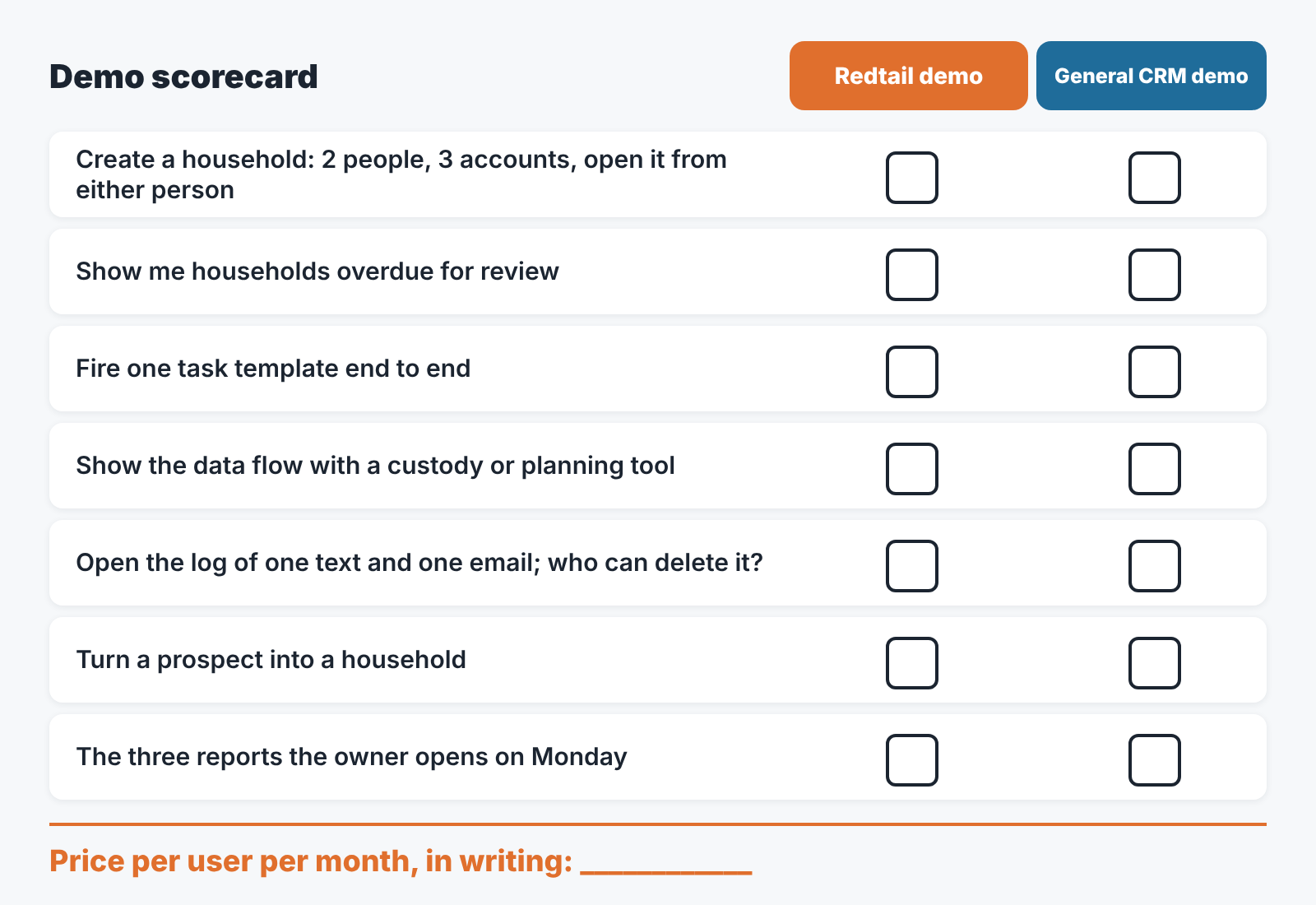
Start with the household, because it is the hardest thing to fake on a demo. Ask the presenter to build one from scratch with two people and three accounts, then to find it by typing the second spouse’s name. Count the screens.
Then reviews. Ask for the list of households due for review this month and the list that is overdue. If the answer is a report that someone has to run, ask who will run it, and when.
Tasks next. The vendor page promises “templates, task tracking, and automation”, so ask for one template to be triggered during the demo and follow it to the task it creates and the person who gets it. On a general CRM demo the same request is for one workflow rule, built in front of you.
Integrations deserve the blunt question: which way does the data flow? The Redtail page names Orion, Schwab and eMoney. Ask what happens in the CRM record when an account changes at the custodian, and what happens at the custodian when the CRM record changes. Then ask the same of the general CRM’s marketplace app.
The communication record is where the word compliance stops being a slogan. Have them open the log of one text and one email and tell you who in the firm can edit or delete it.
Last, price. Redtail publishes per-user tiers, and so do most general CRMs, but a published tier is not a quote. Ask which tier your firm would actually need for the features you just saw, and get the per-user monthly number in writing. For a firm that is also a small business, the shortlist in best CRM for small business is a reasonable place to start the general side.
Run that script on Redtail and on one general CRM, and keep the notes from both in the same table of jobs.
Numbers to review monthly
Whichever CRM wins, the first month tells you whether the firm is using it or only paying for it. Five numbers are enough, and each of them is a saved filter.
Households with no review in the last twelve months, or whatever your cycle is, come first, because that is the direct measure of the service promise. Households with no next activity scheduled come second; they catch the clients who are not overdue yet but will be. Tasks overdue by owner is the third. It is uncomfortable to look at, which is why it works. Open prospects by stage, with the age of each one, is the fourth and the only sales number on the list. The fifth is simply how many records were edited this month and by whom, because a CRM nobody writes to will show you four reassuring zeros above it.
Read them in the same order every month, on the same day, with the same people in the the room, so a change in one number stands out against the other four.
How to check the pipeline afterwards (CRM audit)
A disclosure, since we have reached the tooling question: we build SalesBond, a sales management layer on top of the CRM a team already uses; we started with Pipedrive. SalesBond works with Pipedrive, HubSpot, Salesforce, Zoho CRM, Microsoft Dynamics 365, Freshsales, Close, monday CRM, Copper, Zendesk Sell, Nutshell, Insightly, Attio, Bitrix24 and Kommo (amoCRM).
If your firm runs the prospect side on one of those, the free CRM audit covers the sales half of the list above. SalesBond looks at the last 30 days of the connected CRM and sends a PDF report: money at risk, a CRM score, the top findings, managers and deal health, the pipeline bottleneck, repeat customers, the top-10 clients and what to fix. Seven days later a second PDF shows what changed. The household review numbers stay with your own saved filters. Check your CRM with SalesBond. What the 30-day check usually turns up is in CRM audit: what a 30-day check finds. The pattern there, a pipeline that looks fine until someone counts the deals with no next step, is the same one an advisory firm sees in its review list.
FAQ
Is Redtail a CRM system?
Yes. Redtail CRM is a client relationship management system aimed at financial advisors, and its vendor page describes it as “purpose-built for financial advisors” (Redtail CRM). The vendor also lists companion products for texting (Speak), documents (Imaging) and email archiving (Email) beside it.
Is Redtail owned by Orion?
The vendor’s own page refers to the product as “Orion’s Redtail CRM” and names Orion first among its integrations. Treat that as the vendor’s wording rather than a statement about corporate structure.
How much does Redtail cost per month?
On 2026-11-05 Redtail’s Pricing page listed Launch at $39 per user per month billed yearly ($45 billed monthly, up to 5 users) and Growth at $59 per user per month billed yearly ($65 billed monthly, unlimited users, Imaging and Speak included). Enterprise pricing is agreed with sales.
Is Redtail or Wealthbox better?
We don’t rank CRMs, so the useful answer is a method rather than a verdict. Run the demo script above on both and compare by job. The household record and the review list are where advisor CRMs show their differences, and the per-user price for the tier you would actually need is the other thing to put side by side.
What should a wealth management CRM do that a general CRM does not?
Nothing a general CRM cannot be configured to do, in our experience. The difference is who makes the structural decisions about households, reviews and the communication record: the vendor, or your firm. For a small firm without an administrator, that is a real difference. If your general CRM is on the list in the audit section, the free audit is a quick first check after go-live: Sign up for SalesBond.


