

A call center CRM puts the caller’s history on the agent’s screen the moment the call connects and lets the agent record the outcome in a couple of clicks. An outbound team that dials lists and books meetings usually needs a pipeline CRM with calling attached, which is how Pipedrive sells its product, as a “CRM for call centers and telemarketers” (Pipedrive: call center CRM), while an inbound service team usually needs a contact-center platform such as Salesforce Service Cloud, positioned to “personalize service at scale across your channels” (Salesforce: contact center). For a small team that both sells and supports, a general CRM with a telephony integration is often the right answer.
Quick answer: which kind of system carries which call center
Start from what the agents do all day. The word “CRM” in the vendor’s headline tells you little. Many search results for “call center CRM” are vendor glossaries, and a definition does not tell you which of three different products to buy.
| What the team does all day | What usually carries it | What to see on the demo |
|---|---|---|
| Outbound sales or telemarketing: dial a list, qualify, book or close | Pipeline CRM with calling (Pipedrive, Close) | Dial from the deal, outcome logged in two clicks, callback scheduled on the same record |
| Inbound customer service: answer, resolve, hand off | Contact-center platform (Salesforce Service Cloud, NiCE, Five9, Bright Pattern) | Queue and routing, the record opens by itself on the screen pop, the case survives a transfer |
| Mixed: a small team sells to and supports the same customers | General CRM plus a telephony integration | The number matches the contact, the call lands on the timeline, the phone app does not become a second CRM |
| Appointment setting for a field sales team | Pipeline CRM with calling | The booked meeting becomes a deal the field rep can see |
Two teams get this wrong most often. The sales team that was sold a contact-center platform because “it has a CRM in it”, now keeping the pipeline in a spreadsheet. And the support team that took the sales CRM because sales already had one, now routing calls by shouting across the room. Both bought the right product for the other department.
CRM or contact-center platform: the one question that decides
Does the customer call you, or do you call the customer?
It sounds too simple, and it mostly works. What vendors sell as call center software or a contact-center platform is built around the queue: calls arrive, the system routes them, an agent picks up, the record opens. Five9 calls itself “the Genius CX Platform for enterprises” that will “blend AI and human agents across every channel” (Five9). Bright Pattern describes “Omnichannel Communications Across Voice, IVR, Email, Chat, SMS” (Bright Pattern). NiCE presents “AI customer service automation solutions” (NiCE). None of those sentences mentions a pipeline or a quota, because its not built for that.
A CRM is built around the record and what happens to it next: a lead, a deal, a stage, an owner, a next activity. Calling is one of the activities. If the team’s work is to move records forward, the CRM is the system and the phone is a feature. If it is to answer whatever comes in, it’s the other way round.
The overlap is where money goes. A platform can hold contacts and a sales CRM can take an inbound call, but a contact store is not a pipeline with stage history, and a call landing on a deal is not a queue with skills and a wait-time report. Buy for the job that fills most of the day and integrate the rest.
Outbound sales and telemarketing: the CRM is the dialer’s memory
For a dialing team the whole test is the five seconds after a call ends. If the agent has to leave the record and type, the outcome does not get logged. If it is one click on the deal, and the callback a second, it does. A hotel reservations desk faces the same test and the same split between sales and service, which we compared in the best hotel CRM for hotel sales teams.
Pipedrive pitches its pipeline CRM to call centers and telemarketers directly. For a telemarketing team that means every list record is a lead or a deal, with the call logged on it as an activity and the callback set as the next activity with a date and a time. The agent’s day is the activity list. The manager’s view is the pipeline.
Close leads with the phone: its calling page offers “built-in calling, Power Dialer, and Predictive Dialer” (Close: calling). A power or predictive dialer is telephony that decides who gets called next. Whether it ships inside the CRM or as a separate tool, the CRM has to take the result of every call back onto the record. How to check that hand-off is in power dialer and CRM: five checks before trusting call counts.
Whichever pipeline CRM you pick set up four things before the first list is loaded. A call outcome field (call centers call it a disposition) with a short fixed list: reached, no answer, wrong number, callback, not interested, qualified. That way a report can count it. A callback that is an activity with a due time. A lost reason that is a field. And an owner on every record, because a shared list with no owner is how two agents call the same person on the same morning.
We think a dialing team should refuse any setup where the outcome takes more than two clicks. Agents who dial all day stop logging the moment logging costs them a call, and a CRM with half the outcomes missing is just a list. General pipeline CRMs are compared on this kind of daily work in CRM tools for a sales team, compared by job.
Inbound service: buy the queue, then check what the agent sees
An inbound team’s CRM question is really a screen-pop question. A screen pop is the customer record opening by itself when the call connects, and routing is only half the job if that record is thin.
Five9, Bright Pattern and NiCE all lead with channels and automation. That is the right emphasis for a queue, but it says nothing about where the customer’s history lives, and that is where inbound projects go wrong. Help desks such as Zendesk and Freshdesk turn up on call center lists too; give them the same test.
If sales already has a CRM, the service platform has to read that record, or the agent talks to a customer with an open deal and never knows it. Ask for the agent desktop with a call from a number that exists in your sales CRM, and look for the open deal, the last three interactions and the owner’s name. Then ask for a transfer and watch whether the second agent sees what the first one typed. Then the shift-change question: at six o’clock, is the note on the record or in the agent’s head? A platform that routes beautifully and leaves the history in another tab has only moved the problem.
General CRM plus telephony: what most small teams actually need
A team of eight where the same people quote, close and then answer the “where is my order” call needs neither a contact-center platform nor a telemarketing setup. It needs its CRM to pick up the phone properly, which means the integration does three things. The incoming number matches a contact and opens it. The finished call lands on the contact’s timeline with duration and, if you record, a link to the recording. And the agent can create the follow-up activity from the same screen. If the phone app keeps its own contact list and its own notes, you have two CRMs, and the one with the phone wins because the agent is already in it.
On the demo, hang up and look at the the timeline. If the call is missing, or shows as “Call” with no outcome and no next step, you will end up with a CRM full of calls that mean nothing. Which general CRM fits the rest of the business is covered in the small business CRM shortlist and in CRM software by business type.
The call center CRM demo test, in the order that catches the most problems
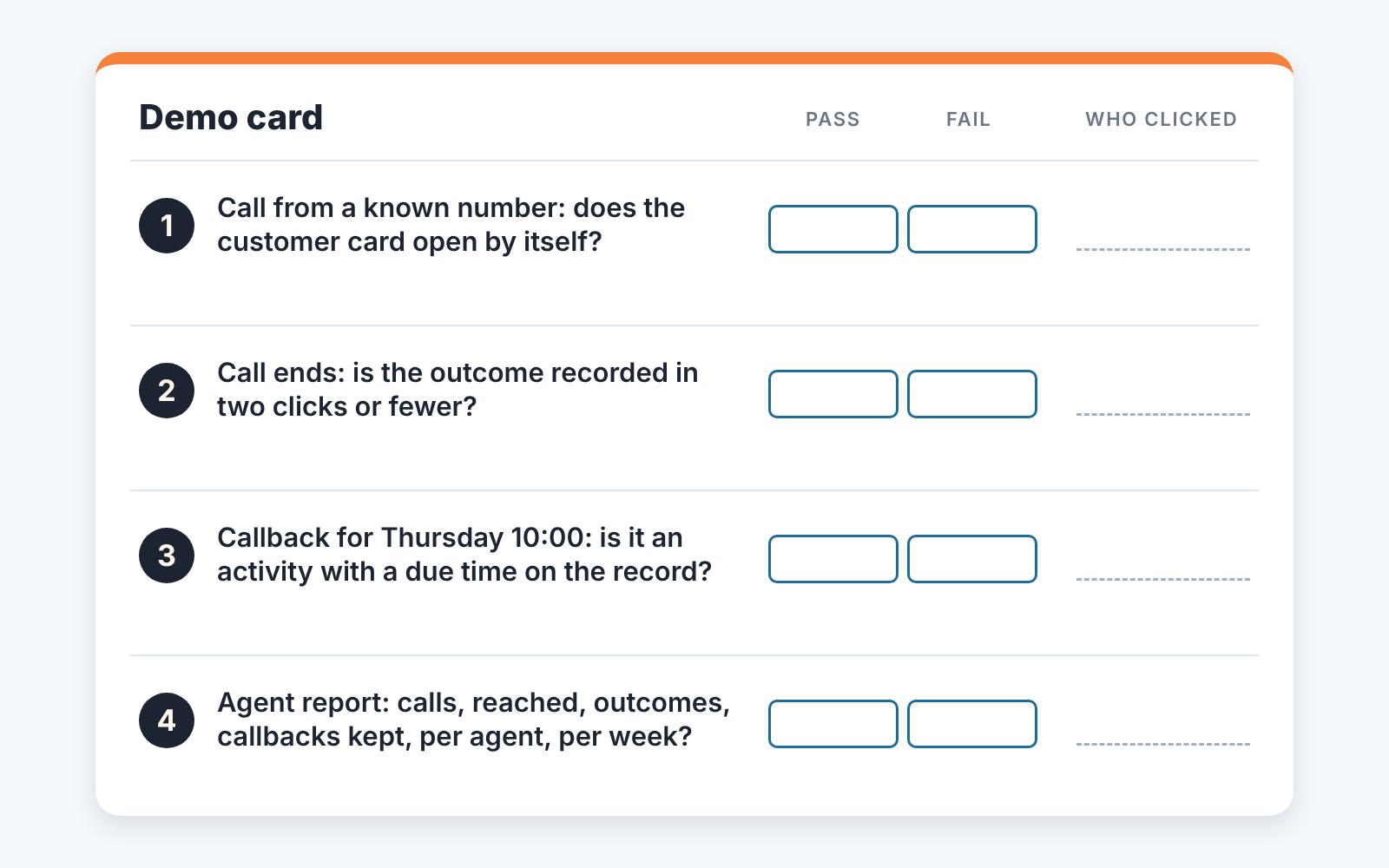
Run these four on a live demo with your own test number, in this order, and don’t let the vendor’s person drive.
Screen pop by number first. Call the demo line from a phone whose number is already in the sample data and see whether the customer’s card opens on its own, with history visible, before anyone says a word. The glossaries describe this; demos tend to skip it.
Call outcome in two clicks. End the call and count. One click to pick the outcome, one to save, and the record is updated. Anything that involves typing a sentence is a note, and notes do not make reports. For HubSpot teams we went through this step in HubSpot call outcomes: what to check after every call.
Callback by schedule. Ask for a callback on Thursday at 10:00, then look for it where the agent will look on Thursday: an activity list, a task queue, a calendar. A date typed into a field is one nobody will see.
Agent report last. Ask for one agent’s week: calls made or taken, reached, outcomes by type, callbacks due and callbacks kept. If the vendor has to export to a spreadsheet to answer, you will be exporting to a spreadsheet every Monday.
Pass all four and it is a call center CRM for your job, whatever the vendor calls it. Fail the first or second and it is not.
Numbers to review weekly
Dials per day is the number every call center already has and the one that tells a manager least. Review a short set instead, per agent rather than per team, because the team average hides the agent whose outcomes are all blank.
For outbound: calls made against calls reached, so the gap shows list quality rather than agent effort. Outcomes logged against calls made, where the only acceptable answer is every call. Callbacks due against callbacks completed, because that is where telemarketing revenue lives. Deals created from calls, and where they stand a week later.
For inbound: calls answered, average handle time, repeat calls from the same number on the same issue, and transfers per call. Repeat calls are first-contact resolution seen from the other side. A customer who calls three times about one order is a record that was not updated teh first time, and a short handle time next to a lot of repeat calls is speed paid for with a second call.
On a pipeline CRM these are the questions a CRM audit asks, and that is the part we build. SalesBond is a sales management layer on top of the CRM a team already uses; its free CRM audit reads the last 30 days of the connected CRM and sends a PDF report: money at risk, a CRM score, the main findings, deal health by manager, the pipeline bottleneck, repeat customers and the top ten clients, with up to five fixes sorted by money. Seven days later a second PDF shows what changed. It works with Pipedrive, HubSpot, Salesforce, Zoho CRM, Microsoft Dynamics 365, Freshsales, Close, monday CRM, Copper, Zendesk Sell, Nutshell, Insightly, Attio, Bitrix24 and Kommo (amoCRM), so an outbound team on any of them can Check your CRM with SalesBond and read the activity findings first. The manual version is in CRM audit: what a 30-day check finds.
FAQ
What is CRM software in customer service? It is the record of the customer the agent sees while handling the call: who they are, what they bought, what was said last time, what is open now. Queues, routing and channels are the contact-center platform’s job; the CRM’s job is that the record is complete and opens by itself when the call connects. Whether a platform keeps that record itself or reads it from your sales CRM is a question for the demo.
Is a contact-center platform a CRM? It stores contacts, so vendors use the word, but it is built around the queue rather than the pipeline. If your team needs stage history, deal values and a forecast, test for them explicitly instead of assuming the contact store will grow into a pipeline.
Do we need both a CRM and a contact-center platform? A company with a real outbound sales team and a real inbound service team usually ends up with both, connected so each side sees the other’s open deal or case. A small mixed team usually needs one general CRM with a telephony integration that passes the four demo tests.
Can a sales CRM handle inbound calls? With a telephony integration it can usually take the call and match the number to a contact. Skill routing, a queue and wait-time reports are what contact-center platforms are built for, so ask for them by name on the demo. A few calls an hour to a small team is fine without them; a real queue is not.
Does this change by industry? The split holds; the fields change. Insurance agencies with phone-heavy renewal teams face the same outbound-versus-service question with policy and renewal fields added, which we covered in best insurance CRM for agents and brokers, compared by job.
Already dialing from a pipeline CRM and want to know how many of last month’s calls have no outcome and no next step? Start with SalesBond.


