
A power dialer dials the next number on your list as soon as the last call ends. It speeds up calling, not the quality of the record. Before trusting its numbers, check that every call lands on the right deal or contact with an outcome and a next step, and that unanswered dials are not counted as conversations. That takes about ten minutes once you know the five things to look at. The week to do it is the first week the dialer is live, when the activity report jumps and everyone is pleased.
Power dialer vs. parallel and predictive dialers
A power dialer works one number at a time: it dials from a list and puts the call through to the rep only when a person answers, screening out answering machines and busy signals (NiCE glossary: power dialer). A parallel dialer calls several lines at once, skips voicemail with answer detection and connects the rep only on a live pickup (Salesmessage: best power dialer software). A predictive dialer also calls several numbers at once, but it uses an algorithm to predict when a rep will be free and dials ahead of that moment (Salesmessage; NiCE). “Auto dialer” is the broad word for any software that dials from a list on its own (Emitrr: power dialer vs auto dialer).
For a team of three to ten reps the difference matters less than the vendor pages suggest. All three do the same thing to the CRM: they create many more call records, written by software, a minute or two apart. What each record says is still up to the person who was on the call.
What a call record in the CRM must contain
A call record needs four things: the deal or contact, an outcome picked by the rep, the duration and a dated next step. The dialer can supply only one of them on its own. Take a Tuesday’s worth of dials from one rep, open any single call and look for all four.
The deal or contact it belongs to. The dialer knows which number it called; the CRM has to know whose number that is and which open deal the conversation was about. A call attached to a person and to no deal is fine for a first cold touch and useless for a deal sitting in Proposal.
The outcome, chosen by a human. Connected, left voicemail, wrong number, no answer. The dialer can tell the CRM that the line connected. It cannot tell it that the decision maker was on the other end. HubSpot keeps these as two separate properties: call status (Completed, No answer, Busy and so on) and call outcome, which the rep selects (HubSpot: review calls in the call index). We went through that pair in HubSpot call outcomes: what a sales manager should see after every logged call, so one line here: status is what the phone network did, outcome is what the rep learned.
Duration. The dialer gives you this field for free, and it is the most honest one on the record. A “connected” call that lasted a few seconds was not a conversation, whatever the outcome says.
The next step. A date and a verb. “Call back Thursday to walk through the pricing page” is a next step; “follow up” is not. What the note itself needs at minimum is in the sales call notes minimum.
A record with the first three and not the fourth is a record of effort. Only the fourth turns it into pipeline.
Five checks a manager runs in ten minutes
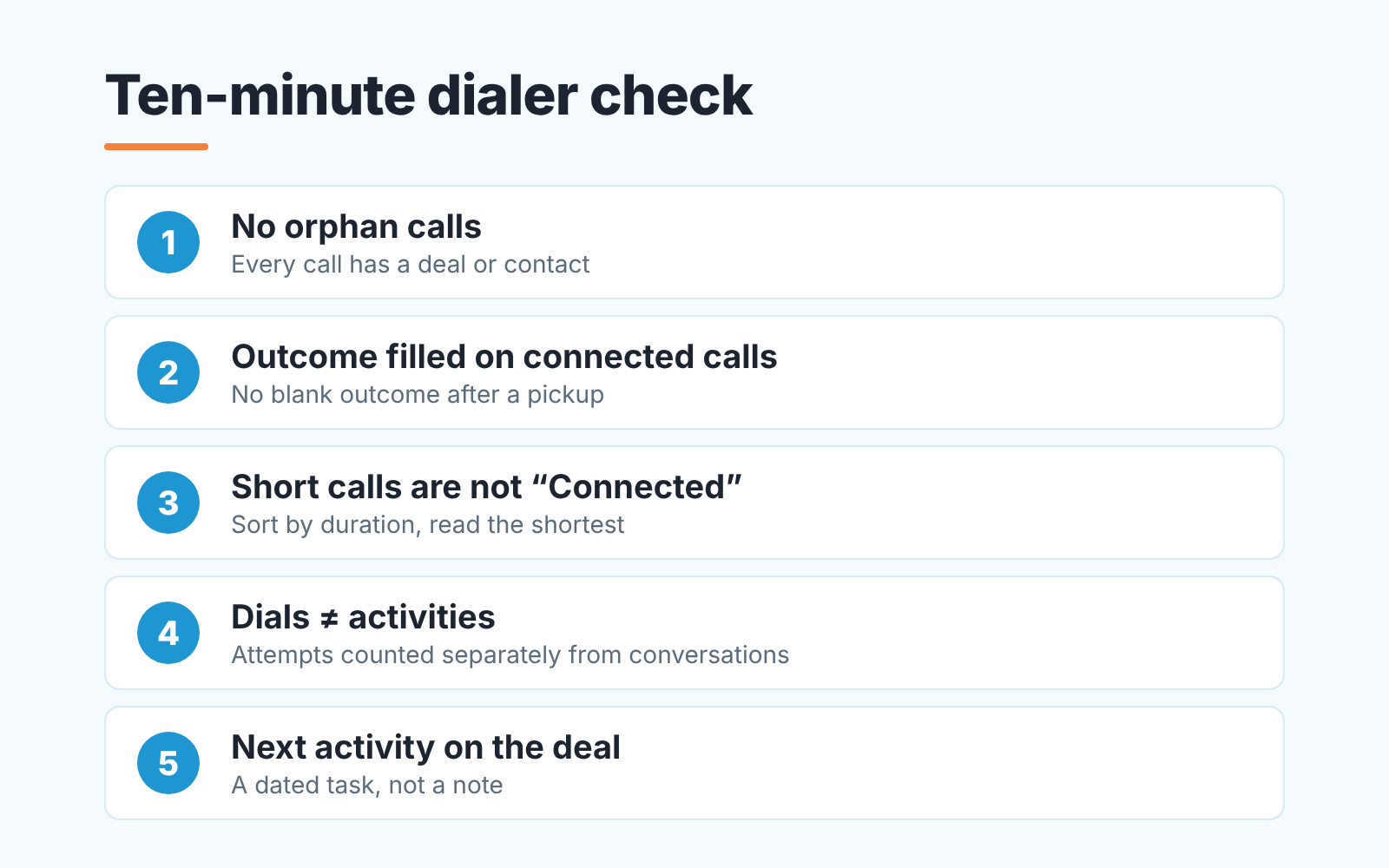
Filter the CRM’s call list to this week and one rep. Then:
- Count the calls with no deal or contact attached. If the number the dialer called did not match a record, the call is floating. More than a handful means the list went in without matching, and the week’s work is sitting outside the pipeline.
- Look down the outcome column. A blank outcome on a connected call is a rep hanging up and moving on because the next number was already ringing.
- Sort by duration, shortest first, and read the outcomes on the short ones. If calls of a few seconds carry “Connected”, the word has stopped meaning a conversation on your team.
- Put the number of dials next to the number of call activities in the activity report. If they match, every unanswered attempt is in the report as a completed activity.
- Open five connected calls and look for a scheduled next activity on the deal. A dated task counts. A note that says “follow up” does not.
None of this needs a report built. If all five are clean, the dialer’s numbers can go into Monday’s review as they are. If two or more fail, start with the fourth.
How a dialer inflates the activity report (and the fix)
The activity report counts records. The dialer creates a record per dial. That is the whole mechanism, and its not a bug.
Before the dialer a rep logged the calls that happened: a conversation, a voicemail that mattered. After the dialer, every attempt lands in the CRM with a status, a duration near zero and no outcome, because nobody was there to pick one. The completed activities number jumps. The manager reads the jump as effort, and the one rep who still dials by hand looks lazy next to it. We saw the same distortion with auto-logged email in Auto-logged emails in Pipedrive: when your activity report counts mail as work. A dialer does it with calls, and faster.
The fix is not to stop logging attempts; they tell you a list is bad or a time of day is dead (the best days and hours to call). The fix is to stop counting them as conversations.
Where the lever sits depends on the CRM. In HubSpot, call status and call outcome are separate properties and the call index shows Associated Deals next to them (HubSpot: review calls in the call index), so the number to compare reps on is calls with outcome Connected, not all calls. Pipedrive has no built-in calling integration. Calls come either from a Marketplace calling app that logs them itself, or from the mobile app, which prompts the rep to log an outgoing call as an activity as soon as it ends (Pipedrive: how can I make calls in Pipedrive). There the lever is the activity type the app writes to: have attempts and conversations land as two types, or leave the app-created type out of the completed-activities figure the team is compared on. Salesforce and Zoho CRM teams pull the same two levers on whatever record their dialer creates; the field names differ, the question does not. Calendar sync can pad the same report in Salesforce, as we showed in Salesforce meetings from Google Calendar in activity reports.
Then say it at the planning call in one sentence: “From Monday we count conversations, not dials. Dials stay in the CRM, they just stop being the scoreboard.”
Setting the next step after the call
The dialer’s best feature and its worst habit are the same thing. The moment one call ends, the next one starts, so there is no pause in which a rep would naturally type a next step.
So the pause has to be built. If the dialer has a wrap-up step between calls, the next step goes there, as a dated activity on the the deal and not as a line in the note. If it has no wrap-up step, the rule is simpler and less popular: a connected call is not finished until the next activity is on the deal, and the dialer waits.
Why on the deal and not in the note? Because of who reads it. A note is read by the rep who wrote it. A dated activity shows up on the manager’s board, in the rep’s day and in the deal’s health. The reverse case, when the buyer calls back and the call is nobody’s, is in missed call follow-up in Pipedrive.
On a dialer team the fifth check is the one that fails most often. Not because reps are careless. Because the software made the next phone ring before they had finished thinking about the last one.
When a dialer is not the problem
Sometimes all five checks pass and the pipeline still does not move. Outcomes are filled, connected calls run several minutes, next steps are dated, and the connect rate is low for every rep at once. Then the dialer is doing its job and the problem is the list, the time of day or the opening line. More dials into a bad list produce more tidy records of nothing. The clean records are what let you have that conversation with evidence instead of a feeling. Meetings that get booked and never reach the deal are the same kind of gap; see meetings booked vs. deal activity in HubSpot.
A disclosure, since we are at the question of who watches the record every week. We build SalesBond, a sales management layer on top of the CRM a team already uses; we started with Pipedrive. It works with Pipedrive, HubSpot, Salesforce and Zoho CRM, checks every deal against more than 20 rules, activity rules among them, and explains what lowered a deal’s score. The five filters above work without it. If you would rather not run them by hand every Monday, check your CRM with SalesBond.


