

Less Annoying CRM (LACRM) is a simple contact-management CRM for small businesses with one plan at $15 per user per month, no tiers and no contracts (Less Annoying CRM: pricing, checked 2026-11-04). It fits a team that needs contacts, leads, follow-up reminders and a shared calendar in one place. The product tour lists no dialer of its own; phone systems come through its integrations, so if you need a sales dialer, ask on the demo which one logs calls on the contact. For a team of two to five that lives on follow-ups, we think it is a sensible, cheap choice. If your manager also needs required fields, a forecast or per-rep reports against a target, test those on the vendor’s live demo before you sign up, or compare a larger CRM for that one job.
What Less Annoying CRM is, and who it fits
The vendor’s own headline is the honest summary: “More than a spreadsheet, less than a CRM” (Less Annoying CRM). So is it a real CRM or a contact manager? For a team that works from follow-ups, a CRM. The pitch is aimed at someone who has maxed out a spreadsheet and found every full CRM stuffed with features they will never use.
By the vendor’s description, you set tasks and get reminders, follow-ups are linked to the contact or lead, and every morning you get an email listing who to touch base with. Notes are timestamped, emails sync into the contact’s timeline, the team can share notes, and access can be restricted or granted per person. Google and Outlook calendars sync both ways. On a phone it runs in the mobile browser with no download needed, according to the product tour.
Who it fits: a solo seller, or a team of two to five where the manager still reads every deal. If the manager’s Monday question is “who are we calling this week,” LACRM answers it. “Which rep is slipping and why” is a different job. We come back to it below.
What it covers, and what to check on the demo
The product tour is organised in seven categories: Contacts, Leads, Calendars, Reporting, Team Management, Integrations, Security (Less Annoying CRM: product tour). The parts that matter for a sales team:
- Leads and pipeline: custom pipeline stages, unlimited custom fields specific to each stage, and a follow-up reminder on any lead.
- Reporting: contact reports filtered by any custom field, pipeline stage or group; a pipeline report of open deals filtered by stage, assigned rep or date range; activity reports over any period with export to a spreadsheet or PDF; task reports; a daily agenda email.
- Team management: assign leads and contacts to a team member in one click; set each user to read-only, no access or full edit.
- Integrations: two-way Google and Outlook calendar sync, Zapier, Mailchimp, “26 more apps + open API.”
On security, the tour lists 256-bit encryption, two-factor authentication and a way for an admin to lock out a compromised account.
Now the part the review videos skip. A sales manager usually asks three things in month two: can I make a field required on a deal, is there a forecast, and can I compare reps against a target? The tour describes the pipeline report as a view of “all open deals” and the activity report as what “you and your team have done.” Neither description tells you how those three questions are answered, so don’t assume either way. Ask them on the live demo or in the trial, with your own deal in front of you, before the import.
One more line from the pricing FAQ to know before you plan a large list: there is no strict contact limit, but the vendor’s rule of thumb is to stay below 50,000 contacts and companies in total (Less Annoying CRM: pricing).
Less Annoying CRM pricing: one plan for a team of five
$15 per user per month plus applicable tax. No tiers, no features locked behind upgrades, a 30-day trial with no credit card (pricing page). The plan includes unlimited contacts and companies, unlimited pipelines, unlimited custom fields, 25GB of file storage per user, task management, email logging, mobile access, user permissions, HIPAA compliance and free support.
For a team of five that is $75 a month before tax, and the number does not change when you add a pipeline or a custom field. We like that for a reason that has little to do with the price: nobody can talk you into a higher tier to get a missing feature, because there is no higher tier. What the demo shows you is what you get.
The flip side is the day the team needs something the plan doesn’t do. Then the answer is “move,” and moving takes real time from somebody on the team. Budget for that moment rather than for the subscription.
LACRM, Pipedrive, HubSpot and Zoho CRM by job (no ranking)
We are not scoring these four. Each is a sensible choice for a different job, and a five-person team usually has two or three of the six jobs below. Every claim here comes from the vendor’s own page on the date shown. We don’t quote Pipedrive prices.
Job 1: keep contacts and follow-ups from falling through
LACRM is built around this job: the morning email, the reminder on a lead, the timestamped note (home page). Zoho CRM’s free edition, for up to three users, also lists contact management, follow-up reminders, tasks and meetings (Zoho CRM: pricing and editions, checked 2026-11-04). HubSpot says its free CRM is “100% free, with no expiration date” for up to two users and 1,000 contacts (HubSpot: free CRM). For this job alone the difference between them is mostly taste. We covered the free tiers and thier limits in free CRM for a small sales team, compared by plan limits.
Job 2: a pipeline with stages the team actually moves deals through
All four do this. LACRM gives you custom stages, unlimited pipelines and fields per stage (tour). In Zoho CRM, multiple sales pipelines appear on the Standard edition’s feature list rather than the free one (Zoho pricing). Pipedrive says it built its product around activity-based selling, with pipeline management as a core feature (Pipedrive: features). Whether the team has a pipeline matters less than whether reps will update it. That comes down to clicks. Try each trial with your own three stages.
Job 3: make reps fill in the fields that matter
Pipedrive has an Important Fields setting that flags missing data on the fields you mark, and the vendor’s article says it is available on the Advanced plan and higher (Pipedrive: Important Fields, updated 2026-09-03). Zoho CRM lists workflow automation, “updating fields when a deal is closed,” on its free edition (Zoho pricing). For LACRM, the tour talks about unlimited custom fields; whether one of them can be made mandatory is a question to put to the demo or the support team. If required fields are your job, ask it first.
Job 4: a report the manager reads without opening deals
LACRM’s reporting category covers pipeline, activity, task and filtered contact reports, with export (tour). Zoho CRM puts “standard reports” on the free edition, “sales forecasting” on Standard, “unlimited reports” on Professional and a “reporting hierarchy” for managers on Enterprise (Zoho pricing). Pipedrive lists reporting and analytics as a product area (Pipedrive: features). Check which plan includes what before you compare. In LACRM, ask the demo to show a forecast and a per-rep view against a target. In Zoho, those sit on named paid editions, so price the edition you need.
Job 5: roles and who sees what
LACRM covers more here than its name suggests: read-only, no access or full edit, set per user, plus assignment of leads and contacts (tour). Pipedrive’s features page names “permission and visibility features” under privacy and security (Pipedrive: features). Zoho’s “multi-team management” and “reporting hierarchy” sit on Enterprise (Zoho pricing). For a team of five, three access levels are usually enough. The question changes when one manager needs to see their own team’s deals and nothing else.
Job 6: connect the rest of the stack
LACRM lists Google and Outlook calendars, Zapier, Mailchimp, “26 more apps + open API” (tour), and the same tour says those apps range “from mapping software to VOIP systems” (checked November 2026). If your team wants a sales dialer, ask on the demo which phone system it connects to and whether calls get logged on the contact’s timeline. Pipedrive says its Marketplace connects “over 500 tools” (Pipedrive: features). Zoho CRM’s free edition lists APIs at 5,000 calls a day, with Gmail and Outlook integration on Standard (Zoho pricing). If LACRM has to exchange data with one of the other three, ask how on the demo; Zapier and the open API are the listed routes. And if you ever move, the pricing FAQ says you can export everything at any time. Count teh tools your team opens every day before any of these numbers matters.
The same by-job method on a wider list is in CRM tools for a sales team, compared by job, and our shortlist by situation is in best CRM for small business: a shortlist.
The signs a team has outgrown a simple CRM
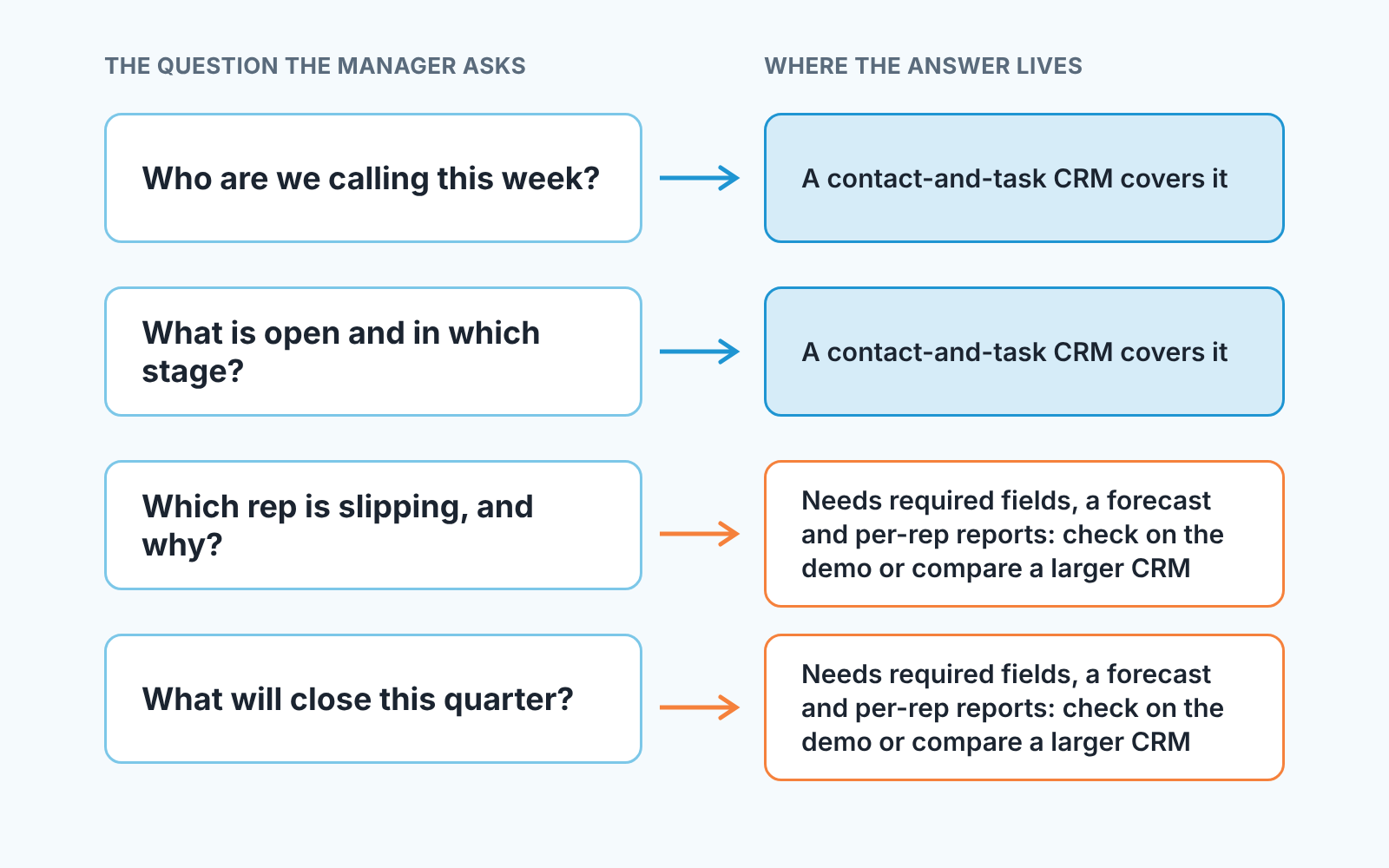
A team usually notices it has outgrown a CRM on a Monday when a question gets no answer. We would watch for four signs, and each one shows up in the CRM’s own data before anyone says the word “migrate.”
The first is the spreadsheet next to the CRM. A manager exports the pipeline report, adds a column for “probability” or “expected close month,” and starts running the meeting from the sheet. The CRM has become the input form and the sheet is the system. Once that sheet is two weeks old, the team has a forecasting job, whatever tool it is on.
The second is the field nobody fills. You add “next step” or “decision maker” as a custom field, you ask for it on three planning calls, and a month later most open deals still have it blank. If nothing in your setup stops a deal from being saved without it the only enforcement is the manager’s patience.
The third is the second manager. The day one person leads two reps and another leads two more, per-user access stops describing the structure. Each of them needs a view of their team’s deals and a report on their team’s activity, without opening every deal. That is the reporting-hierarchy job, and Zoho, for one, puts it on Enterprise.
The fourth is quieter: deals that sit. A pipeline report filtered by stage shows how many deals are in “Proposal sent.” What a manager of five actually wants is the list of those with no activity for three weeks. If you are building that list by hand every week, the job has moved from contact hygiene to pipeline hygiene.
None of this means LACRM was the wrong choice for the team you had then. How to pick the next tool when that happens is in how to choose a CRM for a sales team of five, and matching it to the kind of business is in choosing CRM software by business type. If your team now spends more time on marketing automation than on deals, Keap CRM for small business is compared on its own.
What a demo should show
LACRM offers a live demo with no signup required (tour), which we think is the right place to settle every “does it do X” in this article. Go in with a written list.
Start by moving a lead through three stages and counting the the clicks, because that is the number your reps will feel every day. Then try to save a deal with your most important custom field left empty and see whether anything stops you. Open the pipeline report, filter by one rep, and look for a way to sort by last activity. Look for a forecast, or any report that totals open deals by expected close month, and write down what you find either way. Set a second user to read-only and check what they can and can’t see. Finally, export a report and open the file: would your manager actually read it?
That is one sitting. Whatever comes up short isn’t automatically a reason to walk away. It is what “less than a CRM” costs, and you decide whether the price is right for this year.
Checking the pipeline afterwards
Whichever way you go, the week after a CRM change is a good moment to look at the pipeline with fresh eyes. Stale deals, blank fields and stuck stages are most visible then, and easiest to fix.
A disclosure, since we are at the tooling question: we build SalesBond, a sales management layer on top of the CRM a team already uses; we started with Pipedrive. SalesBond works with Pipedrive, HubSpot, Salesforce, Zoho CRM, Microsoft Dynamics 365, Freshsales, Close, monday CRM, Copper, Zendesk Sell, Nutshell, Insightly, Attio, Bitrix24 and Kommo (amoCRM). If your team is on one of them, or moves to one, the free CRM audit does the first pass for you. SalesBond looks at the last 30 days of the connected CRM and sends a PDF report: money at risk, a CRM score, the pipeline bottleneck, managers and deal health, and what to fix. Seven days later a second PDF shows what changed. Check your CRM with SalesBond. What that 30-day check typically turns up is in CRM audit: what a 30-day check finds.
Your next step is smaller than any of that. Write down the two or three jobs from this article your team actually has, open the LACRM demo, and run the checks above against them. If every answer is yes, you have your CRM for this year.


