No, Salesloft is not a CRM. It is a sales engagement platform, the layer reps work in to run outbound touches (email steps, call steps, follow-up tasks) from one queue, and it records that activity into the CRM, which stays the system of record for contacts, deals and owners. By job, Salesloft fits a Salesforce team that wants reps on one outbound queue, Outreach pitches one platform for engagement, deal management and forecasting, and Apollo starts from finding contacts you do not have yet.
Whichever you pick, a manager has to agree before the first sequence which fields the tool may write, what happens when a contact already exists, and who owns the record after sync. Those three decisions shape whether your pipeline reports still make sense a month later more than any item on the feature list does.
What Salesloft is and what it does
On its home page Salesloft calls itself “The Leading Predictive Revenue System” and describes the mechanism as signals from account activity flowing through “a Data and AI engine that interprets data, prioritizes signals, triggers agents, and pushes next steps to revenue teams” (Salesloft). The integrations page still uses the older, plainer label, “sales engagement platform” (Salesloft: Integrations & Partnerships). The same site lists conversation intelligence, pipeline inspection and Clari Forecast among the platform’s parts.
That last name is new for anyone who looked at Salesloft a couple of years ago. Clari and Salesloft announced an agreement to merge on August 7, 2025 (Salesloft newsroom), and the company’s release dated December 3, 2025 says the merger is complete, with Steve Cox as CEO (Salesloft newsroom). For a buyer the practical effect is that a Salesloft quote may now include forecasting as well as the engagement tool, so ask which products are in it.
For a sales manager the useful reading is simpler. Salesloft runs the reps’ outbound day. Your CRM still holds who the customer is, which deal is open and who is responsible. It suits that Salesforce team best when the CRM is already in decent order, because the engagement tool writes into whatever state the records are in. The whole question is how the two systems talk.
Salesloft pricing: what is public
Not much. The pricing link on the vendor’s site opens a “Talk to Sales” page (Salesloft: Talk to Sales), and there is no price list, plan table or per-seat figure on it (checked November 2026). Any number you read in a third-party review is that reviewer’s own quote.
So buying works through a sales call and a quote. Go into that call knowing three things: how many reps will actually run sequences (not everyone with a CRM login), which CRM you run, and which parts of the platform you need. Then ask the rep to put the quote’s line items in writing, including what is priced per user and what is a platform fee. We cannot tell you what the answer will be, and neither can anyone who has not seen your quote.
What lands in the CRM and what stays in Salesloft
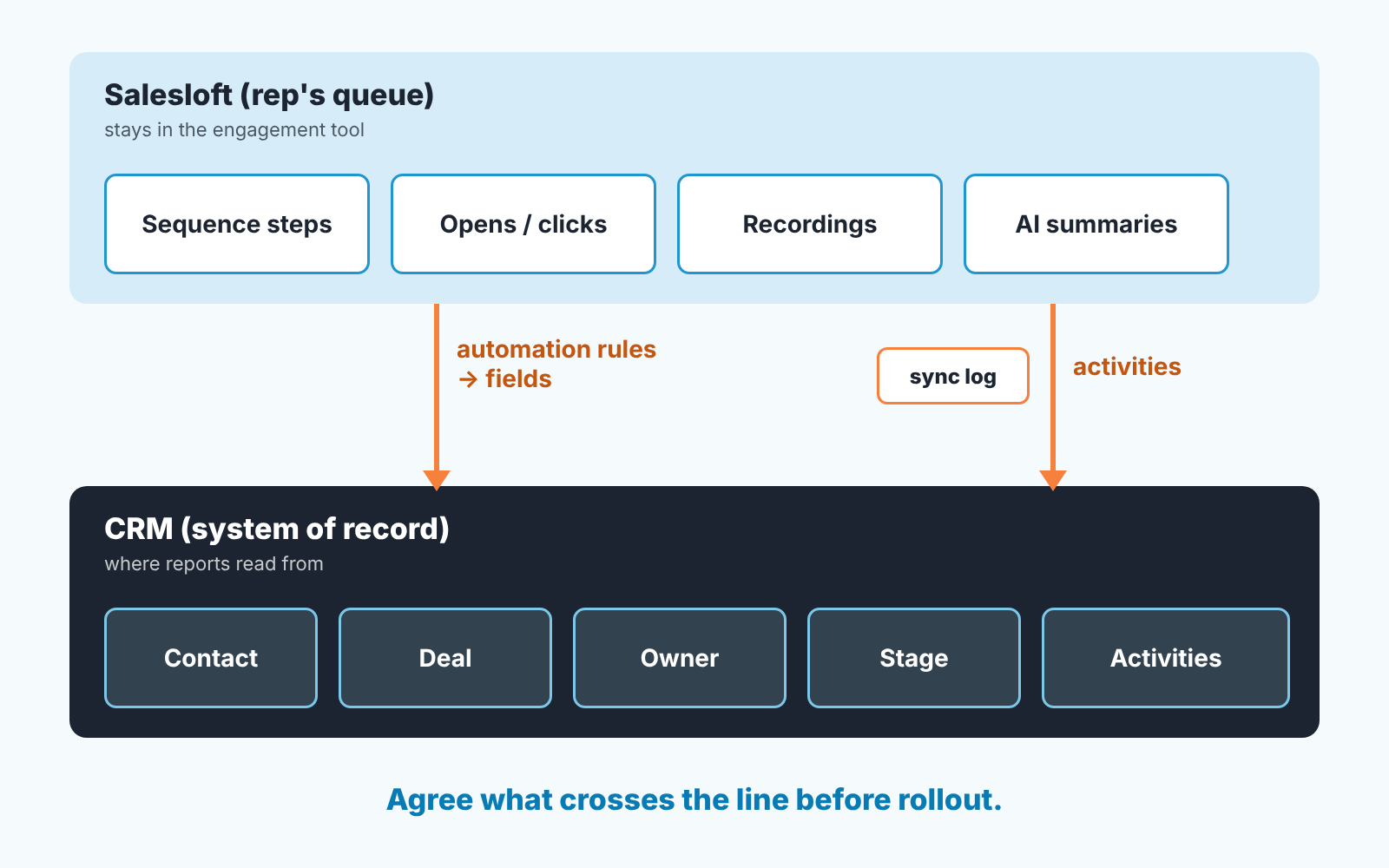
The clearest vendor statement is about Salesforce. Salesloft describes its CRM Sync as the ability to “automatically record activities to Salesforce, create powerful automation rules, and access a comprehensive sync log – all with real-time updates on both platforms” (Salesloft: Integrations & Partnerships). Salesforce is the only CRM named on that page. If you run HubSpot, Zoho CRM, Dynamics 365 or anything else, ask the vendor for the current support page for your CRM and get the answer in writing; we could not confirm it from the public pages and will not guess.
Read that Salesforce sentence slowly, because it has three parts a manager cares about.
Activities. Emails sent, calls made, tasks completed arrive in the CRM as activity records. This makes your activity reports fuller and it can flood them: a rep running a long sequence across a whole territory list produces activity at a scale your “calls per rep per week” report was never designed for. Decide in advance whether an automated step counts the same as a hand-written email. We think it should not, and the usual fix is a type or source value on the activity so the report can filter.
Automation rules. Rules that update fields based on what happened in the sequence. This is where the tool starts writing to fields you thought were yours: a status, a last-contacted date, a lead source. Each rule is a decision about who owns that field.
Sync log. What was written, when, and what failed. Your admin will live in this screen during the first month. Ask to see it in the demo.
What stays inside the engagement tool varies by vendor and by what you switch on, so we will not list Salesloft specifics we have not seen. The candidates are the same in every tool of this class: the step-by-step state of a sequence, open and click signals, recordings and transcripts, AI-written summaries, the rep’s personal queue. For each one ask: does a manager need it in a CRM report, or is it fine living in the rep’s tool? Opens and clicks usually belong in teh tool. “When did we last actually talk to this account” belongs in the CRM, on a field every report can read.
It’s the same exercise as with an AI note taker, just a different source of writes; see what an AI note taker should write to the CRM.
Salesloft vs Outreach vs Apollo, by job
Reviews rank these three. We will not, because the honest answer depends on which job you are hiring the tool for, and the vendors describe three different jobs on their own front pages.
If the job is running outbound from contacts that already live in your CRM, and your CRM is Salesforce, Salesloft documents the activity sync, the automation rules and the sync log in one sentence (Salesloft: Integrations & Partnerships). That is the narrowest, most checkable claim of the three.
If the job is one platform for engagement, calls, deal review and the forecast, Outreach describes itself as an “Agentic AI Platform for Revenue Teams” that “unifies sales engagement, conversation intelligence, deal management, and forecasting in a single platform”, and says every meeting “starts with a brief and ends with an updated deal record” (Outreach). Note what that last claim means for you: the tool is writing to the deal record after meetings. That makes the list of writes to agree on longer. The home page says Outreach “connects with CRM” and does not list the CRMs there.
If the job is finding contacts you do not have yet and then working them, Apollo positions itself as “The AI GTM System for Go-to-Market Teams”, splits its product into Data, Intelligence and Execution layers, and says you can “run your GTM motion in Apollo, or plug it into the tools you already use” and that it “helps keep your records fresh, complete, and ready to act on” (Apollo). Keeping records fresh is enrichment, so here the write question covers activities, and contact and company fields too. Decide whether the tool may overwrite a phone number a rep typed in last week.
None of this ranks them. It tells you which write surface you are agreeing to: activities and rules (Salesloft’s stated Salesforce sync), deal records after meetings (Outreach’s stated behavior), or contact data itself (Apollo’s stated behavior). Pick the job first, the shortlist usually becomes one tool. The same method applied to CRMs is in CRM tools for a sales team compared by job.
Three rules to agree before anyone sends a sequence
Most of the data lost in a rollout goes missing in these three decisions, and none of them is a feature. Call centers feel this sync problem most, and we compared that setup in the best call center CRM for sales and service teams.
Who owns the record. A rep adds a contact to a sequence. The contact already exists in the CRM, owned by someone else, attached to an open deal. When the tool syncs, which owner wins? If “the tool creates a new contact”, you now have two records for one person and two reps emailing them. If “the tool reassigns the owner”, the account manager just lost their customer to an SDR without anyone deciding that. Write the rule down: the owner field is never written by the engagement tool, and a contact with an existing owner goes into a sequence only with that owner’s name on the CRM task. The ownership side is in CRM data ownership for a small sales team.
What happens on a duplicate. Same email in both systems, slightly different name. Same company, two domains. Ask what the match key is and what the tool does when the match is uncertain. “Creates a new record” is the worst default, because duplicates do not announce themselves. They show up as a pipeline that looks bigger than it is, and you find out when a customer gets two proposals.
Which fields the tool may touch. Two columns: fields the tool writes, fields the tool reads. Stage is the one to be stubborn about. A sequence reply is a buyer’s signal and should move no stage on its own; if an automation rule moves a deal to “Qualified” because someone answered “not now, thanks”, your stage conversion numbers are fiction from that day on. Our position: the tool writes activities and a last-touched date, and nothing on the deal object until a person has reviewed the rule against real data for a quarter.
If you already let an AI agent act inside your CRM, what to let an AI sales agent do in your CRM is the same checklist from the other side.
Make the demo show you the sync
Vendors demo the sequence builder. You want to see the sync, so bring a laptop with your own CRM open.
Start with the hardest case. Ask the presenter to add a contact to a sequence who already exists in your CRM with an owner and an open deal, then open that contact in the CRM together. Who is the owner now, and is there one record or two? A demo that cannot do this with your CRM is a demo of a different product than the one you would be buying.
Then add the same person again from a second rep’s list, with the email typed in a different case. You want to watch the duplicate handling happen on screen.
Next, have them send one email from a sequence step and one by hand, and open the CRM activity list. Can you tell the two apart? If not, your activity reports will not be able to either.
After that, go to the sync log and make one write fail on purpose. A required field left blank in the CRM is the easiest way. Watch where the failure shows up and who who gets told.
Finally, ask for the field map: every CRM field the tool writes, with the rule that triggers the write. If the answer is “it is configurable”, ask for the default configuration printed out.
Reading the result in your CRM reports
Two weeks after rollout, do not open Salesloft to see how it is going. Open the CRM.
Pull your usual activity report by rep, then the same report filtered to the activity type or source the sequence writes. If you did not set one up, you cannot tell automated touches from real conversations, and that is the first fix. The sequence number tells you reps are using the tool; the hand-written number tells you whether conversations are happening.
Then the pipeline report by owner. Count contacts and deals created since go-live with the engagement tool as source and spot-check a handful by hand against existing records. One duplicate in a handful is a rollback.
Last the stage report. If stage movement jumped the week the tool went live, find the automation rule that did it before you celebrate.
Thirty days later: check the pipeline, not the tool
A disclosure before this part: we build SalesBond, a sales management layer on top of the CRM a team already uses; we started with Pipedrive. SalesBond reads the CRM itself, and the CRM is exactly where an engagement tool’s writes end up. SalesBond works with Pipedrive, HubSpot, Salesforce, Zoho CRM, Microsoft Dynamics 365, Freshsales, Close, monday CRM, Copper, Zendesk Sell, Nutshell, Insightly, Attio, Bitrix24 and Kommo (amoCRM).
On a rollout like this we use the free CRM audit. SalesBond looks at the last 30 days of the connected CRM and sends a PDF report: money at risk, a CRM score, the main findings, deal health by manager, the pipeline bottleneck, repeat customers, the top-10 clients and what to fix first. Seven days later a second PDF shows what changed. Run it the week before the engagement tool goes live and again a month after, and the two reports answer the question this article is about: did the pipeline get healthier or just busier?
The deal part of that report comes from Deal Health, which checks every deal against more than 20 rules in categories that include Activity, Data and Ownership. That is where sync mistakes surface: missing owners, stale fields, deals with activity but no next step.
Check your CRM with SalesBond before the rollout, so you have a baseline. What a 30-day check typically turns up is in CRM audit: what a 30-day check finds.
FAQ
Does Salesloft connect to Salesforce?
Yes. Salesloft’s integrations page describes CRM Sync with Salesforce that records activities automatically, supports automation rules and keeps a sync log with real-time updates on both platforms (Salesloft: Integrations & Partnerships). For other CRMs, ask the vendor for the current support page; the public integrations page names only Salesforce.
How much does Salesloft cost?
The vendor does not publish prices. Its pricing link leads to a “Talk to Sales” page (Salesloft: Talk to Sales), so the price comes as a quote, and any figure you see elsewhere is a third party’s.
Is Salesloft a CRM?
No. It is a sales engagement platform that works alongside a CRM. Contacts, deals and owners should stay in the CRM, and the engagement tool should write activities to it under rules you set.
What are the alternatives to Salesloft?
It depends on the job. Outreach describes itself as one platform for engagement, conversation intelligence, deal management and forecasting; Apollo combines contact data with execution. Each writes to a different part of your CRM, so decide which writes you want before you compare features.
If you want the baseline before the rollout, sign up for SalesBond and run the free CRM audit on the CRM you have today.