

A private school admissions CRM tracks each family from the first inquiry through the tour, the application, the deposit and enrollment, and keeps the record of who spoke to whom along the way. A private K-12 school usually chooses between an enrollment platform built for schools (Finalsite Enrollment or Blackbaud) and a general CRM with admissions stages, such as HubSpot, Salesforce or Zoho CRM, while colleges and universities look at admissions platforms such as Slate, Element451 or Ellucian Recruiting & Admissions. The deciding question is whether the application, the contract and re-enrollment have to live in one system with the family’s communications, or whether the CRM only runs the relationship side while the student information system (SIS) keeps the academic record.
Quick answer: match the admissions job to the system
Pick an admissions platform if the application and the decision have to live in the system; pick a general CRM if you only need to run inquiries, tours and follow-ups. We did not rank anything here. We opened each vendor’s own page, wrote down which job it claims to cover, and put the link next to it so you can check the wording yourself. A few addresses did not open for us, and we say so where it matters. None of the education platforms publishes a price on the pages we opened, so there is no price column. HubSpot’s guide does link to its free CRM.
| The job you cannot drop | Type of system | Where we saw it |
|---|---|---|
| Private K-12 admissions: inquiry, application, contract, re-enrollment of the same family | A K-12 enrollment platform | Finalsite, Finalsite Enrollment: “guides families from inquiry to enrollment”; Blackbaud, Enrollment Management System: “a single login to apply, track application status, submit contracts, and re-enroll” |
| Inquiries from the website and phone, follow-ups, a pipeline from inquiry to enrollment | Any CRM with a pipeline and reminders | Zoho CRM, Education CRM: “manage the complete relationship lifecycle from inquiry to enrollment”; HubSpot, A Quick Guide to a CRM for Education: a journey “that assigns leads to specific enrollment officers” |
| The application itself: processing, review, decision release | An admissions platform | Technolutions, Slate: “optimize communications, streamline application processing, and simplify decision release in modern admissions offices” |
| Early outreach to high-school students, scholarship milestones, duplicate or suspicious applications | An admissions platform at university scale | Ellucian, Recruiting & Admissions: “one-to-one connections with students as early as 9th grade”, a “Micro-Scholarship Engine”, “automated checks that flag suspicious or duplicate applications” |
| AI agents answering applicant questions and reading applications | An AI-first higher-ed platform, or agents on top of your current stack | Element451, AI CRM and Agent Platform for Higher Education: “Answer questions 24/7, read applications, and catch fraud”; Bolt agents “on your existing tech stack” |
| CRM and SIS on one platform across the whole campus | An enterprise education suite | Salesforce, Education CRM Software: “CRM and next-gen SIS capabilities in one place” |
| Portals where parents see scores and staff update attendance | A general CRM built out with portals | Zoho CRM, same page: “staff can update students’ attendance and scores, parents can view scores” |
| Fee reminders and payment tracking next to the pipeline | A general CRM with payment tracking | HubSpot, same page: “track payments students make for their modules and courses” and “manage reminders to students who haven’t paid yet” |
For a private K-12 school the first row usually decides it. If the contract and re-enrollment of the same family have to sit next to the inquiry, Finalsite Enrollment and Blackbaud are the platforms to put on the demo list; if the school only needs inquiries, tours and follow-ups, the second row and a general CRM with an admissions pipeline cover it. For other industries we keep a shortlist of CRMs by business type and a separate comparison for clinics and practices.
What a school CRM actually holds
Walk one family through it. A parent fills in the form on the school site asking about a grade 7 seat for middle school entry. The CRM creates a contact for the parent, a second contact for the child, a pipeline entry at the first stage (Inquiry) with a source (website form) and a next activity (call back today). The admissions officer calls, books an open house, and moves the entry to Tour booked. After the tour the family submits the application; the entry moves to Application received, then Offer made, then Deposit paid, then Enrolled. Or to Withdrawn, with a reason.
Every one of those moves is a field change and every field is something you can report on later: inquiries by source, time from inquiry to first call, tours booked against tours attended, offers against deposits, withdrawals by reason.
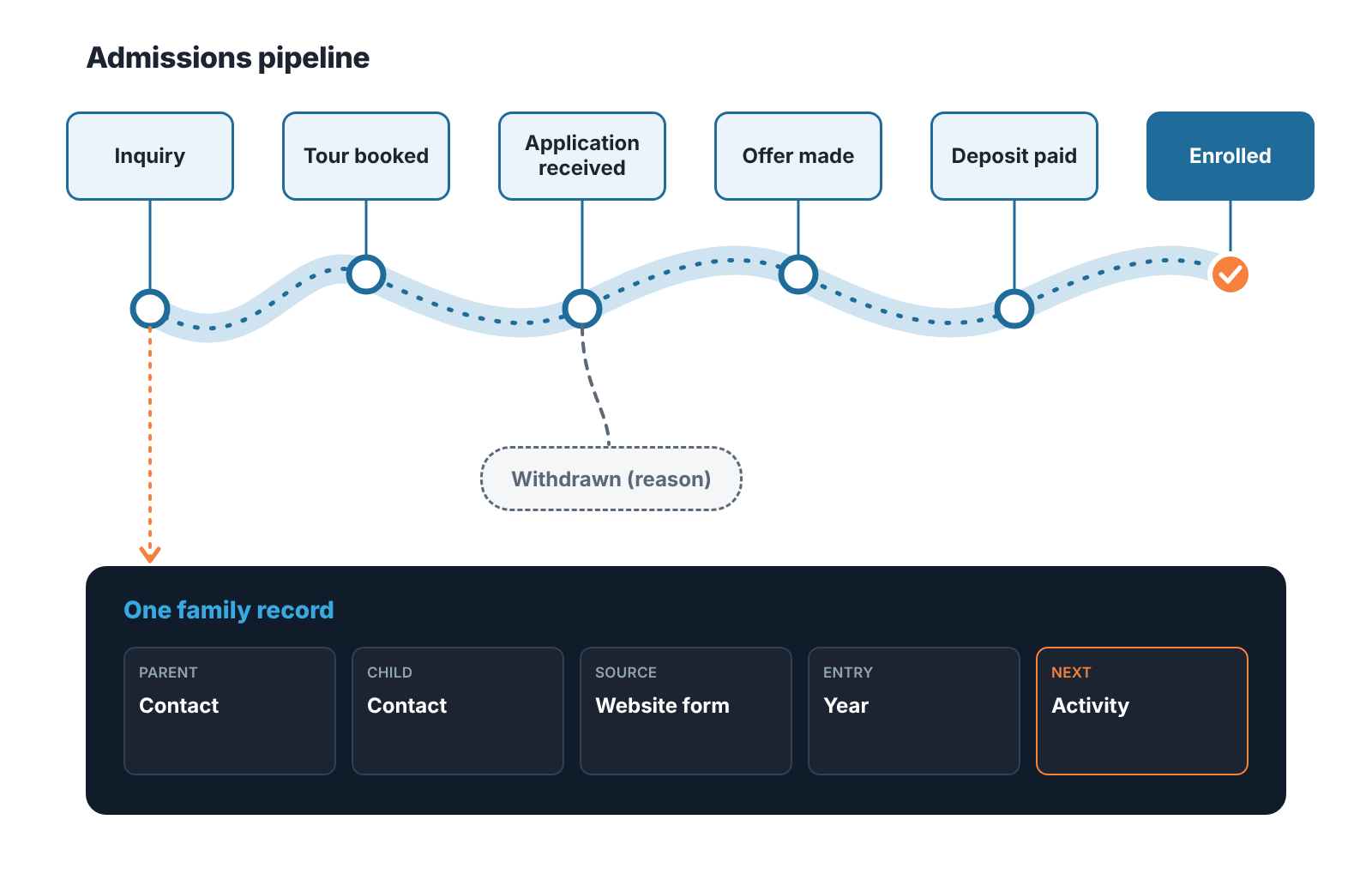
The family record is the part a general CRM does not give you by default. In a school the “customer” is a household: one parent inquires, the other attends the tour, the child is the applicant, and a younger sibling will come through in three years. The CRM needs a way to tie those contacts together so that a second inquiry from the same family lands on the existing record instead of creating a new lead. In a general CRM that is usually a parent record, a company-style object the parent and child contacts attach to; in an admissions platform the household is part of the design. Ask about it on the demo, because it is the field you cannot add later without cleaning up a year of duplicates.
The academic record is the thing a school CRM should not hold. Grades, attendance, timetables and transcripts belong in the SIS. Salesforce sells “CRM and next-gen SIS capabilities in one place”; Zoho’s education page talks about staff updating “attendance and scores” through portals. Both are possible. We think a small or mid-sized school should start on the narrow side: inquiries, tours, applications, deposits, re-enrollment, and the parent communications around them. Widen it only when a specific job needs the CRM to see the academic record, and get the data-protection terms for that widening in writing first.
Enrollment platforms for private K-12 schools
Private schools have their own category of software, and two names came up when we asked AI assistants the question an admissions director would ask. Finalsite Enrollment says it “guides families from inquiry to enrollment with a connected system for admissions, enrollment, and tuition billing”, and splits that into admissions, enrollment (contracts, forms and re-enrollment) and tuition. Blackbaud Enrollment Management System is listed on Blackbaud’s site as admissions tracking and communications for K-12 schools, and it gives families “a single login to apply, track application status, submit contracts, and re-enroll the following year.”
Look at what both pages lead with: the family, the contract, next year’s re-enrollment. That is the household problem, built into these platforms from the start. Neither page we opened lists a price. If your website or your SIS already comes from one of these vendors, ask what the enrollment product shares with it before you look anywhere else.
A private school with two admissions staff and 300 inquiries a year still has the same funnel shape as a university, at a fraction of the volume. So a general CRM with an admissions pipeline is a fair candidate too.
General CRMs with an admissions pipeline
HubSpot’s education guide is the most concrete general-CRM page we opened. It describes a journey that assigns leads to enrollment officers, “personalized sequences” so prospective students hear from you at the right time, reports on enrollment, and, unusually for a CRM page, payment tracking and fee reminders. Because it is a guide, it does not say which hub or tier each of those sits in, so ask. The page links to HubSpot’s free CRM, which is where a small school would start, and the sequences and payment features are the things to confirm on the plan you would actually buy.
Salesforce’s education page is Education Cloud, with the claim “5,000+ educational institutions worldwide trust Salesforce” in the headline and a module list for recruitment and admissions, student success, advancement and marketing. If the job is “answer this week’s inquiries faster” it is more platform than a small school needs. If the job is one platform for admissions, advising and alumni across a university, it is the page to read.
Zoho CRM has a current education page (the older address we tried first returned not-found; the live one is under “verticals”). It reads like a school’s front office: the admissions lifecycle “from inquiry to enrollment”, auto-qualifying leads into funnels, automated follow-ups “via email, WhatsApp, or other apps”, a library of courses with eligibility and fees, and portals for students, parents and staff. Then read the small print at the bottom. Zoho says plainly that Zoho CRM “is not an out-of-the-box vertical CRM solution” and that what the page shows is “a result of such customization.” So the configuration is the project, and you budget for it or for a partner who does it.
Pipedrive we could not confirm. We tried two education addresses on pipedrive.com and both returned not-found, so Pipedrive does not appear in the table above. It is a pipeline CRM and a school can set the six stages up in it in an afternoon; we simply have no vendor page saying it is meant for admissions, and we only list a system for a job when the vendor’s own page claims it.
For a two-person admissions office choosing between the general CRMs, how to choose a CRM for a sales team of five and the CRM tools compared by job cover the pipeline side without the education layer, and the small-business CRM shortlist is the shorter read.
Higher education CRM platforms: what their own pages say
Slate, from Technolutions, says 2,000+ colleges and universities use it, and it is built to hold the application and release the decision, which a general CRM does not do without a form builder and a lot of custom work. Its page publishes no price list. Element451 sells an AI-native CRM and Bolt, which puts its AI agents “on your existing tech stack”; one product, Bolt for CE & Workforce, is listed with “Planned availability in spring 2027”, so ask what is live today. Ellucian’s Recruiting & Admissions page is written for universities that recruit “as early as 9th grade”, and Ellucian also sells the SIS and the ERP, so for a campus already on Ellucian the real question is how much of the suite you want.
Three things to make the demo show you
Vendors demo the happy path, so bring three cases where admissions usually goes wrong.
The first is the inquiry that arrives on the last day of the summer holiday. Ask the presenter to submit a form as a parent and show what happens in the next minute: which officer owns it, what reminder is set, and what the parent receives. If the answer is “you would configure a workflow for that”, ask them to configure it while you watch. A school’s response time to a September inquiry is most of the difference between a tour and a lost family, and the demo should show the mechanism working.
The second is the duplicate family. Ask them to submit a second inquiry from the parent who already has a child at the school, with a slightly different email. Does it land on the existing household, or does it become a fresh lead with no history? Then ask to see the sibling on the first record.
The third is the abandoned application. A family books a tour, attends, starts the application and stops. Ask what the system does on day seven. If nothing happens until someone remembers, the pipeline will fill with applications that look open and are not.
Two questions to ask in writing rather than on the demo: which SIS the vendor integrates with, in which direction the data flows, and whose connector it is; and the data-protection terms for student and family data, including FERPA where it applies. We are not lawyers, and nothing in this article states that any system is FERPA-compliant. That is a claim the vendor makes to you, for your contract and your tier, and it belongs in email before a trial runs on real family data.
The admissions numbers to look at every Monday
Six numbers cover a weekly admissions review, and all six come straight from the fields in the pipeline.
New inquiries by source. Time from inquiry to first contact. Tours booked and tours attended. Applications started and applications submitted. Offers made and deposits paid. Withdrawals, with the reason.
The report goes wrong on the entries that stop moving. An inquiry with no next activity, a tour marked “booked” in March that nobody updated, an application that has been “in review” since the spring: the report looks healthy and the school is losing families quietly. The weekly review should spend its time on the entries that have not moved.
One setup detail makes this report possible in a general CRM. Put a value on the entry, the annual fee for the entry year, and set the “close date” to the start of term. A pipeline with values and dates gives you a forecast of enrolled revenue by year group, which is what the business office actually asks for, and it makes stuck entries visible by age. Admissions platforms do this with their own fields; in HubSpot, Salesforce or Zoho CRM you decide it on day one.
Checking the pipeline after term starts
Here is where we should say what we do. We build SalesBond, a sales management layer on top of the CRM a team already uses, and the first thing it does is a free CRM audit: it reads the last 30 days of your CRM and sends a PDF report with money at risk, a CRM score, the top findings, managers and deal health, the pipeline bottleneck, repeat customers and what to fix. Seven days later a second PDF shows what changed. For a school, “deals” are the applications in the pipeline, “repeat customers” are the families with a second child coming through, and the bottleneck is usually the stage where entries sit without a next activity.
It works with Pipedrive, HubSpot, Salesforce, Zoho CRM, Microsoft Dynamics 365, Freshsales, Close, monday CRM, Copper, Zendesk Sell, Nutshell, Insightly, Attio, Bitrix24 and Kommo (amoCRM), and it reads the pipeline, deals and activities there. It is not an education product and it does not connect to Slate, Element451 or Ellucian; if your admissions pipeline lives in one of those, the audit does not apply to it. For a school whose pipeline runs in one of the general CRMs, Check your CRM with SalesBond, or read what a 30-day CRM audit usually finds before you run one.
FAQ
Is a school CRM the same as a student information system?
No. The CRM runs the relationship: inquiries, tours, applications, offers, deposits and the communications around them. The SIS holds the academic record once the student is enrolled. Some vendors sell both on one platform (Salesforce describes “CRM and next-gen SIS capabilities in one place”; Ellucian sells the SIS alongside Recruiting & Admissions), but the two jobs stay distinct even there.
Can a K-12 private school use a general CRM instead of an admissions platform?
Yes, if the application itself can live in a form tool and the CRM only needs to run the pipeline and the family record. HubSpot’s and Zoho’s education pages describe that kind of setup. If applications, contracts and re-enrollment have to happen inside one system, that is the job Finalsite Enrollment and Blackbaud Enrollment Management System describe on their pages.
Which CRM is best for schools?
It depends on who you admit. A college or university that reviews applications and releases decisions in the system should start with the admissions platforms: Slate, Element451 or Ellucian Recruiting & Admissions. A small private school can pick a K-12 enrollment platform such as Finalsite Enrollment or Blackbaud, or a general CRM such as HubSpot or Zoho CRM set up with admissions stages. We do not rank them; make the demo show the September inquiry, the duplicate family and the abandoned application.
Is Slate a CRM?
Yes, by its own description. Technolutions’ homepage says “Slate for Admissions defines higher education CRM systems” and presents Slate as one system for admissions, student success and advancement offices, written for colleges and universities.


