An AI note taker records and transcribes a call and writes a summary. For a sales team, the useful question is where the summary lands in your CRM, down to the deal, the field and the plan that allows it. Compare tools on what their own pages say they write to the CRM, then check the first ten deals by hand.
We read the vendor pages on November 3, 2026 and put the same four questions to each tool, then looked at what happens to the notes once they are in Pipedrive, HubSpot or Salesforce.
What an AI note taker actually hands your CRM
A note taker joins the call as a visible bot, or listens on the rep’s device without one. It produces a transcript, then an AI summary: topics, decisions, action items. So far every AI notetaker looks alike.
The part a sales manager cares about comes after that. The summary either stays in the vendor’s app or gets pushed to a CRM record. Some tools push a note. A few push a note and fill fields. Most of the pages we read describe the first and are quiet about the second.
The reviews that rank these tools compare transcript accuracy and price. None of them say which object in the CRM receives the text, so that’s what we asked instead.
Four questions to ask any AI note taker before it touches your CRM
The first question is which CRMs the vendor names on its own pages. Not “integrates with your stack”: names. If your CRM isn’t on the pricing or integrations page, it may still be reachable through Zapier or an API, but then you are building the sync yourself.
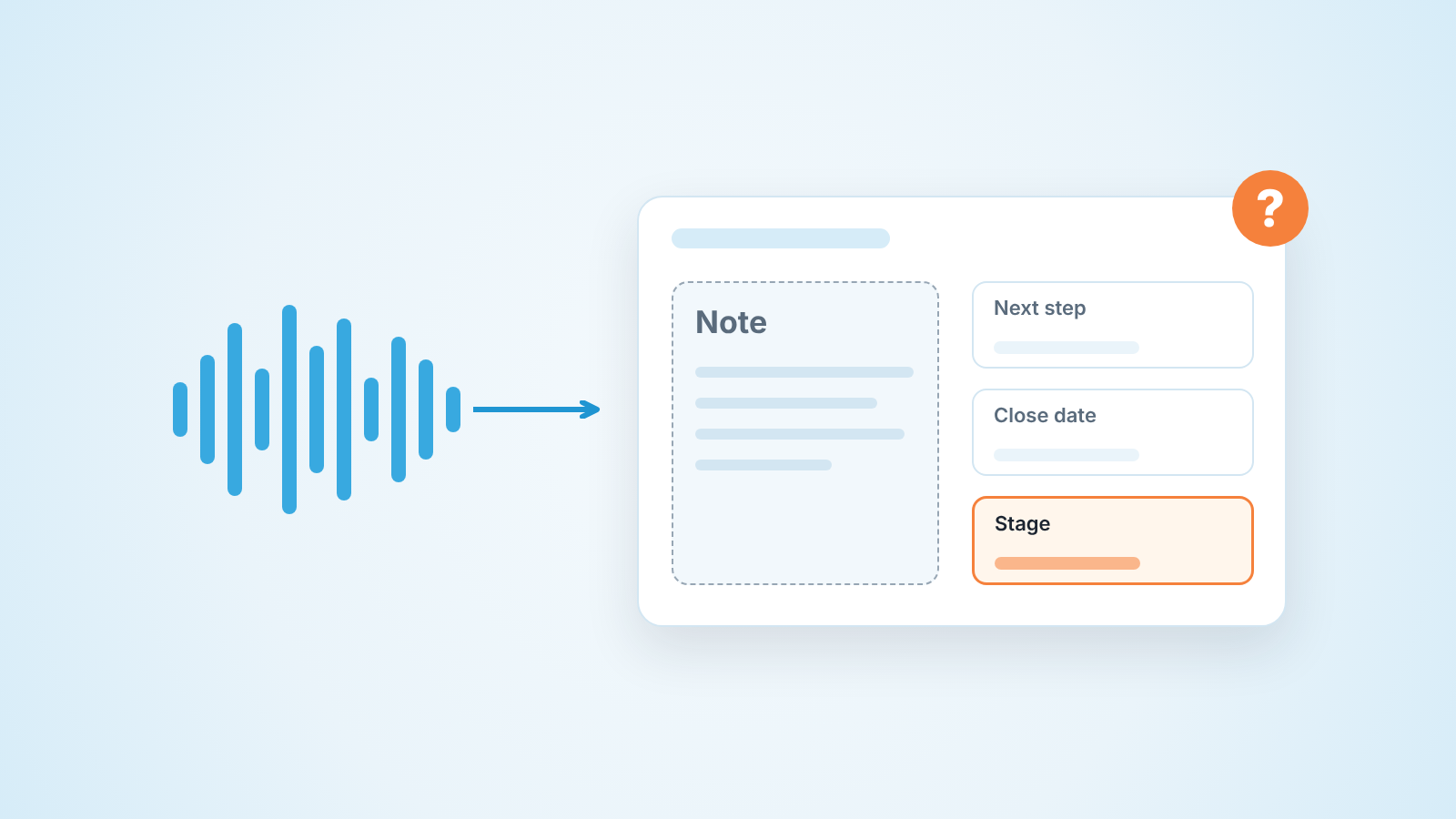
The second is what exactly gets written. A summary as a note. The full transcript. Action items as tasks. Values in specific fields like next step, close date or stage. For the person who runs the pipeline these are very different things. A note is context; a field is data your forecast reads.
The third is which plan opens the CRM sync. On several pages the integration sits a tier or two above free, and on some it comes with a cap on how many users can sync. The price to compare is the price of the the plan with the sync, whatever the headline says.
The fourth: who sees the note in the CRM, and does a second person on the same call create a second note? Vendor pages rarely answer this one. Your first two weeks will.
AI note taker comparison: what each tool writes to the CRM
Every cell below comes from the public pricing or integrations pages, read on 2026-11-03. The pages are dynamic. Prices are per user per month in USD. “Not named on the page” means exactly that and not “not supported”: a CRM can be reachable through Zapier, an API or a help-center article we didn’t read.
| Tool | CRMs named on the vendor’s pages | What the page says is written to the CRM | Plan with CRM sync | Price per user per month (monthly / annual) |
|---|---|---|---|---|
| Fireflies (pricing, integrations, Pipedrive) | HubSpot and Salesforce under Popular Apps; Pipedrive has its own integration page; the CRM list also shows Sugar.ai, folk, Odoo, Intercom. Zoho CRM: not named | Pipedrive: meeting summaries “under the correct contact, lead, or deal”, with transcripts and action items, and optional new leads for unknown participants. Salesforce: “sync meeting notes” | Pro card lists “Unlimited integrations”; the Free card lists none | Pro $18 / $10; Business $29 / $19; Enterprise $39, annual only |
| Fathom (pricing) | HubSpot, Salesforce, Zapier in the Integrations menu. Pipedrive: not named | “CRM syncs” push “meeting summaries and notes” into the CRM. Business adds “CRM field sync, updating records after meetings automatically” | CRM syncs: Free, Premium and Team, each capped at 3 users per domain; field sync: Business (2-user minimum) | Premium $20 / $16; Team $19 / $15; Business $34 / $25 |
| Otter (pricing) | Salesforce, HubSpot (“subject to user limits”); Enterprise adds “custom integrations (CRM, dialers)”. Pipedrive, Zoho CRM: not named | “Synced notes to Salesforce or HubSpot” | The row reads 1 user, 5 users, Unlimited; by column order that is Pro, Business, Enterprise | Pro $16.99 / $8.33; Business $30 / $19.99 |
| Read.ai (pricing) | Salesforce, HubSpot among “Premium integrations”. Pipedrive, Zoho CRM: not named | “Premium integrations” and “meeting reports”; the page doesn’t say which object receives them | Pro and above | Pro $19.75 / $15; Enterprise $29.75 / $22.50; Enterprise+ $39.75 / $29.75 |
| Krisp (note taker, pricing) | HubSpot, Pipedrive, Affinity in the integrations table; Salesforce and ConnectWise under Advanced. Zoho CRM: not named | Keeps “meeting notes and action items in sync” with CRMs; the page doesn’t name the CRM object | Core: HubSpot and Pipedrive; Salesforce: Advanced | Core $16 / $8; Advanced $30 / $15 |
| Granola (pricing) | HubSpot and Attio (with Notion, Affinity, Zapier). Pipedrive, Salesforce, Zoho CRM: not named | “Advanced integrations with Attio, Notion, HubSpot”; the page doesn’t say what is written | Business | Business $14; Enterprise $35 (the cards say “per user per month” and show no monthly/annual switch) |
| Calendly Notetaker (page) | HubSpot, Salesforce (“send recaps to HubSpot or Salesforce directly”), others through Zapier | Recaps with summary, key points, action items and a follow-up email; also kept on the contact’s profile in Calendly | The page asks “Which plans include Notetaker?” but the answer isn’t in the page text | Not stated on the page |
Three things stand out, and none of them is a ranking.
Pipedrive is named by two tools in the table: Fireflies, which has a dedicated Pipedrive page, and Krisp, which lists it on its Core plan. If you run Pipedrive, start with those two or budget for a Zapier recipe. Our notetaker and Pipedrive sync article walks through what to let the recipe write.
Only one page describes writing into fields rather than a note: Fathom, on Business. Everyone else writes “notes”, “recaps”, “meeting reports” or “action items”. That’s the honest state of the category in November 2026.
Prices move. Fathom’s annual Business price was $25 on the day we read it, and a month later it may not be. Check the page itself before you sign.
Why no Gong, Avoma or HubSpot? AI answers and sales roundups often list them, but they sit in a different place. Gong calls itself an “AI OS for Revenue” on gong.io (checked November 2026) and sells through a demo, without a public price. Avoma’s pricing page (checked November 2026) bundles a meeting assistant with conversation intelligence and names Salesforce, HubSpot, Zoho, Pipedrive and Copper, saying it saves notes to Account, Opportunity and Contact records; Pipedrive users should look there too. HubSpot sells its own notetaker inside Sales Hub, in the CRM itself, so the “what gets pushed where” question works differently. We kept the table to standalone note takers.
Bot in the call or bot-free: what it changes for CRM data
Google’s AI Overview for this query splits the tools into bot-based (Fireflies, Otter, Read.ai) and bot-free (Granola, Krisp). The vendor pages back it up: Krisp calls its note taker bot-free, Granola lists “bot-free, device-audio capture” on every plan, and Fathom’s free card offers a “choice of bot-free (in beta) or bot capture”.
For the CRM, the mechanism matters in one practical way. A bot is a participant. It is tied to a calendar event and usually to the people invited, which gives the tool an attendee list to match against CRM contacts. A bot-free recorder hears whatever plays on the rep’s device, including a call that was never on the calendar and a prospect who was never invited. The transcript is just as good. Matching it to a deal is weaker, because there’s less to match on.
We don’t think one is right. Bot-free is quieter for the customer; a bot gives the CRM more to anchor to. Decide by how your team books calls. If every sales call is a calendar invite with the prospect’s email on it either works. If half of them are ad-hoc dials, expect to attach the bot-free notes by hand.
Where the note lands: Notes, activity, or a field
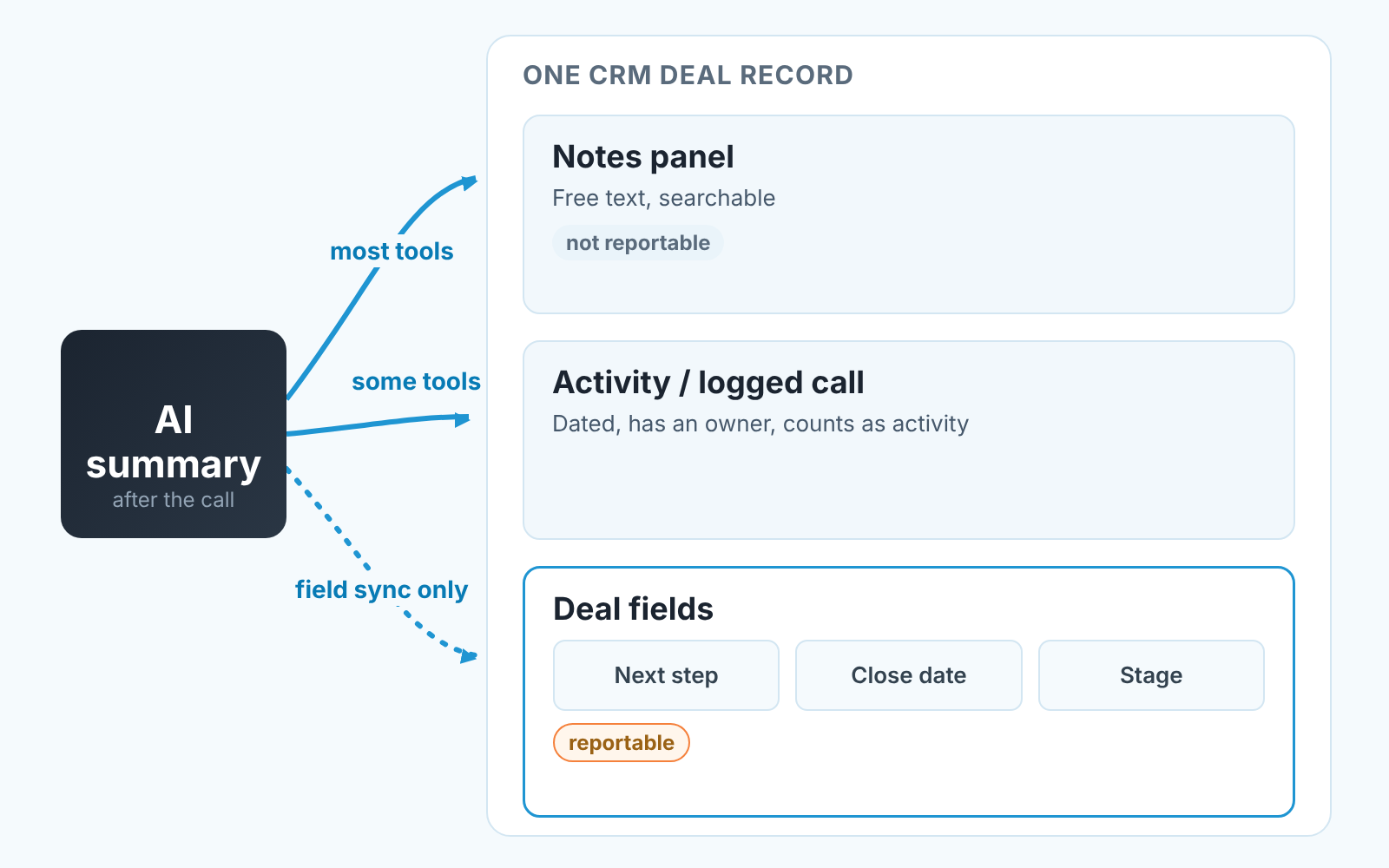
A note is the cheapest thing a tool can write. Its also the thing nobody reports on. If the summary arrives as a note, the deal looks exactly the same in every pipeline view, filter and forecast as it did before the call.
Most vendor pages don’t say which record type they write, so find out in the first test call rather than from the sales deck. Where a page does say, it’s worth reading closely: Fireflies’ Pipedrive page talks about logging summaries under the contact, lead or deal, and Avoma names Account, Opportunity and Contact. That’s three different records a manager might open, and only one of them is the deal.
In Pipedrive, the difference that matters is note versus activity. A note is searchable and can be pinned, which helps the rep. A logged activity has a date and an owner and counts as activity, which helps the manager, because the deal stops looking idle. We covered notes, mentions and pinning in Pipedrive notes for handoffs.
In HubSpot, whatever the tool writes shows up on the record timeline as context. Unless it maps to a property, “Next step” stays whatever it was. If you lean on Breeze for summaries instead, read our manager’s check for Breeze deal properties first.
Salesforce is where the “which record” question bites hardest. A note on the contact is not a note on the opportunity, and the rep working the deal won’t see it where they look. Our piece on where deal context lives in Salesforce explains the three places and which one to use.
Field sync is the exception. Fathom’s Business card says it updates records after meetings, and its feature table says it writes meeting insights “into specific fields in your CRM”. That’s the one setup where the note taker changes a reportable value without a human touching the deal, and the one setup where we would want an approval step. A model guessing a close date into a forecast field is a forecast problem first.
What to check in the first two weeks
Pick ten deals that had a recorded call in week one and open each one. Not the dashboard. The deal.
Is the note on the right deal? Tools match on attendee email or calendar event, and a prospect with two open deals, or a contact who moved companies, gets matched to the wrong one more often than you’d expect. Did the tool create a contact that already existed, with a slightly different email or name? That’s the duplicate that poisons reports six months later. And did two reps on the same call produce two notes, or overwrite something a human had typed?
We wrote the longer version of this trial, with exact Pipedrive filters, in the notetaker sync article, so we won’t repeat it here. Fix the matching rules before you roll teh tool out to the whole team, and keep it writing notes only until the ten-deal check is clean. If your calls go through Zoom and Salesforce, the meetings-logged check is the same idea from the other side, and what Salesloft writes to your CRM asks the same question of outreach tools. Recording rules differ by state and country, so ask a lawyer before the first recorded call.
After the note: next step, owner, date
Here is what a summary can’t do. It can say “John will send pricing by Friday.” It can’t make Friday the next activity date on the deal, assign it to John, and warn anyone when Friday passes. In most of the setups above the note taker simply doesn’t touch those fields.
So after the note someone still has to set the next step as an activity with a date, confirm the deal owner and check the close date against what the customer actually said. Thirty seconds per call. Skipped more often than not, because the summary feels like the work is done.
We build SalesBond, a sales management layer on top of the CRM a team already uses, and this gap is exactly where Deal Health lives. It checks every deal against more than 20 rules in categories like Activity, Progression, Data, Forecast and Ownership and gives the deal a 0 to 100 score. The score reads the deal’s fields, so a perfect call summary on its own does not change it.
Sales GPS then ranks what to work on, with a plain reason why this deal comes first. When a rep accepts a card, it becomes one task in the CRM. The promise from the call still has to be typed in by a person. SalesBond doesn’t record or transcribe calls and doesn’t create tasks on its own, and we won’t pretend otherwise. If you want the scoring explained, the Deal Health score article walks through it.
Measure the CRM before and after the rollout
A note taker rollout changes your CRM data in ways you won’t see from inside the tool. Contacts get created. Activities get logged by a bot instead of a rep. Notes multiply.
So measure the pipeline before and after. The simplest way we know is the free CRM audit: SalesBond reads the last 30 days of your CRM and sends a PDF with money at risk, a CRM score, the top three findings, deal health and the pipeline bottleneck. Seven days later a second PDF shows what changed. The numbers are deterministic; AI writes only the summary text and the stage-name suggestions.
Your next step: run the first report the week before the note taker goes live, and read the second one right after your ten-deal check. Check your CRM with SalesBond.
FAQ
Is there a free AI note taker that writes to the CRM?
Fathom is the one page in our table that shows CRM sync on its Free plan, capped at 3 users per domain, and it pushes summaries and notes only. Elsewhere the sync sits on a paid plan: Fireflies lists integrations from Pro, Otter’s Salesforce and HubSpot sync starts on Pro with a one-user cap, Read.ai puts premium integrations on Pro, Granola puts HubSpot on Business. In this category “free” usually means free notes, with the sync on a paid plan.
How much does an AI note taker cost?
Headline prices on the pages we read start at about $8 to $16 per user per month on annual billing. The plan that actually syncs with your CRM is often a tier higher: Fathom’s field sync is $25 annually on Business, and Krisp’s Salesforce sync is on Advanced at $15. Price the plan that has the sync.
Do these tools work with Microsoft Teams?
Fireflies lists Zoom, Google Meet and Teams on its free card, Read.ai lists Teams among its integrations, Krisp’s integrations table names Teams, and Calendly’s page says it records Teams meetings. For the others, check the vendor page for your meeting platform; we didn’t verify every combination.
Does bot-free mean no CRM sync?
No. Krisp and Granola are bot-free and both list CRM integrations. Bot-free changes how the call is captured; the summary can still be pushed. It can make matching the note to the right deal harder, which is why the ten-deal check matters more with a bot-free tool.
Should the note taker replace the rep’s own call notes?
Let it take over the long recaps. The summary is good at what was said. The rep’s two lines on what they think happens next are what the deal needs, and the fields need a human; see the minimum sales call notes we recommend.