
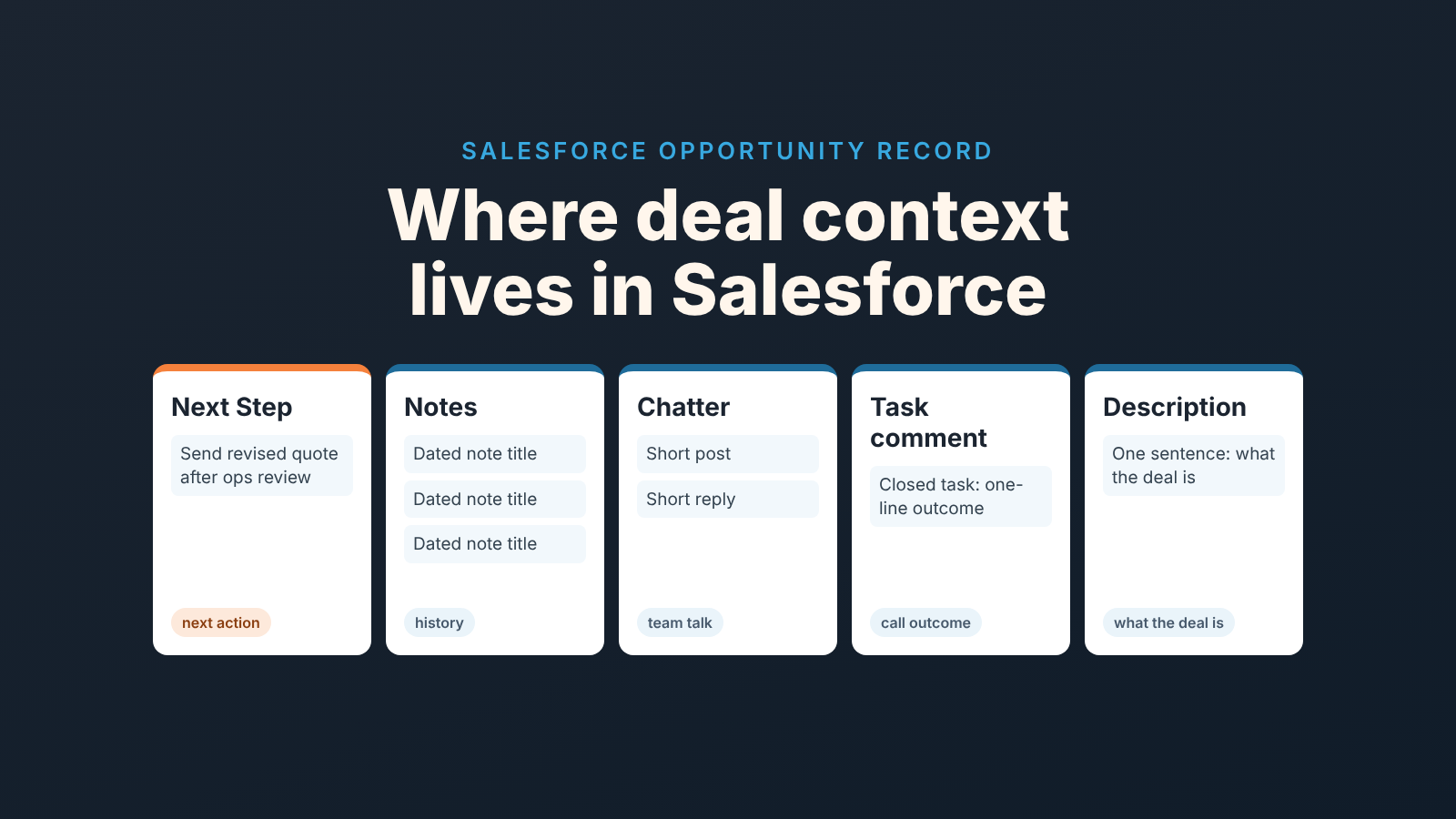
In Salesforce, keep the next action in the Next Step field, the conversation history in Notes, the team discussion in Chatter, and the call outcome in the task comment. Leave Description for what the opportunity is, not what happened. Salesforce gives a rep five places to write about one deal, and the trouble is rarely that reps write too little. It is that the same kind of information lands in a different place on every record, so the only person who can find it is the one who wrote it. Our position is blunt: context that cannot be found in a minute does not exist.
The deal that nobody can explain
Priya runs a nine-rep team. On a Tuesday in September the Calder Logistics opportunity came up in her pipeline view: renewal plus an expansion, stage Proposal, close date pushed twice, and the owner, Marcus, out for the week. She opened the record to find out why it was slipping.
The Description field held a paragraph from the discovery call in July. The Next Step field said “follow up”. Three notes hung off the record with the titles “Note”, “Note” and “call w/ dana”. The Chatter feed had fourteen posts, eleven of them about a pricing exception that was approved in August. Two completed tasks were logged, one of them with the comment “good call, they’re keen”.
Twenty minutes later she knew less than when she started, so she messaged Marcus on his day off. He answered from memory in four lines: ops lead wants a phased rollout, procurement is slow, revised quote promised, waiting on their IT security questionnaire. Everything she needed. None of it on the record.
Marcus was not lazy. He had written more about Calder than about any other deal that quarter. He had simply written it wherever teh cursor happened to be, and Salesforce let him, because every one of those five places accepts free text and none of them says what it is for.
Five places context ends up
The fix is not a longer note. It is a short agreement about which kind of information goes where, so a reader knows where to look before they open the record. This is the map we use.
| Place | What goes there | Who reads it | What does not belong |
|---|---|---|---|
| Next Step field | One line: the next action and who owns it. “Send revised quote after ops review (Marcus)” | The manager scanning a list view; a colleague covering | History, reasons, anything older than the current step |
| Notes (Enhanced) | The conversation history: one note per contact with the buyer, dated, with what changed and what they said | The next person to work the deal, including the rep in three weeks | Questions to colleagues; the next action without a task behind it |
| Chatter on the record | Internal discussion: approvals, questions to legal or ops that need an answer | The colleagues in the thread, and the manager when a note points there | The buyer’s words; anything the next owner will need to find later |
| Task comment | The outcome of a call or meeting, one or two lines, on the completed task | Whoever reads the activity timeline | Detail that belongs in a note; the plan for what happens next |
| Description | What the opportunity is: the scope, the products, the reason the buyer is looking. Written once, rewritten rarely | Anyone meeting the deal for the first time | What happened on any given day |
Two rules sit under the table. First, the Next Step field holds a sentence and nothing else; the date, the owner and the overdue state live in the open task, which we covered in one open Salesforce task per opportunity. The field cannot go red. The task can. Keep it to one line. That is room for a plan and no room for a story, which is the point.
Second, Description is not a diary. It is the one field on the record that should still be true in six months. The moment a rep appends “spoke to Dana on 2 Oct, she wants…” to it, the field starts aging, and nobody rewrites a Description. Put the sentence in a note with that date on it and leave Description describing the deal.
Chatter is the one people argue about. We think it belongs on the record, not in Slack, because the pricing exception on Calder was decided in Chatter and that decision is now part of the deal’s history. But a Chatter thread is a conversation, not a record, and the buyer never appears in it. When something said in Chatter changes the deal, the rep writes one line in the current note: “Pricing exception approved, see Chatter 14 Aug.” The note points to the discussion. The discussion does not replace the note.
Classic vs Enhanced notes: what changes when you migrate
If your org has been on Salesforce for a while, you probably have both kinds of notes, and the difference matters for the map above. Turning on Enhanced Notes is an admin job: in Setup, find Notes Settings in Quick Find and switch on Enable Notes. That alone does not put anything in front of reps. The Notes related list still has to be added to the page layout of each object where people should write notes, Opportunity included, and to every layout if you run more than one (Weflow: Salesforce notes).
The same guide explains why the two kinds behave differently. Enhanced Notes are stored as ContentNote records, a subtype of ContentDocument, and the older Classic Notes do not become Enhanced Notes on their own; they are migrated as a separate step, and reporting on which note sits on which record goes through ContentDocumentLink. In practice this means a record can show two sets of notes that look similar and behave differently, and a rep who was told “write it in Notes” may be writing into the one the team stopped reading.
You will find storage and size limits for both kinds quoted in several places online, and the figures do not agree with each other. We are not going to add another number to that pile. Check the limits for your edition in Salesforce Help before you promise a rep that a long note will save.
What we would do before migrating anything is agree the map first. Migration moves notes, it does not improve them. A note titled “Note” from 2024 is still a note titled “Note” after it becomes a ContentNote, and three hundred of those are no easier to read in the new related list than in the old one. So the order is: turn on Enhanced Notes for the team, agree the template below, write every new note in the new format for a few weeks, and only then decide whether the old notes are worth migrating or whether a one-line summary in Description (“history before Sept 2026 is in Classic Notes”) does the job.
One more honest observation. Weflow’s guide points out that an Enhanced Note can be related to more than one record through its Relate To field (Weflow: Salesforce notes), which is useful when a conversation touches the account and the opportunity at once. It is also how a note goes missing: it sits on the account, the manager is reading the opportunity. Our rule is that a note about a deal is related to the opportunity, always, and to the account only as a second relation.
A note template short enough that reps use it
The map says what a note is for: history. The template says what a note looks like, and it has to survive contact with a rep who has eleven minutes between calls. Ours fits on three lines plus a title.
- Title: date, channel, who.
2026-10-02 call, Dana (ops lead). A list of titles like this reads as a timeline on its own, which is most of the value. - What changed: one or two sentences on what is different since the last note. “Phased rollout now preferred; procurement added as a step.”
- What they said: the buyer’s words on the thing that matters, with the speaker named.
Dana: "IT will not sign anything until the security questionnaire is back." - What is owed: by us and by them. “We owe: revised quote. They owe: questionnaire, promised by the 9th.”
That is the whole note. The next action is not in it, because the next action goes in the Next Step field and the open task. The question for legal is not in it, because that goes in Chatter on the record. If you want the detail of what a good call captures, the five lines of a minimum sales call note are the content; this template is about where it lands in Salesforce. Teams on Pipedrive have the same problem with a different set of places, and we wrote up pinned notes and mentions in Pipedrive for them.
A note that follows the template takes about two minutes to write. The one that took Marcus twenty seconds, “good call, they’re keen”, cost Priya twenty minutes and a message on his day off, and it will cost the next owner of that deal more.
How a manager finds context in a minute
Here is the read that the map makes possible. Open the opportunity. Read the Next Step field: that is the plan, five seconds. Look at the open task under it: that is whether the plan is late, five seconds. Open the latest note by title and read its four lines: that is what happened and what is owed, half a minute. Go to Chatter only if the note sends you there. Skip Description unless you have never seen the deal before.
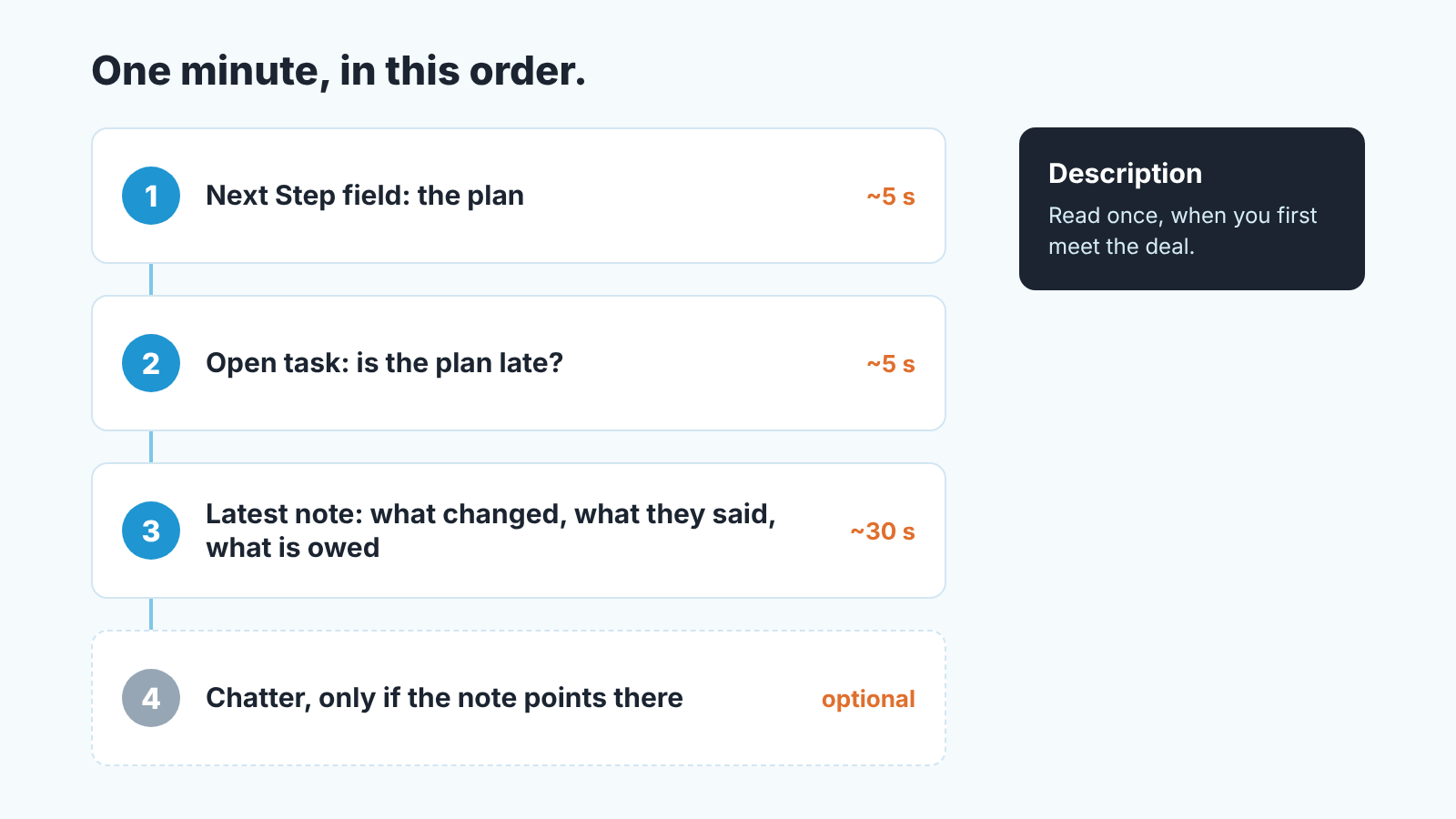
If the read fails at step one, that is the finding. A Next Step that says “follow up” tells a manager more than a long note does: the rep does not currently know what the next action is, and the deal review should start there instead of with the the stage. If it fails at step three, the record has activity but no history, which is the Calder case, and the question for the rep is not “what’s happening” but “write it down before we talk”.
This is also where the one-minute read turns into a weekly check. Priya now runs a list view of open opportunities where Next Step is blank or older than the last stage change, and she reads the latest note on anything at Proposal or later. It takes her part of a Friday morning. We build SalesBond, a sales management layer on top of the CRM a team already uses, and Deal Health, with more than 20 rules, flags open deals with no next step and no fresh context so she does not have to maintain the list view. Check your CRM with SalesBond if that sounds like your Friday. The map itself costs nothing and needs no tool. If you want to fold it into a broader field check, the thresholds are in the Salesforce opportunity audit for sales managers.
Calder, by the way, closed in October, phased rollout and all. When Marcus came back he spent ten minutes moving the four lines he had typed into a chat message into one note titled 2026-09-16 call, Dana (ops lead), put “Send revised quote after ops review” in Next Step with a task due that Thursday, and deleted nothing. The record did not get longer. It got readable, and the next time Priya opened it she did not need Marcus at all.


