
A free CRM is enough for a team of a few reps if it gives you one shared pipeline and basic reports. Zoho CRM’s free edition covers three users, FreeCRM and EngageBay hold larger teams, and HubSpot, Salesforce, Capsule and Bitrix24 stop at two. Before you commit, check how many users the free plan allows, whether the reports a manager needs and automations sit on the free tier or behind a paid one, and how you get your data out later. The seven free plans compared here were checked on their vendor pages on 2026-10-31.
Which free CRM plan fits which team size
One or two people selling? Any of the seven fits, and the choice comes down to which one your email already lives in. If you want a lighter tool for that team, we covered Less Annoying CRM for a small sales team.
Three reps: Zoho CRM’s free edition says “Forever free, for 3 users” (Zoho CRM pricing, checked 2026-10-31), while HubSpot, Salesforce, Capsule and Bitrix24 stop at two. Four to ten reps on a free plan: two of the pages we checked have room for you. FreeCRM lists unlimited users at $0 and says itself that the free plan comes with “no customer support and no campaigns” (FreeCRM, checked 2026-10-31). EngageBay says its free plan is “free for teams of up to 15 members”, with 250 contacts (EngageBay pricing, checked 2026-10-31). Everyone else moves to a paid tier at that size, and we would rather you plan for that than discover it on the day the fourth rep signs in.
What a free CRM plan usually means: user caps, record caps, locked reports
Free CRM plans are built to be outgrown, because that is how the vendor pays for the free tier, and reading the plan with that in mind saves you a migration. Startups meet the user cap as soon as they hire, which is why the best CRM for startups gets its own comparison, and nonprofits meet the record cap once donor and volunteer lists share the CRM, so we compared each nonprofit CRM by job.
The caps come in three shapes. The first is users: two is the most common number on the pages we opened, and a sales team of five does not fit a two-user plan without paying.
The second shape is records. Capsule’s free plan allows 250 contacts, and so does EngageBay’s. HubSpot’s is 1,000. For a team that works 30 to 50 open deals, 250 contacts can run out within a quarter; 1,000 lasts longer but not forever.
The third shape is the one managers miss: the feature that exists, but one tier up. Required fields, automations and deeper reports are the usual candidates. So the useful question is whether the free tier has the report your head of sales reads on Monday.
Seven free plans, one at a time
All facts below come from the vendor’s own page, opened on 2026-10-31. Prices and limits change; open the linked page before you decide.
Zoho CRM Free edition
Three users, one more than HubSpot, Salesforce, Capsule or Bitrix24 allow. The free edition lists contact management, follow-up reminders, tasks, meetings and calls, standard reports and workflow automation, plus up to 10 custom email templates. Import from spreadsheets is free, and export is capped: “Export data from Zoho CRM for up to 10 times for free.” The page we opened does not state a record cap for the free edition. Where it stops: email integration and mass emails, built-in calling and multiple sales pipelines are listed under Standard, and a fourth user needs a paid edition. Source: Zoho CRM pricing.
HubSpot free CRM
HubSpot’s own FAQ gives the numbers: “up to two users, 1,000 contacts, and no limits on customer data”, and it calls the free CRM “100% free, with no expiration date”. The Free column lists contact management, deal pipelines, CRM import and a reporting dashboard. It does not list workflow automation by name. The edge is clear on the same page: required fields and permission sets sit in Starter, which “starts at $15/month per seat”, and custom reporting in Professional. Source: HubSpot: CRM software.
Salesforce Free Suite
“Comes with 2 user licenses.” The Free Suite card lists lead, opportunity and customer case management, simple email marketing and connected Slack conversations, and the FAQ adds “customizable reports or dashboards” and up to 100 emails per month. It stays free “as long as you log in at least once every 60 days.” Sales quoting and forecasting are on the Pro Suite card. Salesforce’s FAQ also names the moment you leave: teams move to Starter Suite ($25/user/month) “when their ambition exceeds the two-user limit”. Source: Salesforce: Free CRM.
Capsule Free
“Maximum 2 users”, 250 contacts, 5 custom fields, 1 sales pipeline and custom sales milestones. That is a tidy plan for two people with a short list. Reporting isn’t listed on Free (Basic Reporting appears from Starter), and workflow automations are a Growth feature. Source: Capsule CRM pricing.
FreeCRM Free
Unlimited users and unlimited storage at $0, with contacts and companies, deals and tasks, cases and calls, calendar and docs, and reports in the Free column. The trade is spelled out by the vendor: no support and no campaigns. Campaigns and forms are listed in Pro at $10/user/month. Source: FreeCRM.
Bitrix24 Free
“100% free for 1–2 users”, with 5 GB storage, a basic CRM (deals, contacts), tasks, shared calendars, and chat and video calls. Bitrix24 is a whole workspace, not only a CRM, so if your team already lives in another chat tool most of the free plan will go unused. Source: Bitrix24 pricing.
EngageBay Free
Free for teams of up to 15 members, which makes it one of only two plans here that hold a team of five at $0. The limits are on volume: 250 contacts, 1,000 branded emails, 5 custom fields and a “limited reporting dashboard”. From the page text we could not confirm whether automations are part of the free plan, so ask before you build on them. Source: EngageBay pricing.
What we could not check
Pipedrive’s pricing page returned a 403 error from our environment on 2026-10-31, and Agile CRM’s pricing page blocked us the same day, so we will not state their free terms. The Freshsales pricing page we opened showed plans starting at Growth ($9/user/month, billed annually) and a free trial; it did not show a free plan, so Freshsales is not on the list. If Pipedrive is your candidate, our note on what Pipedrive costs a five-person sales team covers the paid tiers, and if HubSpot is, our piece on HubSpot’s free CRM limits for a five-person sales team shows what two users and 1,000 contacts mean for a team of five and the signs you have outgrown them.
Three questions before you pick a free plan
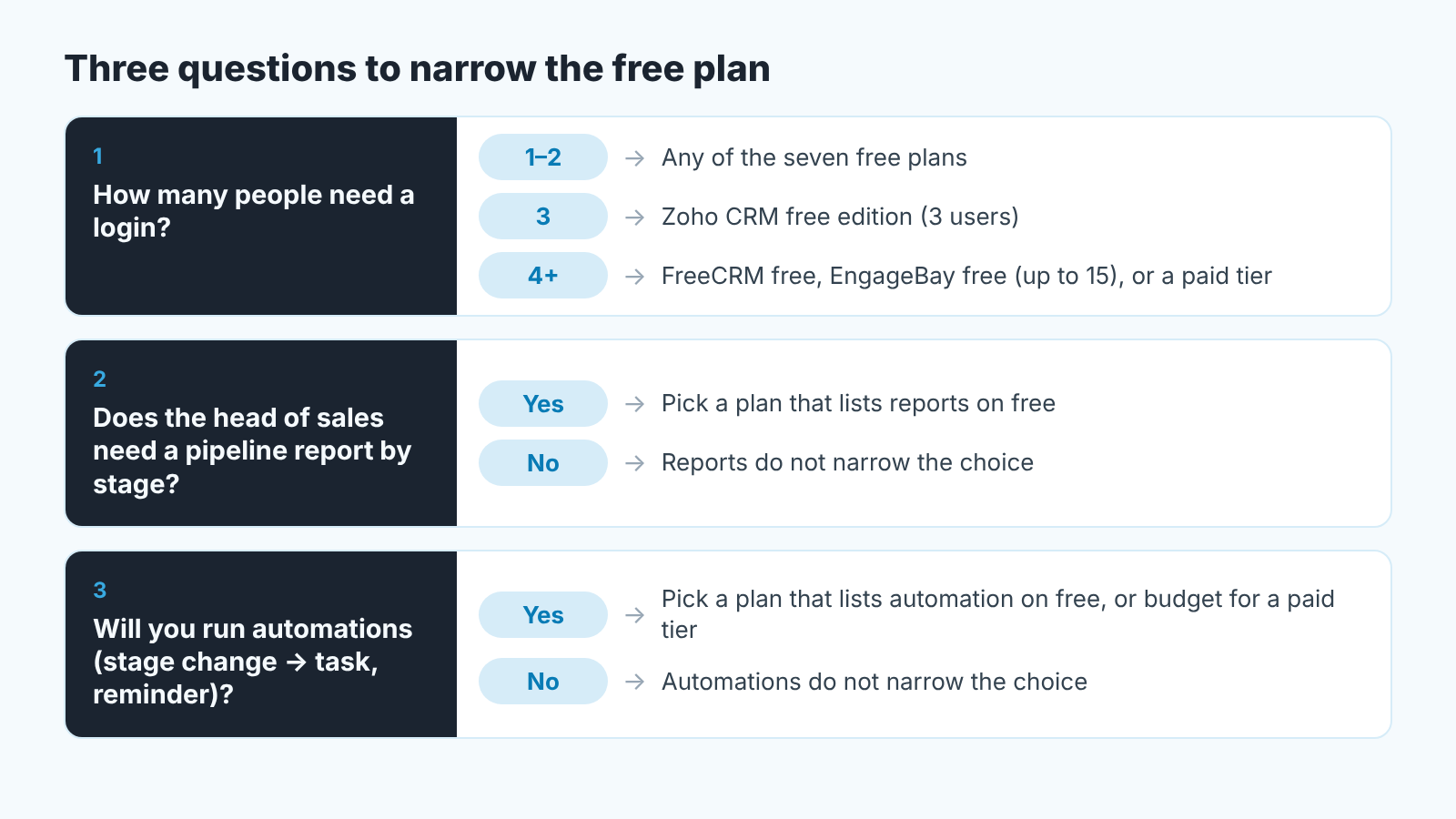
Three questions, asked in this order, narrow the seven plans to one or two.
How many people need a login? Count the owner who closes deals and the person who does the follow-up calls, as well as the people with “sales” in their title; that full count is the number to hold against each user cap. If no free plan with the reports you need fits it, start pricing the paid tier now, because that is the plan you will actually run.
Does the head of sales need a pipeline report by stage? If the answer is yes, and for a team with a target it usually is, read the reports line of each plan before anything else. Capsule’s Free plan doesn’t list reporting at all, and EngageBay calls its dashboard limited.
Will you run automations? “When a deal moves to Proposal, create a task for the rep in three days” is the first automation every small team builds. Zoho CRM lists workflow automation on its free edition; the other pages we read put it on a paid tier or don’t list it. If automations matter to you, either pick a plan that lists them on free or treat the paid tier as the real price.
Our longer guide on how to choose a CRM for a sales team of five works through the same questions with the paid plans included. A team in a specific trade can put the same three questions to its own shortlist; for brokers and loan officers, that shortlist is our best mortgage CRM for brokers and loan officers.
What a head of sales still needs from any free CRM
The free plan does not change the job, and a newer CRM would not change it either; if one is on your shortlist, here is what Attio CRM is. Whatever you pick, the manager needs three things working by the end of week one, and none of them cost money.
First, a deal record with four fields filled every time: amount, expected close date, owner and stage. Capsule’s free plan gives you 5 custom fields; HubSpot’s required fields are a Starter feature. So on a free plan “required” is a rule you enforce at the Monday pipeline review by hand. Say it plainly: a deal with no close date does not get discussed.
Second, stages that mean something. Five to seven stages, each defined by what the buyer did. “Proposal sent” is a rep action. “Buyer confirmed budget and timeline” is a stage. Capsule’s free plan lists custom sales milestones and HubSpot’s lists deal pipelines; on Zoho CRM, multiple pipelines are a Standard feature, so on free you design one pipeline well. If you are new to the terms, our guide to what a CRM is for a sales team walks through them with diagrams.
Third, one report the manager reads every week: deals by stage with amount and age. Where the free plan lists reports, build it there. Where it does not, you will export and build it in a spreadsheet, which is honest work but it is a cost, in hours rather than dollars. Watch the export terms, too. Zoho’s free edition allows 10 exports, which covers ten weeks of a weekly report and runs out well before a year.
When to leave the free plan
Teams see the contact limit coming. The signals that catch people are quieter.
A third or fourth person starts working deals in a shared login because the free plan is capped at two. Now the pipeline report shows one owner for three people’s work, and the the manager cannot tell who is behind. Salesforce’s FAQ says as much about its own free plan, and that is the vendor telling you where the free plan ends; believe them.
The manager is rebuilding the same spreadsheet every Friday because the free tier doesn’t list the report. A few Fridays of that and the paid seat starts to look cheap.
Reps stop filling the close date because nothing forces them to and nothing reminds them. HubSpot puts required fields in Starter and Capsule puts automations in Growth, so the hygiene problem is often a plan problem.
A disclosure here, since we are at the question of what sits on top of the CRM: we build SalesBond, a sales management layer on top of the CRM a team already uses, and stale close dates and ownerless deals are what it checks for. It does not change your CRM’s user cap. If your free plan already holds the team, the cheaper fix is a stricter Monday review; if it does not, check your CRM with SalesBond once you have picked the plan.
FAQ
Is a free CRM enough for a sales team?
For two people, yes, on any of the seven plans above. For three, Zoho CRM’s free edition lists three users. For four or more, FreeCRM lists unlimited users (without support or campaigns) and EngageBay lists teams of up to 15 members (with 250 contacts). The gap to plan for is reports and required fields, which several free tiers keep for the paid plans.
Can I export my data later?
Export terms differ, and most pages don’t state them. Zoho CRM’s free edition states “Export data from Zoho CRM for up to 10 times for free” (Zoho pricing, 2026-10-31). FreeCRM’s page says “Export to any file format and delimiter, anytime” (FreeCRM, 2026-10-31). The HubSpot, Salesforce, Capsule, Bitrix24 and EngageBay pages we opened do not state export limits, so ask before you load a year of deals.
Is there a 100% free CRM?
Yes, with conditions worth reading. HubSpot says its free CRM is “100% free, with no expiration date” for up to two users and 1,000 contacts. Salesforce’s Free Suite stays free “as long as you log in at least once every 60 days”. Bitrix24 calls its plan “100% free for 1–2 users” (vendor pages, 2026-10-31). Read the FAQ at the bottom of the vendor’s pricing page; thats where the conditions live.
Which CRMs are in this comparison, and why not others?
The seven whose pricing pages we could open on 2026-10-31 and that showed a free plan. Pipedrive’s and Agile CRM’s pages did not load for us, and the Freshsales page we opened showed a free trial but not a free plan. If you are weighing CRMs by business type rather than by price, see our overview of CRM software by business type.


