
Yes. Pipedrive has a native WhatsApp integration, in beta on the Growth plan and above (Pipedrive help, updated September 3, 2026). When a customer replies, the Pipedrive WhatsApp integration matches the message to a contact by phone number and then links the conversation on its own: to a deal, a lead or a project, or to nothing if more than one of them fits. If one person has more than one deal, check where the reply landed, and write anything that changes the deal into the deal yourself the same day. For teams without the integration, that last sentence is the whole article.
The customer said yes on WhatsApp. The deal didn’t hear it
A composite example, not a real customer. Monday, pipeline review. A $9,400 equipment-replacement deal shows last activity eleven days ago. No new notes, no scheduled call, the stage has not moved. The manager puts it on the “stalled” list.
The rep who owns it is confused. Tom, the customer at a design studio, wrote on Friday afternoon: “OK, we’ll take the option with the warranty.” The rep answered from their phone. In their head the deal is nearly won.
Both are right, and the CRM is wrong. Tom’s message is in Pipedrive, linked to a deal, just not this one. The equipment deal was created under the studio’s owner, so Tom isn’t on it at all, and he has a service deal that closed last month. The reply went there, where nobody is looking. That is the failure mode of a messenger inside a CRM: messages don’t get lost, they get filed by a rule in a place a person would not have chosen.
What the Pipedrive WhatsApp integration does, and who gets it
The integration is available on the Growth plan and above, and it is still in beta. To switch it on, head to the Beta program page; after that it lives under Tools and apps, WhatsApp, with conversations showing up in the Sales Inbox and on the detail views of the linked records (Pipedrive help). Older guides say Pipedrive has no native WhatsApp integration. As of the September 3, 2026 help article it does, in beta, so details can still change; reread the help page, not this one.
For a sales process, three mechanics matter. The integration decides which record a conversation belongs to. It limits free-text replies to a 24-hour window after the customer’s last message. And it shows a linked conversation to anyone with access to that record.
One honest boundary. Teams below Growth, teams without beta access yet, and anyone whose customers write to a rep’s personal number or by plain SMS have no integration at all. Marketplace apps exist; the TimelinesAI listing describes syncing chats from personal and business numbers via QR code into Pipedrive records (Pipedrive Marketplace: TimelinesAI), which is the vendor’s description, not ours. If you are in that group, skip to the section on writing things down by hand.
How a message finds its deal (or doesn’t)
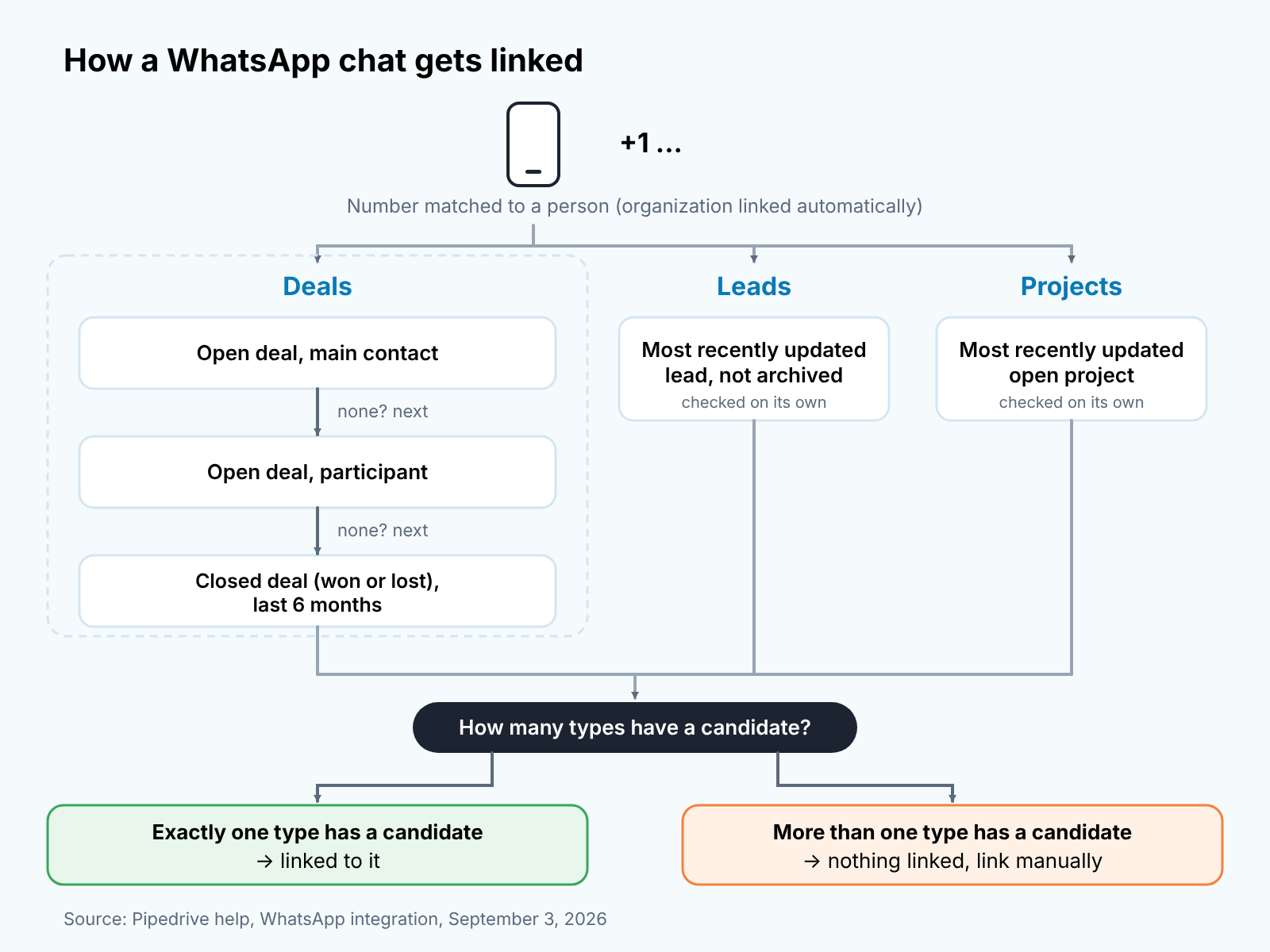
Pipedrive first matches the incoming number to a person, and links their organization automatically. Then it looks for a primary record in three places side by side: deals, leads and projects (Pipedrive help). Inside deals there is an order:
- The most recent open deal where the person is the main contact.
- If there is none, the most recent open deal where they are a participant.
- If there is none, the most recently closed deal, won or lost, from the last six months.
Leads and projects are not further steps on that list. They are checked on their own: the most recently updated lead that is not archived, and the most recently updated open project. If exactly one of the three types has a candidate, the conversation is linked to it. If more than one type has one, say an open deal and a live lead, no primary record is linked and you’ll need to link it manually.
Two consequences the help page does not spell out. First, the phone number is the key to everything. Every number must include a country code, or a conversation cannot be started from the record at all. So the import template and the “add person” habit need one every time, even for domestic customers.
Second, a forgotten lead blocks the link. A person with an open deal and an old lead nobody archived has candidates in two types, so their conversations link to nothing until someone steps in. Archive leads you are done with. Convert the ones you are working before the customer’s first real reply: when a lead converts to a deal, its linked WhatsApp conversations move to the new deal on their own.
One person, two deals: where the reply goes wrong
Back to Tom, with the records set up properly. Anna runs the equipment deal and Tom is its main contact; his service deal closed a month ago, and he has no live lead or open project. His reply hits step one and lands on the equipment deal. Correct, no work needed.
Now change one detail. The equipment deal is run by Anna’s colleague, and Tom is on it only as a participant because he signs off on budget. Tom’s own open deal, where he is the main contact, is a small training package. His message about the warranty goes to the training deal, because that one matches at step one and the equipment deal only at step two. The rule did what it was told, and from the equipment deal page it looks like silence.
Pipedrive handles the fix. Open the conversation, use Unlink, which detaches it from every Pipedrive record, and then link it to the right one. In between the messages are not lost; the conversation stays in the inbox throughout. You can link up to 50 conversations per phone number per entity, so there is room for a long relationship (Pipedrive help).
The part Pipedrive cannot do is notice. A rule picked the deal, and a rule does not know that the warranty was a line item in the other quote. That is what the Monday question in the last section is for.
One thing we would not write as fact: whether a linked message creates an activity or shows in the deal timeline. The help article does not say, and until it does, treat teh conversation panel as the source and the timeline as unrelated.
The 24-hour window is a deadline, not a suggestion
WhatsApp lets you continue a conversation with free text for 24 hours after the customer’s most recent message. After that, the only thing you can send is a template approved by Meta. Pipedrive shows in the composer whether the window is open and how much time is left (Pipedrive help).
Most teams read that as a technical note. We read it as a response deadline the channel enforces for you. Email lets a rep answer on Thursday what arrived on Monday. WhatsApp does not. Miss the window and your next message is a pre-approved form: fine for “we got it,” terrible for a warranty clause.
The Friday evening case is the one that bites. Tom writes at 6:40 p.m., nobody opens the inbox until Monday, and the window closed on Saturday evening. The rep can’t reply “great, sending the new quote.” They can send a template, and only if someone built one in advance.
Templates are created under Tools and apps, WhatsApp, Templates, adding one needs global admin permissions, and Meta’s approval can take up to 48 hours (Pipedrive help). So the “Got your message, I’ll reply on Monday” template has to exist well before the Friday its needed. Our rule is simple. One approved holding template, requested by a manager this week. One named person per week who sends it when a window has closed and the rep is out. And since the integration shows a conversation to everyone with access to the record, who answers is a team agreement, not a setting.
What your team still writes into the deal by hand
The conversation panel holds the chat. It does not hold the decision. A manager scanning twenty deals on Monday will not open twenty chats. Our rule for every rep, integration or not: anything in a WhatsApp exchange that changes the deal goes into the deal as a note the same day. Four things qualify.
- A price or discount the customer accepted, asked for, or pushed back on.
- Any date: delivery, decision, budget approval, “call me after the 15th.”
- A yes. “We’ll take the warranty option” is a verbal commitment and it belongs on the record.
- “Boss wants to see two more quotes.” A no, or a step back, is a stage change rather than small talk.
One line is enough. “WhatsApp, 2:10 p.m.: Tom agrees to the warranty option, waiting for PO.” Time, source, decision, next thing. That is less than the minimum we ask for after a call, and it takes thirty seconds on the mobile app while the the chat is still open. Then move the stage if the decision moved it.
That’s our rule, not Pipedrive’s. The test: would the manager, reading only the deal, make the same forecast call as the rep who read the chat?
We build SalesBond, a sales management layer on top of the CRM a team already uses; we started with Pipedrive. Deal Health checks deals against the data in the CRM, so a reply filed under the wrong deal, or never written down, looks to it like a deal going quiet. SalesBond does not read WhatsApp or write to it; it reads what your team wrote into the deal. Check your CRM with SalesBond if you want the quiet deals surfaced automatically; the note is still yours to write.
When the rep leaves, or when you have no integration at all
A manager does not need to read anyone’s chats. One look a week, by hand, is enough: go through the open deals with nothing new from the customer on the record lately and ask each owner where the conversation with this customer lives right now. “On WhatsApp, under his other deal” is the answer you are fishing for. Write it into the deal in one line. With the integration, linked conversations are visible to everyone with access to the deal, the same way shared email visibility works for mail; without it, the question is the only report there is. Ten minutes, and the tone matters: this is insurance against a sick day, not an audit.
The insurance pays out on the day a rep leaves. With the integration, the conversation is attached to the record, so whoever inherits the deals inherits the chat with them, provided they have access to the record. With personal numbers there is no attachment to inherit. The customer keeps writing to a phone that leaves with the rep, and the deal page says whatever they last bothered to type. That is a data ownership question to settle before it happens: either customers are moved to a business number the company controls, or the rep agrees in writing to forward and log, and the manager checks. Legal requirements for messaging customers vary by country, and we are not the source for yours.
The teams that get this right do not have better software. They have one rep who writes “WhatsApp, 2:10 p.m., he said yes” into the deal before putting the phone down, and one manager who asks the “where does the conversation live” question every Monday until nobody needs asking. The integration, when you have it, saves the copy-paste. It does not save the habit.


