

Pipeline padding is deals created so the pipeline looks fuller than it is. You catch them by the trail they leave, not by how long they have sat there: a creation date in the last few days, a stage too far along for a deal that young, one contact and no participants, no meeting anywhere. Checking one rep takes about twenty minutes in the Pipedrive deal list. For a fix that lasts, count coverage only from deals a buyer has actually touched.
3.4x coverage and nobody in the room believes it
Monday, the last week of the quarter. A founder we will call Delia opens the pipeline for her team of six. Open deals are worth 3.4 times the remaining quota.
It should feel good. It doesn’t. One rep, Rafe, had eleven deals open on the first of the month and has twenty-six now. His calendar for the week has four customer calls on it.
Delia has no proof, only a number she cannot plan from. The figures are made up; the Monday is one we have had.
Pipeline padding is not the same as stale
A stale deal was real once; the buyer went quiet and the card stayed. See stalled deals vs dead deals and rotting deals in Pipedrive, where detection runs on age and silence.
A padded deal is the opposite: new, entered deliberately, often in a batch, so the pipeline looks the way a rep thinks the manager wants. Rotting won’t flag it; the deal is days old. Nor is it sandbagging, which hides real deals to look modest later. Padding inflates. And where a tire kicker is a real buyer who won’t buy, a padded deal may have no buyer behind it at all.
So you hunt it by the trail of creation, not the trail of neglect.
What padding looks like in the deal list
Open the deal list, make a new filter and add the condition “Deal created” for the last seven days. Pipedrive combines filter conditions as ALL (every condition must hold) or ANY (one is enough), per Pipedrive’s guide to common filter uses. Use ALL, and narrow the list to the rep’s deals.
Now the columns. Through the gear icon, add “Participants” next to stage and expected close date. A Pipedrive deal has one primary linked person; anyone else on the buyer’s side is added as a participant, so that column sits empty when the rep has only ever typed one name (Pipedrive: participants).
Sort by creation date and read down. Padded deals tend to share a shape: created the same day, often within minutes; in a middle or late stage three days later; one contact, no participants; a close date this quarter; a round value, or the same value across the batch.
None of this alone proves anything. A rep back from a trade show can create fifteen deals in an afternoon. Fifteen deals that all landed in “Proposal” with one contact each are a different story.
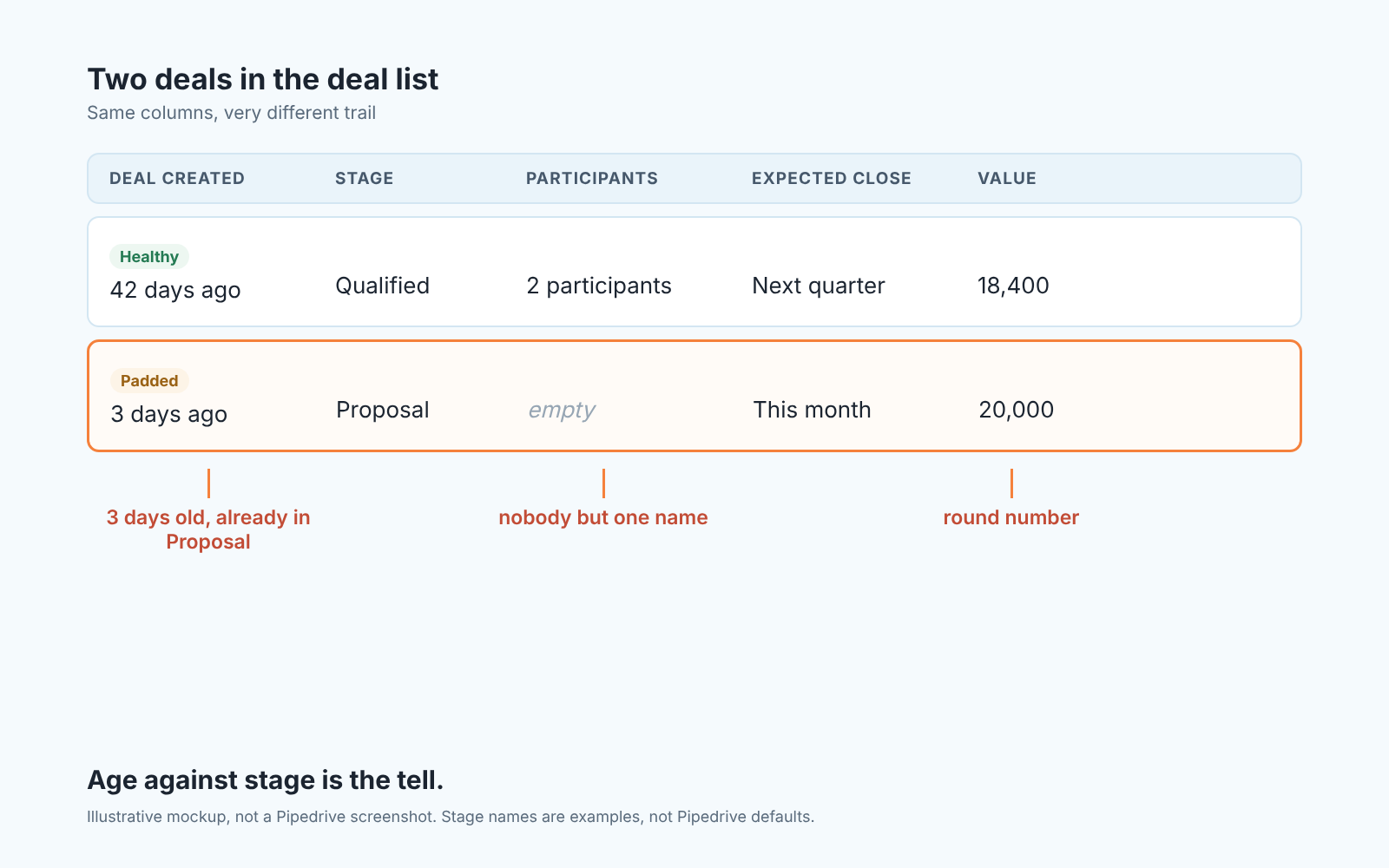
Twenty minutes on one rep
Do it before the one-on-one, not during it.
- Filter: “Deal created” in the current month, narrowed to the rep’s deals. Compare the count with last month. A jump is your first question, not your conclusion.
- Add the “Participants” column and sort by creation date. Mark every deal with an empty participants column and a stage past the first one.
- Open each marked deal. Look for a held meeting, a buyer reply, a file: anything from the other side. Only outbound notes means no evidence.
- Switch to the forecast view sorted by expected close date (the gear icon switches the timeframe, per Pipedrive’s forecast view sorting guide). See how much of this month’s forecast sits on the deals you marked.
- Write down three deals, not twenty-six. You will talk about three.
Stop there. You need a conversation, not a verdict.
The conversation, without the accusation
Start with the deal, not the person. “Walk me through the Hendricks one” is a question a good rep enjoys and a padded rep cannot answer for long. What did the buyer say, and when? Who else at their company has been on a call? What is the next step, and what date did the buyer agree to? If the answers are “they’re interested”, “just my contact so far” and “I’ll follow up” you have learned what you needed, and you have not used the word padding once.
Hold back the accusation for a practical reason: padding is usually a rational response to something you built. MADjozi’s piece on padding the sales pipeline puts the motive on KPI pressure. When a rep is measured on meetings booked and proposals sent, weak leads get worked and recorded because the number demands it. If Delia read out pipeline coverage per rep every Monday, Rafe’s twenty-six deals are partly her Monday.
The second half of the conversation is about the metric, said out loud. Something like: “I’ve been asking for coverage, and I think that pushed you to put maybes in as deals. That’s on me. From now on I only want to see deals where the buyer has done something.” Then offer a safe exit for the deals in question, or nobody will take it: move the card back to the first stage, or close it as lost with an honest reason, and it won’t come up in the team meeting.
One caution. Do this once, privately, then change the system. Repeated padding reviews teach a team that the CRM is where you get caught, and that road ends in the the empty CRM from why reps stop using the CRM.
Make padding pointless
Padding pays only while the padded number is the one everyone looks at. Change that number.
Count coverage only from qualified deals. Your pipeline coverage ratio becomes open value in Qualified or later, where qualified means the buyer did something, divided by remaining quota. A deal only the rep has touched adds nothing to it.
Give the first real stage an entry rule you can see in the deal list: at least one held meeting and at least one participant beyond the primary contact. Its checkable in the two columns you already added, which is the point. Sales pipeline stages covers wording it so reps don’t argue.
Then watch the last days of each month. InsideSales wrote in 2018 that “on the last day of the month, sales reps triple the number of opportunities they have in the pipeline”, citing its own research (InsideSales, 4 bad rep behaviors that lead to inaccurate forecasting). That research is eight years old, and it is not a law. If your month-end spike looks anything like it, give the saved “Deal created” filter a glance on the first of every month.
A disclosure: we build SalesBond, a sales management layer on top of the CRM a team already uses; we started with Pipedrive. Deal Health checks every deal in the connected CRM against the rules you switch on, more than 20 of them, assigns a health score and shows the specific violations with an explanation of what to do. It does not know a padded deal from a real one. It gives a manager one picture of pipeline quality instead of a long list. Check your CRM with SalesBond if you want that picture without building the filters.
What Delia did with the 3.4x
She didn’t announce a crackdown. She stopped reading coverage per rep on Mondays and replaced it with one line: qualified coverage for the team. The first week it read 1.6x. On Tuesday Rafe moved nine deals back to the first stage on his own. Nobody mentioned it.
The number was smaller and, for the first time that year, she could plan from it.


