

Salesforce has no ready-made sales velocity report in its standard reports and dashboards, so you build it from four numbers you can pull from Opportunity reports: open opportunities, average amount, win rate and sales cycle length. Check Amount, Close Date and Created Date first, because the result is only as good as those fields.
This is for a sales manager with a small team on Sales Cloud who wants that number on a Monday without asking an admin for a custom object. It is about the metric, not the Salesforce product called High Velocity Sales. We have already worked through it with examples for a Pipedrive team, and it does not change with the CRM. What changes is where each input lives and how it lies.
What Salesforce gives you out of the box (and what it does not)
Anthony Cone, writing on Salesforceblogger, went looking for pipeline velocity in the standard reports, dashboards and CRM Analytics and found that “we do not” have it. Pipeline velocity is his name for the same metric; we call it sales velocity. There are Stage Duration Analysis dashboards and opportunity snapshots, but “they do not fulfill the requirements of pipeline velocity” (Salesforceblogger: Pipeline velocity, a less common sales metric). The data is there. The metric is not.
That matters less than it sounds. The three standard report formats, Tabular, Summary and Matrix, already let you filter opportunities by status and Close Date, group rows by a field and summarize Amount by Sum (Trailhead: Format Your Report). The multiplication happens once, in a spreadsheet cell, with the definitions written next to it. A dashboard can wait; the components a sales manager actually uses are a separate job.
The formula in four inputs
Sales velocity = (open opportunities × average amount × win rate) ÷ sales cycle length in days: how much won revenue the pipeline produces per day. The worked arithmetic is in the Pipedrive article; here we only fix the Salesforce definitions.
Open opportunities: records whose Stage is not a closed stage. Average amount: the mean Amount of Closed Won opportunities in the lookback period. Win rate: Closed Won divided by Closed Won plus Closed Lost, on opportunities closed in the period. Cycle length: days from Created Date to Close Date, averaged over Closed Won opportunities in the period.
The first input is the contested one. Some teams count all open qualified deals, others count deals that moved into a qualified stage during the period, which needs a custom Qualification Date field (same source; its author takes the second route). We use open opportunities as they stand: a small team can get that number today and repeat it next quarter with the same definition.
Building a sales velocity report from Opportunity reports
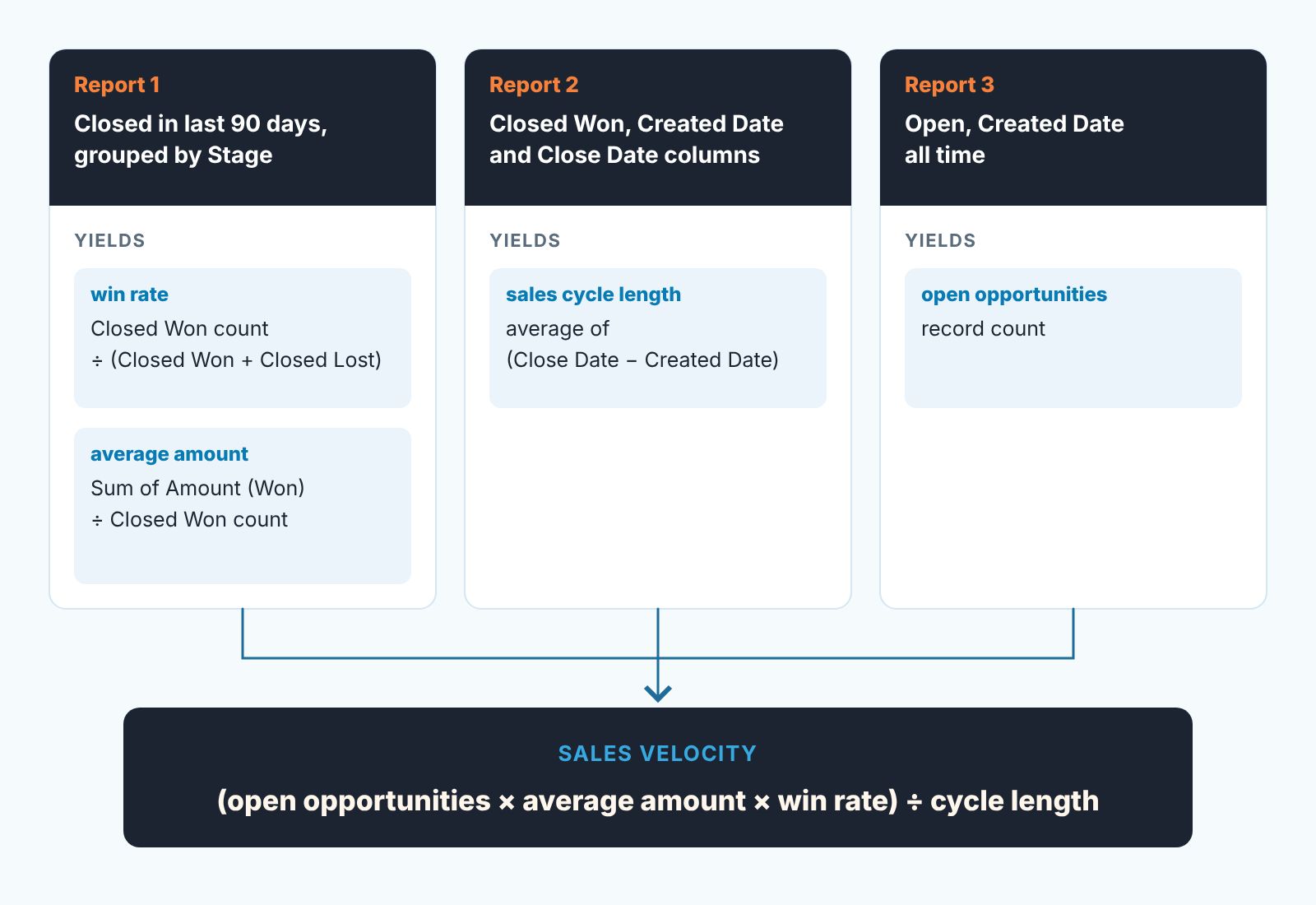
You need three reports, all on the Opportunities report type.
The first one covers decided deals. Start a Summary report, filter Close Date to the last 90 days and add the field filter Stage contains Closed (Trailhead’s Filter Your Report unit uses the same filter, there to leave closed deals out). Group rows by Stage to get Closed Won and Closed Lost, each with a record count. Summarize Amount by Sum. Win rate is the Closed Won count over the total; average amount is the Closed Won sum over the Closed Won count. Two inputs from one report.
The second gives you cycle length. Same filter, Closed Won only. Add Created Date and Close Date as columns and export; the difference, averaged across rows, is your cycle.
The third is the quickest: filter Opportunity Status to Open and Created Date to All Time, the setup Trailhead uses for its open opportunities list (Trailhead: Format Your Report). The record count is your open opportunities.
If weekly report building is new to you the Salesforce reports a sales manager needs each week cover the mechanics in more detail.
Four field checks before you trust the number
Amount, Close Date, Created Date and Stage feed every input above, and each can be wrong without anyone noticing. The reports take one sitting; these checks make the result worth repeating.
Amount is empty or stale
Amount is “Estimated total sale amount,” and it is not required on a standard opportunity (Salesforce Developers: Opportunity object). Blank Amounts on Closed Won records pull the average down; on open records they mean the pipeline was never sized. Teams that use products get a catch: when an opportunity has products, Amount is the sum of the related products, and any attempt to update the field directly is ignored, with no error. A rep who “fixed” the amount by typing over it on such a deal changed nothing.
Close Date was pushed
Close Date is required and is defined as the date when the opportunity is expected to close (Opportunity object). On a Closed Won record it should be the day the deal closed, and often its the day somebody got round to changing the stage. Opportunity History gets a row every time Stage, Amount, Probability or Close Date changes, and since Winter ’21 it keeps the previous Close Date next to the new one (Salesforce Developers: OpportunityHistory object), so a deal whose date moved again and again is easy to spot. A Close Date that lags the real signing stretches the measured cycle, and a team that updates stages late looks slower than it is.
Created Date came from an import
Created Date is an audit field, and audit fields “are automatically updated during API operations unless you set these fields yourself” (Opportunity object). After a move from another CRM, imported records often carry the migration day as Created Date, which makes any deal that was already in progress look like it closed within weeks. Filter the first velocity run to opportunities created after the migration, or your cycle length is fiction.
Won and Lost are set by Stage
IsClosed and IsWon are “directly controlled by StageName” and cannot be set any other way (Opportunity object). A deal counts as won only if it sits in a stage your admin mapped to Closed/Won. That is also why a custom “Dead” or “On hold” stage nobody mapped as closed keeps those deals in your open opportunities forever. Read the stage list once and decide, with the the team, what each closed stage means.
We build SalesBond, a sales management layer on top of the CRM a team already uses; we started with Pipedrive, and Salesforce is supported too. One thing it flags is a deal whose expected close date has passed with no next activity scheduled, the pushed-date problem caught before the quarter ends. Check your CRM with SalesBond if you would rather not build that filter yourself.
Reading velocity by owner and by quarter
One velocity number for the team is a curiosity. Cone argues, and we agree, that the metric “is only relevant when compared to the velocity over time,” Q1 against Q2 against Q3, not Q3 alone (Salesforceblogger). So build a small table: each Opportunity Owner plus the team in rows, the four inputs and velocity in columns, one block per quarter. A rep with a handful of closed deals has a win rate that swings on one outcome, so read direction over several quarters, not a ranking.
When velocity falls: which input moved
Velocity dropped from last quarter. Before anyone says “the team is slower,” look at which input moved.
Fewer open opportunities with everything else steady is a top-of-funnel question first.
Average amount fell? See whether small renewals joined the Closed Won set, and whether the median tells a different story than the mean.
Win rate fell: read Closed Lost, and check when those losses were marked. The win rate traps we described for Pipedrive apply unchanged.
Cycle length grew: count the Close Date pushes on the slowest Closed Won deals before anyone rewrites the coaching plan. Our sales cycle length piece covers telling a real slowdown from a data problem.
The useful habit is not the number. It is opening those three reports on the same day each quarter, with the same filters, and writing one sentence next to each input about what moved and why. After three quarters you have a sales velocity history no standard Salesforce dashboard would have given you, and you know which of its four parts to believe.


