CPQ (configure, price, quote) software assembles a product configuration, calculates the price by rules and produces the quote. A small team needs it when building prices by hand causes errors or when approvals slow deals down. If neither is happening, a quote template and a discount rule in the CRM are enough.
Most pages that explain CPQ are written by companies that sell it, so the answer you find there is always yes. We build SalesBond, a sales management layer on top of the CRM a team already uses. It checks deals and does not build quotes, so we have no CPQ to sell you, and our answer depends on what your own quotes show.
What CPQ stands for and what it does
CPQ stands for configure, price, quote. Each word is a job the software takes off the rep.
Configure means choosing what goes into the offer and blocking combinations that cannot be sold together. Price means applying the price book, the pricing model and the discount rules without a calculator. Quote means generating the document the buyer receives, with the same numbers the system just calculated.
One boundary helps when you read vendor pages. BillingPlatform separates the CPQ process from order-to-cash functions (BillingPlatform: CPQ meaning). CPQ ends when the buyer has an accurate quote. Orders, invoices and collecting the money belong to the next system in the chain. If you are unsure which document is which, we covered that in quote vs invoice vs estimate.
People also ask whether Salesforce is a CPQ system. Salesforce calls itself a CRM, and its own CPQ page presents configuration, pricing and quoting as part of Revenue Cloud, the product that connects quotes with contracts, billing and renewals (Salesforce: CPQ software explained). We compared that quoting layer with the standard quote object in Salesforce CPQ vs standard quotes for a small team. The same article is the place to start if you are looking for quoting tools for Salesforce.
The CPQ process in eight steps
Dock, a vendor in this space, describes the process as eight steps (Dock: What is CPQ). The list is useful even if you never buy the software, because every team that sends quotes does these steps somewhere, often in a spreadsheet and in a manager’s head.
- Products and services. A catalog of what can be sold.
- Pricing models. Dock’s examples include per-seat pricing (its illustration is 10 licenses at $40 per user a month), flat fees and tiered rates.
- Configuration. The rep picks items and options for this buyer.
- The quote. The system produces the document.
- Legal documents. Terms and contracts that travel with the quote.
- Approvals. Someone signs off on exceptions, usually discounts.
- Sending to the customer.
- Revenue recognition. The closed deal is handed to finance; Dock calls this an implied final step that sits outside configure, price, quote.
Go through the list with your team and write next to each step where it happens today and who does teh work. Steps with the answer “it depends on the rep” are the ones that produce wrong quotes.
Three levels: where a small team actually sits
For a team of 5 to 15 reps we see three levels, and most teams belong on the first or second.
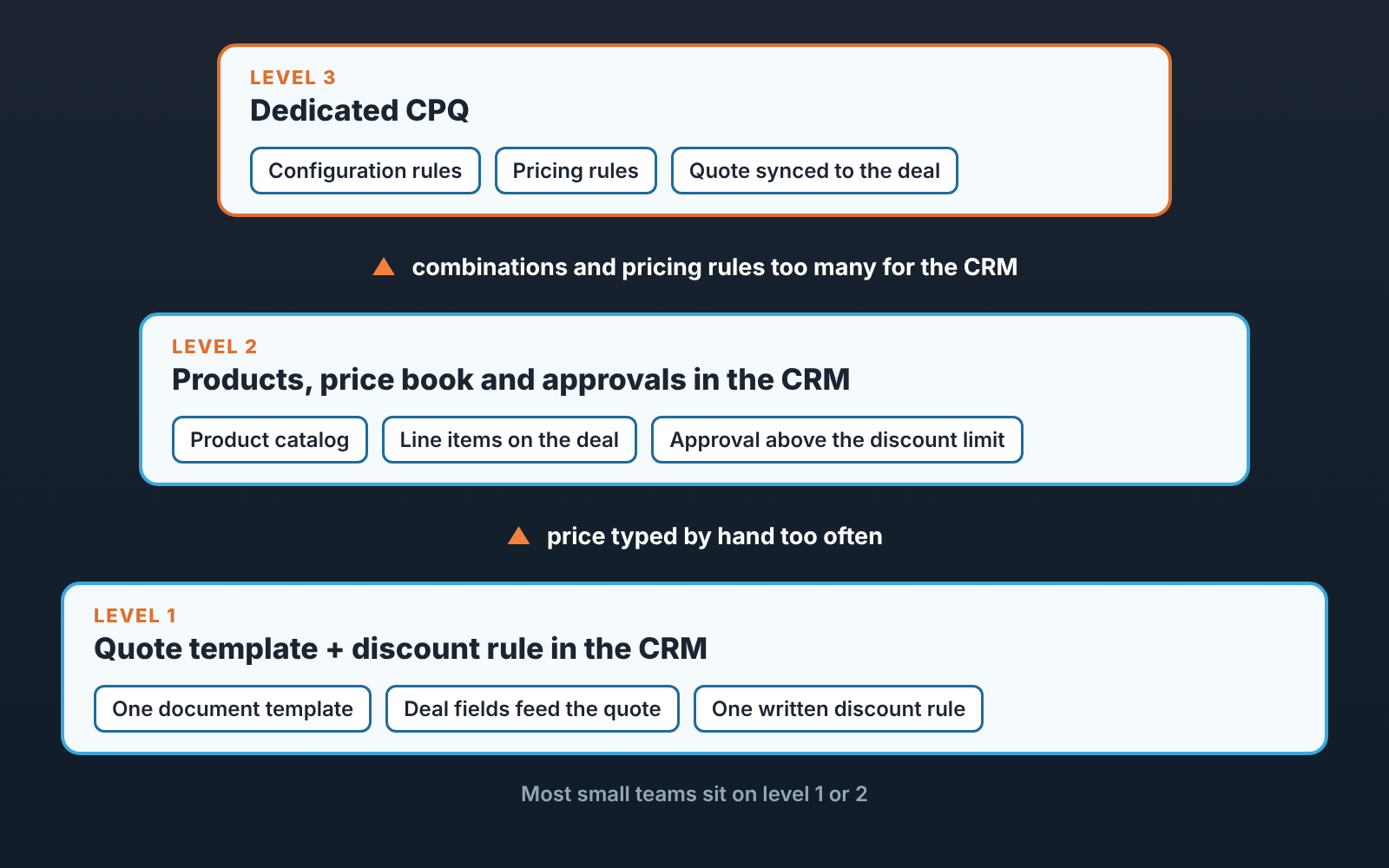
Level one is a quote template in the CRM plus one written discount rule. The template pulls the customer, the items and the total from deal fields, so the rep fills in the deal and the document follows. The discount rule fits in two sentences, for example who may give a discount alone and above what size the manager decides. The fields a template needs are listed in quote template: deal fields.
Level two uses what the CRM already has for products. A price book is the list of your products with their approved prices, kept inside the CRM. Reps add line items to the deal (one row per product, with quantity and price), and a discount above the limit goes to an approver before the quote can be sent. Price now comes from the catalog. The rep chooses quantity and, within the rule, the discount. Some CRMs also sell their own quoting module on top of this: HubSpot, for example, offers CPQ in its Revenue Hub (HubSpot CPQ).
Dedicated CPQ is level three. It earns its cost when the offer has dependencies the CRM cannot hold, such as options that require other options, or prices that change with volume, term and bundle at the same time. BillingPlatform lists the industries where this is common: e-commerce, insurance and finance, manufacturing, retail, subscriptions and SaaS, wholesale (BillingPlatform). Being in one of those industries does not put you on level three by itself. A five-person SaaS team with two plans is a level one team.
Signs a small team has outgrown the template
We do not believe in a threshold like “more than N products means CPQ”. A catalog of hundreds of simple items quotes fine from a price book, and a catalog of a dozen configurable ones can break a template. Three things you can count in your own CRM tell you more.
You will also see a monthly number of quotes offered as the trigger. A count of quotes says little on its own. Forty quotes a month straight from a price book are easy, while ten quotes that each need a manager to work out the price are the the real problem.
Start with the share of quotes where the price was edited by hand. Take last month’s sent quotes and compare each line with the price list. If almost all of them match, the template works. If a large part carries a hand-typed price, find out why. Often the price list is simply out of date, and that is a level one repair. When the reason is that the right price depends on a combination the list cannot express, you are looking at a configuration problem.
Then count the approvers. A single manager who approves discounts can work from a written rule. Once two or three people must each see the quote in sequence, you are running a process, and a process run through chat messages loses quotes. Check how long a quote waits between “sent for approval” and “sent to customer”. If your CRM has no stage or field for that wait, add one before you buy anything, because you cannot measure a delay you do not record. The logic for the discount limit itself is in markup vs margin and discount approval.
The third count is options per product. Ask how many questions a rep must answer before the price is known. If a new rep gets it right soon after onboarding, you have a catalog. If only a couple of people on the team can price a deal correctly, the knowledge lives in their heads and every quote queues behind them.
One sign that tells you nothing is the feeling that quoting takes too long. Measure the three counts first. In practice the slow part often turns out to be a missing price list or an unclear discount rule, and software will automate that confusion without removing it.
What happens to deal data when CPQ is connected
Once CPQ is connected, each deal carries two amounts, the quote total in the quoting tool and the deal value in the CRM, and the team has to decide in writing which one is the main one. Vendor pages rarely cover this, yet it decides whether your forecast survives the project. Before CPQ, the deal amount lived in one place, the deal. The workable answer for a small team is that the quote owns it and the sync writes it to the deal. Reps then stop editing the deal amount by hand, and the field should be locked for them if the CRM allows it.
Discounts need the same decision. Many teams keep a discount percent field on the deal and use it in reports. Once quotes carry line-level discounts that field goes stale unless the sync fills it. Choose one discount field that reports read, and make sure it is the one the quote updates.
Think about several quotes on one deal too. A buyer asks for two options, the rep makes two quotes, and the pipeline needs one number. Agree which quote counts, usually the one marked primary, and what happens to the deal value when the buyer picks the cheaper option.
Last, stages. If “Quote sent” is a pipeline stage, decide whether the tool moves the deal there or the rep does. Mixed ownership gives you deals with a sent quote sitting two stages back.
This is also where our own product meets the topic. SalesBond works on top of the CRM and checks every deal against its rules, so a manager sees the violations without reading every deal. The quickest way to see your starting point is the free CRM audit: SalesBond looks at the last 30 days of your CRM and sends a PDF report with deal health and the pipeline bottleneck, and a second PDF seven days later shows what changed. If approval has its own pipeline stage and quotes pile up there, the bottleneck section is where you will see it, and that is worth knowing before a CPQ demo. Check your CRM with SalesBond.
Questions to ask a vendor
If the counts say level three, take these questions to every demo on your shortlist of CPQ tools. Ask the vendor to show each answer on screen with your products.
- Which system owns the deal amount after the sync, and can a rep still overwrite it in the CRM?
- What does the sync write back to the deal: total only, line items, discount, quote status?
- How are two quotes on one deal handled in the pipeline value?
- Who maintains pricing rules after launch? Can our sales ops person change a price, or does it need a consultant?
- How does approval work when the approver is on vacation?
- What happens to quotes already sent when the price list changes?
- Can we start with the price book and approvals only, and add configuration rules later?
The fourth question matters most for a team of this size. A rule set nobody on your side can edit turns every price change into a ticket.
Mistakes we see
Buying CPQ to fix discounting. Discount discipline is a rule and an approval step, both available on level two. If managers approve every exception today, they will approve every exception inside the new tool as well.
Loading a messy catalog. Duplicated products and old prices move into the new system and now produce wrong quotes faster. Clean the price book first. It is dull work and it often removes the need for the purchase.
Leaving the old discount field alive. Reports keep reading it, reps stop filling it, and some months later the average discount in the dashboard looks wonderful and means nothing.
Skipping the measurement. A team that never recorded how long approval takes cannot say afterwards whether the project helped.
So before any demo, do the cheap version this week. Pull last month’s quotes, mark the ones with a hand-typed price, and time the approvals. If the numbers are calm, fix the template and the discount rule and move on. If they point to configuration, you will walk into the vendor call knowing exactly what the software has to do for you.