

When a customer asks to pause a contract, don’t say yes on the spot. Find out what changed, offer a pause with a fixed return date instead of an open one, and the same day make sure Pipedrive has an open “Resume” deal for the account, with an owner, a date and the condition under which the customer comes back. A contract pause is a temporary stop to billing or service with an agreed restart date. Take away the date and the owner, and it is a cancellation that nobody has written down yet.
The email that says “just a couple of months”
It usually arrives on a quiet afternoon and it is unusually polite. Wiebke, head of operations at a customer that has been with you for two years on an annual contract, writes that they have let four people go, the remaining team is stretched, and could we pause the account for two months while things settle. She adds that they love the product and fully intend to come back. The figures in this example are made up, but the email is not. Plenty of account managers have one like it in their inbox right now.
The reflex is to be nice. Yannick, who owns the account, replies within the hour that of course, no problem, he will sort it out with finance, and he feels good about it because he has just kept a customer. Then nothing happens. Two months become four. The invoice that was supposed to restart is never sent because no one knows whether the pause is over. Wiebke’s team has by now found a workaround in a spreadsheet and when Yannick finally emails in month five, the reply is a shorter, equally polite “let’s hold off for now”.
Nobody cancelled. Nobody decided anything. The account just stopped, which is what a pause does when it has no shape. We think the polite tone of the request is the trap: it feels like a small favour, so it gets a small answer, and small answers don’t get recorded.
What is usually behind the request
A pause is a symptom, and the first job is to find out of what. Ask on a call, not by email, because the email version will be the version that sounds best. Three causes cover most of the cases we have seen.
- Money. A budget cut, a lost client of their own, a quarter that went badly. The product is fine; the invoice is the problem. This is where a shorter term or a smaller package can honestly help, and in our experience it is the cause most likely to end in a real return.
- Priorities moved. The person who championed the purchase changed roles, or the project the product supported has been shelved. Nothing is wrong with the product, but nobody is pulling for it any more. A pause here buys time for nothing unless you find a new owner on on their side.
- It never really got used. The rollout stalled, two people log in, the rest never did. “Pause” is the kind way of saying “we are not getting value”. That’s not a billing conversation at all. It is an onboarding conversation that should have happened six months ago.
The questions that separate the three are short. What changed since the renewal? Who on your side would make the decision to come back, and what would need to be true? If we did nothing for two months, what would you do instead? The last one tells you whether the pause is a pause or a replacement in progress.
Write down the answer in the customer’s own words. You will need it in two months, and you will need it when the renewal comes around (our renewal process for Pipedrive teams covers how that note gets used).
Pause options you can offer without deciding for finance
You probably can’t promise contract terms on a call, and you shouldn’t try. What you can do is shape the offer so that whatever finance signs off has a date in it.
A pause with a fixed length is the cleanest version. Churnkey, which builds cancellation flows for subscription products, treats a pause as an offer made instead of a cancellation and notes that a fixed duration is simpler for billing than an open-ended one (Churnkey: pause subscription). That is written for consumer subscriptions, but the point carries over: “two months, restarting on 8 December” is a commitment; “until things settle” is not.
A reduced scope for a period is the second option, and we usually prefer it to a full stop, because the customer keeps using the product and keeps the habit. Fewer seats, one module, read-only access for the quiet months. We have a separate piece on handling a downgrade request in Pipedrive. Here the only point is that a smaller active account beats a paused one, because you can see an active account in the CRM and you can’t see a paused one.
A deferred invoice with the service left on is the third, and the one customers with a cash problem actually want. They keep working, you move the billing date, and the relationship never goes dark. Whether you can afford to offer it is a finance decision, not a sales one, so the honest wording on the call is “let me check what we can do on timing” rather than “sure, we’ll push it”.
Each of them has a date, something that stays switched on, and a name on both sides. Offer whichever fits the cause you found on the call, not the one the customer asked for first.
The Pipedrive record: a Resume deal, not a note
Here is the part the billing articles skip. A note on the organization saying “paused until December” is where pauses go to die, because nobody opens teh organization page in December. The record needs to be something that shows up on its own when the date comes. In Pipedrive that is an open deal with an activity on it.
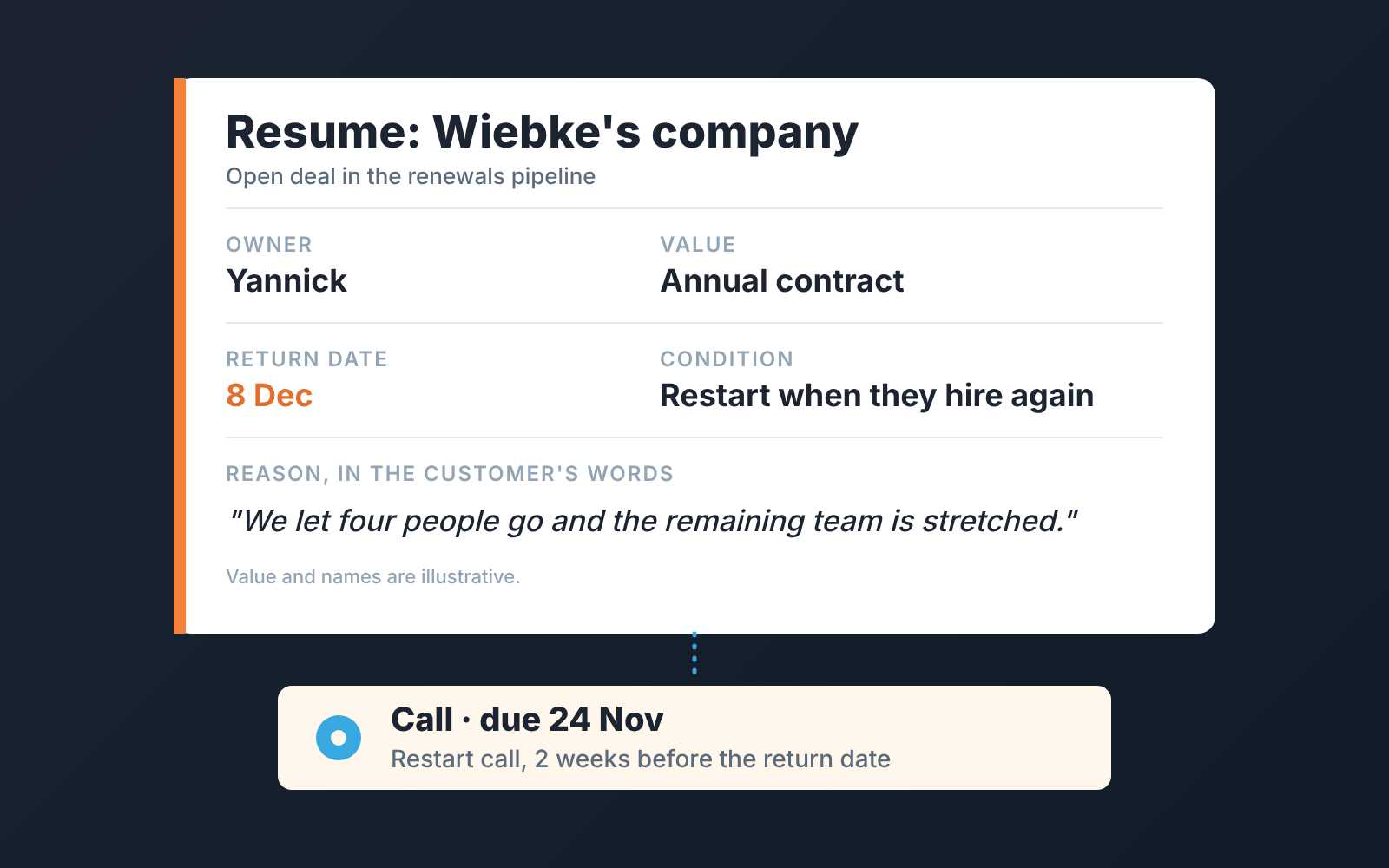
What we put in it:
- One deal for the return, not two. If you already track renewals as deals, keep the renewal deal open, move its expected close date to the return date, put “Resume” in its title and add a note such as “pause agreed, review in December”. It’s the same move we suggest when a cancellation call ends in a pause. If you don’t track renewals as deals, create one: “Resume: Wiebke’s company”, in the pipeline where renewals would live, with the value of the contract that is expected to restart.
- An owner. Not “the team”. The person who had the call. Pipedrive lets you add other users as followers of a deal so they get notifications about it (Pipedrive: followers); add the manager as a follower rather than making the manager the owner.
- A scheduled activity for the restart call, two weeks before the return date. Activities in Pipedrive carry a due date, link to the deal, and show up in the activities list and the calendar (Pipedrive: activities). This is the piece that makes the record appear on its own. Without it the deal is just another open row.
- The condition, in a field you can filter on. “Restart when they hire again”, “restart after their Q1 budget”, “restart if the new ops lead agrees”. We keep this in a custom deal field rather than in the note, because a field can go into a filter, and the next section is built on that filter. Two things from Pipedrive’s page on custom fields: how many you can have depends on your plan, and the field type can’t be changed once the field is created, so decide what kind of field you want before you make it.
- The reason, in the customer’s words, as a note on the deal. Not your summary. “We let four people go and the remaining team is stretched” is more useful in December than “budget”.
Five fields, one activity. It takes about as long as writing the polite reply, and it is the difference between a pause and a disappearance.
How not to forget to come back
The restart activity does most of the work, but it only works if someone looks at the activities list. And if the pause is six months rather than two, the deal will have gone quiet long before the call is due. Two things help.
First a saved filter. Pipedrive’s filters can be built on the deals list or the pipeline view with conditions on fields, and saved as favourites (Pipedrive: advanced filtering). A filter for open deals with “Resume” in the title is a one-screen list of every paused account, and it belongs in the Monday pipeline review next to stuck deals. If you already run a filter for quiet accounts, paused ones go in the same meeting.
Second, let the deal go rotten and use it. Rotting in Pipedrive is switched on stage by stage, and the team sets the number of idle days for each stage itself; a deal then goes rotten when it hasn’t been updated for longer than that (Pipedrive: the rotting feature). So check the stage your Resume deals sit in. If it has a rotting period, say sixty days, a Resume deal that nobody touches for that long turns red in the pipeline. If it has none, nothing turns red at all. Don’t fix a red Resume deal by switching rotting off. It is the pipeline telling you that a paused customer has had no contact, which is exactly what you wanted to know.
Which brings up the uncomfortable part: a paused customer is a quiet customer, and quiet customers look fine in most reports until they are gone (we wrote up how we read customer health in Pipedrive separately). We build SalesBond, a sales management layer on top of the CRM a team already uses; we started with Pipedrive. Its Customer Health product treats each won deal as a purchase and, for customers with two or more, works out their usual gap between purchases. On an annual contract that gap is about a year, so a two-month pause won’t change anything on its own. If the customer doesn’t come back, though, the time since their last won deal outgrows their cycle, and the status becomes overdue and then leaving. While a Resume deal is open and someone is in touch, an overdue customer shows as in work instead. There is no score and no guess about why they paused. Check your CRM with SalesBond if you want that list without building the filter. The call is still yours to make.
When a pause is really a cancellation
Some pauses are not coming back, and it is kinder to both sides to say so early. The signs are in the answers from the first call rather than in the tone of the email. The customer can’t name a condition for returning. The person who would decide has left, and no one else on their side will take the call. They have already moved the work somewhere else and mention it as an aside. Or the return date passes, the restart call happens, and the answer is another two months with no reason attached.
In those cases, treat the Resume deal as what it is and mark it lost. Pipedrive records a lost reason when you do this, either freeform or from a predefined list that a Deals admin sets up, and any comment you add is saved as a note on the deal (Pipedrive: lost reasons). We keep “Paused, never resumed” as its own predefined reason, separate from “Cancelled”, because the two tell different stories at the quarterly review. One is a conversation that went badly. The other is a conversation that never happened.
A lost Resume deal is still a better record than an open one that nobody believes. The account stays in the CRM, the reason is in the customer’s words, and if they do come back a year later you will know exactly what they said on the way out. If it is a straight cancellation from the start, the save-call routine for cancellation requests is the better playbook; this article is for the ones who meant it when they said “a few months”. Make them say which few.


