

Send a price increase letter to customers in order of risk, not to everyone at once. Customers who buy on schedule and have an open deal hear it first, from their rep, before the letter. Quiet customers past their usual buying cycle hear it last, after someone has talked to them. Put the new price and the date in the first lines, give 30 to 60 days, and track who was told in one Pipedrive field.
The notice window is not ours: HubSpot and Orb both put it at 30 days or more and want the change stated up front.
The letter is not the hard part. The order is
Most guides on this topic argue about tone and templates. Fine, but the template is rarely what loses a customer. Timing is.
Say a team of four sells maintenance contracts to about two hundred accounts. The owner approves a price change, the letter is written over a weekend, and on Tuesday morning it goes to everyone at once. Two replies come back within the hour.
One is from a customer who renews every quarter and has a proposal sitting open with a rep. He wants to know why he heard about a price change from a mail merge while his rep was quoting him the old number on Friday. The other is from a customer who last ordered eight months ago. Nobody has called him since. The letter is the first contact in eight months, and read from his side it says: you only remembered me to charge me more. His reply is one line. Cancel.
Neither of them objected to the price. Both objected to the order. The first should have had a call before the letter; the second should not have had a letter yet at all. Everything below is about making that order visible in Pipedrive, so it survives a busy week.
Four groups, two questions
Before anyone writes a word, split the the customer list on two questions. Is this customer buying on their usual rhythm? And is there an open deal with them right now?
The rhythm is the buying cycle: the usual gap between a customer’s purchases, which for most small teams means the median gap between won deals. If the time since the last purchase is longer than that, the customer is late. The same ratio, turned into a health score, is how to tell who is past their cycle at a glance. We showed how to find those customers in the inactive accounts filter, so the arithmetic stays there. The second question takes one look at the deals list.
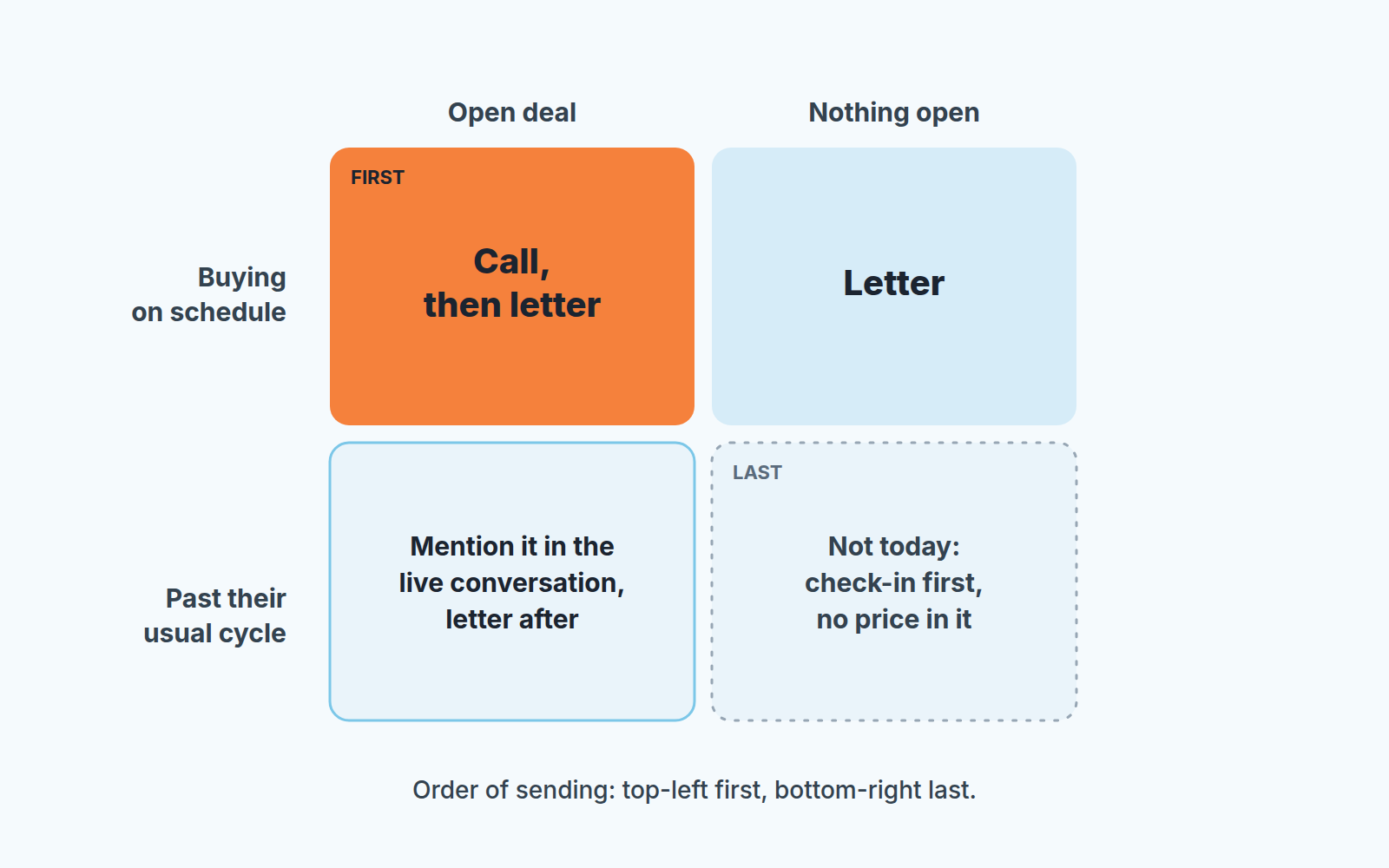
Two questions give four groups:
- On track, open deal. Your best customers at the moment they are paying most attention.
- On track, nothing open. Steady buyers between orders.
- Late, but someone is already talking to them: an open deal or a conversation this month.
- Late and silent. Nobody on your side has spoken to them in a while.
Notice what is missing: account size. PricePoint Partners splits customers that way, large accounts in person and small or infrequent ones without a letter, and for a manufacturer with a handful of big distributors it works. A small B2B team with two hundred accounts of similar size learns more from the cycle than from the invoice total. A small account that orders every month is more exposed to a bad letter than a large one that orders once a year and expects to renegotiate anyway.
Who gets a call, who gets a letter, who waits
Group one gets a call from the rep who owns the open deal, and the letter the same day or the day after. The reason is practical. The open quote has to change, or someone has to decide that it doesn’t. Our rule: we honour a quote already sent until its own expiry date, unless the quote or the contract says otherwise, and the rep says so on the call. The customer hears two things at once: prices are going up, and the number in front of you is safe.
Group two gets the letter and no call. These customers have a working relationship with you and a habit of buying, so the letter is news rather than a shock.
Group three is where tidy teams go wrong. The customer is past their usual cycle, but a rep is talking to them this week about something. Do not drop a letter into the middle of that. The rep mentions the change in the live conversation, in thier own words, and the letter follows as confirmation of what was already said.
Group four waits. The first contact after a long silence should be a check-in with no price in it: how are things, has anything changed on your side, do you still need what you used to buy from us. If they answer, they move into group two or three and get handled like the rest. If they don’t, the letter goes out last, after everyone else, and you accept that you may be writing to a customer who has already left. The letter will not cause that. It will only tell you.
Nobody in group one or three should read about the price before the person who owns the relationship has spoken to them. If that person is on holiday, the letter waits a week.
The letter itself: price and date first
HubSpot and Orb both have whole sets of templates, and they are fine. You need less than that. Something like this is enough, with the blanks left for you:
Hi [first name],
From [date], the price of [product or service] goes from [current price] to [new price]. I wanted you to hear it from me before it shows up on an invoice.
Nothing else changes: same [support / delivery terms], same people. Any quote you already have from us stays valid until the date on it.
[One honest sentence on why, or leave this out.]
If you want to talk it through, reply here or call me on [direct line].
[Name], [role]
The number and the date sit in the first lines because a customer reads those and decides whether the rest is worth reading. If they have to hunt for the price, they assume you are hiding it.
The signature matters more than it looks. It is the person the customer will actually call, with a direct line, and it should be the same person who owns the account in Pipedrive. Not “the team”.
On notice, 30 days is the floor HubSpot and Orb agree on. For anything with an annual budget behind it we would go to 60, which is also where Jobber lands for larger contracts. Read the contract before you pick a date, though. Some agreements set their own notice terms for price changes, and the contract wins over any blog, this one included.
The reason line is optional. One honest sentence beats three vague ones, and no reason at all beats a made-up one.
Keeping track: a Price notice field in Pipedrive
Halfway through a rollout ask three people on the team which customers have been told and you will get three different lists. The order needs a home in the CRM, not in someone’s head.
We use a custom field called “Price notice” with four values: not told, told, confirmed, objects. An admin with the right global permissions adds it under Data fields in Personal preferences (Pipedrive: custom fields).
Put it on the organization, not on the deal. A customer is told once, however many deals they have open. A field on the deal leaves you telling the same customer twice, or marking one deal and forgetting the other.
From there each group becomes a saved filter. Custom fields work in filters and can be shown as a column in the list view (the gear icon, then “Choose columns”), so “on track, open deal, Price notice is not told” turns into a view the whole team shares; our notes on quick filters and shared filters cover the mechanics. Every organization in group one also gets a call task for the deal owner, due before the send date, because a task is harder to forget than a plan.
The rule we would defend hardest is about the field itself: it moves only when something happened. “Told” means a person spoke or the letter actually went out. “Confirmed” means the customer replied and accepted. “Objects” means they pushed back. A mail merge running is not an event.
By the end of the first week, the organization list sorted by Price notice is your rollout status. No spreadsheet, no Slack thread asking who called whom.
When a customer objects
An objection is not a disaster. Its a customer who still wants to buy from you and is telling you the price is in the way. Mark “objects” in the field and let the person who owns the relationship decide, not the rep who is under pressure on the call.
Whatever you concede, give it an end date. A six-month hold at the old price, a smaller increase for a year, a volume tier: all fine, as long as each has a date on which it stops. A concession with no end date is a new price list for one customer, and in a year you have twelve price lists and no price increase. We wrote the longer version in our discount policy for sales teams. The short version: the concession goes into the deal, with its expiry, before the customer hears yes. If the customer also adds products mid-term, keep one renewal date for everything the customer bought.
A concession written into the contract is harder still to unwind: a most favored customer clause ties the price of one customer to what comparable customers get.
Thirty days later: what the field tells you
A month in, open the organization list and count the four values. That count is the honest result of the rollout, and it tells you more than the reply rate to the letter.
Confirmed is your base for next year. Told with no reply is normal for group two, because steady buyers often say nothing and simply pay the new invoice. Told with no reply in group three or four is the list to call this week. Silence after a price letter, from a customer who was already late, is what churn looks like from inside a CRM.
Objects is the list the owner reads personally, with each concession and its end date next to the name.
Some customers in group four will not have answered the check-in either. Treat them as gone and stop sending them price news. They belong in a renewal or win-back process, which is a different conversation and a different pipeline; ours is in the customer renewal process in Pipedrive.
Where SalesBond fits
We build SalesBond, a sales management layer on top of the CRM a team already uses; we started with Pipedrive. Most of the sorting above is what its Customer Health section does without the filters. It counts every won deal as a purchase, works out a customer’s buying cycle from the gaps between purchases once there are at least two, and checks how long it has been since the last one. Each repeat customer comes out on track, overdue or leaving. An overdue customer with an open deal and recent contact shows as in work, which is close to your group three. There is no score in it and no model guessing who will churn, only the customer’s own history against the calendar. It also never writes to your customers: the letter, and the call before it, stay with your reps. If you would rather see the four groups than build them, check your CRM with SalesBond.


