
Quota attainment is actual sales divided by the assigned quota, multiplied by 100. In Zoho CRM the target and the achieved figure live in the Forecasts module, where each role and each user gets a Target, an Achieved amount and a Target Achieved in % for the month or quarter. Whether that percentage is honest depends on which deals Zoho counted as closed, which period they landed in and who owned them, and that is what the rest of this article is about.
The quota attainment formula, and why the CRM should hold it
For one rep, attainment is the revenue from their closed deals in the period divided by their quota, times 100. For a team it is the revenue from everyone’s closed deals divided by the total team quota, times 100 (Salesforce: quota attainment). So a rep with a $100,000 quarterly quota who closed $75,000 sits at 75%.
Don’t confuse it with quota participation, sometimes called hit rate: the share of reps who reached 100% of their quota. Attainment is about money against a target. Participation is about people against a line. A team can have high attainment and low participation at the same time, and later in this article it does.
Nothing hard there. The arithmetic is not where small teams get into trouble.
The trouble is the numerator. “Revenue from closed deals in the period” sounds like one number and is actually three decisions: which deals count as closed, which period each deal belongs to, and whose column it goes in. A spreadsheet lets a manager make those decisions differently every month, usually without noticing. The CRM makes them once, in settings, and applies teh same rule to every deal. That’s the whole argument for keeping attainment in Zoho rather than in a sheet someone updates on Friday afternoon. Consistency is what makes a 75% in March comparable to a 75% in June.
This article is about measuring attainment, not setting it. How to arrive at the quota in the first place is in how to set sales quotas for a small team, and the HubSpot version of the mechanics below is in HubSpot goals: setting rep targets that match the pipeline.
Where the target and the achieved number live in Zoho CRM
Zoho keeps both in the Forecasts module, and the setup has a specific order. Before any forecast exists, an administrator defines the start and end month of the financial year, picks the forecast period (monthly or quarterly), and chooses the field whose values the targets are set against (Zoho CRM help: Working with Forecasts). Forecasts then follow either the role hierarchy or, if territory management is on, the territory hierarchy. For a team of five on one pipeline, the role hierarchy is the one you want.
Targets flow down from the top role: a target for each sub-role, for each role manager and for each user in those roles. Each role and each user gets one forecast target per month or quarter. Role managers can set a target for themselves; ordinary users cannot (Zoho CRM help: Forecasts Based on Role Hierarchy). We like that rule more than it sounds. The number a rep is measured against should come from the person who will read the result.
Once a period is open, the Forecasts Based on Role Hierarchy page defines the figures you will see:
- Target: the sales target that was set.
- Achieved: the closed amount for the role and its sub-roles.
- Pipeline Deal: the expected amount of deals in the pipeline for the month or quarter.
- Target Achieved in %: the attainment percentage itself.
- Shortage in %: the share of the target that is not in the pipeline for the period.
- Target Achieved Count and Pipeline Count: deals won, and deals expected to close in the period, as counts.
- Target Mismatch: a flag when a role’s target does not equal the sum of the targets under it.
The figures are not live. There is a Compute button for the role level you are looking at and Compute All for every role and sub-role. If a rep closes a deal and the number has not moved, that is why . Click Compute before anyone argues about the number.
Zoho’s product page for the module adds a pipeline split into Committed, Best Case and Open Deals (Zoho CRM: Forecasting). Those categories are about what is still open. Attainment is only about what closed. Keep the two words apart in the weekly review, because a rep who says “I’m at 90% committed” hasn’t told you their attainment. Velocity is the other half of the picture: Zoho CRM sales velocity combines open deals, win rate, deal size and cycle length.
What Zoho counts as achieved
Zoho counts a deal as achieved when it is closed-won, falls in the forecast period, and its owner sits under the role. Each of the three parts can move the number.
Closed-won is the easy one, with one catch. Every stage in a Zoho pipeline carries a deal category (open, closed won or closed lost), and the help page on deals says plainly that all deals in the closed won category count towards the target no matter which stage they are in (Zoho CRM help: Creating Deals). So if someone mapped a stage like “Proposal accepted” to closed won, every deal in that stage is already in Achieved. Check the stage mapping once, then once a month pull the closed-won deals for the period from the Deals module and see if they add up to the card. A deal the customer has not actually signed means the stage is lying, and so is the percentage built on it.
The period is the part to be careful with. Zoho’s help defines Pipeline Count as deals “expected to have the closing date within this month/quarter”, so for open deals the Closing Date is what places them in a period. That makes it the field to watch. A Closing Date edited after a deal was won is a question for the manager to ask the rep: when was it really signed, and why did the date change?
Ownership decides the column. Achieved for a role is the closed amount for that role and its sub-roles, so the credit follows whoever owns the deal. Reassign a deal from a rep who left to the manager who inherited the account and the achievement moves with it. On territory-based forecasts there is an extra wrinkle: the Achieved and pipeline figures also include deals owned by users who are not part of the territory (Zoho CRM help: Standard Fields in Forecasts). A territory total can contain revenue from someone outside the team. A small team on role-based forecasts will not hit this, but teams on territories should read the owner column of the deals behind the number.
Zoho does not judge any of this. It adds up what the records say, so the percentage is always correct about the data and sometimes wrong about the quarter.
Three ways the percentage lies
We have never seen a team misled by the formula. We have seen plenty misled by the single number it produces.
One deal carries the quarter
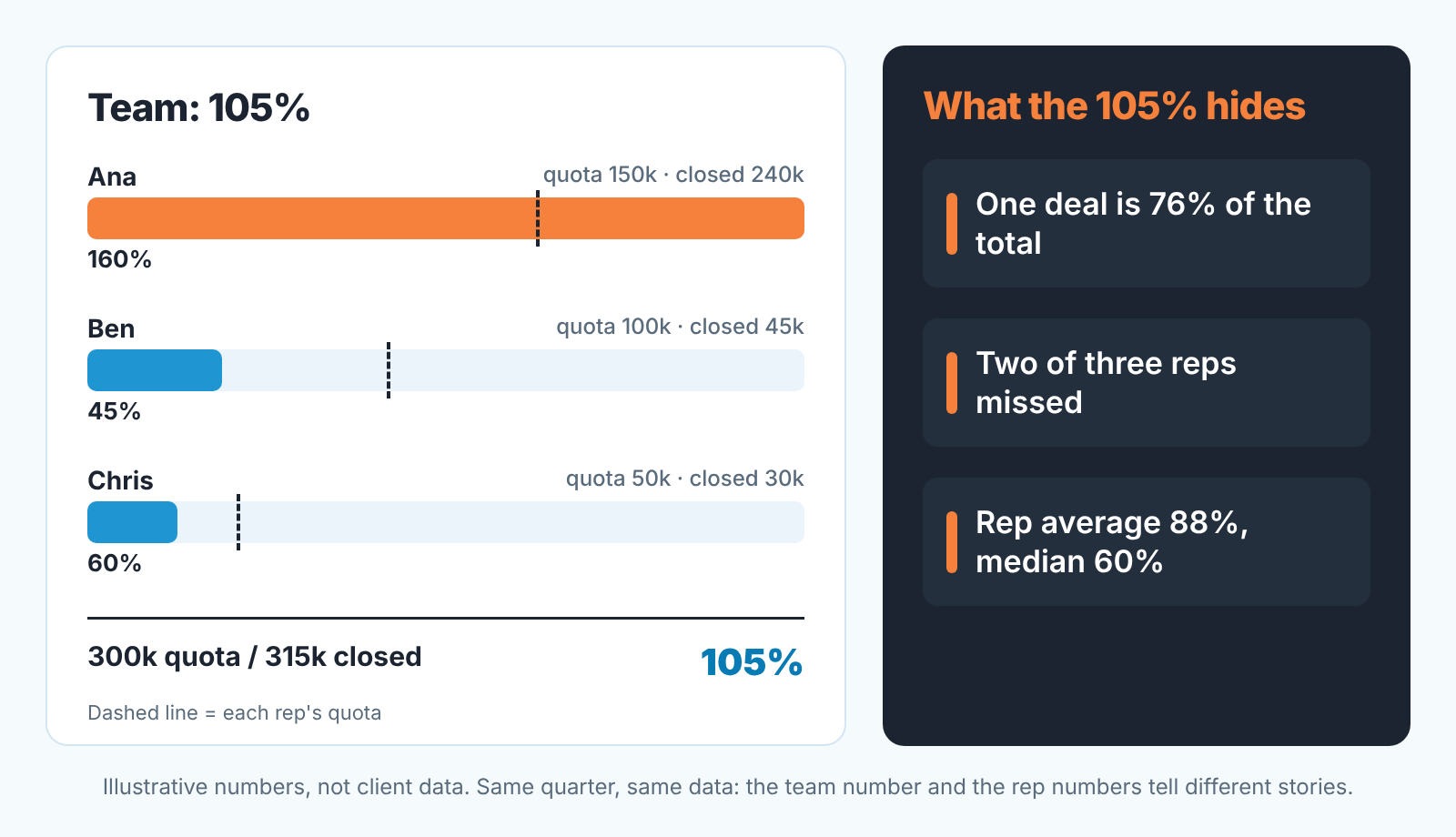
Take a made-up team of three; the numbers are an illustration, not client data. Ana has a $150,000 quota and closes $240,000, almost all of it one contract. Ben has $100,000 and closes $45,000. Chris has $50,000 and closes $30,000. The team card reads $300,000 target, $315,000 achieved, 105%. Everyone relaxes.
Two of the three reps missed. The one deal that saved the quarter was 76% of everything the team sold, and it will not repeat next quarter. A percentage over 100 is the most dangerous reading in the module because it ends the conversation exactly when it should start. The same mechanism distorts the forecast before the deal closes, and we wrote about it for Pipedrive teams in when one big deal is the forecast. The fix is the same in Zoho: list the closed-won deals for the period, sort by amount and look at the top line as a share of the total.
Pushed dates move revenue between periods
The second lie is quieter. A rep with a weak month and a deal due on the 30th moves the closing date to the 2nd, because “it will slip anyway”. The month ends, attainment is 60%, the manager has a hard conversation. On the 2nd the deal closes, the following month opens at 40% on day two, and the same manager says well done. Nothing was sold that was not going to be sold. The percentage just reported it twice, once as a miss and once as a win, and both readings were about the date field.
Our rule: a closing date edited in the last five working days of the period gets a question, not a reprimand. “What changed on the customer side?” If the answer is a real event, fine. If it’s a shrug, the date goes back.
The team percentage is not the average rep
In the illustrative team of three, with Ana at 160%, Ben at 45% and Chris at 60%, the team card shows 105%. The average of the three rep percentages is 88%. The median rep is at 60%. All three numbers are correct. They answer different questions, and the team figure answers the least useful one for a manager, because it is dominated by whoever has the biggest quota and the biggest deal. When reps have different quotas, as they should the team percentage is a weighted average that leans toward the senior rep. Read the rep cards first and the team card last.
One more thing on totals. An older thread in the Zoho community reported a quarterly forecast whose monthly Target Achieved read 91.7%, 15% and 9%, while the quarter total showed 115.7%, the sum of the three months, rather than the roughly 35% the author expected. According to the author, support called it the system’s default design (Zoho community: Total of Target Achieved percentage is calculated incorrectly). We have not reproduced it on a current account, and the module has changed since. The formula does not change because of it: quarter attainment is total Achieved divided by total Target, and that division is the number to report.
What a manager reads next to the percentage
The percentage tells you where the period ended. It tells you nothing about why.
Start with the card itself. Shortage in % is the share of the target that is not even in the pipeline. A rep at 40% attainment with 0% shortage has the deals and needs to close them. A rep at 40% with 50% shortage does not have the deals, and no amount of closing coaching will fix a prospecting gap. Same percentage, opposite action. We would rather have this one figure than a page of charts.
Then the report behind the card. Zoho announced in its community that the Target Achievement Report has been renamed Achievement and Performance Report, that its top section shows Target, Achievement, Gap to Target, a breakdown of Open Deals and Closed Lost Deals, and that Zia insights underneath are generated daily for the forecast period, grouped as a Performance Summary, an Achievement and Gap Analysis and Suggestions for Improvement (Zoho community: Forecast in Zoho CRM just got smarter). Treat Gap to Target as the number you manage, since you can still do something about it. Treat the Zia reasons as hypotheses to check against the deals, not as a verdict.
Then look away from Forecasts altogether. Attainment counts money that already closed; the deals that decide next month’s percentage are the the open ones. The fastest read on those is the Deals Closing by this Month report from the Zoho reports a manager actually opens, gone through deal by deal with a yes, a “move it” or a question for the rep. If the team prefers a picture, the target line belongs on the Monday dashboard next to closed revenue, where the gap is visible without opening a module.
Here is where we should say what we do, in one paragraph. Everything above assumes the deals behind Achieved and Pipeline Deal are real: closed when signed, dated when they actually close, owned by the person who sold them. We build SalesBond, a sales management layer on top of the CRM a team already uses, and Zoho CRM is one of them. Deal Health checks every open deal against more than 20 rules, a closing date that has already passed with no next activity scheduled among them, and explains what to do about each one. That is the check that keeps the Pipeline Deal figure, and therefore next month’s attainment, worth reading. If you want to see what it finds, check your CRM with SalesBond.
FAQ
What percent of sales reps hit quota?
Strictly, that question is about quota participation, the share of reps at 100% or more, not attainment. The attainment benchmark that circulates most comes from Optifai, whose study of 939 B2B companies (Q2 2025 to Q1 2026) puts average attainment at 65% (Optifai: sales quota attainment rate). We would not manage to it. Market averages mix industries, deal sizes and quota-setting habits you do not share. The useful benchmark is your own last four periods, rep by rep, from the Forecasts cards.
What is a good quota attainment rate? Is 90% good?
A 90% is a good reading when it is built from several deals of similar size whose closing dates nobody moved; then the rep is close and the quota is probably about right. It is a weak reading when one deal arrived early or a deal was pulled forward from next month, because the real number is lower. List the deals behind Achieved before you decide which one you have.
Why does the team show 100% when most reps missed?
Because the team figure is total achieved over total target, so one large deal or one senior rep with a big quota covers the gaps of everyone else. Read the rep cards and the share of the largest deal before you read the team card.


