
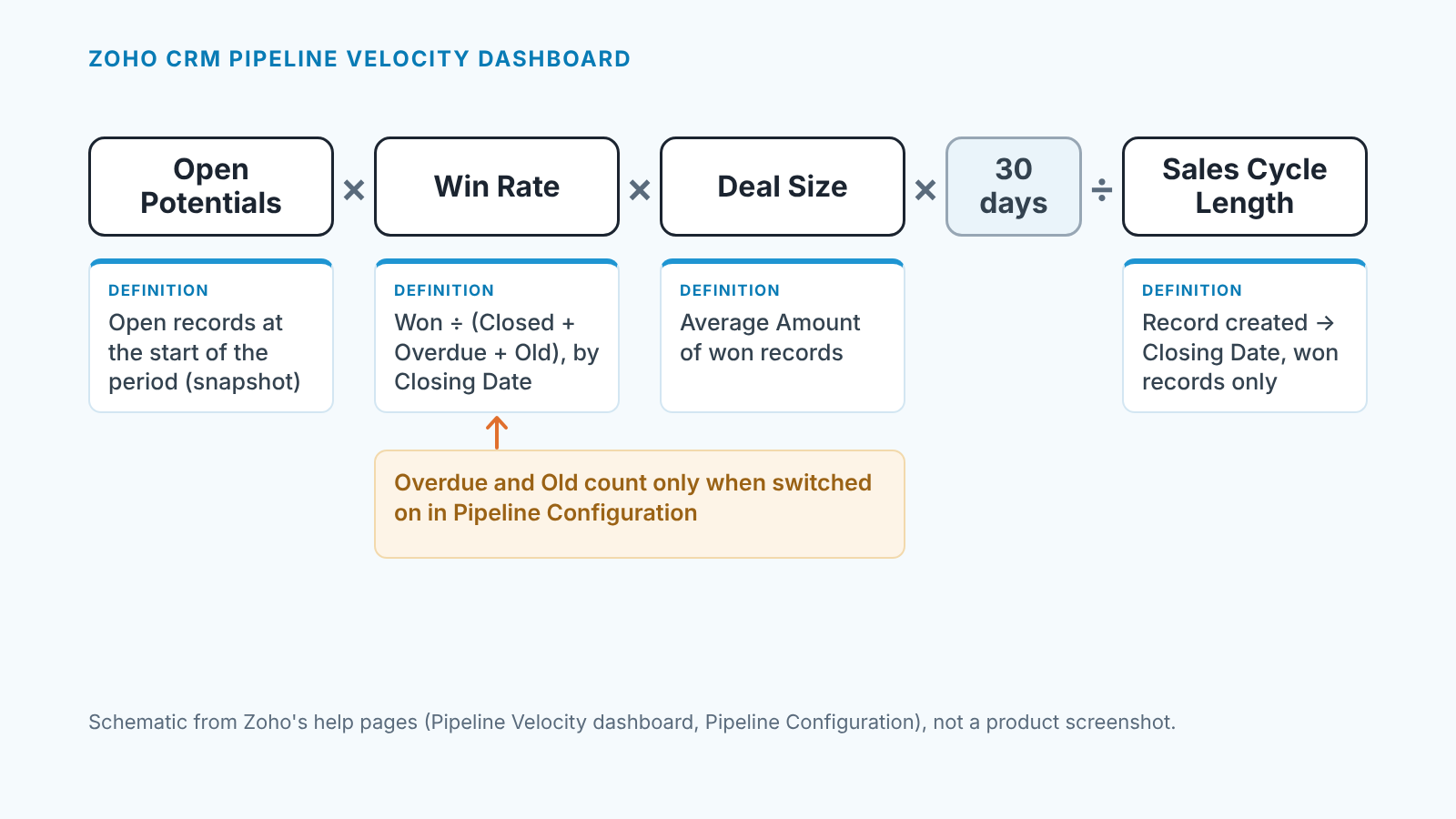
Sales velocity in Zoho CRM is open deals × win rate × average won-deal size × 30 days ÷ average sales cycle length, and the Pipeline Velocity dashboard in Zoho CRM Motivator calculates exactly that from your Deals records (Zoho Motivator help: Pipeline Velocity dashboard). Two of the four inputs are defined in ways most managers do not expect, so check each one against a standard Deals report before the number goes on a slide.
Velocity is four numbers and a divisor
The general formula, with a worked example, is in sales velocity in Pipedrive: deals in play, times the share you win, times what a win is worth, divided by how long a win takes. Zoho adds one constant. Multiplying by 30 days turns the rate into money per month and pins the dashboard to the last month or the last 30 days. That window is where the definitions start to matter.
What the Zoho CRM Pipeline Velocity dashboard counts
The Pipeline Velocity dashboard in Zoho CRM Motivator uses four inputs, each defined on Zoho’s help page. Open, won and closed are forecast categories, not stage names: a record is open when its forecast type is Open, won when it is Closed Won, closed when it is Closed Won or Closed Lost. Which stage lands in which category is decided in Zoho CRM’s Stage-Probability Mapping (Motivator help: Pipeline Configuration). Say someone mapped a custom “On hold” stage to Closed Lost years ago: it is a loss here today. More on that mapping in win rate in Zoho CRM.
Open Potentials is a snapshot at the start of the period, not deals created during it. That is the opposite of the Pipedrive article’s convention, so don’t compare the two. A snapshot counts every deal nobody has marked lost, so clean out dead deals on the 3rd and next month’s velocity drops for a reason unrelated to selling.
“Potentials”, by the way, is the old name of the Deals module. Accounts that signed up before June 2016 may still show it that way (Zoho CRM help: Working with Deals). Same records.
Win rate: why overdue and old records drag the number down
Most win-rate definitions divide won by won plus lost. This one can add two more groups to the denominator: Overdue records, open deals whose Closing Date has already passed, and Old records, open deals older than a number of days you choose. Neither has been lost. With the matching options on, the dashboard counts them as if they had been.
Both are options in Motivator’s Pipeline Configuration, not on the dashboard, and the Old one asks for the day count. Open that screen first and write down which options are on, and the day count, next to your velocity number.
We think the instinct is right and the place is wrong. In practice an open deal far past its expected close is a loss nobody has admitted, but a tile labelled Win Rate should not move every time a deal crosses a date.
Two things follow. A month with zero lost deals can still show a falling win rate, because nothing was lost; deals simply aged into the denominator. And pipeline cleanup does less than you would hope. Mark an Old deal Closed Lost with a Closing Date inside the period and it only moves from the Old group to the closed group: same denominator, same win rate. Leave a Closing Date from before the period and the deal drops out of the calculation, so the win rate goes up.
So when the Win Rate tile drops, count the open deals that are overdue or past the Old day count before you open the list of lost deals. If that count is the larger one, Monday’s conversation is about closing dates, not closing skills.
Deal size and cycle length: the two inputs reps can distort
Deal Size is the average Amount of the deals won in the period. It breaks in two ways. A won deal has an empty Amount, or the placeholder a rep typed on day one and never corrected. Or one large win lands in a small month and pulls the the average toward a pipeline you do not have. The dashboard shows only the average, so report the median next to it.
Sales Cycle Length is the average time from the record’s creation to its Closing Date, for the same won deals. A rep who enters a deal they have worked for a quarter in the week it closes hands the dashboard a cycle of a few days, and a tiny divisor sends velocity up sharply. The Closing Date end is typed by hand, and a won deal whose date was never updated from the first guess has a cycle length that is fiction.
Our rule for both fits in two sentences. A deal is created in Zoho CRM after the first conversation where the buyer confirms a need. Closing Date is set to the real date on the day the deal is marked won.
Re-calculate it from a Deals report in ten minutes
Rebuild the four numbers from a standard Deals report and the dashboard stops being a black box. Report building in general is in Zoho CRM reports for sales managers; here is the velocity-specific part.
- Open Potentials. A report shows stages as of today, so reconstruct the snapshot: deals created before the period began that are still open, plus deals created before it that closed inside it. Filter on Created Time before the period start, then count the two groups.
- Win Rate. Filter Closing Date within the period, group by Stage, count records. That gives won and lost. If the Overdue option is on, add the open deals whose Closing Date has passed; if Old is on, add the open deals older than your day count. Won ÷ (won + lost + overdue + old).
- Deal Size. Same won deals, average of Amount. Export them and add the median.
- Sales Cycle Length. From the same export, Closing Date minus Created Time for each won deal, averaged.
Multiply the four, with the 30 days on top. If your result and the dashboard disagree by more than rounding, the gap is in step 1 or the second half of step 2: those are the two groups a report cannot read off directly.
Which lever moved this month
Velocity fell, and the dashboard’s trend chart lets you add Win Rate alongside it. Ask which input moved; each points at a different Monday. If velocity already sits on your Zoho CRM dashboard for sales managers, put the four inputs next to the total.
Open Potentials down: prospecting slowed or someone cleaned the pipeline; last week’s lost deals tell you which. Win Rate down with no rise in lost deals: deals aged into the Overdue or Old group, a closing-date conversation. Deal Size down: look at the mix of wins and at the median before you conclude anyone is discounting. Cycle length up: look at who created which deals and when, because two reps with opposite entry habits swing the team average with thier share of the month’s wins.
A disclosure, since this is the problem we work on: we build SalesBond, a sales management layer on top of the CRM a team already uses; we started with Pipedrive, and it works with Zoho CRM too. Its Deal Health flags deals whose expected close date has passed with no next activity scheduled, the same deals that can sit in this dashboard’s Overdue group, and says why in plain words. Check your CRM with SalesBond.
The planning-meeting sentence then writes itself: “Velocity is down. Open deals at the start of the month were flat, deal size held, and the win rate fell because more deals crossed the Old threshold than we lost. This month we are fixing closing dates.” Same four inputs, same day next month, and the dashboard becomes something you can argue with.


