
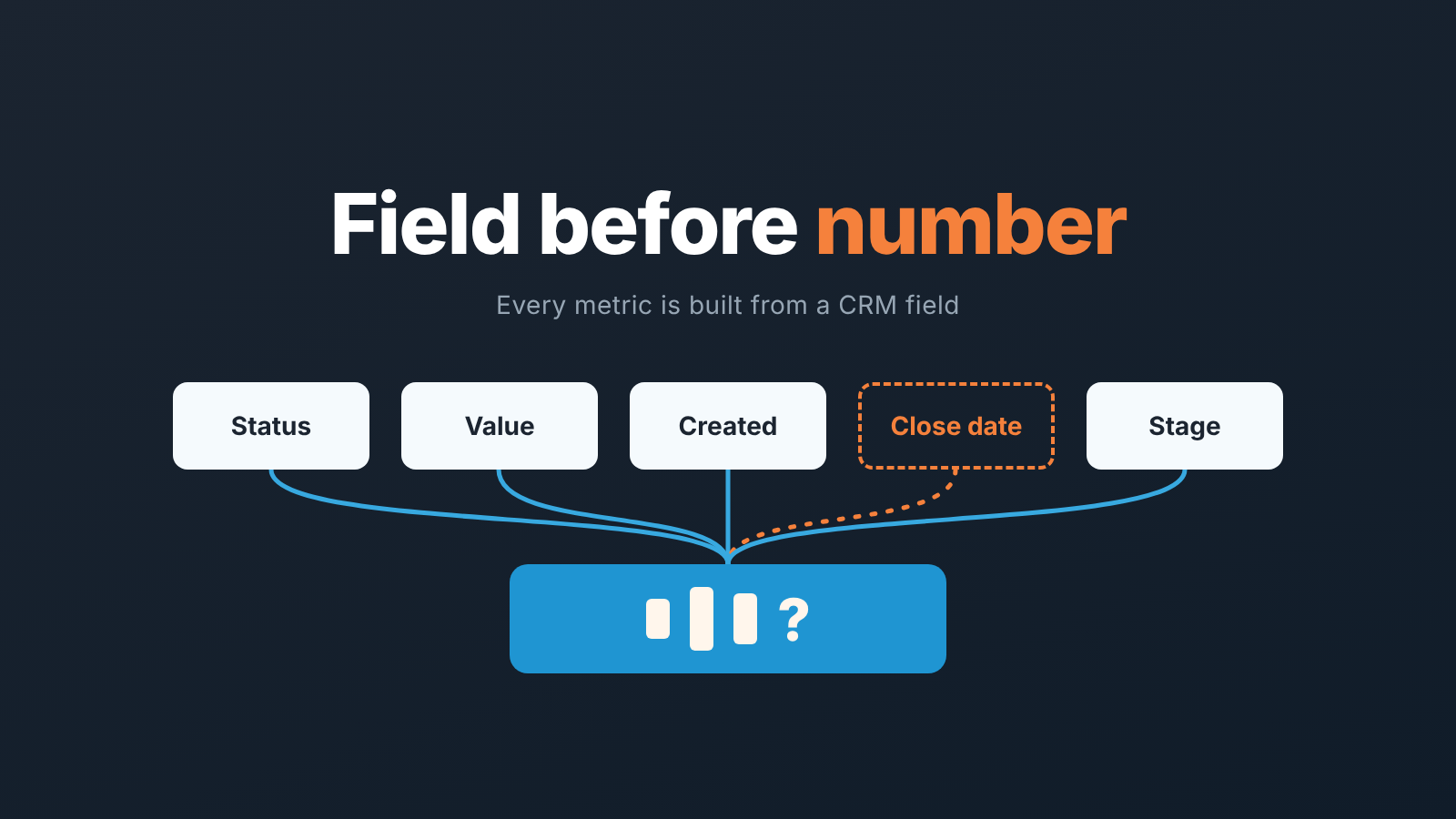
Start with the sales performance metrics you can calculate from fields your CRM already requires: win rate, average deal size, sales cycle length, pipeline coverage and stage conversion. Then, before you trust any of the five numbers, check that the field each one is built from is actually filled in. A metric with an empty or made-up source field is not a metric, it is a guess with a decimal point.
That is the whole argument. The rest of this piece is the list, the field behind each number, and the three checks we run before a number goes on a manager’s screen.
Thirty metrics, five that matter
The top results for “sales performance metrics” are lists. Highspot has thirty, sorted into quantity, quality, productivity and efficiency (Highspot). Salesforce has nine KPIs, from annual contract value to rep retention (Salesforce). Pipedrive’s guide separates metrics from KPIs and walks through setting targets (Pipedrive). As glossaries, they’re fine.
None of them answers the question a manager with six reps is actually asking, which is: which of these can I compute from my CRM on Monday morning without anyone lying to me?
We think the honest answer is five. Not because five is a magic number, but because five is roughly how many metrics a small team can keep the source data clean for. Every metric you add is another field reps have to fill in correctly, every time, on every deal. Thirty metrics means thirty fields nobody owns.
Salesforce’s own list admits that some KPIs are “difficult to track accurately” and then moves on without saying why (Salesforce). The why is the point. A sales metric is a calculation over CRM records, and the records are typed by people who are paid to close deals, not to type.
A metric is only as good as the field behind it
Here is a hypothetical example, not a benchmark. A team reports a 40-day average sales cycle. The manager is pleased, because last quarter it was 55. Then someone checks how the number is built. Cycle length is the gap between the deal’s creation date and its close date. Two reps on the team create the deal in the CRM on the day they send the proposal, because that is when they bother. The other three create it at first contact. The “improvement” is two reps changing when they open the record.
Nothing in the dashboard flags this. The formula is correct. The field is there. The number is nonsense.
Pipedrive’s guide says it plainly: metrics like deals in pipeline, win rate and total revenue depend on reps updating the CRM as deals progress (Pipedrive). We’d go a step further. Every performance metric has one or two source fields, and the first question to ask about any number is not “what is it” but “what has to be true in the CRM for it to mean anything”.
So for each of the five below we name the field, and we name the failure mode.
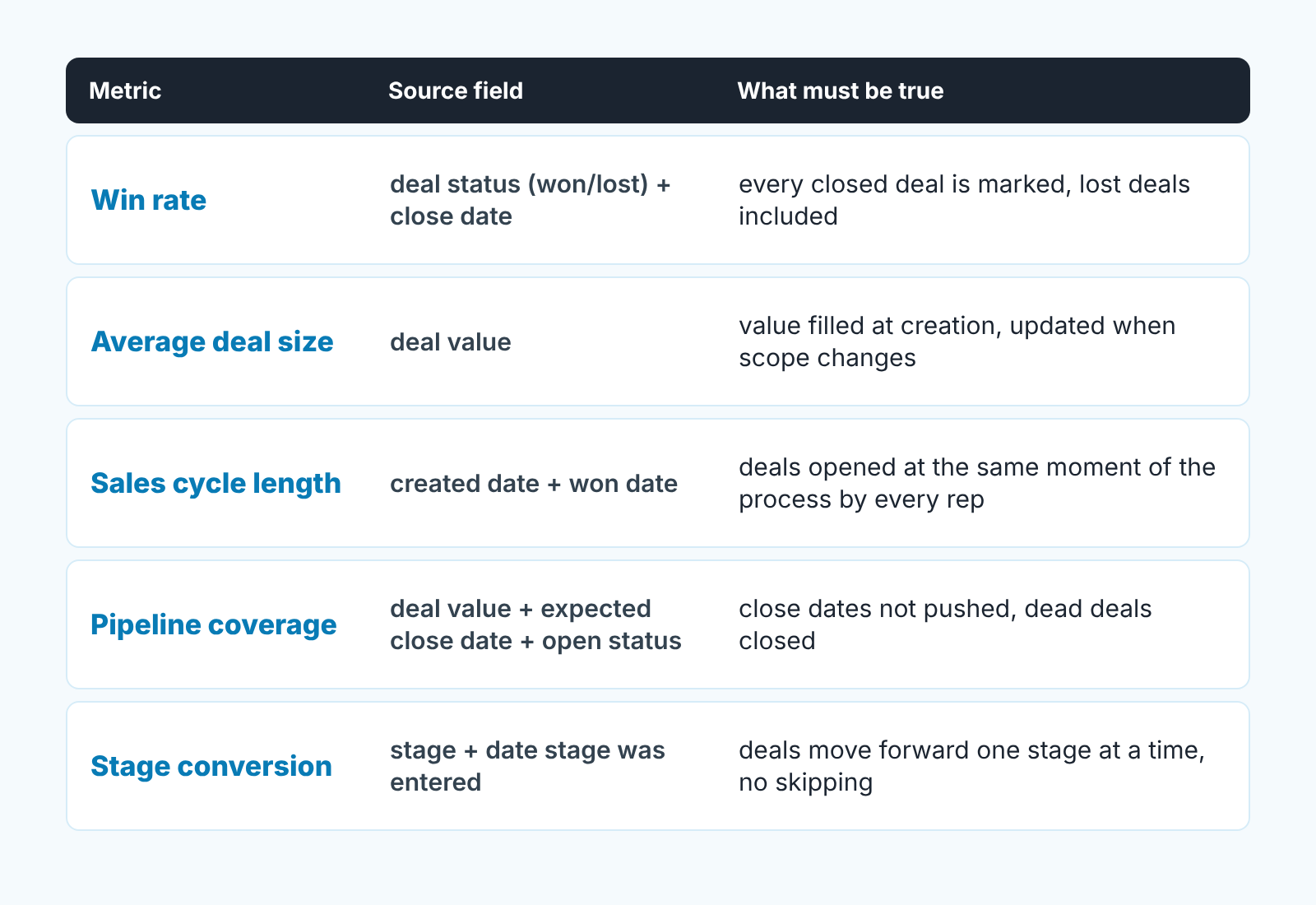
Five metrics with a source field
-
Win rate. Highspot’s definition is the simple one: wins divided by total closed deals (Highspot). Source fields: the deal status (won or lost) and the date it was closed. What must be true: lost deals are actually marked lost. On most teams they aren’t. A deal that went quiet sits open for months, never counts as a loss, and win rate drifts upward while nothing improves. Watch the denominator, too. Salesforce defines its conversion rate as deals closed divided by leads in the pipeline (Salesforce), which is a different number from closed-won over closed-total. Both are legitimate; pick one and write it down, or two people will report two win rates from the same CRM. We cover how to set it up in Pipedrive in sales win rate in Pipedrive.
-
Average deal size: total revenue divided by won deals (Highspot). Source field: the deal value. The failure mode is the placeholder. Reps enter a round number at creation so the required field stops nagging, then never revise it when the scope changes. Average deal size then measures what reps guessed in week one. Check how many won deals closed with exactly the value they were created with.
-
Sales cycle length. Highspot writes it as average close days over won deals (Highspot); in field terms, the created date to the won date. This is the metric from the example above, and its weak point is the start, not the end. Won dates are reliable because something happens on that day. Created dates mean whatever each rep decides the mean. Agree on one trigger for creating a deal (first qualified conversation, say) and the number starts to mean something. We go through the setup step by step in sales cycle length in Pipedrive.
-
Pipeline coverage. CaptivateIQ defines it as “the ratio of your current pipeline value to your quota target for a specific period” (CaptivateIQ). Three fields feed it: deal value, expected close date and open status. All three fail in familiar ways. Close dates get pushed to next month, so the deal always sits in “this period”. Dead deals stay open. Values are the placeholders from point two. Coverage is the metric most sensitive to pipeline hygiene, which is why we trust it last and check it first. How to calculate it and read the ratio is in pipeline coverage ratio; where it sits among the numbers a manager looks at weekly is in the six-number manager dashboard.
-
Stage conversion. Highspot’s pipeline conversion ratio: next stage count over prior stage count (Highspot). Source fields: the stage, and the date the deal entered it. What must be true: deals move through stages in order. If reps drag a deal from “qualified” straight to “won” because the buyer called and signed, the middle stages show conversion rates that never happened. For the mechanics in Pipedrive, see pipeline stage conversion rates.
Notice that none of the five needs a custom field, an integration or a spreadsheet. Status, value, created date, close date, stage. Any CRM a small team is likely to run has them, and that is the point of starting here.
You may be wondering where quota attainment went. Many lists put it first. We left it out on purpose: the quota itself usually lives in a spreadsheet or a plan, not in a deal field, so the CRM can only give you half of the calculation.
Two that look useful and mislead
Activity counts first. Calls made, emails sent, meetings booked all have formulas in the lists above, and all of them are counts of a thing the rep logs about themselves. The source field is the activity record, and the rep controls both whether it exists and what it says. A number that measures effort, filled in by the person whose effort it measures, is not a performance metric. We’ve written about the only way we think activity numbers earn a dashboard slot, which is paired with an outcome, in sales activity metrics for a small team, so we won’t repeat it here.
The second one is subtler: lost reasons. Almost every CRM lets you record why a deal was lost, and almost every manager at some point, builds a chart of it. The chart says “price” at the top. It always says price. The field is filled in at the worst possible moment, by the person who just lost the deal, from a dropdown where “price” is the first option and the least embarrassing. The real reasons (no decision maker, wrong timing, a competitor already in) hide behind it. Lost reasons are worth collecting. They are not worth charting until you have sat in on a few of the conversations where the reason was chosen.
What these two have in common: the source field is an opinion, not an event. Won is an event. Value is a negotiated fact. Stage entry is a timestamp. “Price” and “3 calls” are what someone decided to write.
The same test splits leading from lagging metrics, which we treat as a separate question. A leading metric built on an opinion field is still an opinion.
Check the field before you trust the number
Three checks, in this order, before a metric goes on the weekly screen. They take a filter each, not a project.
-
Count the blanks. Filter open deals for an empty value, an empty expected close date, or no stage change in a window that is long for your cycle. If the blank count is a meaningful share of the pipeline, the metrics downstream of that field are not ready. Fix the field before you report the number. We keep a short set of fill-rate numbers for exactly this, including the share of lost deals with a loss reason and the share of deals with an overdue close date, in CRM data quality metrics.
-
Look at who filled it and when. Sort won deals by created date and by rep. If one rep’s deals are all created in the week they close, the created date on that rep’s deals means “proposal sent”, not “deal opened”. Sales cycle length across the team is now mixing two definitions. Agree one trigger and move on.
-
Recompute one number by hand. Take last month’s win rate from the dashboard, then count won and lost deals yourself from a list view. If the two disagree, the dashboard is counting something you didn’t expect: deleted deals, deals moved to another pipeline, or lost deals that were never marked. You will learn more about your CRM setup in that ten minutes than in a quarter of reading charts.
Do this once per metric when you set it up, and again whenever a number moves in in a way nobody can explain.
Where this leaves you
Five numbers, each with a field you can point to and a condition you can check. That is a smaller dashboard than the thirty-metric lists promise, and a more boring one. It is also one you can defend in a planning meeting, because when someone asks “where does that come from” you can open the deal list and show them.
Add a sixth metric when the five are clean and have stayed clean for a quarter. Not before. The metric you add will be built from a field nobody is watching yet, and it will be wrong in a way that looks exactly like good news.


