
Sales activity metrics are the counts of what reps do (calls, emails, meetings, next steps logged), and they are only worth tracking as a pair with an outcome: conversations held with meetings booked, dated next steps with deals moving stage, touches on open deals with deals going stale. A raw count of calls or emails tells you how busy a rep is, not whether the pipeline is healthier, and it is the first number reps learn to inflate.
That’s the whole position. What follows: which three activity numbers deserve a manager’s attention when the team is three to ten reps, what to stop reporting this week, and how to pull the pairs out of the Pipedrive activities your team already logs.
Why a call quota turns into junk calls
Every manager who has set a daily call target has watched the same thing happen. The number goes up. The pipeline does not.
Here is an invented example, not a benchmark. Say a team of five is told to make forty dials a day. Within a month the activity report is green across the board. Open it up by rep and the story changes. One rep is calling the same handful of switchboard numbers each morning, getting voicemail, and logging each attempt as a call. Another has started logging LinkedIn views. A third is doing real work but has noticed that a two-minute “just checking in” call to an existing contact counts the same as a long discovery call with a new one, so the mix drifts toward the cheap ones. Nobody is lying, exactly. They are doing what the number asks.
Since July 2026 an admin can also make the Outcome field in Pipedrive required before a call is marked done, so a logged call says what came of it.
An activity count measures effort, and effort is the one input a rep controls completely. Attach a target to it and the rep optimizes the input instead of the result it was meant to produce. Gangly makes a related point in its piece on activity quality: two reps with the same connect rate but very different connect-to-meeting conversion have different problems, one with targeting and one with conversation quality (Gangly). Neither of those is fixed by more dials. If you want your own connect rate, count it by weekday and part of the day; a two-week test shows when your buyers actually pick up. Push harder on effort when the issue is qualification and you just make more junk faster.
So we treat activity numbers as a diagnostic, not a target. You look at them to find out why an outcome moved. You never ask a rep to move them directly. A call quota is especially unfair to a rep who spends the day in meetings; see how to track inside and outside reps in one CRM.
If you do want to pay for something short-term, pay a SPIFF on a result a rep cannot move with a date, not on a call count.
Three sales activity metrics that earn a dashboard slot
A common piece of advice in the top results is to keep a short list of core metrics instead of tracking everything; monday.com puts it at five to seven (monday.com). For a small team we go further: three activity numbers, each shown next to the outcome it is supposed to move. Alone, they’re theatre. In pairs they are useful.
-
Conversations held per rep per week, paired with meetings booked. Not dials, not emails sent. A conversation is a call or a reply where the prospect actually engaged, and meetings booked is the result it should produce. A rep with lots of conversations and almost no meetings has a pitch problem, a rep with few conversations and a high meeting rate has a volume problem. Those two need very different coaching. Before you count meetings booked, check where the booking came from: a customer who picked a slot is not the same thing as a meeting a rep worked for (what a booked meeting does to your activity data).
-
Open deals with a dated next step, paired with deals that moved stage this week. The next step is binary per deal: there is a scheduled activity with a date, or there is not. If most deals carry a next step but nothing moves, the next steps are placeholders. If deals move without next steps, your reps are working from memory, which works until it doesn’t. Our piece on the next-activity habit in Pipedrive covers how to make this one stick.
-
Touches on open deals in a recent window, paired with deals gone stale. A touch is any logged activity on a deal. Stale means no stage change and no activity past the window you consider normal for your cycle. This pair shows whether the team is working the pipeline it has or only the top of it.
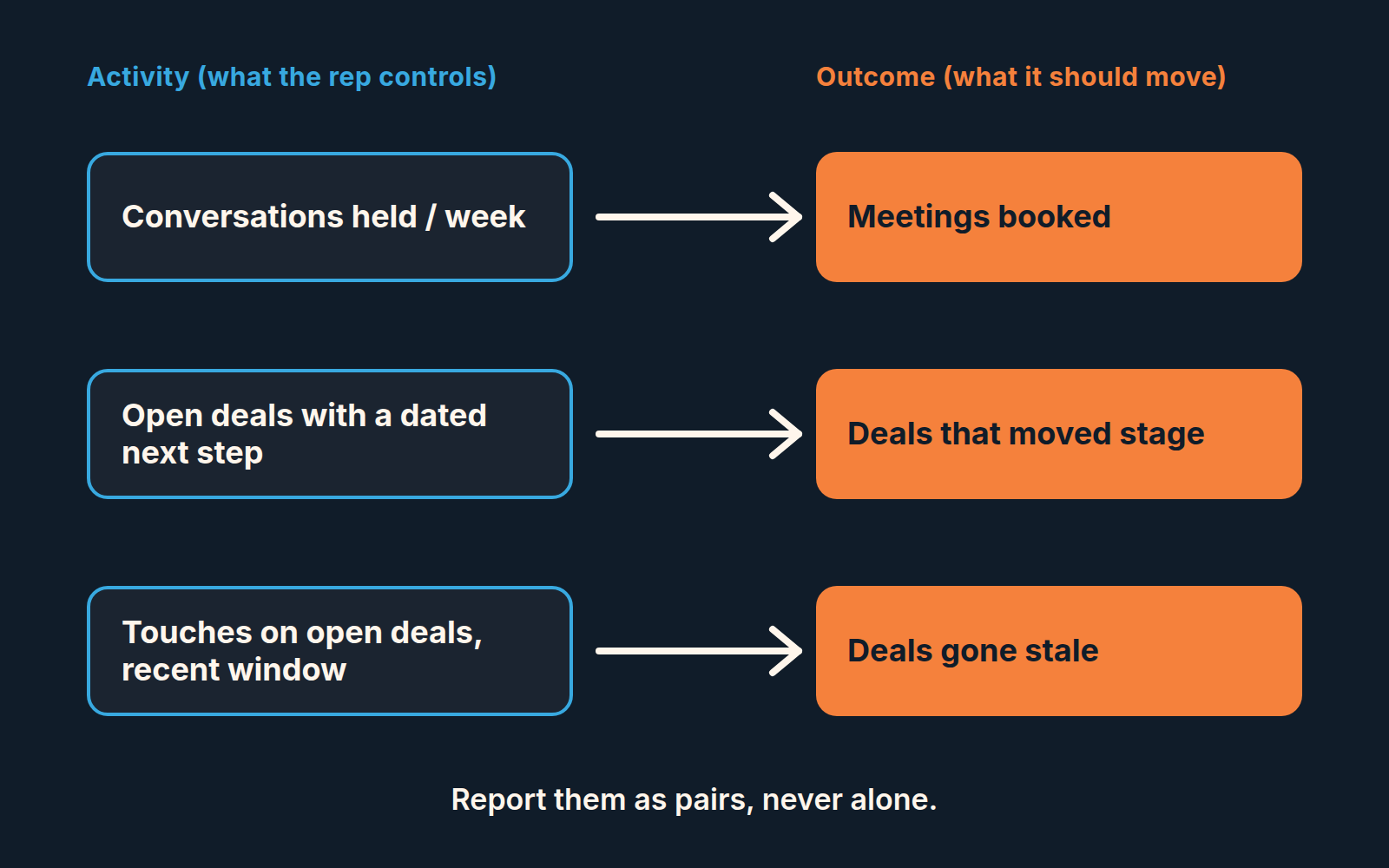
None of the three is a raw volume count, and all three come from fields reps already fill in Pipedrive: the type of activity, the next activity on a deal, and the date an activity was marked done. The window for the third pair is yours to set. Match it to how long a deal normally sits between touches on your team.
The pairs also map onto the leading-and-lagging split, which we won’t re-explain here; the leading vs lagging sales metrics post does that properly. Short version: each pair is a leading number on the left and a lagging one on the right.
Numbers to drop this week
Total dials. Total emails sent. Email open rate on sequences. Time logged in CRM. Activities per rep as a league table.
Each of these has a defender, so here is the test we use: can this number change what you do on Monday? If a rep’s dials drop sharply from one week to the next, what’s the action? You don’t know, because dials fall for good reasons (longer, better conversations) and bad ones (a rep has checked out). The number can’t tell them apart, so it can’t tell you what to do. Out it goes.
Email open rate is the one people fight hardest to keep. It feels like signal because it moves. But an open is a tracking pixel firing, sometimes triggered by the mail client rather than a person, and even a real open says nothing about whether the right person read it. Replies are the the activity that matters, and replies already sit inside “conversations held” above.
The league table gets its own sentence. Ranking reps by activity volume teaches a team, quickly, that logging is the job.
Rank by outcomes if you must rank at all, and look at activity only when an outcome is off.
You will also notice there is no “calls per day” target anywhere in this article. That is deliberate: teh figures that circulate are mostly vendor numbers for SDR teams, published without a method, and they don’t transfer to a five-person team selling a longer cycle. The same test sorts out other metrics you cannot trust yet.
If your weekly report carries any of these, the weekly sales report piece has a cut list that goes beyond activity. And if you are deciding what belongs on the manager’s screen overall, that is the job of the six-number manager dashboard, not this article. For reps the daily version can be lighter still: a daily sales report that is just the CRM, closed properly.
Four quick diagnoses
Reading activity metrics next to outcome metrics gives four patterns, and they cover almost everything you will see on a small team. Once the pairs are on one screen this is a quick read per rep, not an analysis project.
| Activity | Outcome | What it usually means | What to do Monday |
|---|---|---|---|
| High | Low | Message or qualification problem. The rep is reaching people who were never going to buy, or saying the wrong thing to the ones who might. | Listen to two of their calls. Check who they are calling against your ideal customer profile. Do not ask for more activity. |
| Low | High | Good targeting, thin pipeline. Fine for a month, dangerous for a quarter, because a few lucky deals are carrying the number. | Ask where the next ten conversations come from. Protect prospecting time on their calendar. |
| High | High | Working as intended. | Leave them alone. Find out what they do differently and have them show the team. |
| Low | Low | Either a new rep still ramping or someone who has stopped trying. Tenure tells you which. | For a new rep: pair them with the High/High person. For a veteran: a direct conversation in the next 1:1, not another dashboard. |
The point of the table is the last column. An activity number earns its place only if the diagnosis leads to an action, and the action is almost never “do more of the activity”. One pattern deserves its own article: the rep with 60 calls and no deals.
High/Low is where most small-team managers get it wrong. The instinct is to push volume, because volume is visible and coaching is slow. Resist it. The 1:1 agenda we use starts from one deal, not from a number, for exactly this reason.
Setting it up in Pipedrive, no extra tool
Everything above comes out of the activities your reps already log, provided two habits are in place: every call and meeting gets an activity of the right type, and every open deal has a next activity scheduled. Without those, no report will save you. Check the first habit before you trust the report: calendar sync can fill your Meeting count with lunches and standups.
Start in Insights. Pipedrive’s Activities performance report tracks the completion of your team’s activities, like calls, meetings and tasks, and shows them by activity type, status and user. You can view by, measure by and segment by fields such as Type of activity, Assigned to user, Status, Marked as done time, Deal and Add time; which fields are offered depends on the section of the report (Pipedrive Knowledge Base). That gives you the left side of every pair. One catch before you compare reps: sent emails only count here when automatic email logging is on, and that switch is set per user.
For the first pair filter the report to the types of activity you treat as real conversations (calls and meetings, plus whatever you use for a prospect reply) and segment by user and week. Meetings booked sits next to it on the same dashboard: activities where Type of activity is Meeting, counted by Add time for the same period.
For the second pair, the activity side is the deal list rather than a report: deals in open stages with no scheduled next activity, against the total. The outcome side is the Insights Deal progress report, which shows how deals move through stages in a time frame, using the “Date of entering stage” filter (Pipedrive Knowledge Base). One quirk to know: a stage’s count also includes deals that skipped that stage on their way to a later one. We keep the “no next activity” count as a single tile, because it should sit close to zero, and anything above that is a conversation with a specific rep about specific deals.
For the third pair, use the same activities report limited to your chosen window and segmented by deal, so you can see which open deals had any touch at all. Set the stale side up as a deal filter: open, no stage change in the window, no activity in the same window. The only real decision here is the length of the window.
One warning from experience. Don’t build the report before you have agreed with the team what each activity type means. If “call” is sometimes a dial and sometimes a conversation, the report is measuring two different things with one label, and you’re back to theatre with better charts. Write the definitions down, one line each, and only then build the dashboard.
The Monday test
Before you add any activity number back to the report, ask one question: if this number changes, do I know what to do differently on Monday? If the answer is no, it isn’t a metric. It is a performance, and your reps will learn the script faster than you can rewrite it. At month end, the activity numbers that pass this test can be rolled into a monthly scorecard per rep.
If you want to see how the activity side connects to the money side, the sales velocity in Pipedrive post picks up where this one leaves off.


