
A sales SPIFF (short for sales performance incentive fund) is a one-off bonus for a specific action or result inside a short window, paid on top of commission and gone when the window closes. On a team of three to ten reps it works when there is one measurable target, a rule that fits on a single line, and a number pulled from the CRM that a rep cannot move by changing a date or splitting a deal. Then you compare the window with the weeks around it. “Did we sell more” is the easy question. The honest one is whether next month’s deals just arrived early.
That last part is where most SPIFFs quietly fail. The rest of this article is about not failing there.
A SPIFF is not a commission plan with a bow on it
Commission is the standing deal between you and a rep: this is how you get paid for revenue, every month, by the same rule. A SPIFF is the opposite: temporary, narrow, and tied to one thing you want to happen in the next few weeks. Three demos of the new module. The old pipeline cleaned out, won or lost, by the end of the month.
If you are still choosing the standing deal, start with commission structures for a small team and how to set the quota. A SPIFF on top of a broken plan patches the wrong thing, and reps learn fast that the real money is in waiting for the the next patch.
Our rule of thumb: a SPIFF should be rare enough to notice. If you have run one every month this year, what you have is a second commission plan that nobody wrote down. Fold it into the plan or stop.
When the bonus is the wrong tool
A SPIFF buys effort. It does nothing for a process problem, and plenty of “the team isn’t pushing” moments are process problems in disguise.
The check is the same one we use for deciding whether it is the rep or the pipeline: look at the team’s numbers before the rep’s. If every rep is stalling at the same stage, if win rate dropped for everyone in the same quarter, if the leads went thin two months ago and the pipeline is only now showing it, more effort will not fix it.
The second wrong use is paying for activity: calls, emails, meetings booked. We have written about why activity metrics turn into theater the moment money is attached, and a SPIFF attaches money very directly. Pay for an outcome, or for an action that is itself a quality check, like a discovery with the required fields filled.
The third is a SPIFF aimed at a number you have never measured. Measure first, bonus second.
Pick a number a rep cannot move with a date
The obvious metric is “deals won between the start and end date”. Pipedrive stamps a won time when a deal is marked won and its reports place won deals by it (Pipedrive: revenue forecast report), but a user with deals admin permissions can edit that date from the deal’s detail view or the list view (Pipedrive: how can I edit the deal won time); we explained why that permission should stay with the manager in commission structures for a small team.
So a won-deal count can be gamed three ways, and each has an answer.
- Moving the date. Before you pay, open the changelog of every qualifying deal. The Changelog tab under History records updates to stage, value, the expected close date and other default and custom fields, sorted by date (Pipedrive: deal detail view), and the default-field changes are where an edited won time should show up. A won time moved after the fact is a conversation, not a payout.
- Splitting a deal. One $9,000 deal becomes three $3,000 deals the day a “three deals won” SPIFF starts. If you count deals, add a floor on deal value, or count organizations instead of deals. If you count value splitting stops mattering.
- Shifting the timing. A deal that would have closed on the 3rd of next month closes on the 29th with a discount, or a rep sits on a deal for a week so it lands inside the window, which is plain sandbagging. No filter blocks either; the measurement in the last section catches them. For old pipeline we freeze the list: on day one the manager saves a filter of the deals in scope and exports it. Nothing added later counts, so nobody invents deals.
The rule fits on one line
If the rule needs a paragraph, each rep will read it differently. One line, six parts:
WHO       every rep on the Pipedrive account (or: named reps)
WHAT      one deal condition you can filter for
WINDOW    start date, end date, inclusive
AMOUNT    fixed sum per unit, or a fixed sum for hitting the line
CAP       the most one rep can earn
JUDGE     the manager, using the Pipedrive filter named X, on the day after the window
Published guides land on the same shape. One example rule reads “For every 10 units sold within a month, you earn a $50 bonus” (All Digital Rewards), and Salesmate puts the useful length at “2–6 weeks” (Salesmate). For a small team we stay at the bottom of that range. Two weeks is long enough to close something and too short to plan a quarter around.
Here is a filled-in line for a made-up four-rep team, numbers invented for the example:
Every rep. Each deal won from the “Q3 stale” filter saved on 5 October, value $2,000 or more. 5 to 16 October inclusive. $150 per deal, cap $600 per rep. Judged by the sales lead on 19 October from the shared filter “SPIFF Oct”, with a changelog check on every deal.
Read that aloud at the stand-up. If someone asks “what if”, the answer either fits in the line or the rule is not ready.
The cap is not optional. Without one, a single large account turns the SPIFF into a lottery, and the rep who happens to hold it collects the lot. Its the same lesson as the one large deal in our commission back-test, with even less data to smooth it out.
Paying it out of Pipedrive without an argument
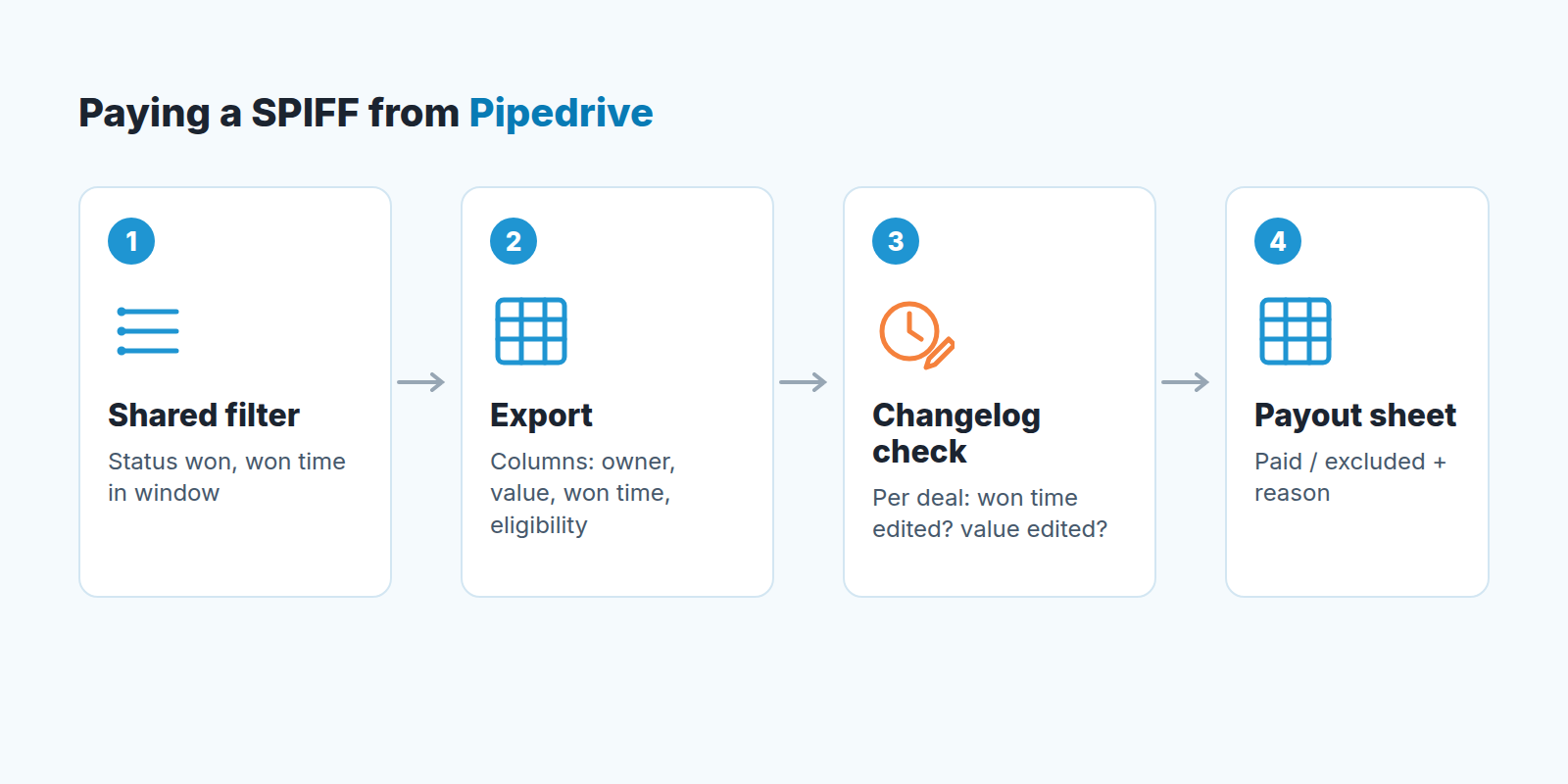
The payout should come from a filter built before the window opened, not a spreadsheet assembled afterwards from memory. Pipedrive filters combine conditions in two groups: ALL conditions, where “an item will only appear in your results if it meets every condition listed”, and ANY conditions, where it appears “if it meets at least one” (Pipedrive: filtering). For a SPIFF you want ALL: status is won, won time within the window, plus whatever the WHAT line says. Save it as a shared filter so reps watch the same list you will pay from. No surprises on the 19th.
If the condition is something Pipedrive does not store, add a custom deal field for it, a single-option field like “SPIFF Oct: eligible / not eligible”. Creating and editing custom fields “is only available for users with the correct global permissions enabled” (Pipedrive: custom fields), so an admin creates the field. That covers the field, not its value: anyone who can edit the deal can set the flag. Agree up front that only the manager sets it, after the deal is won, and read flag changes in the changelog with everything else. A flag the rep sets is a flag the rep will argue about.
The morning after the window:
- Open the shared filter, add the columns you need to the list view through the gear icon (owner, value, won time, the eligibility field) and export the filter results. Note that “only global admins and regular users with the correct permissions enabled can export data” (Pipedrive: exporting data).
- Go through the changelog of every row and write the verdict in the export, not in Pipedrive. Look for a won time edited after the deal was won and a value changed in the window’s last days. The sheet is where you write “excluded: won time edited 15 Oct, closed 2 Oct”.
- Pay from the sheet, and keep it. It is the answer to “why didn’t I get mine”.
Tax and contract treatment of the payout varies by country, so we leave it out. Settle it with your accountant before the window opens, not after the first payslip.
Did it work, or did the window just borrow from the next two weeks?
A SPIFF is an experiment with a cost, and an experiment needs a “before”. Take the same metric and the same filter logic for the four to eight weeks before the window. Not last year, not the quarter: the weeks right before, because that is teh team you actually have. Write the number down before the window opens. We have watched managers skip this, see two good weeks, and have no way to tell whether they were unusual.
Then measure three things:
- The window itself against the baseline. More won deals or more value, and by how much?
- The two weeks after the window against the same baseline. This is the pull-forward test: if the window was up and the two weeks after are down by about the same amount, you moved deals and did not create any. All Digital Rewards puts it plainly: “Look at baseline performance before the SPIFF vs. during or after” (All Digital Rewards).
- What it cost against what it brought in, which Salesmate frames as comparing “the program’s cost (rewards and associated resources) with its revenue” (Salesmate). Count the discounts given inside the window, because reps will have used them.


