

There is no number of deals per sales rep that fits every team. The right open-deal load is the most deals a rep can touch with a dated next step every week without activities going overdue. You find it by looking at the point where a rep’s overdue activities and idle deals start climbing, and you cap the load just below that point. Everything below is how to find that point in your own Pipedrive data, what overload looks like once you cross it, and what to do about it.
Why the usual numbers do not transfer
Search for this and most of what comes back answers a neighboring question: deals closed per month, usually split by contract size, or how many reps a company should hire. Some pages do give ranges of open opportunities per rep. SaaStr, for example, works the number backward from quota. Treat those ranges as a starting band for planning, not a target: they average over deal mixes and sales cycles that aren’t yours. The closed-per-month figures are further off still. They can’t tell you how many deals a rep can carry in the pipeline today, because a closed deal is the end of a process and an open deal is the middle of one. A rep closing four deals a month might be working twelve, or forty, and the two situations feel nothing alike from the inside.
The other reason benchmarks fail is that “a deal” is not a unit of work. A renewal with a known champion needs one email every two weeks. A new logo with three stakeholders and a procurement team needs a call, a follow-up, and a document every few days. Twenty of the first kind is a quiet month. Twenty of the second is a rep who has stopped sleeping. Any number that ignores touches per deal per week is counting the wrong thing.
The same difference is behind the question of whether to split hunter and farmer work on a small team.
We also hear the objection that bigger pipelines are safer. They are, up to a point and we wrote about that point in our piece on the pipeline coverage ratio. Coverage says how much pipeline you need so the quota survives a normal loss rate. Capacity says how much pipeline one person can actually work. The two pull against each other, and when they conflict, capacity wins: pipeline a rep cannot touch is not coverage, it is inventory with a close date on it. This article does not redo the coverage math. It is about the other limit.
Finding each rep’s deal ceiling in Pipedrive
The method is cheap and takes one afternoon per rep. You are looking for the week in the last quarter when the rep’s open-deal count went up and their follow-through went down.
- Pick one rep and the last full quarter. Do this one person at a time. Team averages hide exactly the thing you are looking for.
- Count open deals per week. In the deals list, filter on that owner and status open, and note the count at the end of each week. If you kept weekly pipeline snapshots, use those; if not, the deal’s add date and close date are enough to reconstruct the count by hand.
- Count overdue next activities per week. In the deals list view, build a filter for open deals where the next activity date is before today; run against each week’s end date, it gives you the overdue count. The pipeline view sorts deals by next activity by default, which is a quick way to eyeball the same thing for the current week. Our guide to the next activity in Pipedrive walks through the filters, including the one for deals with no next activity at all, which is worth tracking alongside.
- Count idle deals per week: deals with no activity logged in the last seven days. Pipedrive’s rotting feature looks similar but counts something else. You set a threshold per stage, and the clock runs from the last time the deal was updated. Marking an activity done resets it, so does an email, and so does a plain edit to a field. That makes rotting a decent idle counter with one blind spot: a rep tidying up a field counts as a touch. For capacity, count activities.
- Put the three lines next to each other. Open deals, overdue activities, idle deals, by week. The tipping point is the first week where overdue and idle start climbing faster than open deals do. That open-deal count is the rep’s ceiling.
- Set the cap a few deals under the ceiling. The ceiling is where things start breaking, not where they work well.
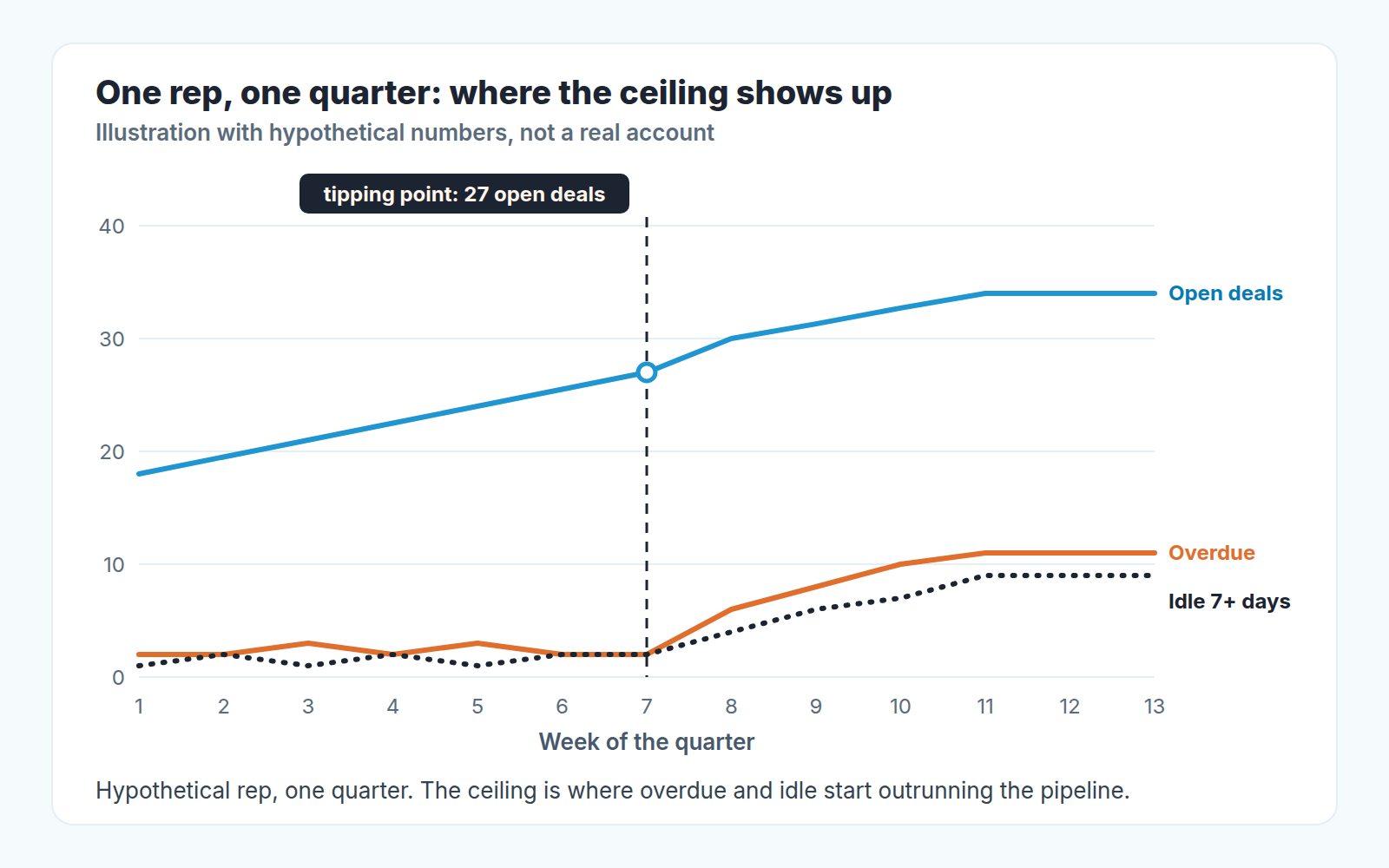
A hypothetical example, so the shape is clear. A rep starts the quarter at eighteen open deals with two overdue activities. Through week seven the pipeline grows to twenty-seven and overdue stays at two or three. In week eight the pipeline hits thirty, and overdue jumps to six; by week eleven, thirty-four open deals and eleven overdue, with nine deals untouched for a week or more. The ceiling for this rep, with this deal mix, is somewhere around twenty-seven. The cap we would set is twenty-four. Your rep’s numbers will be different, and that is the whole point of doing this on your own data.
One more thing to watch while you are in there: look at what the next activities say in the weeks past the ceiling. Reps under load do not stop scheduling activities, they start scheduling vague ones. “Check in” and “follow up” with no name and no purpose are the pipeline’s way of saying it has outgrown the person holding it.
What an overloaded rep looks like in the data
You do not always have the luxury of a quarter of history. Here is what an overloaded rep’s workload looks like in the current week, roughly in the order it shows up.
- Overdue next activities grow faster than the pipeline, and the rep reschedules them in bulk on Monday morning instead of doing them.
- New leads wait longer for a first touch. If you track speed to lead, this is usually the first number to move, because new leads have no history and no advocate inside the rep’s head.
- Deals sit idle in the middle stages while the rep works the ones closest to close.
- Close dates get pushed a week at a time, and the pushed deals are the ones with no next activity.
- Activity notes get thinner.
None of these alone proves overload. A rep can let notes slide because they are lazy, or push close dates because teh buyer’s budget cycle moved. It is the combination, arriving in the same two or three weeks, that tells you the load crossed the line. When you compare reps, read productivity per rep, not per call, and against their own quarter.
Three moves: cap, reassign, close out the weak ones
The cap is the easy part. Once you know a rep’s ceiling, write it down, say it in the next one-on-one, and route new leads elsewhere when the rep is at it. The hard part is what to do with the deals already over the line, and there are only two honest options: move them to someone else, or stop pretending they are deals.
Reassigning works when the deals are real and the problem is hands. Hand the newest, least-worked deals to the rep with room, not the oldest ones; a deal that has been idle for a month under one owner rarely comes back to life under a second, because the buyer has already formed an opinion about about how responsive you are. Tell the buyer who their new contact is, in writing, the same day. A silent handover costs more trust than the delay it was meant to fix.
Closing out is the move managers avoid and the one that does the most good. Go through the rep’s idle deals and ask, for each one, whether anyone on the buyer side has done anything in the last month. If the answer is no, the deal is not stalled, it is dead, and the difference matters: we drew that line in stalled deals vs dead deals. Mark it lost with a reason, or park it in a separate holding pipeline if your process allows it, and give the rep the hours back.
Here is the argument for why trimming beats coverage. A rep’s attention is the scarce input. Spread across forty deals, it produces vague next steps and late follow-ups on all of them, including the eight that could have closed. Concentrated on twenty-four, it produces real touches on the deals that respond to touches. Win rate is a ratio of deals won to deals that reached a decision, and starving the good deals to keep the weak ones warm pushes both halves of that ratio the wrong way. We went into what moves that number in our guide to win rate in Pipedrive. The short version: the deals you cut were mostly going to lose anyway, and the ones you kept now get the attention that changes outcomes.
When a fat pipeline is really a hiding place
Not every oversized pipeline is a capacity problem. Some are a comfort problem.
A rep with sixty open deals and a weak quarter has a story ready: look at everything in flight, the quarter is just late. A rep with twenty open deals and a weak quarter has no story, only the twenty deals and what has or has not happened on each. The second rep is in a far better position, and knows it, which is exactly why the first rep does not want to become the second one. Closing a deal lost is a small admission. Sixty small admissions at once feels like a verdict.
You can usually tell which problem you have by watching what happens when you offer to reassign. A rep who is genuinely overloaded says yes with relief. A rep who is hiding says the deals are all close, and asks for two more weeks. Take the second answer seriously, and then ask for the buyer-side evidence on each deal in the next one-on-one. If the evidence is there, fine, the rep was right. If it is not, the pipeline was never that big, and the cap conversation turns into a different one about how deals get qualified in the first place.
Managers do this too, by the way. A team pipeline that looks three times quota is easier to show upward than one that looks like a tight one-and-a-half with every deal worked. The fifteen-minute weekly pipeline review exists partly to make that habit visible: when every deal gets a question each week, the ones that exist only for the chart stop surviving the meeting.
So start with one rep this week, ideally the one whose pipeline you trust least. Pull their last quarter, plot the three lines, and bring the number to your next one-on-one. It will probably be smaller than the one you had in your head.


