
Accountability means owning a result and being ready to explain it. Responsibility is doing the work. In a sales team the first one only works when every number has one named owner and a place in the CRM where everyone can see it. If two people can both say “that’s not really mine”, nobody is accountable, however hard they both work.
The rest of this piece is how to set that up so it survives past the first bad month.
Accountability vs responsibility in plain words
A sales accountability system gives every number one named owner, keeps that number in the CRM where the owner can read it, and asks the same questions about it every week. You can hand responsibility out and split it between people, so three of them can each do part of one deal. Accountability can’t be split that way, because one name has to stay on the result.
A rep is responsible for calling the lead back. She is accountable for whether the deal moves. Both matter, but they are checked differently. Responsibility is about activity: the task got done or it did not. Accountability is about a result and the explanation that comes with it. When the number lands, the accountable person says what worked. When it misses, the same person says why and what changes next week. Nobody else gets to tell that story for them, and nobody else gets to take it from them either.
Most of what you find when you search the word is about accountability in the workplace in general. FranklinCovey, for example, describes accountability as what keeps an organization’s objectives and an individual’s actions in line with each other (FranklinCovey: Fostering accountability in the workplace). True, and not enough for a sales floor. In sales the objective is a number, the actions are logged in a CRM, and the gap between them is visible every Monday if you choose to look. So the question is narrower than culture: which number, whose, and where is it written down. A who-does-what matrix across a deal’s stages is a different tool, covered in the RACI chart for a sales team.
Who answers for what: rep, manager, owner
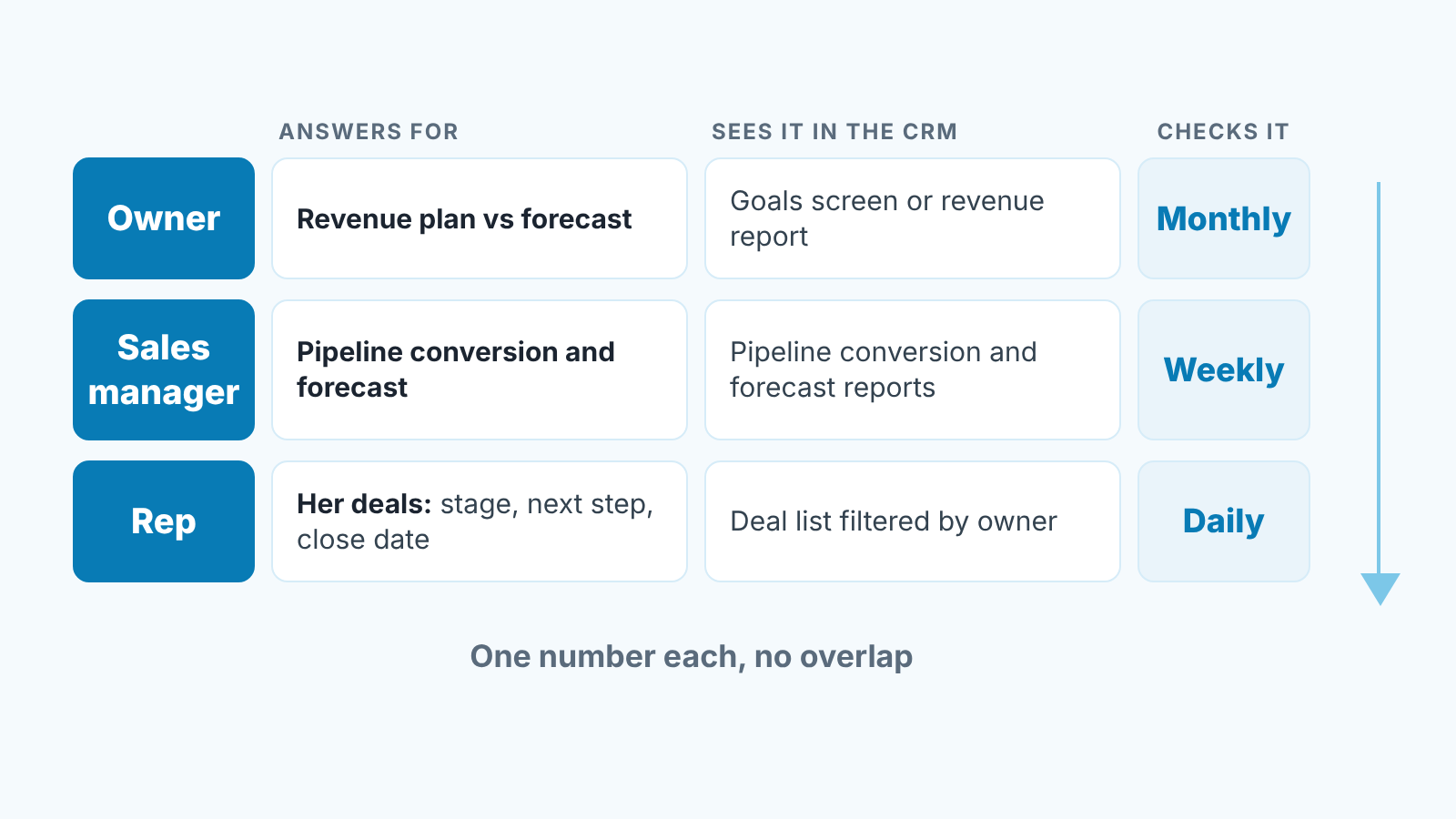
Three levels, three different numbers. Mixing them is where most accountability talk goes wrong: the owner starts asking reps about revenue and the manager starts answering for individual deals.
The rep answers for the deals with her name in the owner field, and leaves the team’s conversion rate and the forecast to the manager. Three things on each one: the stage is honest, a next step is scheduled, and the expected close date is one she would defend. If a deal sits in Proposal Sent for six weeks with no activity, that is her number going wrong, and she should be the first to notice.
The sales manager answers for the pipeline as a system. Stage-to-stage conversion, time in stage, and whether the forecast for the month rests on deals that actually have a next step. He does not own the deals. He owns the question “is this pipeline going to produce what we committed to”, and he answers it with the team’s numbers, and his own closing stays out of it. The rest of that job is in sales manager responsibilities your CRM can show you.
The owner answers for the revenue plan. Target for the quarter, booked, forecast, gap. She does not ask why the Henderson deal slipped. She asks the manager whether the forecast still holds and what the gap looks like if it does not.
Notice what is missing: nobody answers for someone else’s number. The rep is not accountable for the forecast, so she does not pad it. The manager is not accountable for closing the big deal himself, so he does not take it over from the rep in the last week.
One number per person, and where it lives in your CRM
The owner field is the accountability field. Everything else hangs off it.
In Pipedrive every deal has an Owner; in HubSpot it is the Deal owner property. If that field is empty, shared, or pointed at the manager “for now”, the rest of this article does not work, because the CRM cannot show you whose number a deal is. The fix is boring. Make the field required at deal creation, assign a real person, and filter every report by it.
With that in place, each level gets one number, one place to read it and one time to look at it. Here is how it runs for us, with one manager and four reps.
The rep’s number is the state of her own deals: stage, next step and close date on each one. She reads it every morning in the deal list filtered by Owner in Pipedrive or by Deal owner in HubSpot, sorted by next activity. On Monday she and the manager add one more view, her deals with no next activity at all, because that is usually the first sign a deal is drifting.
The manager’s number is the forecast: the month’s deals grouped by expected close date, with their probability next to them. Conversion is the tool he checks it with, from the pipeline conversion or funnel report, this month against last. He looks at both every Monday and goes through the forecast with the owner at the end of the month.
The owner’s number is revenue against the quarterly plan, read on the first Monday of the month with the manager in the room. It comes from the goals screen (deals won by value against target) or from the revenue report, which means the target has to live in the CRM next to the actuals.
Both CRMs in the examples can hold it. Pipedrive’s Insights goals come in types such as deals added, deals progressed, deals won and revenue forecast, and each goal is assigned to a user, a team or the whole company (Pipedrive: Insights goals). HubSpot’s sales goals let you choose individual user targets, team-only targets, or team targets with individual targets underneath (HubSpot: Create sales goals). That choice is an accountability decision dressed up as a settings screen. A team goal with no individual targets means no rep answers for a number. Individual targets with no team rollup means the manager does not.
What we would not do is keep these numbers in a spreadsheet that copies them out of the CRM once a month. The moment the number lives somewhere the rep cannot open, it stops being hers.
The weekly check: five minutes, same questions every time
Monday, before the pipeline review, the manager opens the deal list filtered to one rep at a time and asks the same questions every week. Which of your deals has no next step? Which close date moved since last week, and why? Which deal has been in its current stage longer than our usual time there? Is there anything in your forecast you would take out today if nobody minded? What is the one thing you need from me this week?
Five questions, five minutes per rep, no slides. The repetition is the mechanism. When the questions change every week, reps prepare for the meeting. When they never change, reps fix the deals before the meeting, because its easier to clean up a deal on Friday than to explain it on Monday.
The manager gets the same treatment from the owner, once a month, with his own number and the rate behind it: forecast against what was promised, conversion this month against last, and the gap that leaves against the plan. If he knows the owner will ask about the forecast on the first Monday the forecast gets honest by the last Friday.
A disclosure, since this is where tooling comes up: we build SalesBond, a sales management layer on top of the CRM a team already uses, and the Monday list of deals with no next step or a slipping close date is one of the things it puts in front of a manager without building the filters by hand. Building the filters takes an afternoon, and asking the same five questions for the the twentieth week in a row is the harder habit.
When the number is missed: questions that do not turn into blame
The number will be missed. What happens in the next ten minutes decides whether the rep tells you the truth next month.
The question that kills accountability is “why did you miss”. It sounds reasonable. It invites a defence, and a defence is a story in which the rep did everything right and the market or the lead quality let her down. Once she has told that story out loud she will not change anything, because in the story there was nothing to change.
The question that keeps it alive is “what do we change for next month”. It assumes the miss is real and already accepted, skips the trial, and moves to the part with a decision in it. The rep still owns the result; that is what the owner field was for. She just does not have to defend it.
A few rules we hold ourselves to in that conversation. The number comes from the CRM, so nobody argues about what happened. The accountable person explains first; the manager speaks second even when he already knows the answer. The output is one change, written down, with a date to check it. And the same change cannot be proposed twice: if “I’ll follow up faster” was the fix in September, it is not the fix in October.
That last rule is where the manager’s own accountability shows up. A rep proposing the same fix twice means the problem is now his: either the fix was wrong or the rep cannot do it alone, and both are the manager’s number now. How you handle that depends on how you run the team, which we got into in leadership styles for a sales manager.
Sometimes nobody can take accountability for a miss at all. That happens when the number never had one owner, or when the person named has no say over it: a shared target, or deals that sit with someone else. That is a setup problem, and it usually looks like one of the three below.
Three ways this quietly breaks
The setup above fails in predictable places. We have hit all three.
Shared numbers. A deal with two reps on it, a region two people cover, a target set “for the team” with no split. Shared sounds collaborative and reads, in the CRM, as unowned. When the number misses, the conversation becomes a negotiation about whose fault it was, which is the conversation we were trying to avoid. One owner per deal, one owner per target. If two people genuinely work a deal, one of them helps and the other one’s name is in the owner field, and that person answers for it.
No deal owner, or the wrong one. Deals from an inbound form often land on whoever set up the integration, usually the manager or an admin. Deals from a rep who left stay with teh departed account for months. Both are invisible until you filter the pipeline by owner and see forty deals belonging to someone who does not sell. Make the owner field required, reassign leavers’ deals on the day they leave, and add “deals owned by non-reps” to the Monday filters. The wider version of this, who keeps the data clean with no ops person, is in who owns CRM data quality when you have no ops person.
Goals nobody can see. The target is in a deck from January. The rep’s number is in the manager’s head. The forecast is a figure the owner heard on a call. None of it is where the deals are, so when the number is checked, the first ten minutes go to agreeing what the number was. Put the target in the CRM’s goal feature, or at minimum in a report every rep can open. If you want targets that roll up into something the whole company reads, that is the OKR version of the same idea; we wrote about key results you can pull straight from your CRM, and the rule there is the same as here: a key result with no named owner is a wish.
Put names on it
All of this fits on one page, and we think it should, because the page is what you point at when the argument starts. Write down the three numbers, where each one lives in your CRM and when it gets looked at. Then print it, date it, and put the rep’s, the manager’s and the owner’s names next to their lines, so every line has someone who answers for it.


