
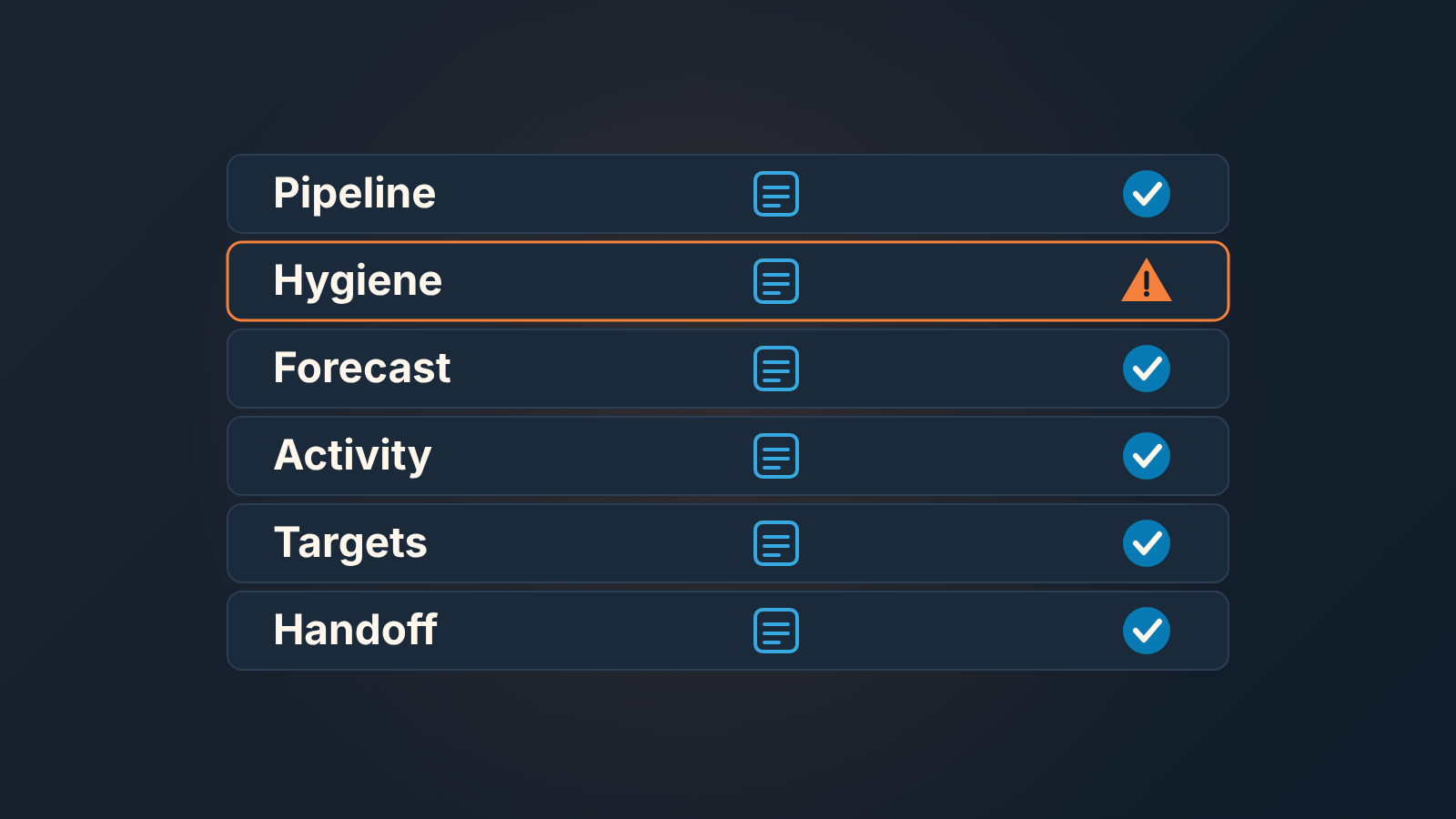
A sales manager is responsible for the pipeline, deal hygiene, the forecast, activity and coaching, targets, and the handoff of a won customer, and each of these can be checked once a week in one CRM view instead of a status call. Job descriptions list the duties well enough. What they leave out is the second half: how you know, on a Monday morning, that each duty is actually being done. That second half is what this page is for.
A job description tells you what to do, not how you will know
Open any sales manager job description and you get the same list: hire and onboard reps, train and coach them, set the sales strategy and split the territory, own the forecast and report it upward, hit the number. Fine for hiring. Useless the week after you start, because the question changes. It is no longer “what am I responsible for” but “is it happening, and how would I know”.
Some of that list will never show up in a CRM, and it is better to admit it up front. Whether you hired the right person is something you learn over months, not from a filter. How good a rep’s conversations are lives in the call itself, not in the record that says the call happened. Strategy and territory get set a few times a year, and reporting upward is mostly a by-product of everything else. What is left is the weekly work, and the weekly work leaves a trail in the CRM.
Most managers check that weekly work with a status call. Everyone reads out their deals, the manager nods, and by Wednesday nobody remembers who said what. The call feels like control. It is a reading, taken from memory, by the people being read.
We think the honest version is simpler and colder: a responsibility you cannot see in the CRM is a responsibility you are checking by feel, and feel is late. The CRM records the work. It will not manage the team for you, and we have written before about why a CRM does not manage sales on its own. But for each thing a manager is supposed to keep in order, there is one view that shows whether it is in order. That view, opened weekly, replaces most of the status call.
Six sales manager responsibilities and the CRM view for each
Each of the six comes down to a question you are really asking, a place where the answer sits, and a sign that something has gone wrong. The views are described in generic terms on purpose, because the CRMs we write for all have them under their own names. If you want the exact report setup, we have written it up for Salesforce reports and for Zoho CRM.
Pipeline and stages come first. The question is whether there is enough in the pipe and whether it sits where the reps say it does. Group open deals by stage and sort each stage by days in stage. Worry when one stage holds far more deals than its neighbors, or when deals jump stages with nothing logged in between.
Deal hygiene is easier to state: does every open deal have a next step and an honest close date? Two filters answer it, open deals with no next activity and open deals with a close date in the past. The warning sign is repetition. Same deals on the no-next-step list two weeks running means nobody is working them.
For the forecast, you are asking which of these deals you actually believe. Look at open deals by expected close date, with stage and last activity shown next to each. Close dates that drift forward every week while stage and activity stay put are the tell.
Activity and coaching is about whether the work lands in the right places, and whether last month’s coaching took. The view is the activity report by rep, split by deal stage. Trouble looks like plenty of activity on new deals and none on proposal-stage deals. Or a lot of volume and no stage movement at all.
Targets and quota mean knowing who is on plan, who is behind, and why. Put won and lost by rep for the period next to each rep’s open pipeline. A rep who is behind with a thin pipeline has a coverage problem: there is not enough open pipeline left to cover what remains of the target. Behind with a full pipeline is a conversion problem. On a leaderboard the two look identical, and they need different help.
The handoff is the one most teams cannot see at all, because “handed off” is not a standard field in a CRM. The question is whether the customer you won actually arrived at delivery. If your team added a custom field that gets filled at close, filter deals won in the period where it is still empty. If you have not, use the next best sign: a won deal with no activity after the close.
Notice that every one of these ends in something you open, not something you ask. One level up the job changes: managing sales managers means looking at how each manager runs these same views.
Pipeline and stages
Start with the view grouped by stage, because it fails loudest. A healthy pipeline thins out as it moves right. When one stage is fatter than the ones on either side, something is stuck there, and the reps already know which deals; you are the last to find out.
Sort each stage by days in stage. Your CRM records when a deal entered its current stage, and that number is harder to argue with than “it’s moving”. The deals at the top of each column are your review list for the week. If you only have a quarter of an hour, the 15-minute weekly pipeline review is the short version of this walk.
Then look at the opposite failure: deals that moved forward too easily. A deal that went from qualification to proposal with no call, email or meeting logged in between did not progress. Someone dragged a card. Our rule is that a stage change without an activity behind it goes back, and the rep adds the activity if it happened. It feels petty the first time, but its the cheapest honesty check you will ever run. We described the longer version in pipeline inspection versus pipeline review: inspect the records first, review the deals after.
If your stages do not mean the same thing to every rep, none of this works, and the fix is upstream of the CRM. Managing sales by process is where we cover what a stage definition has to contain before the pipeline view can be trusted.
Deals, next steps, forecast
Two filters do most of the work here, and both take a minute to build.
The first is open deals with no next activity scheduled, grouped by owner. We think this is the single most useful list a sales manager owns. A deal with no next step is not being worked, whatever the stage says. When the same deal shows up on this list two Mondays in a row, the next step is not “schedule a call”. It is a decision: push it, park it or lose it on purpose.
The second is open deals whose expected close date is in the past. These are the deals that teh forecast still counts and reality has already dropped. A close date is a promise the rep made to the number. When it passes without a stage change or a lost reason, the rep has quietly stopped believing in the deal and has not told you.
So the forecast is the sum of the deals you believe, and belief has to be earned by those two filters. A deal with a next activity, a close date in the future and a recent stage move is a forecast deal. A deal missing any of those is a hope. The five questions in sales management in your CRM cover the six fields that make these filters possible; if those fields are empty, build the habit before you build the report.
Coaching and activity: reading without micromanaging
Here is where managers go wrong in both directions. Some count calls. Others refuse to open the activity report at all, because counting calls is beneath them. Both are reading the wrong thing.
Read activity for shape, not volume. Split the activity report by deal stage and a pattern shows up fast: the rep whose calls all land on fresh deals while her proposal-stage deals sit silent for for weeks; the rep with the busiest week on the team and no deal that moved. Neither needs a lecture about effort. One needs help with the uncomfortable end of the pipeline. The other is working, and the work is not converting, which is a different conversation.
Coaching is the hardest responsibility to see in a CRM and the easiest to fake in a status call. The test we use: whatever you coached last month should be visible in the data this month. If you worked on next steps with a rep in September, his no-next-activity list in October should be shorter. If it is not, the coaching did not take, and you want to know that before the next 1:1 rather than after the quarter.
Pick the 1:1 deals from the CRM, not from memory. One deal from the stuck column, one from the past-close-date filter. The rep will know you looked, which does more for hygiene than any reminder.
Still carrying your own deals? Your pipeline sits in the same views, and it distorts them, especially the won-by-rep comparison. The player-coach article covers how to keep your deals out of the team’s numbers so the reports above stay about the team.
The 30-minute Monday routine
The six checks above say what to look at. This is the order to look in. Same order every week, so the reps learn what you will open before you open it.
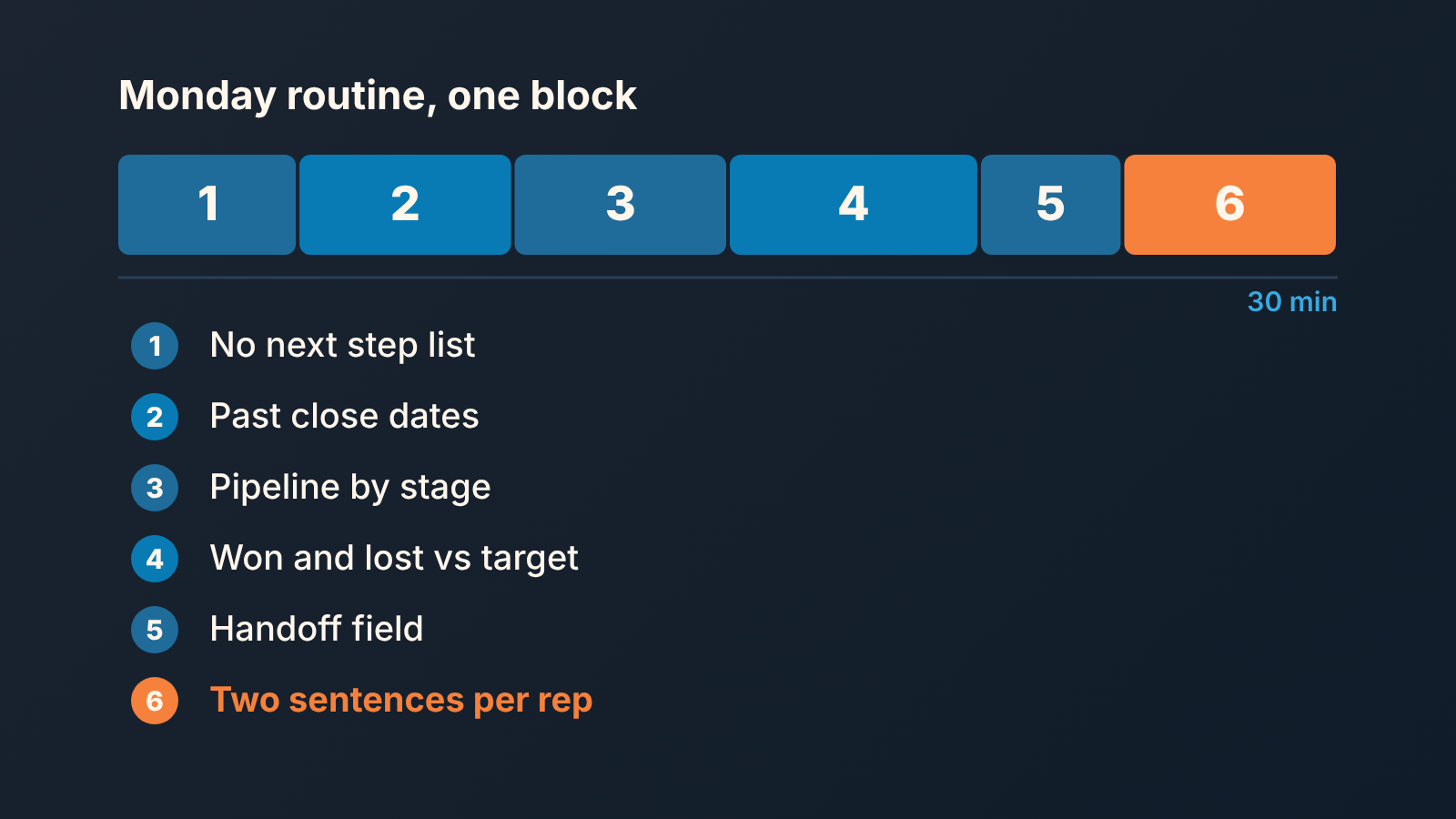
- Open deals with no next activity, by owner. Note the names and the repeat offenders from last week.
- Open deals with a close date in the past. For each one, decide: move the date with a reason, move the stage, or mark it lost.
- Pipeline by stage, sorted by days in stage. Pick the one deal per rep you will ask about in the 1:1.
- Won and lost for last week by rep, next to each rep’s open pipeline. Decide whether anyone behind is short on coverage or on conversion, because those get different help.
- Deals won last week with the handoff field empty, if your team keeps one as a custom field filled at close; if not, won deals with no activity since. Chase those today. A customer who went quiet in week one is expensive to recover later.
- Write two sentences per rep: what you saw, what you expect to see next Monday. This is also the raw material for the weekly sales report, so you write it once.
Six steps, two of them one-liners. Steps 1 and 2 are most of the time, if they are clean, the rest is a formality and you are done early. If they are not, you have already found the week’s work without a single person reading out their deals.
What the CRM cannot tell you
It cannot tell you whether the proposal was any good. It cannot tell you that the customer is being polite about the timeline, or that the champion is leaving in a month, or that a deal the data says is healthy should be walked away from because the margin is wrong. It cannot decide whether a rep who is behind needs a harder conversation or a quieter one.
Those are conversations and judgment, and they are the part of the job description that nobody can check in a view. The views above do not replace them. They clear the table so that the hour you have with each rep goes to those questions instead of to “so where are we on the Hendricks deal”.


