

Managing sales in a CRM means getting five answers out of it without calling a meeting: what is really in the pipeline, who has no next step, what is stuck and for how long, what will close this period, and whose deals you need to sit down and talk about. It only works if six fields on every deal are filled in honestly. Everything else that deserves the word management, the conversation, the coaching, the decision, happens outside the CRM. This is the map from each question to the fields that answer it, and to the ways the answer goes wrong.
What “managing sales in the CRM” actually means
In sales management, the CRM is the record that shows a manager which deals need a decision while there is still time to act. Search the phrase, though, and you get software. The top result is a definition of CRM, and the strongest vendor page describes sales management as a seven-step process from qualifying leads to onboarding, followed by a list of features such as lead scoring and lead assignment (Zoho). Another walks through what a CRM does at each stage of a sale, from prospecting to closing to reporting (Zendesk). None of it is wrong. It is just a description of a product, and you did not search for a product.
A manager with a team of three to ten people manages decisions. Which deal to ask about on Tuesday. Whether to let a rep keep a deal that has been at proposal for a month or to join the next call. Whether the number you told the owner last week still holds. None of those decisions are made inside the CRM and no setting makes them for you.
What the CRM does is let you make them early. Without it you find out a deal died when the rep mentions it in passing, three weeks after the buyer went quiet. With it, and only with it filled in, you can see the silence while there is still something to do about it. So skip “what can my CRM do” and ask a narrower question: what do I need to know every week, and does it tell me?
We count five things.
Five questions you should get answered in five minutes
Every CRM we have seen can answer these from its standard pipeline view, provided the data underneath is honest. The third column is the part the vendor pages leave out.
| The question | Fields that answer it | When the answer lies |
|---|---|---|
| How much is really in the pipeline, and at which stages? | amount, stage, owner | amounts typed in at creation and never revised; dead deals left open because closing them feels like admitting it; a stage moved so the report looks right |
| Who has no next step? | next activity (with a date), owner | the next step lives in the rep’s calendar or head, not on the deal; an activity logged as “follow up” with no date |
| What is stuck, and for how long? | stage, last activity date | a note edit makes a dead deal look touched; the rep updates the close date and nothing else, so the deal looks fresh |
| What closes this period, and what is just carried over from last month? | expected close date, stage, amount | close date empty, in the past, or pushed to the end of each month in turn; the default close date nobody changed |
| Whose deals do I sit down and talk about? | owner, plus the four answers above split by owner | deals still under a rep who left, under the manager, or unassigned; the one rep with clean data looks like the one with problems |
Read the right-hand column again. Not one of those is a software limitation. Each is a human entering what was convenient instead of what was true, usually in a hurry, usually with no bad intent. The CRM then does exactly what it is supposed to do and reports it back to you, straight-faced. For the full list, see sales manager responsibilities and the CRM view for each.
The six fields everything leans on
Six fields carry all five answers: owner, amount, stage, expected close date, next activity, last activity. Your CRM may call the record a deal or an opportunity, the amount a value, the activity a task. The names do not matter. What matters is whether each one reflects what the rep knows today.
They are not equally hard to keep honest.
- Owner is set once and is almost always right, until someone leaves or a manager takes a deal “temporarily”. Check it quarterly and after every hire.
- Stage is the field reps care about most, because it is the one you look at. It moves. The question is whether it moves on evidence from the buyer or on the rep’s optimism.
- Amount starts as a guess and becomes a fact only near the end. The guess is fine. A guess nobody updates is where the pipeline total starts lying.
- The expected close date is the most abused of the six. Reps treat it as a hope, managers read it as a forecast, and the two never meet. A close date that moves every month is the clearest signal in the whole CRM, and the easiest one to miss.
- Next activity is the field we would keep if we could only keep one. A deal with a dated next step is being worked. A deal without one is a hope with a name on it.
- Last activity is filled by the CRM itself when the rep logs something, which is precisely the problem: it is only as honest as the logging.
Our position: a team of under ten should not add a seventh required field until these six are reliably filled. Each new field adds blanks faster than it adds truth, and the reasons reps stop filling things in are well known enough that we will only point to them here. If you are still moving off a spreadsheet, the fields worth carrying over from it are a longer list for a different job: what to record, rather than what a manager asks. If you want to measure how honest the six are rather than feel it, there are a few data quality metrics that fit on one screen, and in a small team the question of who owns which field is worth settling once, out loud.
Where the CRM stops
The CRM can tell you that Dana’s largest deal has had no activity since the proposal went out and no next step. It cannot tell you why.
Maybe the buyer went silent after the price came up. Maybe Dana is certain the deal is signing and stopped logging because logging felt like paperwork. Maybe the champion left the company and nobody on your side knows yet. Those are three completely different situations, with three different responses, and they look identical in the the pipeline view. The only instrument that separates them is a conversation with Dana, and then possibly a call to the buyer.
That conversation is the management. Deciding that Dana should not carry the renewal negotiation alone this time. Noticing that her deals stall at the same stage every quarter and spending an hour on how she presents price. Agreeing on what “next step” means for a deal of this size, so that next month the field means the same thing to both of you. A CRM holds none of that, and we would not want it to. We made the argument once before that a CRM records sales and does not manage them, so we will not repeat it. The practical consequence for this article is narrower: the five answers are the start of your week. What you do with them is the part that cannot be exported.
Three neighbors of this article pick up from here. If you want the answers on one screen rather than five filters, six numbers for a sales manager’s dashboard lists which ones. If you want to know what to do with the answers once a week, there is a fifteen-minute pipeline review built around them. And if you want a structure for the conversation itself, managing by process rather than by the number is the method we use.
A five-minute check you can run today
Open your pipeline, filter to open deals, and take the five questions one at a time. Do not fix anything yet. Just write down for each question, one of three words: yes, partly, no.
Here is what it tends to look like on a first pass. The figures are illustrative, not from any one team.
Question one, how much is in the pipeline: yes, the number is on the screen. Then you sort by amount and the second-largest deal has been open since spring with a close date in the past. Partly. Question two, who has no next step: you filter by “next activity is empty” and get a third of the open deals. Yes, the CRM answers; the answer is just unpleasant. Question three, what is stuck: your CRM shows you last activity, but two of the oldest deals were “touched” this week because someone corrected a company name. Partly. Question four, what closes this month: you look at the close dates and half of them are the last day of the month, which was also true last month. No. Question five, whose deals to talk about: by now you know, and it is not the rep you expected.
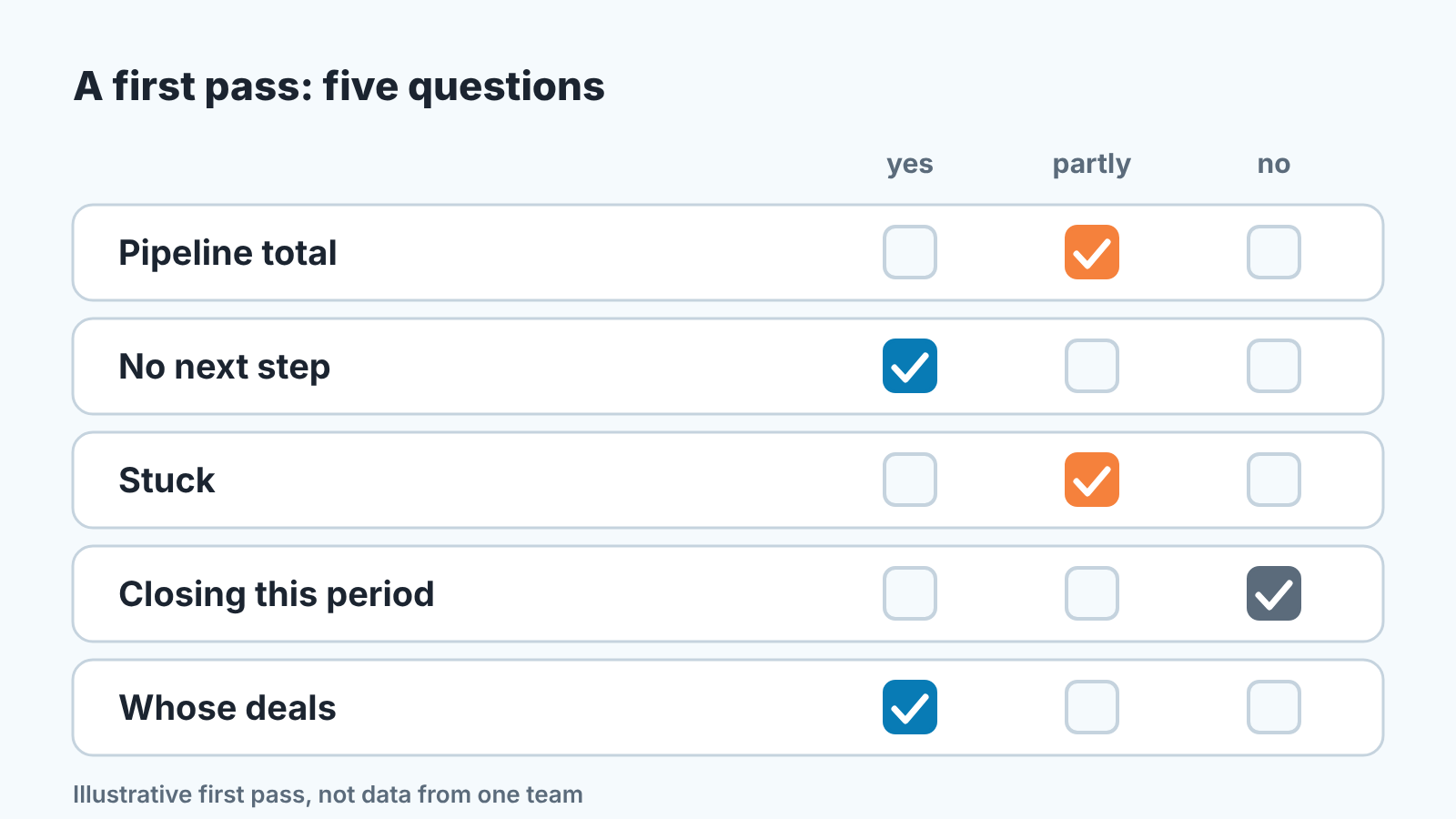
In our experience, two honest answers out of five is a common first result. It also tells you precisely which of the six fields to repair first, because each “partly” or “no” points at one of them. In the pass above it is the expected close date, every time.
The check you just ran by hand is the one worth automating. The five conversations it leads to are not.


