
A good cold email template is short, names one reason you are writing to this person rather than to a list, and ends with one question. That is the whole template. The part most template collections skip is what happens after Send. In Zoho CRM, send the email from the lead or contact record, so the open, the click and the reply land on that record, and put the next step in a task with a date. For a team of five the second half matters more than the wording. The wording gets tuned in a week; the logging habit decides whether anyone can tell what the templates did.
Four cold email templates that fit a five-person team (and when each is wrong)
Four is enough. A small team cannot keep fifty templates honest: after a month three are in use and the rest are stale merge fields nobody checks. Each template below is a first touch, under ninety words, with one job. For more subject line options, see sales email subject lines by stage.
1. The observed trigger. Use it when you saw something concrete: a job post, a new office, a product launch on their site. Wrong when the trigger is a guess. “I noticed you might be growing” is not an observation.
Subject: Two AE openings in {City}

Hi {First name},

Your careers page lists two account executive openings in {City}. Teams that add reps usually hit the same wall a month later: the pipeline review starts taking longer than the selling.

We help {Industry} teams of five to fifteen keep every open deal under watch without adding reports. Worth a 15-minute look next week, or is hiring the only thing on the plate right now?

{Your name}
2. The peer reference. Use it when you have a customer in the same industry or city and their permission to name them. Wrong when you cannot name them. “Companies like yours” is the tell that you have none.
Subject: How {Customer company} runs deal reviews

Hi {First name},

{Customer company}, a {Industry} firm about your size, moved their deal reviews out of a spreadsheet and into their CRM last quarter. In their words: {one sentence they actually said, with their OK}.

If pipeline visibility is on your list this year, I can show you what they changed in 20 minutes. If not, say so and I will not follow up.

{Your name}
3. The one question. Use it when you have no trigger and no reference, and the list is filtered tightly enough that the pain is probably real. Wrong for large accounts where you need several people in the loop, and wrong for a loose list, because this template has nothing to stand on except fit.
Subject: Quiet deals at {Company}

Hi {First name},

Quick one: when a deal in your pipeline goes quiet for two weeks, who notices first, the rep or you?

If the honest answer is "usually me, and late", that is the problem we work on. Happy to show how in 15 minutes. If it is not a problem for you, no reply needed.

{Your name}
4. The right-person ask. Use it when you are not sure who owns the pipeline at the company. Wrong when you already know. Sent to the obvious owner it reads as if you did not look.
Subject: Who owns pipeline at {Company}?

Hi {First name},

I am looking for whoever runs the sales pipeline at {Company}: the person who decides which deals get a push this week.

If that is you, I would like 15 minutes to show how teams your size keep every deal under review without a weekly spreadsheet. If it is someone else, could you point me to them?

{Your name}
What the four share: one specific, one ask, no attachment and no feature list. If you have to invent the specific, change templates instead of faking it. A faked trigger costs more than a plain question, because the reply you get is “where did you see that?”
Send from the CRM, not from a mailbox nobody sees
The templates live in Zoho CRM under Setup > Customization > Templates > Email Templates, and you pick one when sending an email from within the CRM (Zoho CRM help: FAQ on working with emails). Email templates are available in Leads, Contacts, Accounts, Deals and other modules, so build the cold ones where your cold prospects actually sit. For most small teams that is Leads.
Where you send from decides what gets recorded. A cold email sent from a personal Gmail tab has no record behind it until someone forwards it in, and nobody forwards cold emails in. Sent from the lead record the same email sits in that record’s Email related list, and the reply, when it comes, has somewhere to land.
Zoho offers two ways to get there, and they are not equal. The native email option works without connecting your inbox, but Zoho’s own guide calls it a limited setup that cannot track replies to emails sent via CRM. Inbox integration over IMAP or POP3 brings the two-way conversation onto the record (Zoho CRM help: your guide to Zoho CRM email tools). For cold outreach the reply is the only outcome that counts, so we think the integration is not optional. Connect every rep’s mailbox before the first template goes out.
Keep cold first touches out of Mass Email, too. It is a campaign tool built around opens, clicks and bounce counts (Zoho CRM help: sending mass emails), and a cold first touch is waiting for a reply that belongs on the record.
What Zoho CRM tracks on a sent email and what it cannot
Three things, once Email Insights is enabled: when the email was opened, whether any links were clicked, and whether the recipient replied. All three show in the Email related list on the record, in Leads, Contacts, Accounts and Deals (Zoho CRM help: FAQ on working with emails).
Now the limits. The “replied” mark depends on the reply being visible to the CRM, and the native setup without inbox integration cannot track replies. A team on that setup sees opens and clicks and no replies, and concludes the templates are being ignored when they are being answered in a mailbox the CRM does not read.
An open is also a weak signal. It tells you a mail client rendered something, not that a person read it. We made the same case for another CRM in email tracking: what opens and clicks prove. Do not schedule a follow-up because of an open. Schedule it because the date arrived.
And Zoho records that a reply came, not what it said. That part is yours.
After the reply: the three outcomes and the next step for each
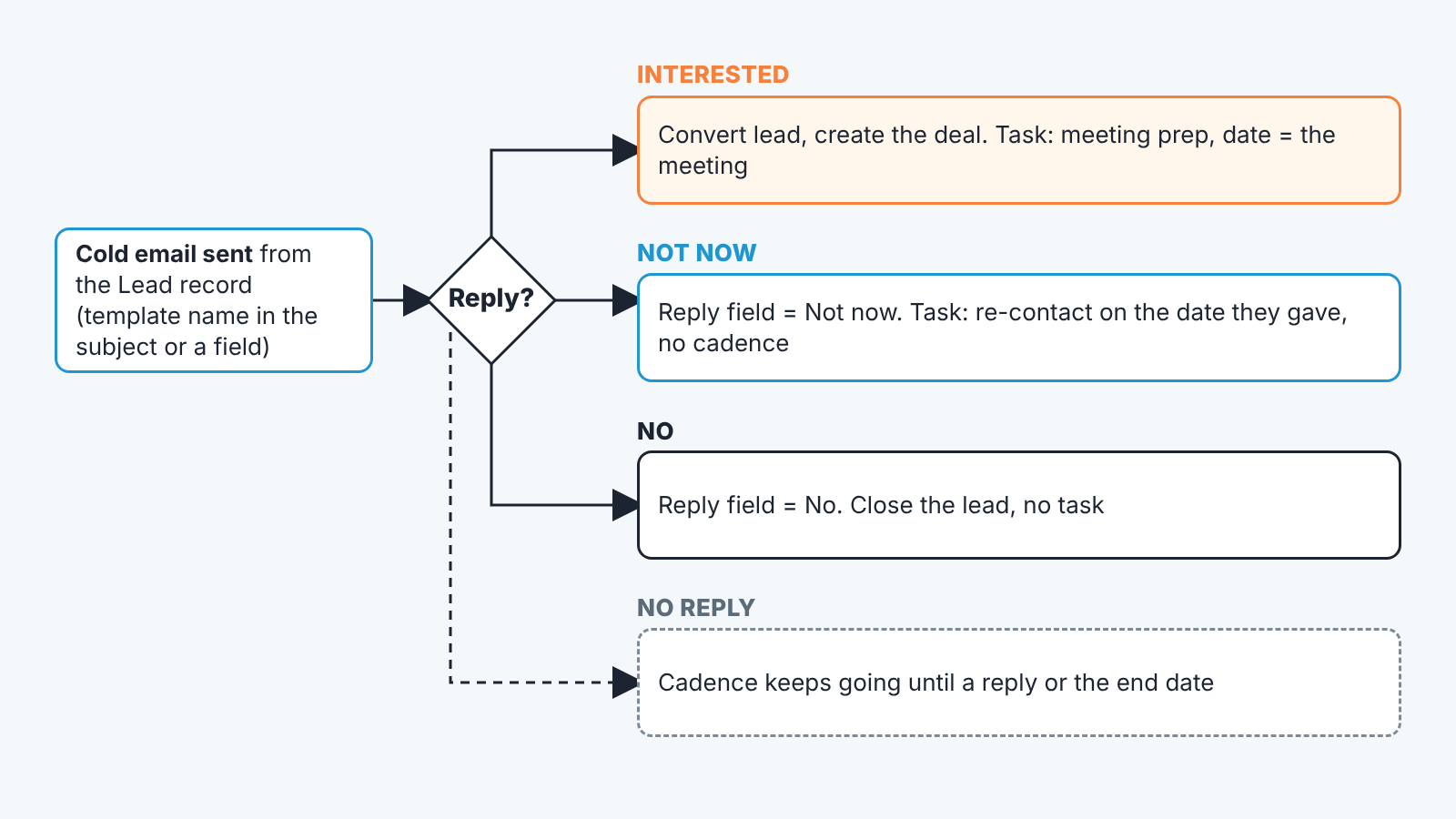
“Replied” covers “yes, Tuesday at ten” and “remove me from your list” equally. So every reply to a cold email gets sorted into one of three outcomes, and a rep should be able to log it in under a minute.
Interested means they asked a question or agreed to a time. The next step is a meeting or an answer, and the record needs a task with the real date, not “follow up”. If the lead is now a real opportunity, convert it so the deal exists and the email history moves with it.
Not now means timing. They named a quarter, a hire, a budget cycle. Write the reason in a note and put the re-contact date in a task, the date they gave, not thirty days by default. A “not now” lead with a dated task is a pipeline asset; a “not now” lead with no task is a prospect the team will cold email again in two months with the same template, and that reply will be the third outcome.
No means no. Close the lead with the reason , and make sure no sequence keeps running. Zoho CRM Cadences can un-enroll a record when the buyer replies, which we walked through in Zoho CRM Cadences for a sales manager. A declined lead still receiving step three of a cadence is the fastest way to turn a polite no into a spam complaint.
Where to write the outcome: a picklist field on the Lead with the three values plus Bounced and Opted out, filled by the rep when they read the reply. Opens and clicks are Zoho’s job; this field is the rep’s. Once it exists, a workflow rule can create the right task when the value changes, the same pattern as in a Zoho CRM workflow rule that creates the follow-up task.
The fourth case is silence. No reply is not an outcome, it is a step in a sequence and the sequence is what the cadences article covers. Do not log silence as “No”.
Opt-outs and bounces: what to write down
An opt-out is a person telling you to stop. Zoho’s mass email page mentions letting customers opt in or out of emails, with GDPR named as the reason (Zoho CRM help: sending mass emails). For a one-to-one cold email the mechanism is the rep, so the rule has to be written down: when someone asks to be removed, mark the record so it drops out of every list and every sequence, and add a note with the date and the words they used. If the note says “please stop emailing me”, the next rep who finds the lead in a fresh list has nothing to debate. The failure we see most in small teams is the opt-out handled in the rep’s inbox, the thread deleted, and the lead left open in the CRM with no mark, so six weeks later it is in someone else’s list. The rule should be the manager’s, not each rep’s.
A bounce means the address is wrong or the mailbox is gone, and it says nothing about the person. Zoho CRM’s email guide describes bounce management tools for keeping contact lists clean, and on mass emails a bounce can trigger a field update. For a one-to-one cold email the useful record is the bounce itself and what you did about it: found teh right address, found the person’s successor, or dropped the lead. Do not count a bounce as a rejection in your template numbers. It never reached anyone.
Reading template results without a reply-rate fantasy
Open rates make cold email look busier than it is. Five reps, four templates, a few dozen sends per week: the honest numbers are small, and most of what you see in the the first month is noise. Count replies by outcome, per template, over a month, and ignore opens entirely. Interested replies per template is the number that tells you which first touch works; a template with the most opens and no Interested replies has a subject line that works and a body that does not.
For that count to exist, the template name has to be on the record. Zoho shows the email in the related list, but a manager cannot filter leads by “which template got the reply” unless someone wrote it down. Put the template name in a field next to the reply picklist, filled at send time. Then the manager’s view is one list: leads sent this month, grouped by template, with the reply outcome. No report builder required.
Change one line at a time, and only when a month of replies says so; a team that rewrites all four templates every Friday has no idea which change did what.
A disclosure, since this is where the manager’s view comes in. We build SalesBond, a sales management layer on top of the CRM a team already uses; we started with Pipedrive. It does not read cold emails. Where it comes in is after the Interested reply becomes a deal and then goes quiet: its Deal Health check runs more than 20 rules over open deals, and that quiet deal is the one it flags, with the reason. If you want to see that on your own pipeline, check your CRM with SalesBond. The cold email log is yours to keep, and it is the cheaper half of the work.
FAQ
Do I need Email Insights for a one-to-one cold email, or only for mass email?
For any email sent from the CRM. Zoho’s FAQ ties open and click tracking on CRM emails to Email Insights.
How long should a cold email be?
Short enough to read on a phone without scrolling. Each template here is under ninety words, with one specific and one question.
Should cold emails go to leads or contacts?
Leads, if that is where unqualified prospects live. Send from the lead record and convert after an Interested reply, so the email history moves to the contact and the deal.
Where does the template name go so a manager can compare them?
In a field on the lead, filled at send time. Zoho records the email, not which template produced it.


