

A good sales email subject line gives the buyer a specific reason from their own world to open it, stays short, matches the body, and changes with the deal stage. The examples below are grouped by stage. With five reps you can’t A/B test them, so log the subject, the stage and the reply in the CRM instead.
Most pages that rank for this query are lists written for marketers who send one email to thousands of addresses. A small team has a different question: we send a few dozen emails a week, so how do we find out which of these lines work for our buyers without a spreadsheet nobody fills in? This article gives you the starting lines and the way to check them.
What a subject line can and cannot do
A sales email subject line is a label on a letter, not the letter. Its job is to get one specific person to open the message and find inside exactly what the subject promised.
“Quick question” that turns out to be a pitch buys you one open and costs you every later email in the thread, and for a team working a few dozen accounts, the later emails are where the money is.
What a subject line cannot do: revive a deal with no agreed next step, make a proposal cheaper, or be judged by opens. An open tells you the subject worked on a tired person with a phone, not that the deal moved. As we wrote in Pipedrive email tracking: what opens and clicks actually show, a reply is the only signal worth logging. So this article judges a subject line by one thing: did the buyer answer, and at which stage of the deal.
Why A/B testing fails for five reps
Picture the test. Two subject lines for the first-touch template, A and B. Five reps each send a handful of first emails a week, half with A, half with B. By the end of the month each variant has a few dozen sends and a few replies. One rep had a good week with a warm referral list, and all her emails happened to carry variant B. One buyer replied to A to say “please stop emailing me”, and a simple reply count scores that the same as a yes. The winner flips if you move one email from one column to the other.
That is the whole problem, and no formula fixes it. A/B testing works in marketing because one sender mails the same email to a large list at once, so only the subject differs. In a sales team nothing else is held still: different reps, different accounts, different stages, different weeks. The sample is small and the variants are not comparable, and either flaw alone would be enough. We won’t give you a minimum number of emails per variant, because any number we named would be made up.
What works at this size is observing, not testing: treat the subject as one more field on the deal and read it with the stage next to it. The sample stays small. You just stop pretending it is bigger.
What to log in the CRM instead: subject, stage, replied or not
Three things, and two of them are already there if your reps send from the CRM.
- The subject, as sent. In Pipedrive, email sync links conversations to deals, leads or projects automatically or manually, and you can read them in the detail view of the linked deal (Pipedrive: email sync). In HubSpot, an email logged through the BCC or forwarding address is associated with the recipient’s contact record, its primary company and the five most recent open deals on that contact (HubSpot: log email with the BCC or forwarding address). Either way the subject is on the deal without anyone typing it twice.
- The stage the deal was in when the email went out. That is already on the deal; the habit to build is sending from the deal, not the phone’s mail app, so the two stay attached.
- Whether a person replied. Not an auto-reply, not an out-of-office, not a bounce. A sentence written by the buyer. Nobody fills this in for you: the manager reads the thread.
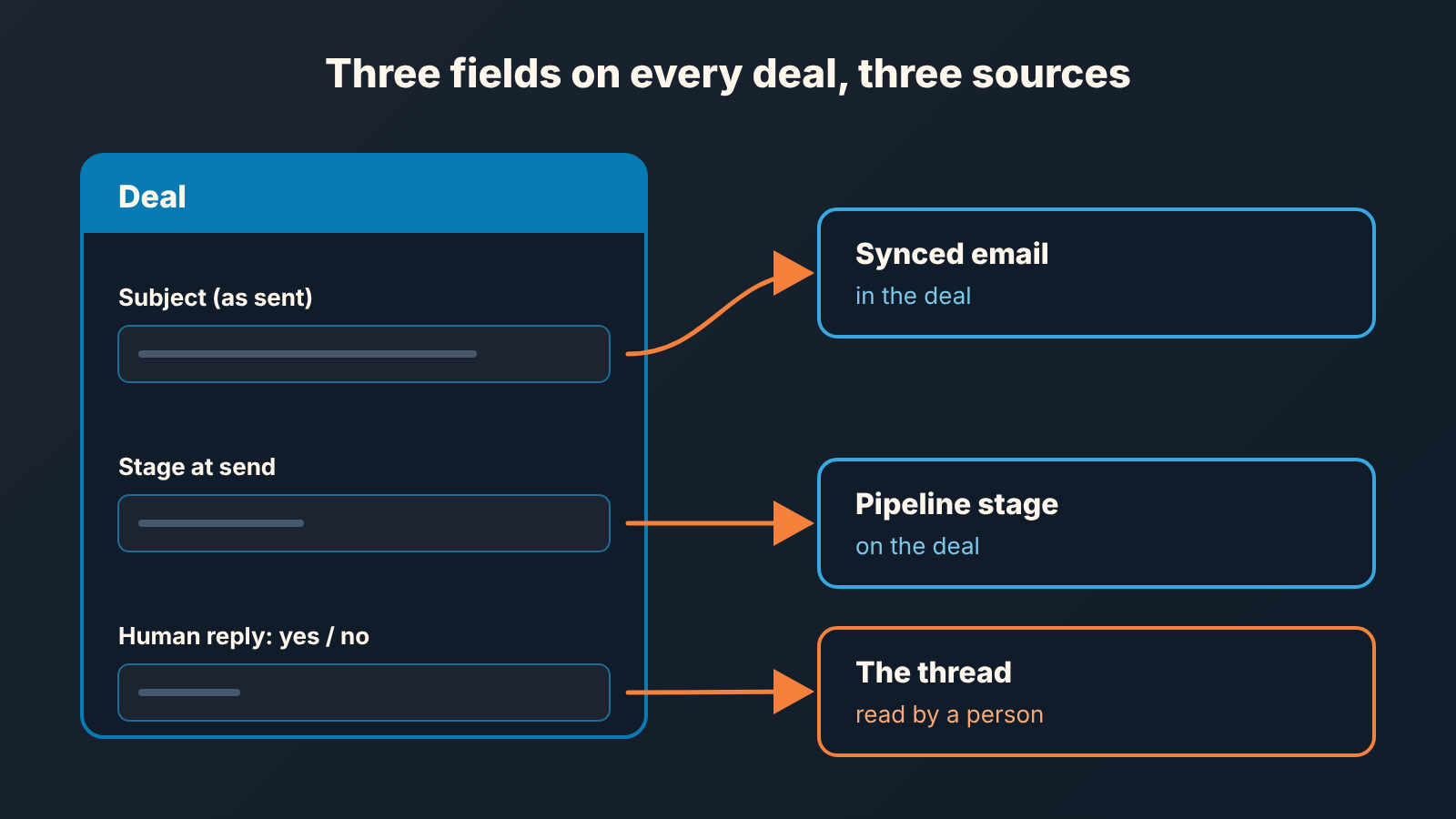
Two settings decide whether the manager can read any of this. In Pipedrive, synced email has a visibility setting: “Shared” means all users with access to the linked items can view the emails, “Private” means only the sender can (Pipedrive: email sync). A rep with private sync is not hiding anything, but the monthly review below is impossible until it is shared. In HubSpot, the forwarding address is there to log a buyer’s reply to the contact record’s timeline, and the help article warns that if HubSpot can’t process the forwarded format, the email will not log (HubSpot: log email with the BCC or forwarding address). Check that replies actually land on the deal before you trust the review.
Pipedrive’s email sync is available on Growth and higher plans (Pipedrive: email sync). Below that, Smart Bcc works with all Pipedrive plans and lets a rep forward individual threads into Pipedrive, including to a deal-specific Bcc address (Pipedrive: Smart Bcc). If reps won’t build that habit, paste the subject into the deal notes. Its ugly. It still beats a separate spreadsheet, because it sits next to the stage.
Sales email subject line examples by stage: first touch, follow-up, after the proposal
These are starting versions to log, not proven winners: every example is illustrative, and your own replies decide which to keep.
First touch
The buyer doesn’t know you, so the subject has to carry the reason you are writing, and the reason has to come from their world: a hire they announced, a tool they switched to, the person who introduced you. An introduction through a referrer is the strongest version of this, because the reason is a name they already trust. “Partnership opportunity” fails because it is about you. Our rule: a stranger should be able to tell from the subject alone why this email exists.
- [Referrer] suggested I write to you
- Your new warehouse in Denver
- Your [trigger] at [Company]
- Idea for [Company]’s [process]
- After your move to [tool]: one question
- [Referrer] and I talked about your [project]
Follow-up
What is a good subject line for a follow-up email? The one the first email had. Reply in the same thread and keep the subject; a follow-up with a fresh, clever subject reads as a new cold email and gets treated like one. The exception is a thread that clearly died, with no open after a reasonable gap. Then start a new thread that restates the reason. Timing and sequences are a different article (Pipedrive sequences for deal follow-up).
- (same thread, original subject, no edits)
- The [topic] we discussed: one question
- Still on your list for [quarter]?
- [Company] and [topic], picking up from [month]
After the proposal
Now the buyer knows exactly who you are, and the subject’s job is to name the decision. “Checking in” gives them nothing to answer. Never fake a “Re:” on a thread that never existed; buyers notice, and it costs trust at the stage where trust closes deals. The body of the email and when to send it are in follow-up after the proposal in Pipedrive.
- Proposal for [Company]: two questions before [day]
- [Company] proposal: start date or pause?
- [Option A] or [Option B] for [Company]?
- Who else should see the [Company] proposal?
- Holding [start date] for [Company]?
One more thing the stage tells you. A first-touch subject that gets no replies is a targeting problem as often as a wording problem. A post-proposal subject that gets no replies is almost never about the subject.
One variable at a time: how to change a shared template
Keep subject lines inside shared templates, and not for convenience. A template name is the only thing that connects a reply back to the version of the subject that earned it.
In Pipedrive, a template has a name, a private or shared visibility setting and a subject line, and regular users can only edit templates they created themselves (Pipedrive: email templates). That last rule is useful: the manager owns the shared set, and reps can’t quietly rewrite the subject mid-month. In HubSpot, you enter a name and a subject for each template, it is shared with everyone unless you switch it to Private, and HubSpot recommends keeping the subject under 45 characters so recipients can read all of it (HubSpot: create and send templates). Free HubSpot accounts created on or after September 18, 2024 are limited to three templates, which is one per stage and no more. How to organize the library is covered in shared email templates for a Pipedrive team, HubSpot snippets vs templates and, for Salesforce teams, the Salesforce email template follow-up audit.
The working rule is this. One template per stage, one subject per template. When you change the subject, change one thing: the first word, the length, the named reason, whether the company name is in it, whether it is a question, or whether it carries personalization. Personalizing the reason (their trigger, their name for the problem) is the one we would bet on over personalizing the greeting, and a question in the subject only helps when the body actually asks it, but that’s an opinion, and your log is what settles it. Emoji go on the same list: one variable, one stage, one month.
Put the month in the template name (“First touch, Oct”) so a reply in the deal can be traced to the version that was live. If a rep wants to try thier own subject, fine, as long as it is saved as a template too. A subject that exists only in an outbox is one you can never learn from.
After a bad month the temptation is to change everything at once. With volumes this small changing three things and seeing more replies teaches you nothing about which one did it.
The monthly ten-email review
This replaces the A/B test, and it takes one sitting a month.
The manager opens the pipeline, filters to deals that had an email sent in the last month, and picks ten. Not a random sample; a deliberate one. A few first-touch deals, a few in follow-up, a few sitting after the proposal. For each, read the subject as sent, note the stage, and read the the thread far enough to answer one question: did a person reply, and did the reply move the deal or just close the door politely?
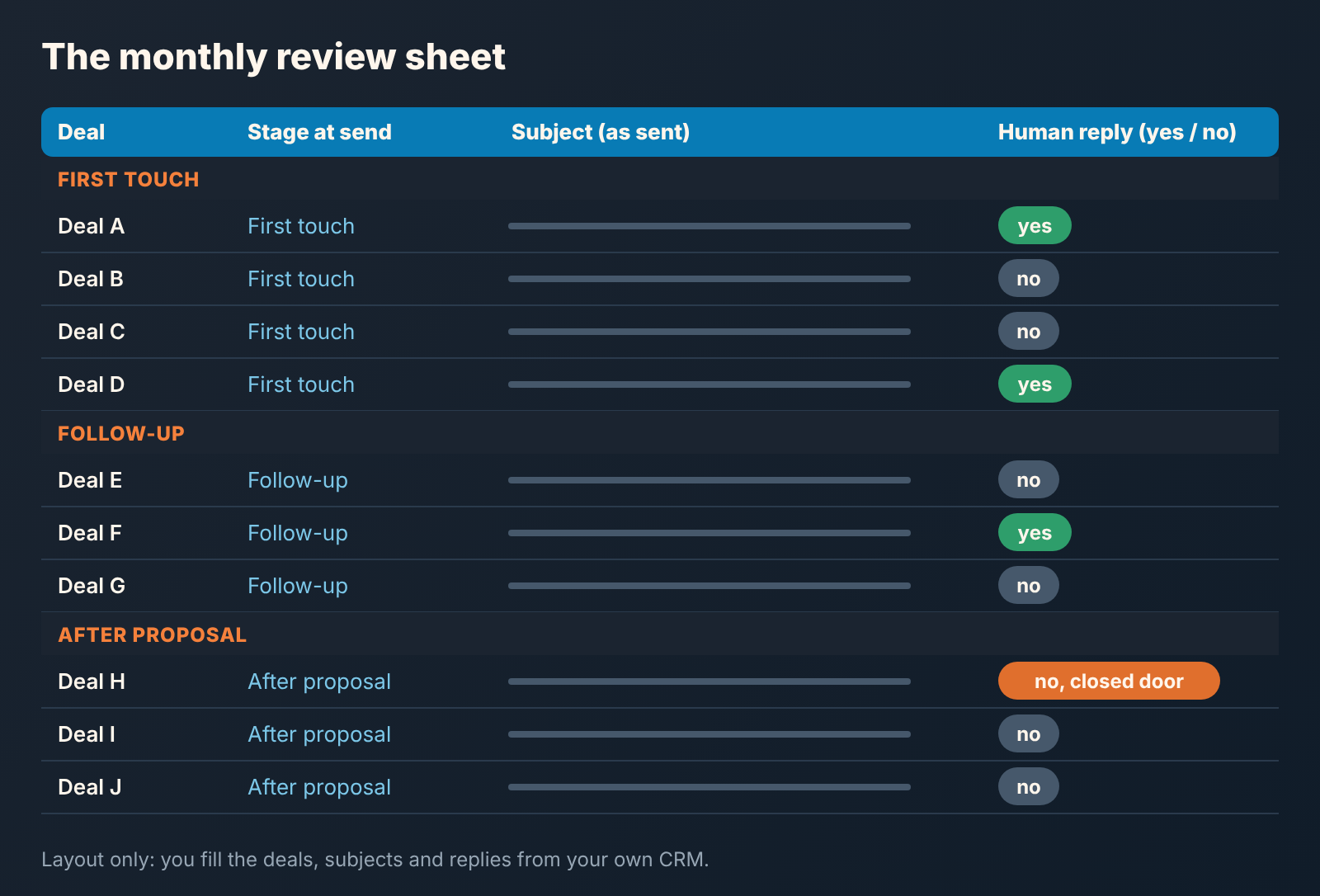
Then say what you saw, in words. “Both first-touch replies this month came on subjects that named the buyer’s trigger; none of the ‘quick question’ ones got an answer.” “Post-proposal emails are not getting replies regardless of subject; the problem is upstream.” That is a finding a team of five can act on at Monday’s meeting. “Variant B had a higher reply rate” with a precise percentage after it is a sentence you cannot honestly say.
Each stage template gets one of three outcomes. Keep it. Change one variable and name the new version. Or retire it, because the stage itself is the problem and the subject is not where the fix is. Write the decision in the template name or in a pinned note on the shared library, so next month’s review starts from a known state, not memory.
Start this month with the three stage templates and the examples above, and book the first review for the last Friday. After a few months you will have something no list on the first page of Google has: a record of which subjects your buyers answered, at which stage, from which rep. It won’t be statistically significant. It will be true.


